Introduction
Wi-Fi security is important because wireless signals travel through the air. Unlike wired Ethernet, where an attacker usually needs physical access to cables or switch ports, Wi-Fi signals may reach nearby rooms, offices, streets, or public spaces.
This makes wireless networks easier to observe from outside the actual location. Wi-Fi security exists to make sure only authorized users can join the network and that wireless traffic remains protected while traveling between the device and the access point.
Why Wi-Fi Security Is Needed
Wi-Fi uses radio waves, so any device within range may be able to detect wireless transmissions. Without proper security, attackers may try to capture traffic, impersonate a trusted network, disrupt connections, or gain access to internal resources.
Wi-Fi security mainly protects against:
Unauthorized access: Prevents unknown users from joining private networks.
Traffic interception: Makes captured wireless traffic unreadable through encryption.
Data tampering: Helps detect unauthorized changes to protected frames.
Network misuse: Stops outsiders from consuming bandwidth or reaching internal systems.
Wireless impersonation: Reduces risks from fake or rogue access points.
The goal is not only to hide data, but also to verify users, devices, and wireless communication.
Core Goals of Wi-Fi Security
Modern Wi-Fi security is built around a few major goals.
Authentication: Verifies whether a user or device is allowed to connect.
Confidentiality: Encrypts wireless traffic so nearby attackers cannot read it.
Integrity: Detects whether protected traffic was modified.
Access control: Limits network access to authorized users and devices.
Management protection: Helps protect important Wi-Fi control messages from spoofing or abuse.
These goals work together to make wireless communication safer over a medium that is naturally shared and exposed.
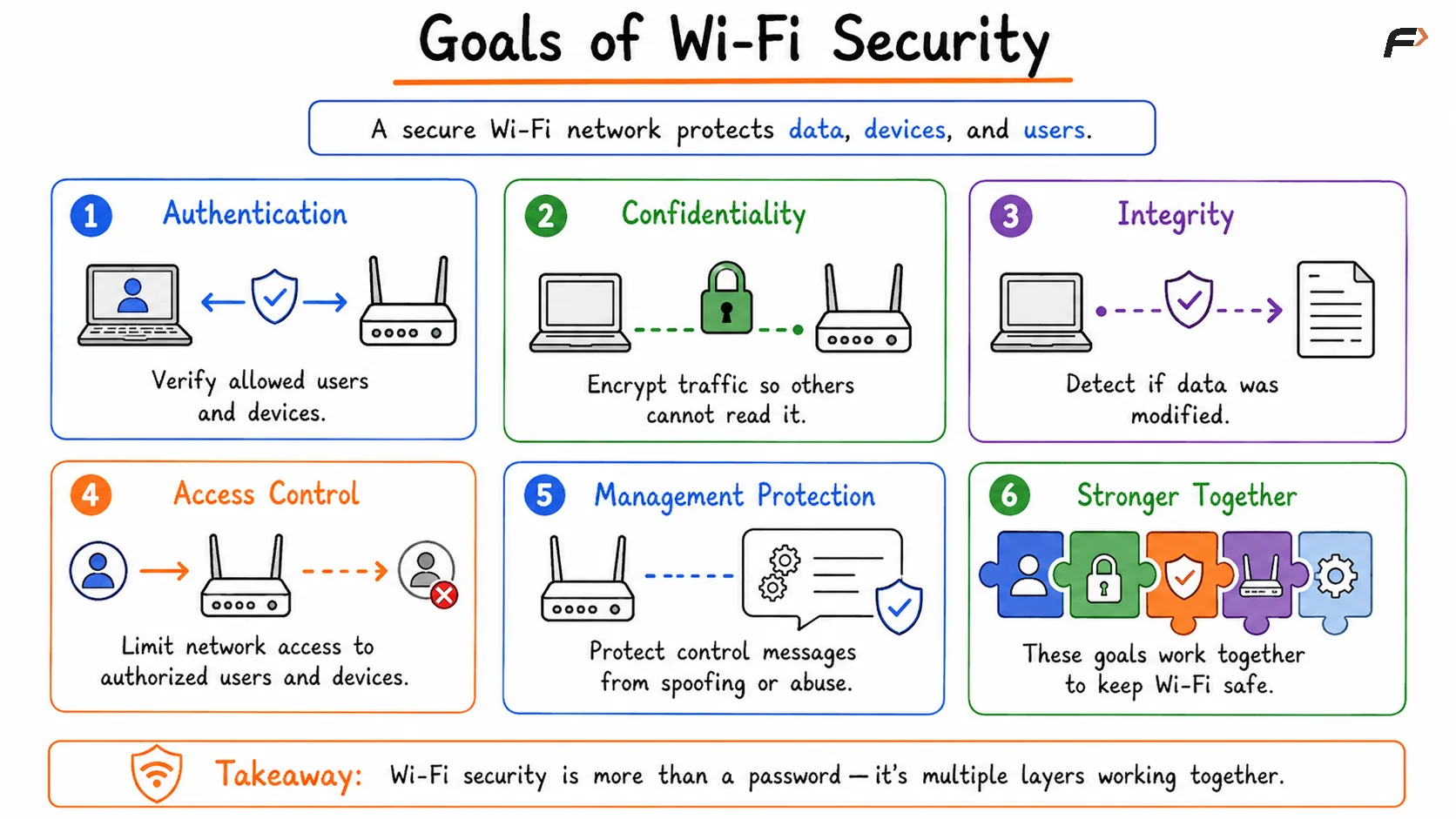
Goals of Wi-Fi Security
Evolution of Wi-Fi Security
Wi-Fi security improved over time because older protection methods became weak against practical attacks.
Standard | Meaning | Current Status |
|---|---|---|
WEP | Wired Equivalent Privacy | Insecure and outdated |
WPA | Wi-Fi Protected Access | Legacy improvement over WEP |
WPA2 | Wi-Fi Protected Access 2 | Widely used and still common |
WPA3 | Wi-Fi Protected Access 3 | Newer and stronger security standard |
WEP should not be used for modern Wi-Fi networks. WPA2 remains widely deployed, while WPA3 provides stronger protection where supported by devices and access points.
WPA2 Security
WPA2 became the dominant Wi-Fi security standard for many years. It improved wireless protection by using stronger encryption and better authentication than older methods.
WPA2 commonly uses AES-CCMP for protecting wireless data. In WPA2-Personal, users connect using a shared Wi-Fi password, also called a Pre-Shared Key or PSK.
WPA2 has two major modes:
Mode | How It Works | Common Use |
|---|---|---|
WPA2-Personal | Uses one shared Wi-Fi password | Homes and small offices |
WPA2-Enterprise | Uses 802.1X and RADIUS authentication | Companies, colleges, and large organizations |
WPA2-Personal is simple and easy to deploy, but its security depends heavily on password strength. Weak passwords can be guessed if attackers capture useful handshake material and test password guesses offline.
WPA3 Security
WPA3 improves Wi-Fi security by strengthening password-based authentication and adding better protection against several weaknesses found in WPA2 deployments.
In WPA3-Personal, SAE, or Simultaneous Authentication of Equals, replaces the older PSK-style approach. SAE makes password guessing attacks harder and provides better session protection.
Important WPA3 improvements include:
SAE authentication: Strengthens password-based Wi-Fi authentication.
Better resistance to offline guessing: Captured handshake data is less useful for attackers.
Improved session protection: Past sessions are better protected if a password is discovered later.
Protected Management Frames: Important management frames receive stronger protection.
Enterprise security options: WPA3-Enterprise supports stronger security modes for sensitive environments.
WPA3 is stronger, but adoption may still depend on device support. Older phones, laptops, printers, or IoT devices may only support WPA2.
WPA2 vs WPA3
Feature | WPA2 | WPA3 |
|---|---|---|
Personal Authentication | PSK-based | SAE-based |
Password Guessing Protection | Weaker if password is poor | Stronger resistance |
Session Protection | More limited | Improved |
Management Frame Protection | Supported but not always required | Stronger requirement |
Device Support | Very broad | Requires newer support |
Best Use | Compatibility with older devices | Stronger modern Wi-Fi security |
WPA2/WPA3 transition mode allows both WPA2 and WPA3 devices to connect to the same network. This helps during migration, but it does not provide the full benefit of a pure WPA3-only network because WPA2 clients still use WPA2 behavior.
Personal vs Enterprise Wi-Fi Security
Wi-Fi security can be deployed differently depending on the environment.
WPA-Personal is easier to set up because everyone uses a shared password. This works well for homes and small offices, but it becomes difficult to manage when many users need separate access.
WPA-Enterprise is designed for larger organizations. It uses 802.1X authentication and usually a RADIUS server, allowing each user or device to authenticate separately.
Feature | Personal Mode | Enterprise Mode |
|---|---|---|
Credentials | Shared Wi-Fi password | Individual user/device credentials |
Infrastructure | No RADIUS required | Uses RADIUS/identity system |
Management | Simple | Centralized |
Best Fit | Homes and small offices | Enterprises, universities, hospitals |
Access Revocation | Password change affects everyone | Individual access can be revoked |
Enterprise mode provides better accountability and control because each user can have separate credentials.
Common Wi-Fi Security Threats
Wi-Fi security also involves understanding common wireless threats at a high level.
Open Wi-Fi risks: Public Wi-Fi without a password may provide little or no Wi-Fi-layer encryption.
Evil twin attack: An attacker creates a fake access point that imitates a legitimate Wi-Fi network.
Rogue access point: An unauthorized access point is connected to a network.
Deauthentication attack: Attackers try to force clients to disconnect using spoofed management frames.
Weak password attacks: Poor Wi-Fi passwords can make WPA2-Personal networks easier to attack.
Legacy protocol risk: WEP, old WPA, and weak configurations reduce security.
An SSID is only a network name. Seeing a familiar Wi-Fi name does not automatically prove that the network is genuine.
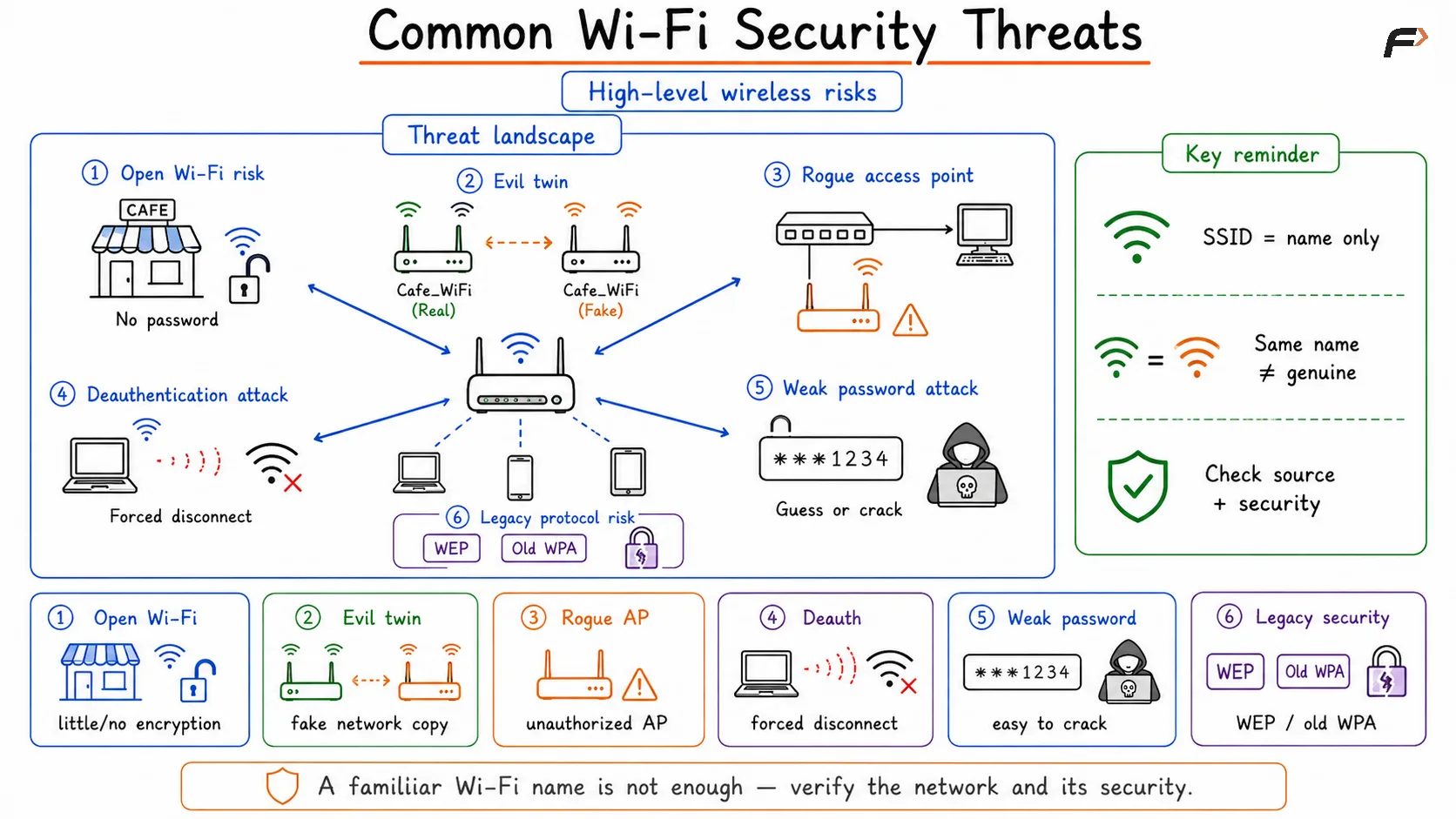
Common Wi-Fi Security Threats
Wi-Fi Security vs HTTPS Security
Wi-Fi security and HTTPS security protect different parts of communication.
Wi-Fi security protects the local wireless link between the client device and the access point. HTTPS, through TLS, protects communication between the browser or application and the remote server.
Security Layer | Protects | Example |
|---|---|---|
WPA2/WPA3 | Device to access point | Local Wi-Fi traffic |
HTTPS/TLS | Application to server | Browser to banking website |
This difference matters on public Wi-Fi. Even if the Wi-Fi network is open or untrusted, HTTPS still protects sensitive web traffic between the browser and the real website, as long as certificate validation succeeds.
Summary
Wi-Fi security protects wireless communication from unauthorized access, interception, tampering, and impersonation. Since Wi-Fi signals travel through the air, strong authentication and encryption are essential.
WPA2 remains widely used and provides strong protection when configured with secure passwords or enterprise authentication. WPA3 improves security through SAE, better password protection, improved session security, and stronger Protected Management Frame requirements. Wi-Fi security protects the local wireless link, while HTTPS/TLS protects application communication beyond the access point.
Be the first to add a comment.