Introduction
A VLAN, or Virtual Local Area Network, is a way to divide one physical switched network into multiple logical networks. Devices may still connect to the same switch, but VLANs make them behave as if they belong to different independent LANs.
This logical separation is the most important idea behind VLANs. The switch hardware may remain the same, but the traffic behavior changes because devices are grouped into separate broadcast domains.
Why VLANs Are Used
Without VLANs, a large switched LAN can become one big broadcast domain. As more devices join the network, broadcast traffic spreads more widely, management becomes harder, and unrelated users remain part of the same logical network.
VLANs solve this by creating smaller, separate logical segments inside the same switching infrastructure. This makes the network easier to organize and improves control over how traffic moves.
Some of the main reasons VLANs are used are:
Broadcast control: Broadcast traffic stays within its own VLAN instead of reaching the entire switched network.
Better isolation: Different departments or user groups can be separated logically.
Improved security: Unrelated devices do not automatically share the same Layer 2 space.
Easier management: Policies, devices, and user groups are easier to organize.
Scalability: A growing LAN can be segmented more cleanly without changing the full physical design.
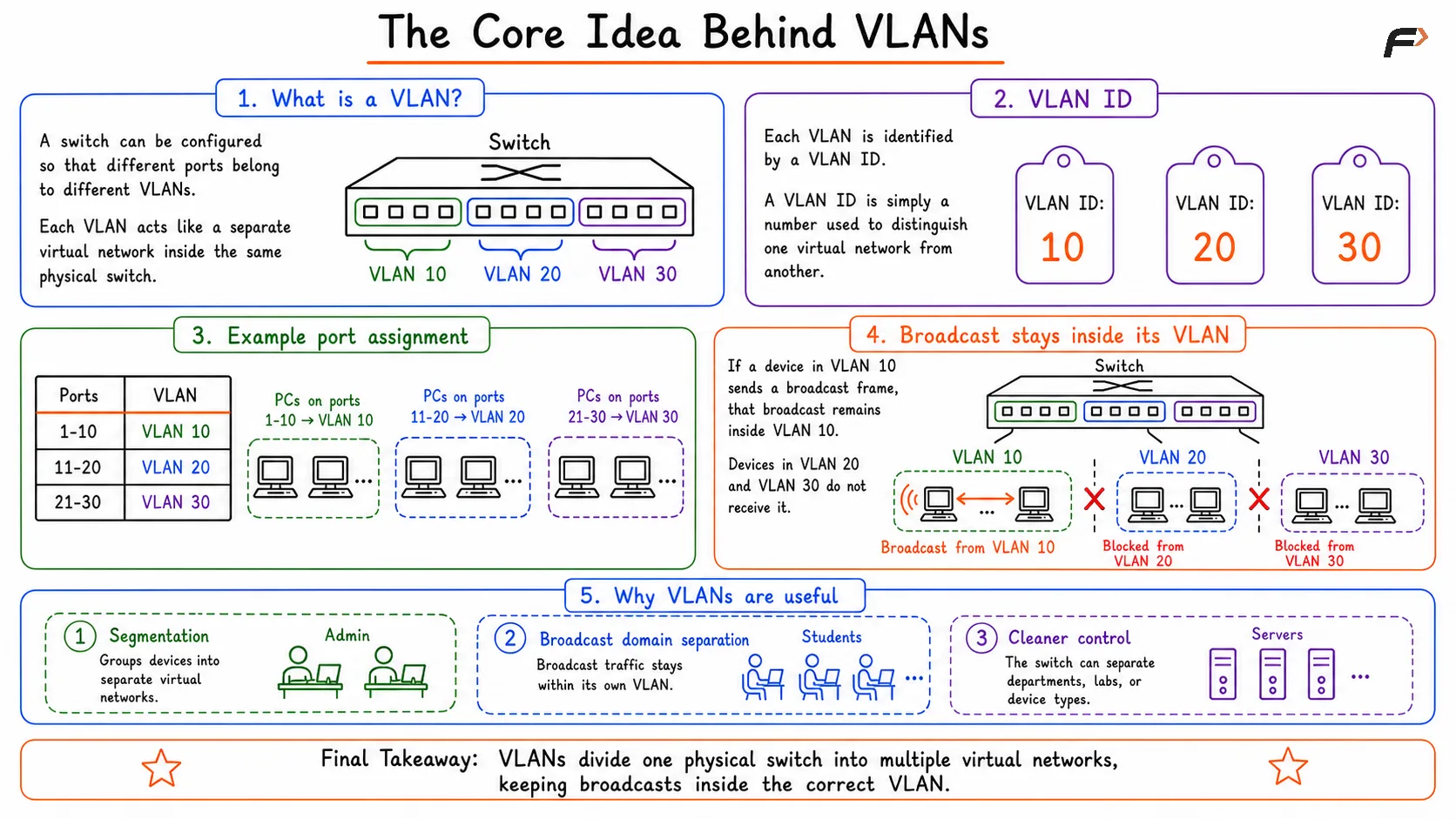
Diagram explaining the core idea behind VLANs, showing how a single physical switch is divided into multiple logical networks to isolate devices, reduce broadcast traffic, and improve network security and management.
A switch can be configured so that different ports belong to different VLANs. Each VLAN is identified by a VLAN ID, which is simply a number used to distinguish one virtual network from another.
For example:
Ports 1-10: VLAN 10
Ports 11-20: VLAN 20
Ports 21-30: VLAN 30
If a device in VLAN 10 sends a broadcast frame, that broadcast remains inside VLAN 10. Devices in VLAN 20 and VLAN 30 do not receive it. This is what makes VLANs useful for network segmentation and broadcast domain separation.
VLAN Membership
VLAN membership decides which logical network a device belongs to. In a common port-based VLAN setup, the switch determines membership based on the port to which the device is connected.
If Port 5 is assigned to VLAN 10, any device connected to Port 5 becomes part of VLAN 10. Its traffic stays inside the VLAN 10 broadcast domain unless a Layer 3 device is used to move traffic between VLANs.
VLAN membership defines:
Which VLAN a port belongs to
Which logical LAN a device joins
Which broadcast domain its traffic stays inside
Access Ports and Trunk Ports
Switch ports are usually configured as either access ports or trunk ports. These two port types serve different purposes in VLAN-aware switching.
Feature | Access Port | Trunk Port |
|---|---|---|
VLAN carriage | Carries traffic for one VLAN | Carries traffic for multiple VLANs |
Typical use | End devices such as laptops, desktops, printers, IP phones | Links between switches, switch-to-router links, some server links |
Frame style | Usually untagged toward the end device | Tagged so multiple VLANs can share one link |
VLAN awareness at endpoint | End device usually does not need VLAN awareness | Receiving device must distinguish VLAN traffic |
An access port is the normal choice for user devices. A trunk port is used when one physical link must carry traffic from several VLANs at the same time.
Untagged Frames on Access Ports
On an access port, the switch already knows which VLAN the port belongs to. Because of that, the end device usually does not need to understand VLAN tags.
If a frame arrives on Port 2 and Port 2 belongs to VLAN 10, the switch associates that frame with VLAN 10 based on the port configuration. The connected laptop or printer sees it as a normal network connection.
This is why access ports are simple for endpoints. The VLAN logic is handled by the switch, not by the user device.
Why Trunk Ports Need Tagging
A trunk port carries traffic for multiple VLANs over the same physical link. That means the receiving switch or router must be able to tell which frame belongs to which VLAN.
If VLAN 10, VLAN 20, and VLAN 30 all travel over one cable, the traffic cannot remain separated unless each frame carries VLAN information. Without that identification, the receiving device would not know how to classify the traffic.
This is why VLAN tagging is required on trunk links. It preserves logical separation even when several VLANs share the same physical path.
802.1Q VLAN Tagging
The standard most commonly used for VLAN tagging is IEEE 802.1Q. With 802.1Q, VLAN information is inserted into the Ethernet frame so the receiving device can identify the correct VLAN.
This allows multiple VLANs to pass through one trunk link while remaining logically separate. The receiving switch reads the tag and places the frame into the correct VLAN.
802.1Q is important because it makes VLAN communication practical across multiple switches instead of limiting VLANs to one local device.
Common VLAN Use Cases
VLANs are widely used to separate users, services, and traffic types inside the same network.
Some common examples are:
Department-based segmentation: HR, Engineering, Finance, and Sales can each use separate VLANs.
Guest network separation: Guest users can be isolated from internal corporate systems.
Voice and data separation: IP phones and regular user devices can be placed in different VLANs.
Management traffic isolation: Administrative traffic can be kept separate from user traffic.
These use cases show why VLANs are not only about structure, but also about security, control, and clean network design.
Can Devices in Different VLANs Communicate?
Devices in different VLANs cannot communicate directly through ordinary Layer 2 switching. Each VLAN acts as a separate broadcast domain and behaves like an independent Layer 2 network.
For example, if one PC belongs to VLAN 10 and another belongs to VLAN 20, their traffic is separated by default. Normal switching does not bridge that gap automatically.
To allow communication between VLANs, a Layer 3 device is required.
Inter-VLAN Routing
Communication between VLANs is called inter-VLAN routing. This routing function is performed by a router or a Layer 3 switch.
The Layer 3 device receives traffic from one VLAN, routes it, and forwards it into the destination VLAN. That is how systems in different virtual networks can communicate when the network design allows it.
Inter-VLAN routing is important because VLANs create separation at Layer 2, but many real networks still need controlled communication between departments, services, or user groups.
Summary
VLANs are Virtual Local Area Networks that divide one physical switched network into multiple logical Layer 2 networks. They create separate broadcast domains, improve traffic isolation, support cleaner network segmentation, and make large LANs easier to manage.
Access ports carry traffic for one VLAN, trunk ports carry traffic for multiple VLANs, and 802.1Q tagging preserves VLAN identity across shared links. When communication is needed between different VLANs, inter-VLAN routing through a router or Layer 3 switch is required.
Be the first to add a comment.