Introduction
DNS, or Domain Name System, translates domain names like google.com into IP addresses that computers use for communication.
When DNS fails, the browser may know the website name, but it cannot find the server address needed to start the connection. As a result, the website may not load even if the web server itself is working properly.
DNS failure is one of the most common reasons behind browser errors such as “server IP address could not be found” or “DNS probe finished.”
What DNS Failure Means
DNS failure means the system could not get a valid IP address for the requested domain name.
This can happen because:
The domain does not exist.
The DNS resolver is not reachable.
The authoritative DNS server is down.
The DNS response is delayed or blocked.
The DNS record is misconfigured.
DNSSEC validation fails.
A firewall, VPN, or network policy blocks DNS traffic.
In simple terms, the browser asks, “What is the IP address of this domain?” but does not receive a usable answer.
Step 1: Browser Checks Cache
Before making a fresh DNS query, the browser and operating system may check cached DNS records.
If a valid cached IP address exists, the website may still open even if live DNS lookup is currently failing.
This is why DNS failure may affect some users but not others. One device may still have a cached record, while another device may need a fresh DNS lookup and fail.
If the cache does not contain a valid record, the system must ask a DNS resolver.
Step 2: Recursive Resolver Is Contacted
The device usually sends the DNS query to a recursive resolver. This resolver may belong to the ISP, a public DNS provider, an organization, or a local router.
If the recursive resolver is down or unreachable, the lookup fails.
Common reasons include:
Internet connectivity issues
Incorrect DNS server settings
ISP DNS outage
Router DNS forwarding problems
Firewall blocking port
53VPN DNS misconfiguration
In this case, the domain may be valid, but the client cannot reach a working resolver.
Step 3: DNS Hierarchy May Fail to Respond
If the recursive resolver is working, it may need to contact the DNS hierarchy.
This may include:
Root name servers
TLD name servers
Authoritative name servers
If the authoritative server for a domain is down or misconfigured, the resolver may not get the final answer.
For example, if a domain's authoritative name servers are not responding, users may not be able to resolve that domain even though their internet connection is fine.
Step 4: Browser Shows an Error
If DNS resolution fails, the browser cannot start the normal website connection.
Common browser errors include:
DNS_PROBE_FINISHED_NXDOMAINDNS_PROBE_FINISHED_BAD_CONFIGERR_NAME_NOT_RESOLVEDServer IP address could not be foundThis site can't be reached
The exact message depends on the browser and operating system.
These errors usually mean the browser could not convert the domain name into an IP address.
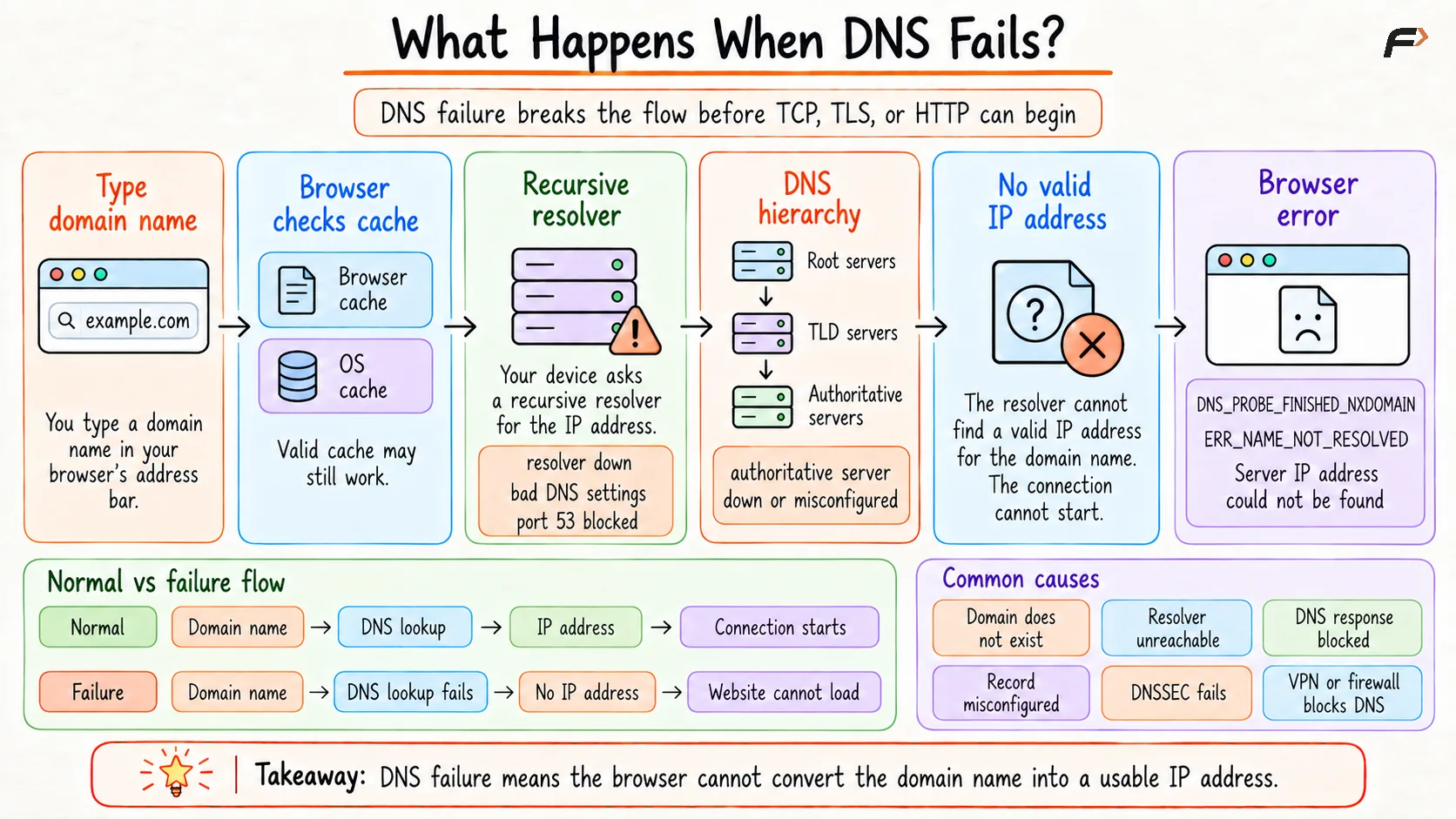
What Happens When DNS Fails?
Common DNS Failure Types
Different DNS errors mean different things.
Error Type | Meaning |
|---|---|
NXDOMAIN | The domain name does not exist |
Timeout | DNS server did not respond in time |
SERVFAIL | DNS server failed while processing the query |
DNSSEC failure | DNS response could not be validated |
Misconfigured record | DNS exists, but the record is wrong or missing |
What Happens to TCP, TLS, and HTTP?
If DNS fails completely, the browser usually cannot move to the next steps.
That means:
TCP connection does not start.
TLS handshake does not happen.
HTTP request is not sent.
Server response is not received.
DNS happens before these steps because the browser needs the destination IP address first.
However, if the IP address is already cached, the browser may still continue with TCP, TLS, and HTTP using the cached address.
Conclusion
When DNS fails, the browser cannot convert a domain name into an IP address. Because of that, the connection to the website may never begin.
DNS failure usually happens before TCP, TLS, and HTTP. The browser may show errors such as ERR_NAME_NOT_RESOLVED or DNS_PROBE_FINISHED_NXDOMAIN.
Understanding DNS failure helps separate name-resolution problems from server, TLS, and application problems. This makes troubleshooting faster and clearer.
Be the first to add a comment.