Introduction
A Virtual Private Network, or VPN, is a technology that creates a secure encrypted tunnel over an untrusted network such as the public internet. It allows a user, device, or remote office to communicate with a private network without exposing private resources directly to everyone on the internet.
The internet is public by nature. Data may pass through ISPs, routers, and different intermediate networks before reaching its destination. A VPN protects this communication path by encrypting traffic between the user device and the VPN server.
Why VPNs Are Needed
Organizations often have internal systems that should not be publicly reachable. These systems may be useful for employees, developers, administrators, and support teams, but exposing them directly to the internet increases security risk.
Common private resources include:
Internal dashboards: Used by teams to manage company operations.
Private repositories: Code and project resources that should stay restricted.
Database panels: Administrative tools that must not be open to public users.
Monitoring systems: Internal tools used to observe servers and applications.
Corporate file servers: Private documents and shared business files.
A VPN allows authorized users to access these systems securely from home, office branches, hotels, airports, or public Wi-Fi networks.
How a VPN Works
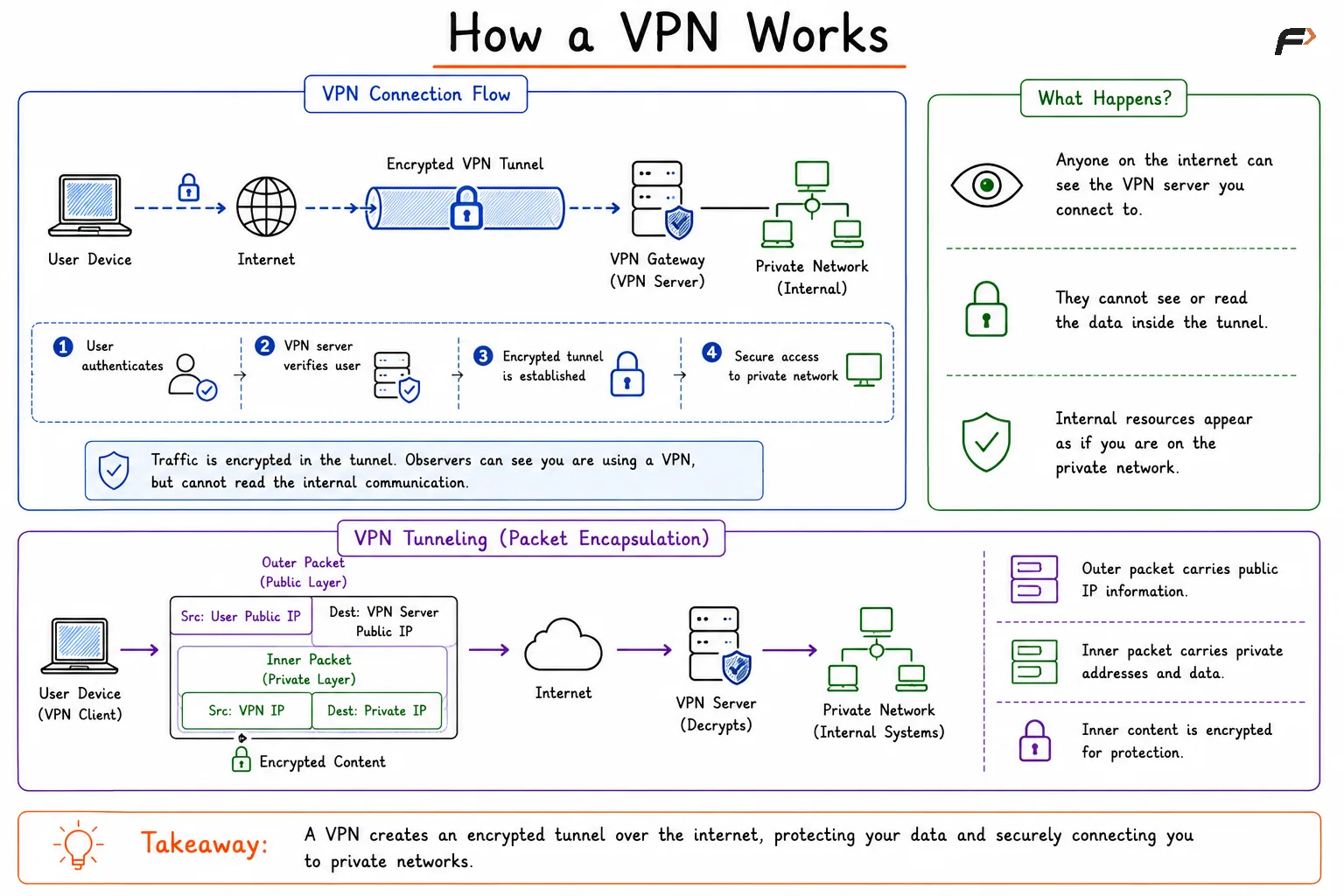
A VPN connection is created between the user device and a VPN server or VPN gateway. The user first authenticates, and after successful verification, an encrypted tunnel is established.
A simple VPN flow looks like:
User device => Internet => Encrypted VPN tunnel => VPN gateway => Private network
The original traffic is protected inside the tunnel. Anyone observing the public internet may see that the user is connected to a VPN server, but they cannot easily read the encrypted internal traffic.
How VPN Works
VPN Tunneling
Tunneling means wrapping one packet inside another packet so it can travel safely across a network. This is useful when a user needs to reach a private IP address that is not directly accessible from the public internet.
A VPN packet usually has two layers:
Outer packet: Contains the user’s public IP address and the VPN server’s public IP address.
Inner packet: Contains the user’s VPN address and the private destination address inside the organization.
Encrypted content: The inner packet is protected so outsiders cannot read the actual private communication.
The VPN server receives the encrypted packet, decrypts it, and forwards the original traffic to the correct internal system.
Full Tunnel vs Split Tunnel VPN
After a VPN is connected, traffic can be routed in different ways. The two common approaches are full tunnel and split tunnel VPN.
Feature | Full Tunnel VPN | Split Tunnel VPN |
|---|---|---|
Traffic Routing | All traffic goes through the VPN | Only private network traffic goes through the VPN |
Security Visibility | Higher centralized monitoring | Lower centralized visibility |
Performance | May be slower due to extra routing | Usually better for normal internet traffic |
Bandwidth Usage | Higher VPN bandwidth usage | Lower VPN bandwidth usage |
Best Fit | Strong control and compliance needs | Better performance and reduced VPN load |
Full tunnel VPN focuses more on centralized control and security visibility. Split tunnel VPN focuses more on performance and efficiency, but it must be configured carefully because some traffic bypasses the VPN.
Common VPN Protocols
VPNs can use different protocols to create secure tunnels. The protocol decides how encryption, authentication, and tunneling are handled.
IPsec: Commonly used for secure network-to-network and remote access VPNs.
SSL/TLS VPN: Often used for remote access through HTTPS-like secure communication.
OpenVPN: A widely used VPN solution based on TLS.
WireGuard: A modern VPN protocol known for simpler design and strong performance.
L2TP/IPsec: Combines tunneling with IPsec encryption.
The choice of VPN protocol depends on security needs, performance requirements, device support, and ease of management.
What a VPN Does Not Protect
A VPN protects the communication path, but it does not automatically make every connected system secure. This is an important limitation.
Application bugs remain: A VPN does not fix SQL injection, XSS, or insecure business logic.
Compromised devices remain risky: Malware on a user’s laptop may still access internal resources after VPN login.
Weak access control remains dangerous: Users should only receive the access they actually need.
Misconfigured systems remain exposed internally: VPN access should still be combined with firewalls, monitoring, and proper permissions.
VPN security works best when combined with authentication, endpoint protection, access control, logging, and secure application development.
Summary
A VPN creates a secure encrypted tunnel across the public internet and allows users or networks to access private resources safely. It is commonly used for secure remote access, branch office connectivity, private network routing, and protected communication over untrusted networks.
Remote access VPNs connect individual users to a private network, while site-to-site VPNs connect entire networks. Full tunnel VPN routes all traffic through the VPN, while split tunnel VPN sends only selected traffic through the tunnel. A VPN protects data in transit, but it should always be used as one part of a broader security design.
Be the first to add a comment.