Introduction
Firewalls can operate at different layers of the network stack. The layer matters because it decides what the firewall can actually see before allowing or blocking traffic.
A lower-layer firewall is usually faster because it checks fewer details. A higher-layer firewall has more context, but it also needs more processing because it inspects traffic more deeply.
Layer 3 firewall: Works mainly with IP addresses.
Layer 4 firewall: Works with IP addresses, ports, protocols, and sometimes connection state.
Layer 7 firewall: Works with application requests, behavior, and content.
Layer 3 Firewall
A Layer 3 firewall operates at the Network Layer of the OSI model. It focuses on packet-level information, mainly where traffic is coming from and where it is going.
A pure L3 firewall does not understand application data. It does not know whether the request is a login request, a file upload, or an API call. It only sees network-level details.
Layer 3 firewalls commonly inspect:
Source IP address: The IP address from which traffic is coming.
Destination IP address: The IP address the traffic is trying to reach.
Network direction: Whether traffic is entering, leaving, or moving between network segments.
Example rules:
Block a source IP: Block traffic from
45.10.20.30.Allow internal subnet: Allow traffic from
10.0.0.0/16.Restrict network access: Block one network segment from reaching another private subnet.
Layer 4 Firewall
A Layer 4 firewall operates at the Transport Layer. It adds more context by checking TCP, UDP, port numbers, and in many cases, connection state.
This is where firewall rules become more practical for services. For example, HTTPS runs on TCP port 443, SSH commonly runs on TCP port 22, DNS often uses UDP port 53, and MySQL commonly runs on TCP port 3306.
Layer 4 firewalls commonly inspect:
IP addresses: Source and destination systems.
Transport protocol: TCP, UDP, ICMP, or related protocols.
Port numbers: The service being accessed.
Connection state: Whether the traffic belongs to a valid session, if the firewall is stateful.
Example rules:
Allow HTTPS: Allow TCP traffic on port
443.Block database access: Block TCP traffic on port
3306from the internet.Allow DNS: Allow UDP traffic on port
53.
Layer 7 Firewall
A Layer 7 firewall operates at the Application Layer. It understands application protocols and can inspect the actual request being made.
For web applications, this usually means inspecting HTTP or HTTPS traffic. If HTTPS is used, the traffic must be decrypted at or before the Layer 7 firewall for deep inspection to happen.
Layer 7 firewalls can inspect:
URL paths: Such as
/login,/admin, or/api/users.HTTP methods: Such as GET, POST, PUT, and DELETE.
Headers and cookies: Useful for detecting abnormal or suspicious requests.
Request body: Important for identifying malicious payloads.
Application behavior: Such as too many login attempts or unusual request patterns.
Example rules:
Block SQL injection: Block requests containing malicious SQL patterns.
Protect admin routes: Block public access to
/admin.Limit login abuse: Block repeated failed login attempts.
Filter bad bots: Block automated scanners or suspicious user agents.
Layer 3 vs Layer 4 vs Layer 7 Firewall
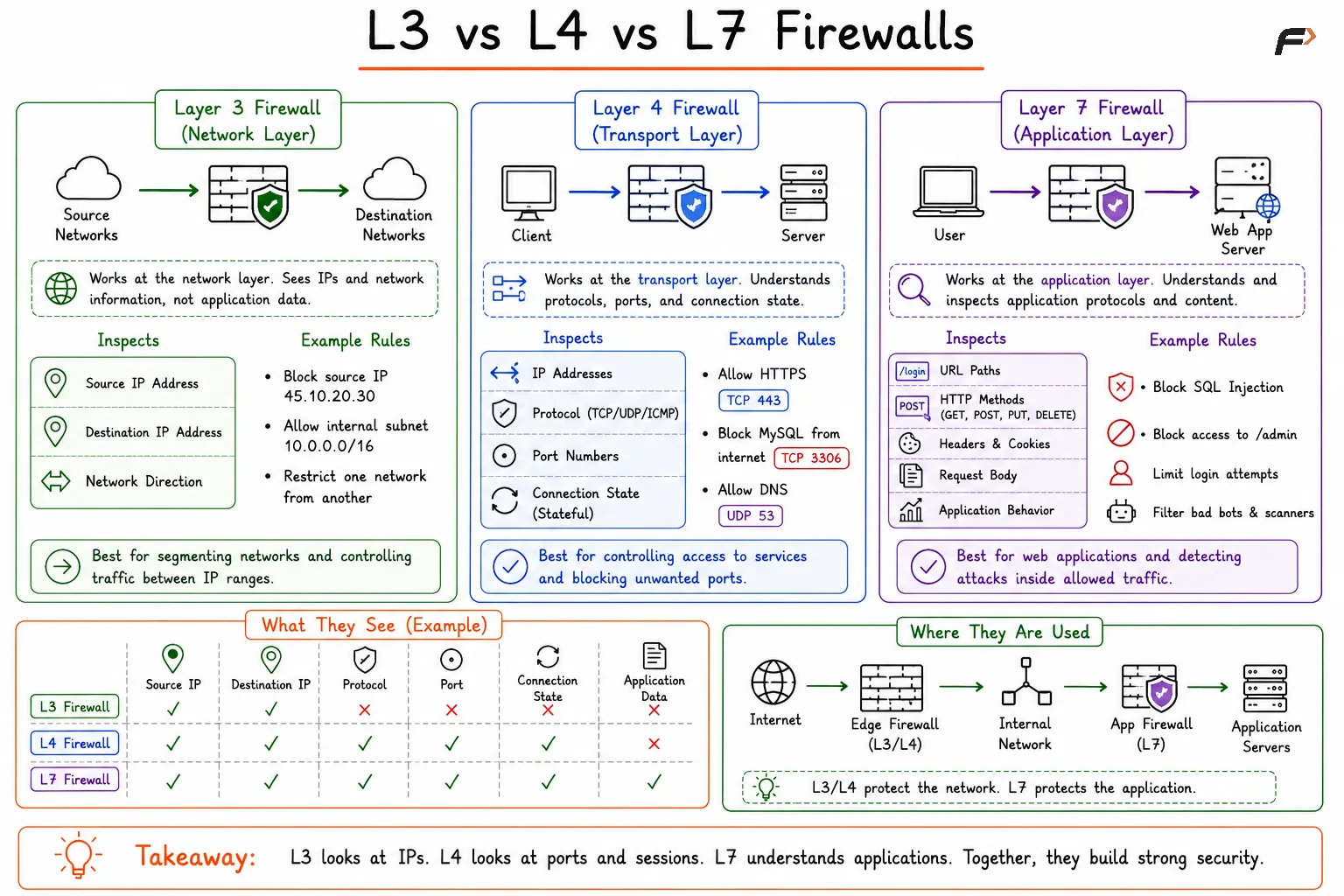
Firewalls Comparison: Layer 3, 4 and 7
Aspect | Layer 3 Firewall | Layer 4 Firewall | Layer 7 Firewall |
|---|---|---|---|
OSI Layer | Network Layer | Transport Layer | Application Layer |
Main Visibility | IP addresses | IP addresses, ports, protocols | Application requests and content |
Common Data Checked | Source IP, destination IP | TCP/UDP, port number, connection state | URLs, headers, cookies, request body |
Security Depth | Basic | Moderate | High |
Performance | Fastest | Fast and practical | Slower due to deep inspection |
Common Use | Network filtering and segmentation | Service-level access control | Web application and API protection |
Example Rule | Block traffic from a specific IP | Allow TCP port | Block SQL injection attempts |
Summary
Layer 3, Layer 4, and Layer 7 firewalls protect networks at different depths. A Layer 3 firewall filters traffic using IP addresses, a Layer 4 firewall uses ports, protocols, and connection state, and a Layer 7 firewall inspects application-level requests.
In real network security design, these firewall layers usually work together. L3 and L4 firewalls reduce unwanted network exposure, while L7 firewalls protect applications from deeper threats such as SQL injection, XSS, bot abuse, and suspicious HTTP behavior.
Be the first to add a comment.