Introduction
FTP, or File Transfer Protocol, is one of the oldest and most important application layer protocols in computer networks. It was designed to move files between a client and a server, and for many years it was widely used for website hosting, software distribution, document sharing, and remote file management.
Even though modern systems usually prefer more secure alternatives, FTP is still worth studying because it clearly shows how application protocols are designed and how file transfer works across a network.
What Is FTP?
FTP is a standard protocol used to transfer files between two systems over a network. It follows the client-server model, where one side acts as the client requesting operations and the other side acts as the server storing or serving files.
Using FTP, a user can perform tasks such as:
Upload files: Send files from the client to the server.
Download files: Retrieve files from the server to the client.
View directories: Check folders and file listings on the remote system.
Manage files remotely: Rename, move, or organize files depending on permissions.
This made FTP very useful in the early internet, especially when servers needed a common method for remote file access.
How FTP Works
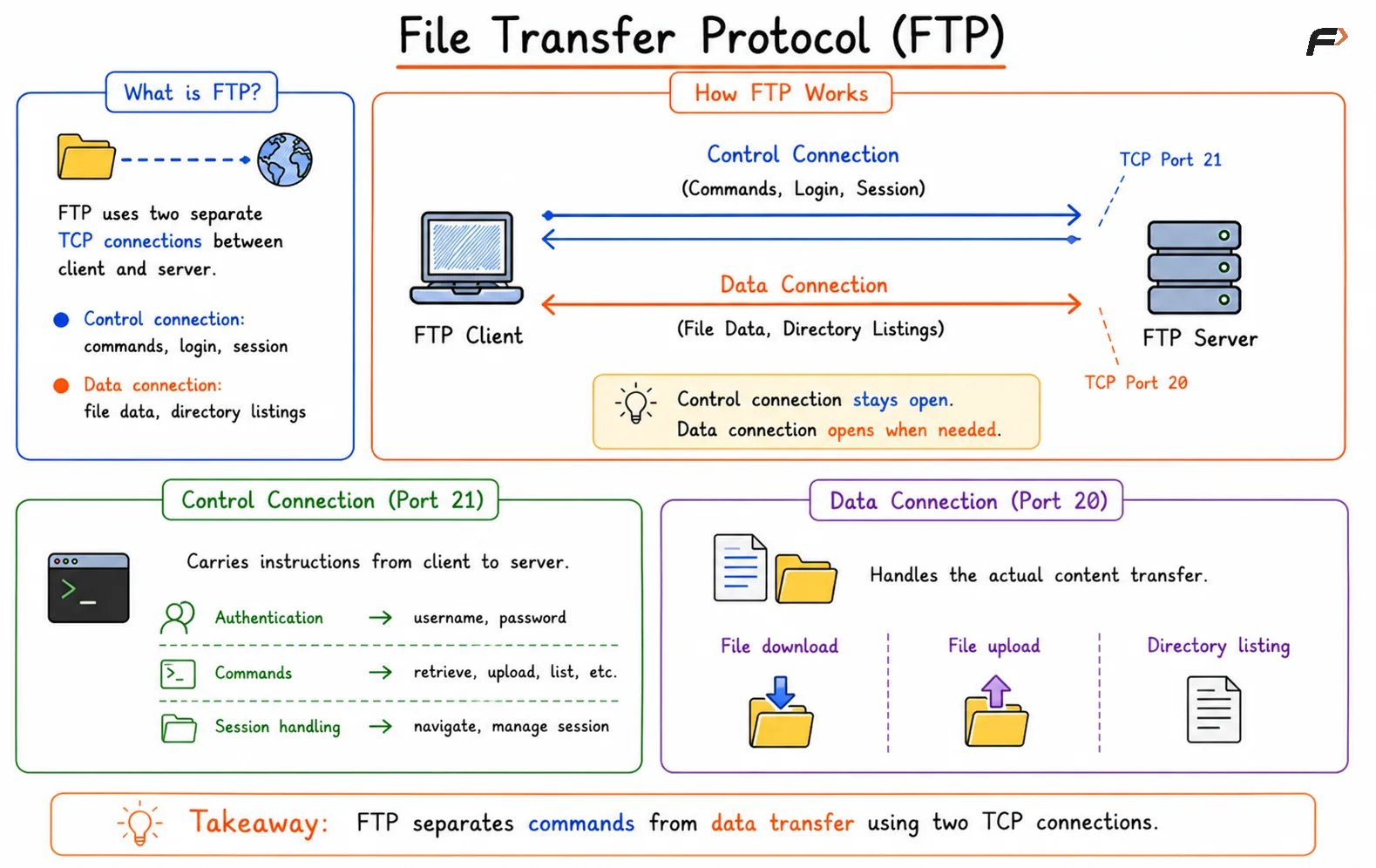
FTP is different from many common protocols because it does not rely on just one TCP connection. Instead, it uses two separate TCP connections between the client and the server.
Control connection: Used for commands, login, and session management.
Data connection: Used for transferring actual file data or directory listings.
The control connection usually remains active during the session, while a separate data connection is opened when real file transfer is needed. This separation between commands and file data is one of the main features of FTP.
File Transfer Protocol
Control Connection and Data Connection
The control connection carries instructions from the client to the server. This includes login information and file operation commands.
Common activities on the control channel include:
Authentication: Username and password are sent to the server.
Commands: Instructions such as file retrieval, upload, or listing are issued.
Session handling: The client navigates directories and manages the session.
The data connection is separate and is responsible for the actual content transfer.
That means FTP keeps communication and data movement apart. This design was useful historically, but it also made the protocol more complicated than many modern alternatives.
Why FTP Became Popular
FTP became widely adopted because it solved a very practical problem in a standard way. Systems needed a reliable method for sending and receiving files across networks, and FTP provided that.
Some reasons for its popularity were:
Simple file sharing model: It gave a clear way to move files between client and server.
Support for large file transfer: It worked well for software, logs, and hosted files.
Remote access features: Users could interact with files on distant systems.
Standard protocol design: Different systems could communicate using the same rules.
For a long time, FTP was one of the most common ways to manage server files.
Problems with FTP
Although FTP was useful, it has major security and operational limitations. These weaknesses are the main reason it is no longer preferred in modern systems.
Plaintext credentials: Usernames and passwords are sent without encryption.
Plaintext file transfer: The transferred data can also be intercepted.
No built-in confidentiality: Attackers may read traffic if they capture it.
No strong integrity protection: The protocol itself does not provide modern protection against tampering.
Operational complexity: Two separate connections make setup and network handling harder.
This means traditional FTP is vulnerable to eavesdropping and other network attacks, especially on untrusted networks.
Modern Alternatives to FTP
Because plain FTP is insecure, modern applications generally avoid using it directly for sensitive systems. Secure alternatives are now preferred for almost all real-world use cases.
Protocol | Main Idea | Why It Is Preferred |
|---|---|---|
SFTP | File transfer over SSH | Encrypted and secure |
SCP | Secure file copy over SSH | Simple secure copying |
FTPS | FTP with TLS encryption | Keeps FTP style with added security |
HTTPS uploads | File transfer over secure HTTP | Common for web applications |
Cloud storage links | Signed upload or download URLs | Safer and easier for modern systems |
These options provide better confidentiality, stronger authentication, and more practical deployment in current systems.
Summary
FTP is an application layer protocol used to transfer files between a client and a server. It is known for using two separate TCP connections, one for control commands and one for actual data transfer, which makes it structurally different from many other protocols.
FTP played a major historical role in file sharing and remote server management, but it sends credentials and data in plaintext and creates extra complexity with firewalls and NAT. Because of these limitations, modern systems usually prefer secure alternatives such as SFTP, FTPS, SCP, and HTTPS-based file transfer.
Be the first to add a comment.