Introduction
When a user logs into a website, the server needs some way to remember who that user is on the next request. HTTP by itself is stateless, which means every request looks independent unless some extra mechanism is used to maintain identity and login state.
This is where cookies, sessions, and tokens become important. They solve related problems, but they do not mean the same thing. In modern web development and networking, understanding their differences is essential for authentication, authorization, and secure user management.
Why These Concepts Are Needed
Suppose a user logs into an application and then opens five different pages. The browser sends five separate HTTP requests, but the server should not force the user to log in again on every page.
The system needs a way to recognize that all those requests belong to the same authenticated user. That recognition can be built using cookies, sessions, tokens, or a combination of them.
In practical terms, these mechanisms help with:
Login persistence: Keeping the user signed in across requests
User identification: Telling the server who is making the request
Access control: Allowing or denying protected actions
Session continuity: Maintaining application state during use
What Is a Cookie?
A cookie is a small piece of data stored by the browser and associated with a website. The server can send a cookie to the browser, and the browser can automatically include it in future requests to the same site.
Cookies are often used for:
Session tracking
Login state
User preferences
Shopping cart data
Analytics and personalization
A cookie by itself is not automatically an authentication system. It is simply a storage and transport mechanism that helps the browser remember and send data.
How Cookies Work
A server can send a cookie using the Set-Cookie header in an HTTP response. After that, the browser stores the cookie and includes it in future requests when the domain and path rules match.
A simple flow looks like this:
User logs in => Server sends Set-Cookie => Browser stores cookie => Browser sends cookie with later requests => Server identifies the request context
This is why cookies are commonly used in login systems. The browser handles the repeated sending automatically, which makes them convenient for web applications.
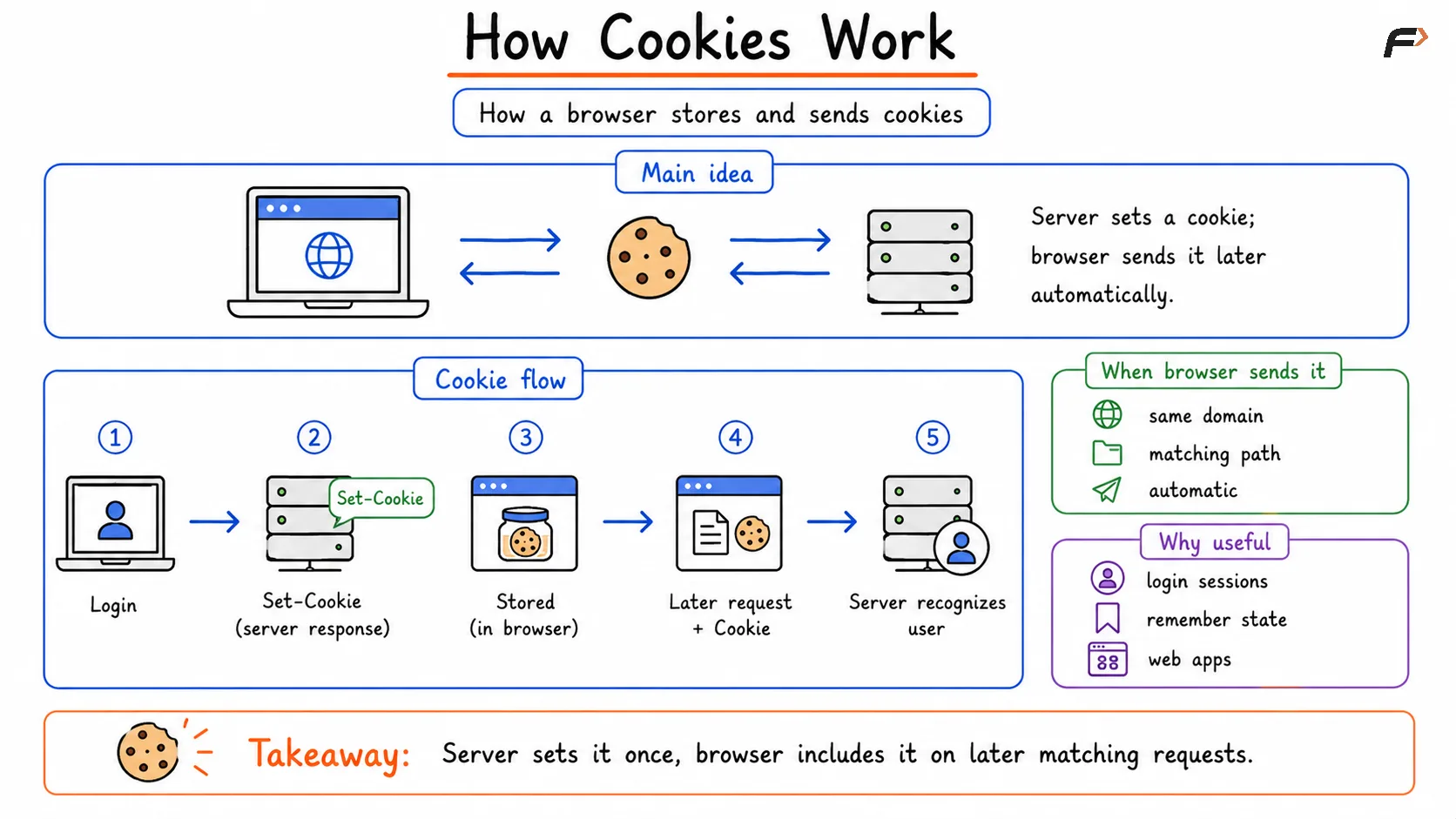
How Cookies Work
Common Types of Cookies
Cookies can be grouped in different ways depending on their purpose and lifetime.
Session cookies: Exist only during the current browser session and usually disappear when the browser closes
Persistent cookies: Stay until a defined expiration time
Authentication cookies: Help identify logged-in users
Preference cookies: Remember settings such as theme or language
Tracking cookies: Used for analytics, ad behavior, or cross-site tracking
From a security and authentication perspective, session cookies are the most important type to understand first.
What Is a Session?
A session is the server-side representation of a user’s interaction state. Instead of storing all authentication details in the browser, the server stores session information on its side and gives the browser a session identifier.
That session identifier is often placed inside a cookie.
This means an important point:
A cookie may store the session ID
The session itself usually lives on the server
The server uses that session ID to look up the logged-in user, permissions, cart, preferences, or other temporary state tied to that interaction.
How Session-Based Authentication Works
A session-based login system usually works like this:
The user sends login credentials
The server verifies them
The server creates a session record
The server generates a session ID
The session ID is sent to the browser in a cookie
The browser sends that cookie in future requests
The server finds the matching session and recognizes the user
This model is very common in traditional web applications.
A useful way to think about it is:
The browser carries the session ID
The server keeps the actual session data
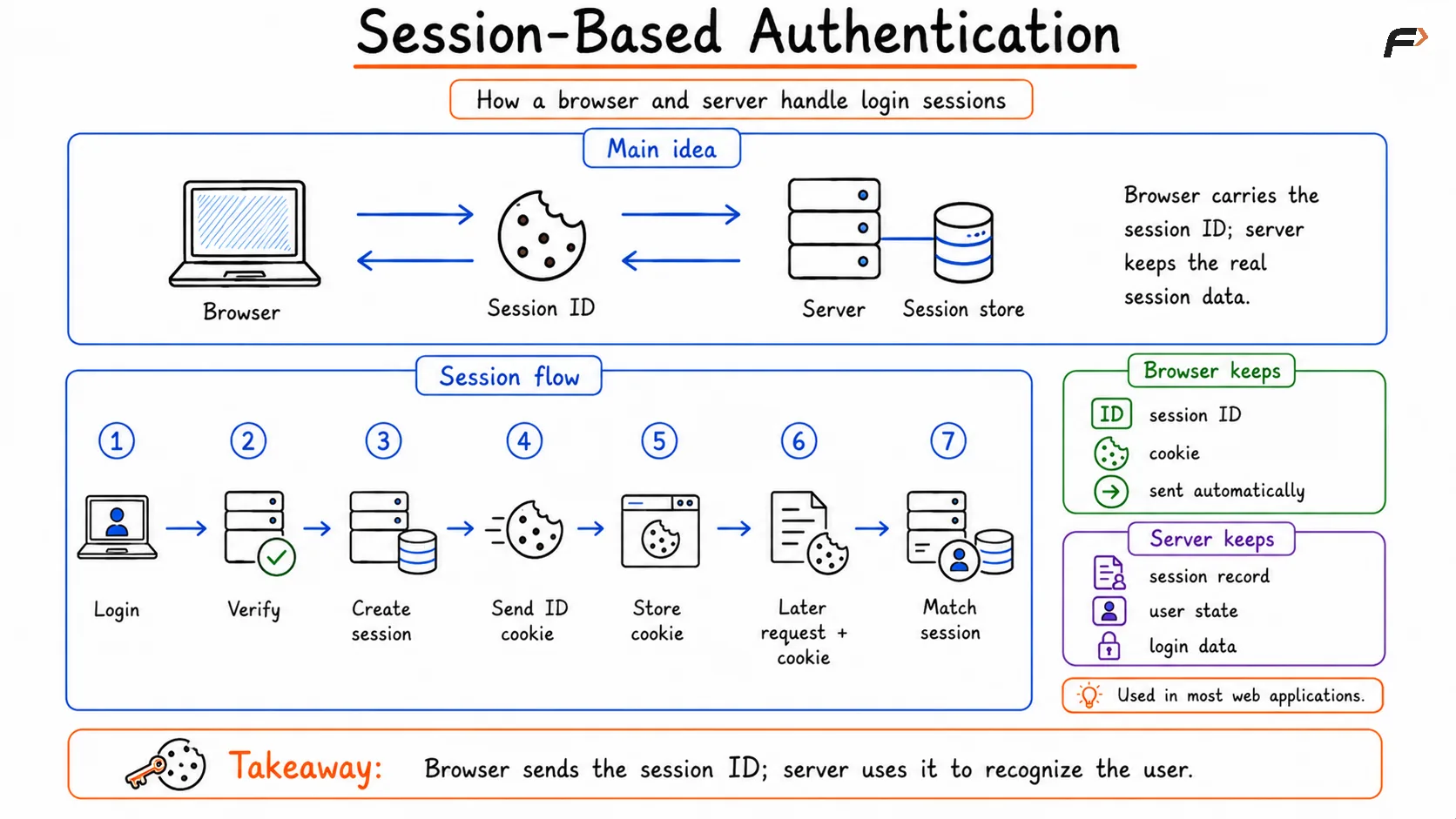
Session-Based Authentication
Advantages and Limits of Sessions
Sessions are popular because they make it easy for the server to centrally control authentication state.
Some advantages are:
Server-side control: Sessions can be invalidated directly by the server
Clear login state management: Easier to revoke access after logout
Less sensitive data in the browser: The browser usually stores only the session ID
Good fit for server-rendered web apps: Especially where browser and backend are tightly connected
But sessions also have trade-offs:
Server storage is required: Session data must be kept somewhere
Scaling becomes more complex: Distributed systems need shared session storage or stickiness
Stateful design: The server must remember each active user session
What Is a Token?
A token is a piece of data that represents identity, access rights, or authentication state. Unlike classic server-side sessions, tokens are often used in stateless authentication models, especially in APIs, mobile apps, and modern frontend-backend architectures.
The client stores the token and sends it with requests, usually in the Authorization header.
A token may contain:
User identity information
Permissions or claims
Expiration details
Cryptographic verification data
One of the most discussed token formats is the JWT, or JSON Web Token, though not every token is a JWT.
Access Tokens and Refresh Tokens
Modern token-based systems often use two token types together.
Token Type | Main Purpose |
|---|---|
Access Token | Used to access protected resources and APIs |
Refresh Token | Used to obtain a new access token after expiry |
This separation improves security and control.
Access token: Usually short-lived and sent frequently
Refresh token: Usually longer-lived and used less often to renew authentication
This model is common in API security, OAuth-based systems, and mobile or single-page applications.
Cookies vs Sessions vs Tokens
These three terms are often mixed together, but they solve different layers of the authentication problem.
Concept | Main Role | Usually Stored Where | Typical Use |
|---|---|---|---|
Cookie | Browser-side storage and automatic sending | Browser | Carry session ID, preferences, or auth data |
Session | Server-side user state | Server | Traditional login tracking |
Token | Proof of identity or access | Client-side and sent with requests | APIs, stateless auth, distributed systems |
A simple summary is:
Cookie: How the browser remembers and sends data
Session: How the server remembers the user
Token: How identity or access can be represented and verified
Security Risks to Understand
Cookies, sessions, and tokens all come with security concerns if they are not handled properly.
Important risks include:
Session hijacking: An attacker steals a valid session identifier
Token theft: A stolen access token may allow unauthorized API access
Cross-site scripting (XSS): Malicious scripts may steal accessible auth data
Cross-site request forgery (CSRF): Browser-sent credentials can be abused in unwanted requests
Weak expiration design: Long-lived authentication data increases risk
Improper storage: Sensitive tokens in unsafe browser storage can be exposed
That is why secure cookie attributes, HTTPS, token expiry, refresh logic, and careful frontend-backend design are all important.
When to Use What
Different application styles often prefer different patterns.
Traditional server-rendered web apps: Often use session-based authentication with cookies
REST APIs and mobile apps: Often use tokens, especially access tokens and refresh tokens
Single-page applications: May use token-based models, sometimes with secure cookies
Enterprise systems: May combine sessions, cookies, and tokens depending on architecture
The correct design is not about choosing the trendiest method. It is about matching the authentication model to the application’s structure and security needs.
Summary
Cookies, sessions, and tokens are closely related but different concepts in web authentication. Cookies are browser-side data units used to remember and send information, sessions are server-side records used to maintain user state, and tokens are portable representations of identity or access used heavily in APIs and modern distributed applications.
In simple terms, cookies help carry data, sessions help the server remember the user, and tokens help prove identity or access across requests. Understanding how they work together is essential for designing secure login systems, API authentication, and reliable web applications.
Be the first to add a comment.