Introduction
Opening an application feels like one simple action. You click an icon, tap an app, or run a command, and the app appears after a few seconds.
Inside the system, the operating system performs several controlled steps. It takes a passive program stored on disk and prepares it as an active process that can run on the CPU.
Why This Process Matters
App launch connects many core operating system concepts. It involves program files, process creation, memory setup, resource allocation, scheduling, file descriptors, libraries, and system calls.
So, opening an app does not simply mean “start the code.” The OS must find the program, check that it can run, create a process, prepare its execution environment, and then give it CPU time when the scheduler allows.
Program Vs Process
A program is a passive file stored on disk or storage. It contains executable code, metadata, and other information needed to start an application.
A process is an active running instance of a program. When the OS starts a program, it creates a process and gives it memory, identity, permissions, open resources, and scheduling information.
Term | Meaning | Example |
|---|---|---|
Program | Passive executable file stored on disk | An app binary or |
Process | Active running instance managed by the OS | Chrome currently running |
A simple way to remember it is: the program is the stored code, while the process is that code running under operating system control.
What Happens When We Open An App
The exact internal details differ across Windows, Linux, macOS, Android, and iOS, but the broad flow is similar. The OS converts the application from a stored executable into a managed process.
The basic flow is:
User action: The user clicks an icon, taps an app, or types a command.
Launcher or shell request: The launcher, shell, or desktop environment asks the OS to start the application.
Program lookup: The OS finds the executable file and checks whether it exists and can be executed.
Process creation: The OS creates a process with a process ID, state, credentials, and internal kernel data.
Memory setup: The OS prepares virtual memory, code mappings, stack, heap, page tables, and required memory areas.
Resource setup: The OS sets command-line arguments, environment variables, standard input, output, error, permissions, and file handles.
Library loading: Required shared libraries and runtime components are prepared or mapped as needed.
Ready state: The process becomes ready to run and waits for CPU time.
CPU execution: The scheduler selects the process, and execution begins from the program’s entry point.
This flow is important because the app does not directly take control of the CPU or hardware. The operating system builds a safe execution environment first.
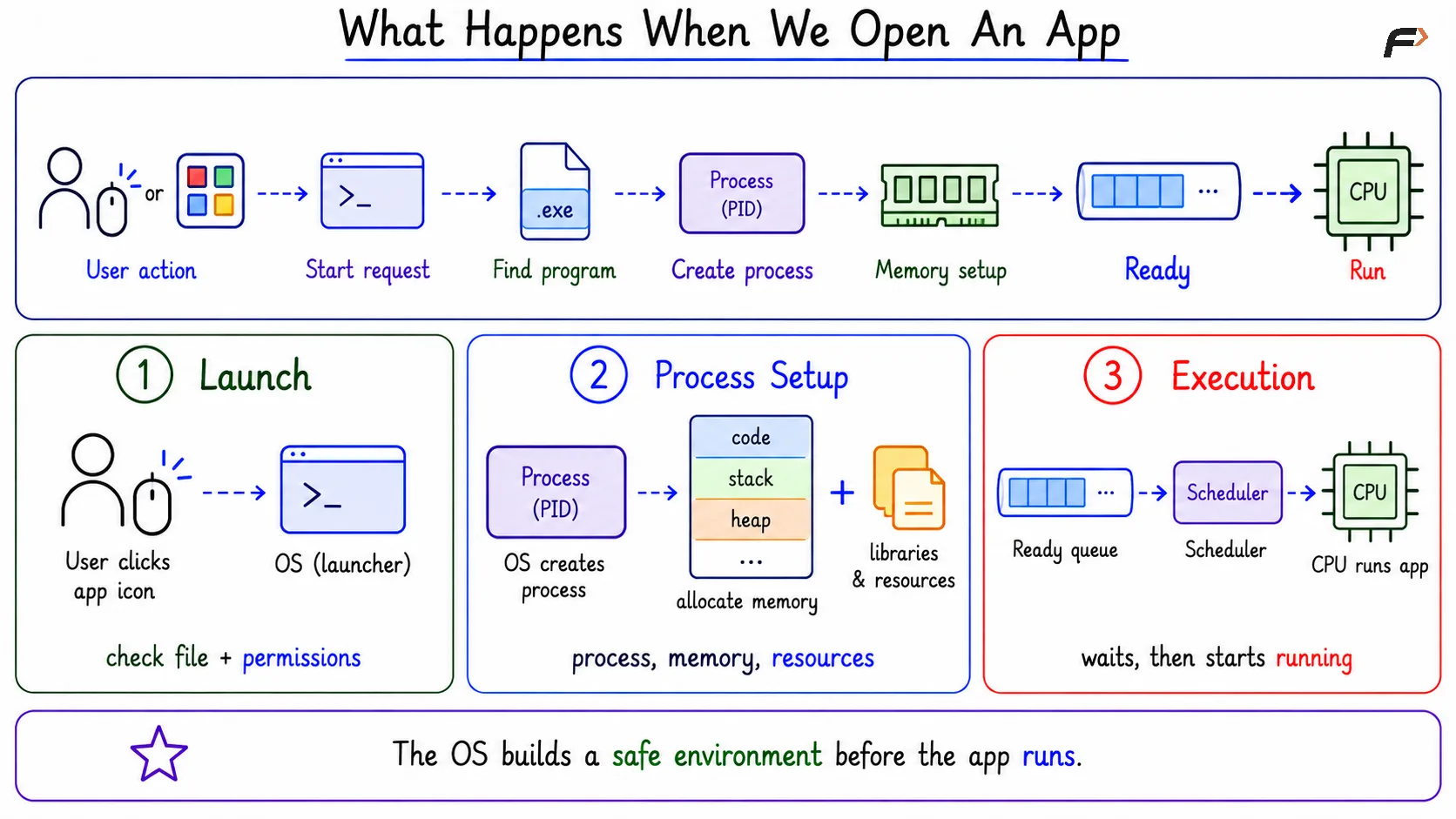
What Happens When We Open An App
Memory And Resources During App Launch
When an app opens, the whole program is usually not loaded into RAM at once. Modern operating systems often use virtual memory and demand paging, so parts of the program are loaded when they are actually needed.
The process may contain code, data, stack, heap, shared libraries, memory mappings, and page tables. These parts allow the process to execute while still remaining isolated from other processes.
The OS also sets up resources such as file descriptors, handles, permissions, user identity, and environment variables. This is why a process is more than just code in memory; it is a complete managed environment.
Internal Structure Of A Process
A process stores information that helps the OS control and track the running program. The exact names may differ across operating systems, but the core idea remains the same.
A process usually includes:
Process ID: A unique identity for the running instance.
Process state: Whether it is ready, running, waiting, or blocked.
Virtual address space: The private memory view given to the process.
Page tables: Mappings from virtual addresses to physical memory.
Stack and heap: Runtime memory areas used while the program executes.
Code and data mappings: The executable instructions and program data.
File descriptor table: Open files, sockets, pipes, or similar resources.
Permissions: User identity and access rights.
Scheduler information: Priority, runtime, and scheduling details.
This is why creating a process is an operating-system-managed task. The OS must prepare enough information to run, pause, resume, protect, and eventually terminate the process.
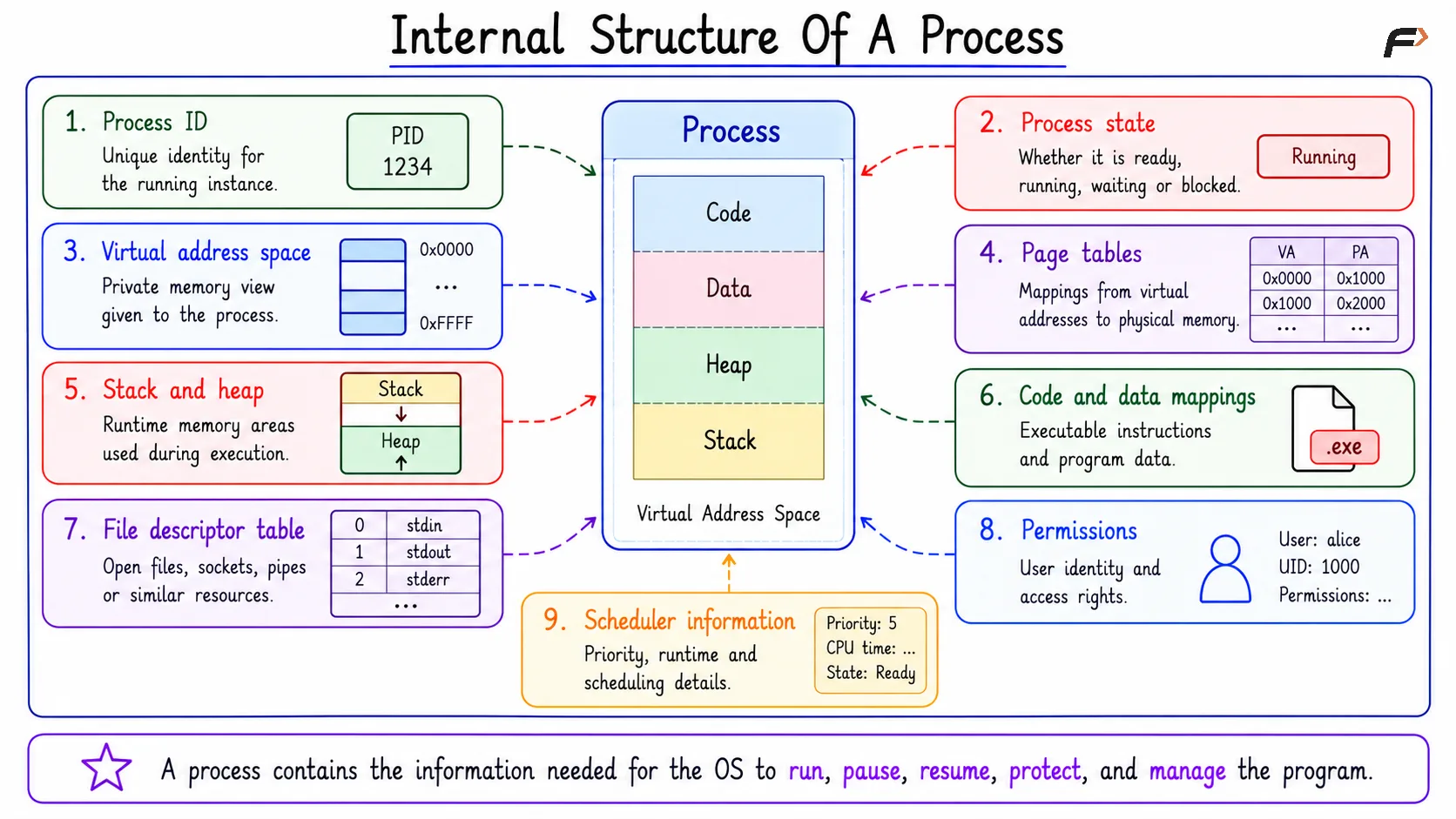
Internal Structure Of A Process
Opened Does Not Always Mean Running
An app may be opened as a process, but that does not mean it is executing on the CPU at every moment. A process can be ready, running, blocked, sleeping, or waiting for an event.
For example, if the CPU is busy, the newly opened app may be ready but waiting for CPU time. If it needs data from disk, network, or user input, it may be blocked until that operation completes.
Common states include:
Running: The process is currently executing on the CPU.
Ready: The process can run but is waiting for CPU time.
Blocked: The process is waiting for disk, network, input, or another event.
Sleeping: The process is waiting for a timer or scheduled wake-up.
So, “opened” and “running right now” are not always the same thing. The scheduler decides when the process actually receives CPU time.
Common Questions
Does one app always mean one process?
No. One application can create multiple processes. For example, a browser may use separate processes for tabs, extensions, rendering, or background work.
Is the full program loaded into RAM immediately?
Usually, no. Modern systems often load required parts first and bring other parts into memory when needed through demand paging.
Summary
Opening an app is not a single internal action. The OS finds the program, creates a process, prepares memory, sets up resources, loads required libraries, and schedules it for CPU execution.
A program is passive code stored on disk, while a process is an active OS-managed running instance. The key idea is that the operating system controls the journey from stored executable to running process.
Be the first to add a comment.