Introduction
Physical RAM is limited, but programs are written as if they have a large private memory space. Virtual memory creates this clean view for each process.
The process works with virtual addresses, while the operating system decides where the actual bytes live. This separation between process view and OS reality is the core idea of virtual memory.
What Virtual Memory Means
Virtual memory is an OS and hardware technique that gives each process its own virtual address space. The process does not directly work with physical RAM addresses. Instead, it uses virtual addresses, and the system translates them into physical locations when needed.
The backing for a virtual page may come from RAM, swap space, executable files, mapped files, shared pages, or pages that are created only when first used.
Process View vs OS Reality
From the process view, memory looks simple:
Private: The process sees its own address space.
Continuous-looking: Addresses appear organized and clean.
Location-independent: The program does not need to know where bytes are physically stored.
From the OS view, memory is more flexible. One page may be in RAM, another may come from a file, another may be swapped out, and another may not exist physically until the process touches it.
So the process sees a private memory world, while the OS manages the real placement underneath.
Main Mechanisms of Virtual Memory
Virtual memory works through several connected mechanisms.
Mechanism | Role |
|---|---|
Page table | Stores virtual-page to physical-frame mappings |
MMU | Translates virtual addresses to physical addresses |
Protection bits | Control read, write, and execute permissions |
Backing store | Provides storage for pages not currently in RAM |
Page fault | Handles missing, invalid, or protected page accesses |
TLB | Caches recent translations for faster access |
Together, these mechanisms allow the system to translate addresses, enforce protection, load pages on demand, and avoid repeated slow translation work.
What Virtual Memory Solves
Virtual memory solves several important memory-management problems.
Isolation: One process cannot directly access another process’s private memory.
Simpler programming: Programs can use virtual addresses without caring about physical RAM layout.
Efficient startup: A program does not need all pages loaded before it begins running.
Large address spaces: A process can have a virtual address space larger than available RAM.
Sharing: Multiple processes can map the same library or file-backed pages.
This is why virtual memory is not just about “using disk as extra RAM.” It is also about protection, abstraction, sharing, and efficient physical memory use.
Demand Loading and Page Faults
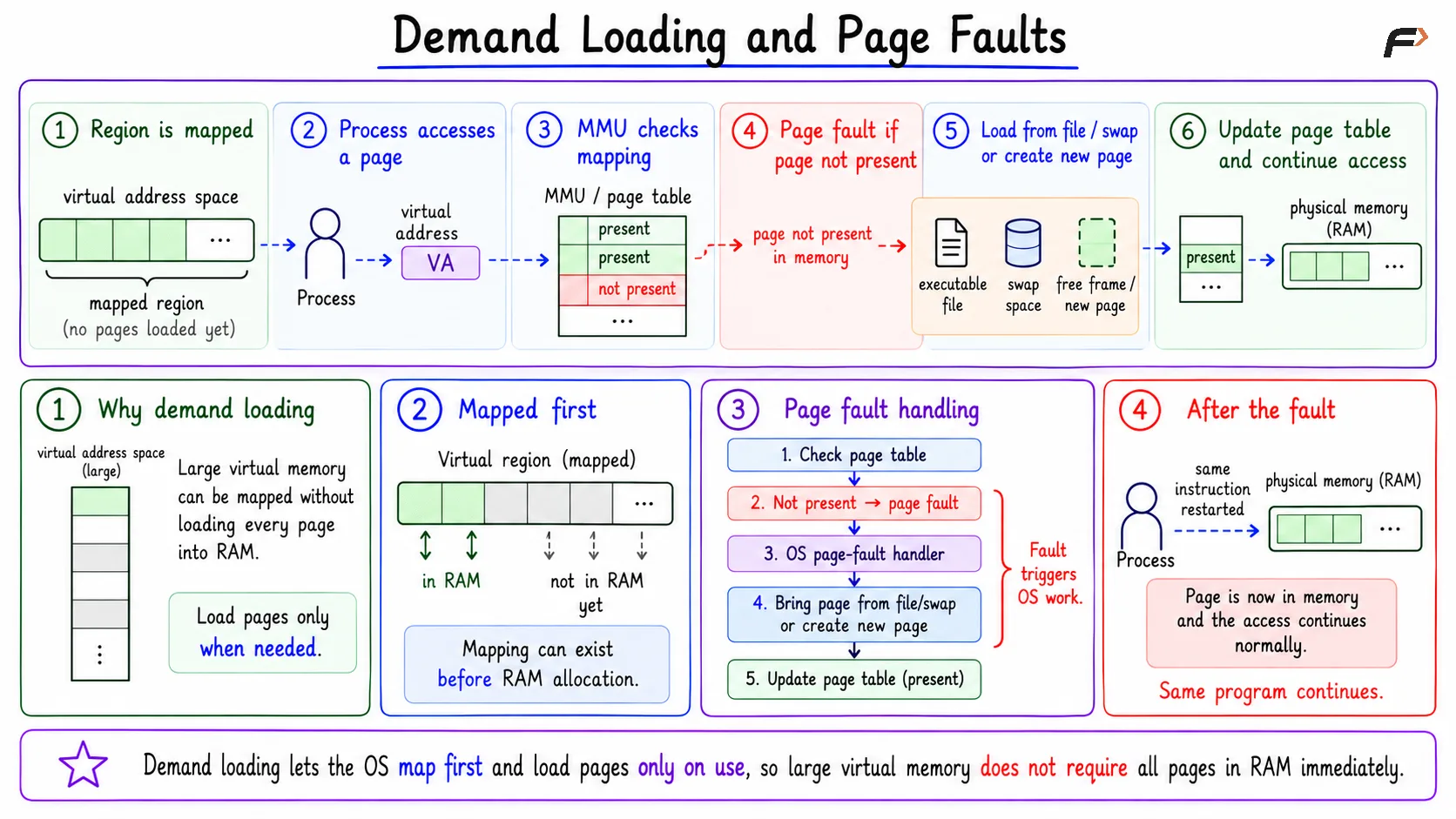
Virtual memory allows the OS to map regions first and load pages only when they are actually needed.
A compact demand-loading flow is:
Region is mapped: The process receives a virtual memory region.
Process accesses a page: The CPU generates a virtual address.
MMU checks the mapping: The page table is consulted through hardware support.
Page fault occurs if needed: If the page is not present, the OS handles the fault.
Page is brought or created: The OS loads it from a file, swap, or allocates a new frame.
Access continues: The process can now use the page.
This is how a large virtual address space can exist without every page occupying RAM immediately.
Demand Loading and Page Faults
Copy-on-Write and Lazy Allocation
Copy-on-write avoids copying pages until a write actually requires a separate copy. For example, after fork, a parent and child process can initially share the same physical pages. If the child writes to a shared page, the OS creates a new physical copy for the child at that moment.
Lazy allocation follows a similar memory-saving idea. The OS may reserve virtual memory first, but allocate a physical frame only when the process actually touches the page.
File Mapping and Shared Pages
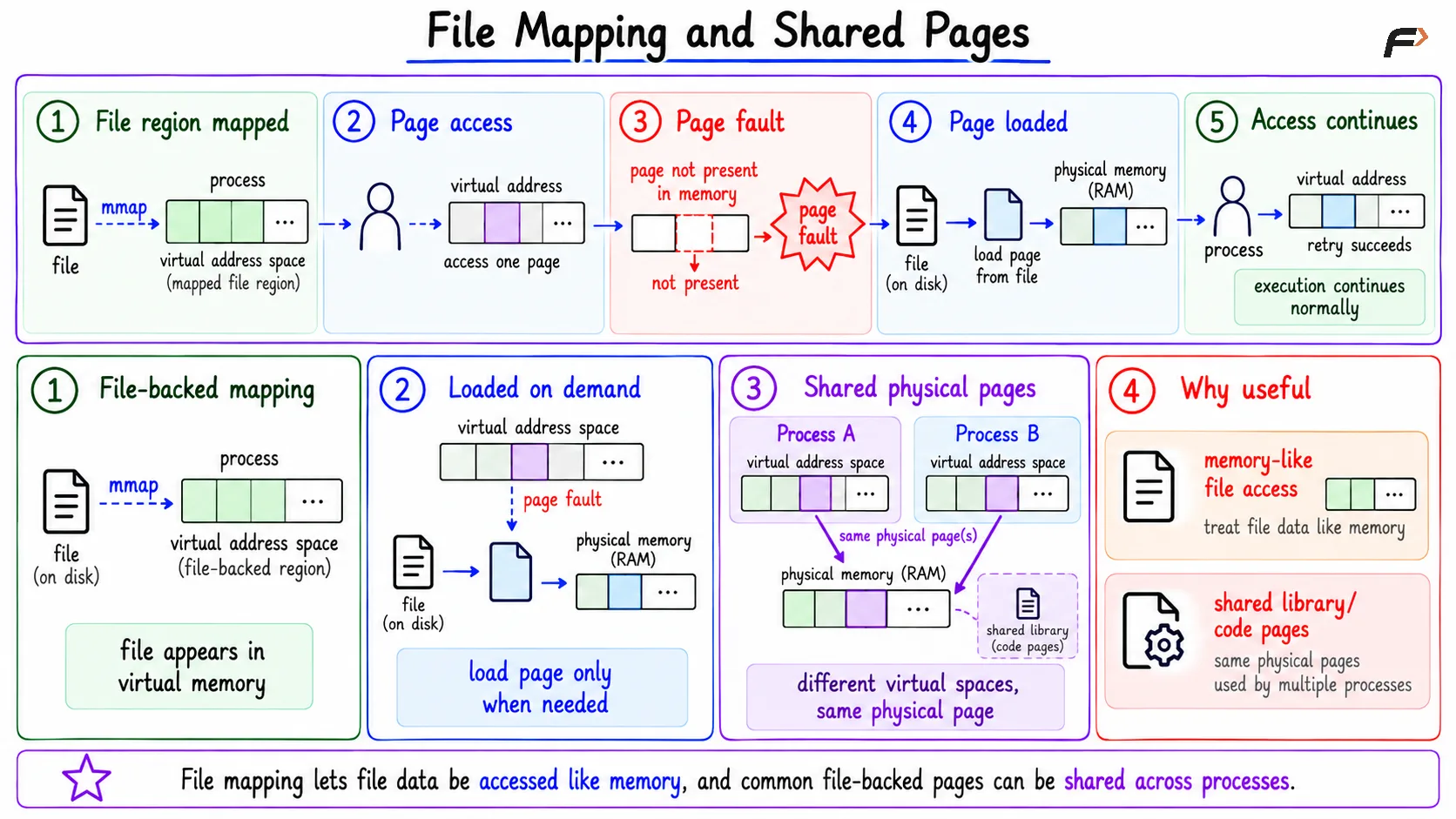
Virtual memory also supports file-backed mappings. With mmap, a file region can appear inside a process’s virtual address space. The basic flow is:
File region mapped: A file region is mapped into the process's virtual address space.
Page access: The process accesses a page from the mapped region.
Page fault: If the page is not already in memory, a page fault occurs.
Page loaded: The OS loads the required page from the file into memory.
Access succeeds: The process retries the access and continues normally.
This makes file access look like memory access. It also allows multiple processes to share the same file-backed physical pages when appropriate. Shared libraries work in a similar spirit. Different processes can have their own virtual address spaces while sharing the same underlying physical pages for common library code.
File Mapping and Shared Pages
Real-System View
A browser may have code, heap, stacks, shared libraries, mapped files, JIT regions, and many other virtual memory regions. Not all of those pages need to be present in RAM at once.
A backend server may have large heaps, buffers, stacks, and mapped files. The OS backs only the active parts with physical frames and handles missing pages through page faults.
This makes virtual memory practical: the visible address space can be large, while RAM is used mainly for pages that are actually active.
Summary
Virtual memory gives each process a private, continuous-looking address space. The process uses virtual addresses, while the OS and hardware map those addresses to RAM frames, files, swap, shared pages, or pages created on demand.
It depends on page tables, the MMU, protection bits, page faults, backing storage, and the TLB. Its main benefits are isolation, simpler programming, demand loading, sharing, copy-on-write, lazy allocation, and the ability to run programs whose virtual address spaces are larger than physical RAM.
Be the first to add a comment.