Introduction
Thrashing and the working set model are closely connected ideas in virtual memory management. Thrashing is the bad state where the system spends too much time handling page faults and paging instead of doing useful work.
The working set model helps explain why thrashing happens. It estimates the active pages a process needs, so the operating system can judge whether available RAM is enough for the active processes.
What Is Thrashing?
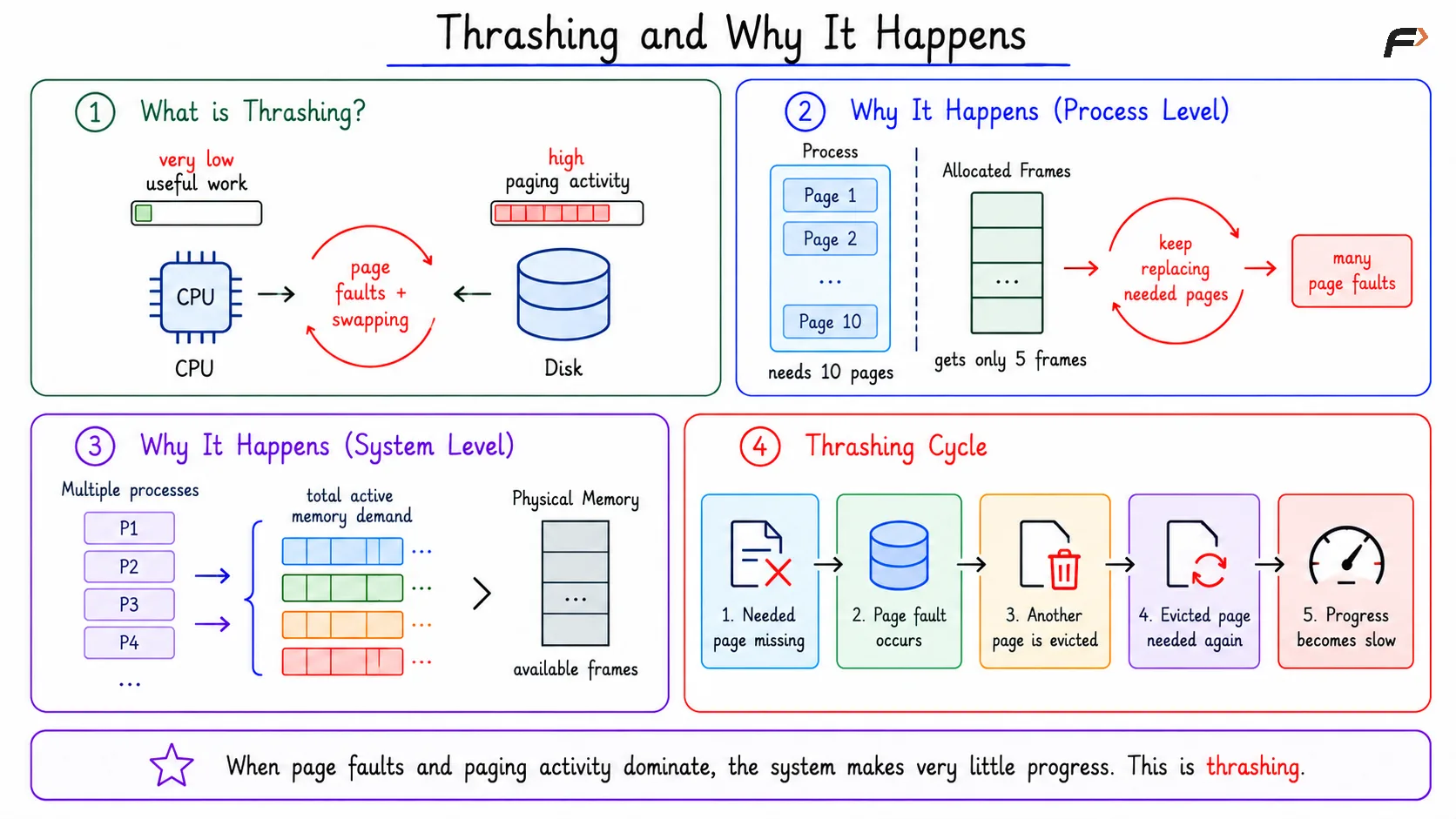
Thrashing occurs when a system spends more time handling page faults, swapping, and paging activity than executing useful instructions. A page fault is normal in virtual memory, but continuous page faults can make the system extremely slow.
Thrashing is not the same as a program simply doing heavy computation. In thrashing, the main problem is memory pressure: required pages are repeatedly missing from RAM.
Why Thrashing Happens
At the process level, thrashing happens when a process does not get enough frames to hold its active pages. If a process actively needs 10 pages but gets only 5 frames, it must keep replacing pages that it will need again soon.
This creates a repeated cycle:
Needed page missing: The process references a page that is not in RAM.
Page fault occurs: The operating system loads the required page.
Another useful page is evicted: The limited frames force replacement.
Evicted page is needed again: Another page fault occurs soon.
Progress becomes slow: The process spends too much time waiting for paging.
At the system level, thrashing happens when too many processes are active at the same time and their total active memory demand exceeds available physical frames.
Thrashing and Why it Happens
Symptoms of Thrashing
Thrashing is usually recognized through a group of symptoms. One symptom alone may not prove thrashing, but together they indicate heavy memory pressure.
High page fault rate: Many required pages are not present in RAM.
High I/O wait: The CPU spends time waiting for paging-related I/O.
Low useful CPU progress: Programs do not complete much work despite system activity.
Sluggish applications: Applications respond slowly because their active pages are repeatedly unavailable.
Process termination under pressure: In severe cases, the system may kill processes when memory cannot be reclaimed.
High CPU usage alone does not mean thrashing. Thrashing is better identified by memory pressure, page faults, paging I/O, and poor useful progress.
Working Set Model
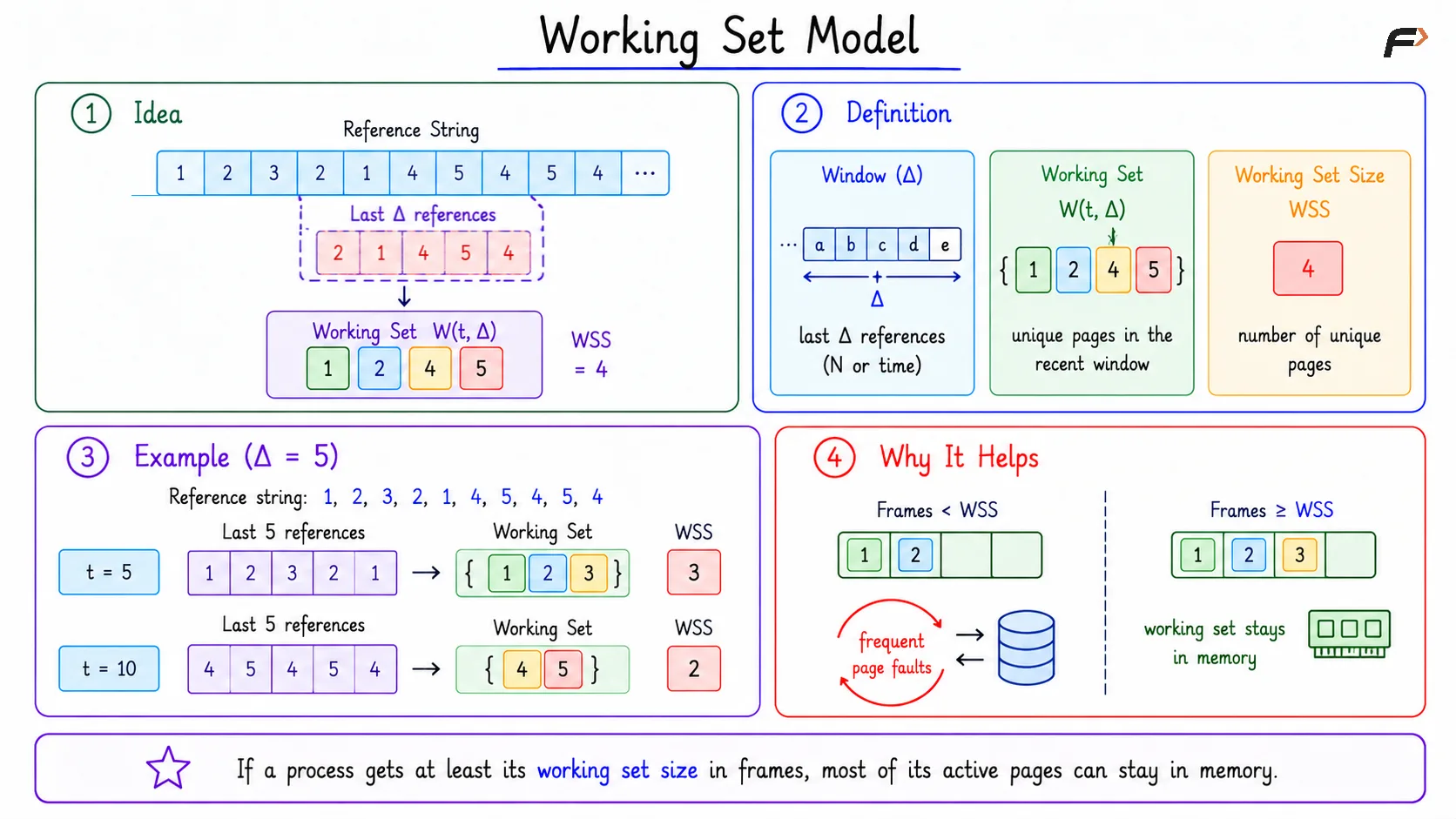
The working set model estimates the active memory requirement of a process. A process does not need every page of its address space at every moment; it mainly needs the pages used recently and likely to be used again soon.
The working set is defined using a recent window, usually represented by Delta.
Window: Delta may mean the last
Nreferences or a recent time interval.Working set:
W(t, Delta)is the set of unique pages referenced in that recent window.Working set size:
WSSis the number of unique pages in the working set.
If a process gets at least its working set size in frames, most of its active pages can remain in RAM. This usually reduces page faults and helps the process make steady progress.
Working Set Model
Working Set Size Example
Consider this reference string: 1, 2, 3, 2, 1, 4, 5, 4, 5, 4
Let Delta = 5, meaning the working set is calculated from the last 5 references.
Time | Last 5 References | Working Set | WSS |
|---|---|---|---|
|
|
|
|
|
|
|
|
This shows that the working set changes as the program phase changes. In one phase, the process may mainly need pages 1, 2, 3; later, it may mainly need pages 4, 5.
Thrashing Check Using Working Set Demand
The working set model can be used to check whether the active processes can fit in memory. Add the working set sizes of all active processes and compare the total with available frames.
Suppose the system has 12 available frames, and three processes have working set sizes of 5 frames for P1, 4 frames for P2, and 6 frames for P3. Total demand is D = 5 + 4 + 6 = 15 frames. Since D = 15 is greater than 12 available frames, the system is at risk of thrashing.
One fix is to reduce the active process count. If P3 is temporarily suspended, the new demand becomes 5 + 4 = 9 frames, which fits within 12 available frames.
Page-Fault Frequency
Page-fault frequency means how often a process causes page faults. It is a feedback method for deciding whether a process has too few, too many, or a reasonable number of frames.
Fault Rate Condition | Meaning | Possible Action |
|---|---|---|
Too high | Process likely has too few frames | Give more frames or suspend another process |
Reasonable | Allocation is balanced | Keep allocation mostly stable |
Very low | Process may have extra frames | Take some frames and reallocate them |
The goal is balance. Too many faults indicate memory pressure, while very few faults may mean frames are being held by a process that does not currently need all of them.
Reducing Thrashing Risk
Thrashing risk can be reduced by controlling memory demand and giving active processes enough frames for their working sets.
Reduce degree of multiprogramming: Suspend or swap out some processes temporarily.
Use working set information: Keep each active process close to its working set requirement.
Monitor page-fault frequency: Give frames to high-fault processes when possible.
Reclaim from low-fault processes: Move extra frames to processes under pressure.
The main idea is simple: active processes should have enough frames to hold the pages they are actively using.
Summary
Thrashing is a condition where excessive page faults and paging activity prevent useful execution. It can happen when a process gets too few frames or when the total working set demand of all active processes exceeds available RAM.
The working set model estimates the pages a process actively needs in a recent window. By comparing total working set demand with available frames and using page-fault frequency as feedback, the operating system can reduce thrashing risk and keep execution balanced.
Be the first to add a comment.