Introduction
System calls are the safe mechanism through which a user program asks the operating system for help. They are needed because normal application code runs with restrictions and cannot directly access hardware, disks, devices, or kernel data.
At the same time, programs still need OS services such as reading files, creating processes, using memory, and communicating over networks. System calls provide a controlled doorway from user programs to the kernel.
What Is a System Call?
A system call is a controlled entry point into the operating system kernel. It allows a user program to request a privileged service that ordinary user-level code cannot perform directly.
For example, a program cannot directly read arbitrary disk blocks or control a device on its own. Instead, it asks the kernel through a system call, and the kernel checks and performs the operation safely.
Why System Calls Are Needed
User programs run in a restricted environment for safety. If every application could directly modify memory, access devices, or change disk state, one faulty or malicious program could damage the whole system.
System calls solve this by giving programs limited and approved access to OS services. Common services include:
File I/O: Opening, reading, writing, and closing files.
Process management: Creating, running, waiting for, or terminating processes.
Memory management: Mapping memory or changing memory-related settings.
Device access: Requesting controlled use of hardware and I/O devices.
The kernel remains in control, while applications still get the services they need.
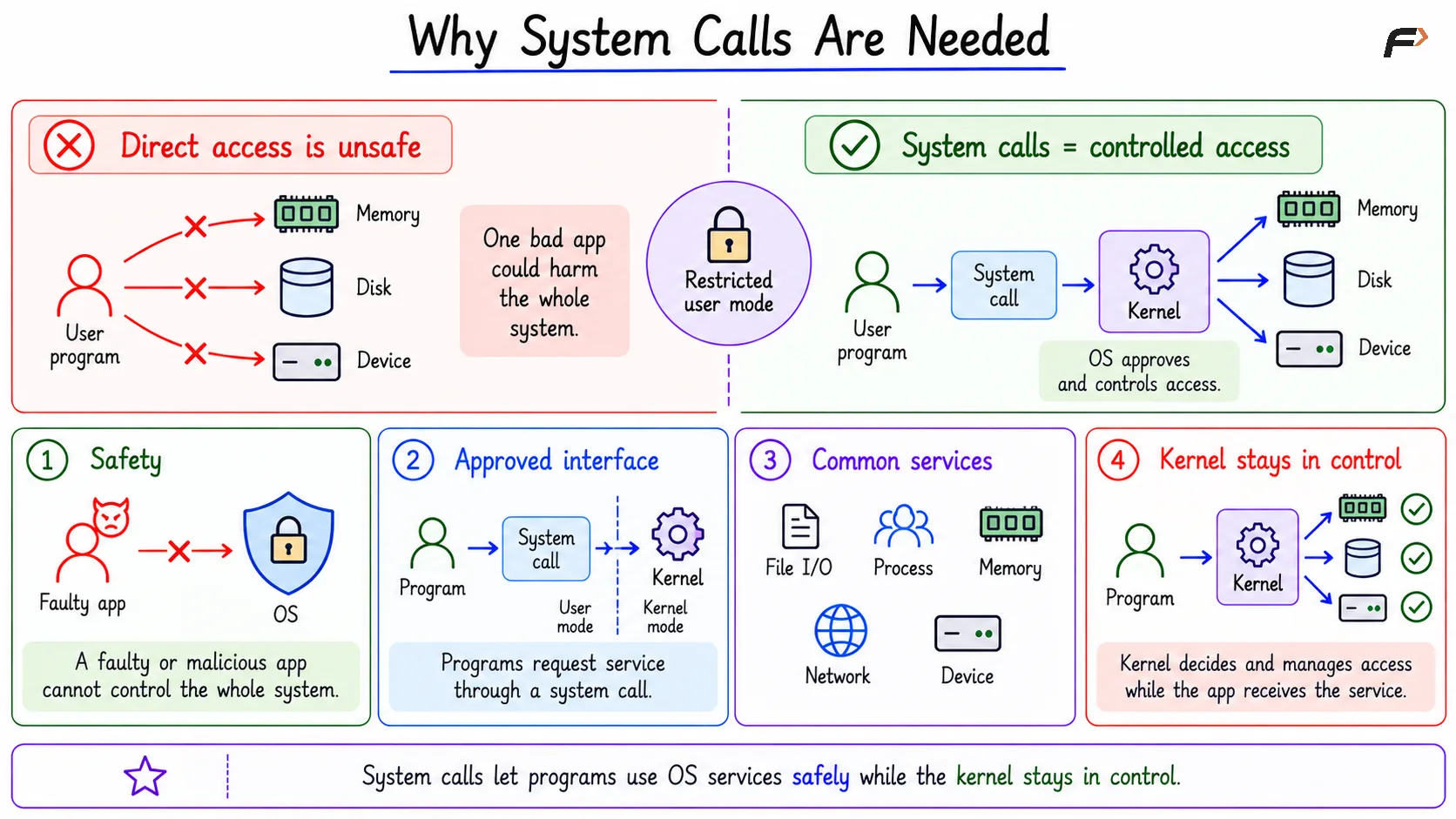
Why System Calls Are Needed
System Call vs Function Call
A normal function call and a system call may look similar in source code, but they are different in where the actual work happens.
Point | Normal Function Call | System Call |
|---|---|---|
Execution | Stays inside the user program | Crosses into the kernel |
Privilege | Runs in user mode | Requires kernel mode service |
Purpose | Performs ordinary program logic | Requests OS-managed service |
Example | A helper function for calculation |
|
The key difference is not the syntax. The key difference is whether the request crosses the user/kernel boundary.
User Mode and Kernel Mode
User mode is the restricted mode where applications run. Kernel mode is the privileged mode where the operating system can access protected memory, hardware, devices, and internal OS data structures.
A system call crosses from user mode to kernel mode through a controlled CPU mechanism. The application does not freely jump into kernel code; it enters only through approved system call entry points.
This separation protects the operating system. The kernel validates requests before performing privileged work.
How a System Call Works
When a program needs an OS service, the request follows a controlled sequence. The exact low-level details depend on the operating system and CPU, but the main idea remains the same.
The basic flow is:
User program calls a service-facing function: For example, a program may call
read()orwrite().Library wrapper prepares the request: It sets up arguments and the system call number.
Trap or system-call instruction runs: The CPU enters the kernel through a controlled entry point.
Kernel mode begins: The operating system receives the request.
Kernel validates the request: It checks permissions, arguments, and resource state.
Kernel performs the service: If valid, the requested OS work is done.
Result returns: The program receives a result or an error.
User mode resumes: Normal application execution continues.
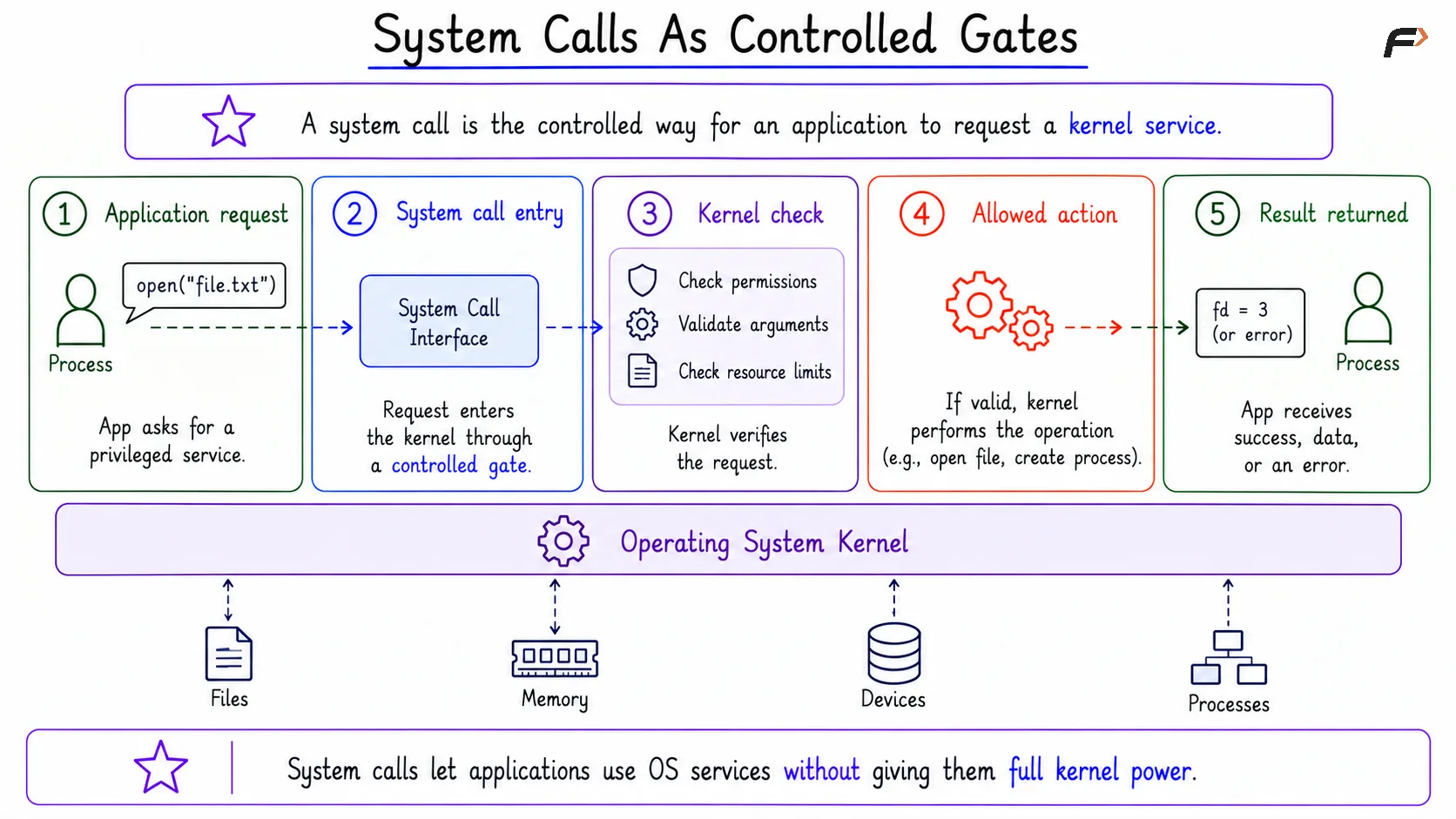
System Call
Examples of System Calls
Common system calls include:
open: Opens a file and usually returns a file descriptor.
read: Reads data from a file descriptor.
write: Writes data to a file descriptor.
fork: Creates a new process.
exec: Replaces the current process image with a new program.
These calls all follow the same broad principle. The program needs an OS-managed service, so it requests the service through the system call interface.
Library Wrappers and Raw System Calls
In real programming, developers usually do not write raw system call instructions directly. They call a library wrapper that looks like a normal function.
For example, a C program may call: write(fd, buffer, n)
The wrapper prepares the low-level details, such as arguments and the system call number, then triggers the actual kernel entry mechanism. It may also handle error conventions in a form that is easier for the program to use.
A wrapper and a raw system call are related, but not always identical. A wrapper may do extra preprocessing, expose a simpler interface, or convert kernel errors into user-space conventions.
Return Values and Errors
A successful system call returns a result, but the meaning of that result depends on the specific call.
For example:
read: May return the number of bytes read.
open: May return a file descriptor.
Many calls: Return
0to indicate success.
On error, many user-space wrappers return -1 and set errno to describe the reason. A common mistake is assuming every system call returns 0 on success and -1 on failure. In reality, successful return values differ across system calls.
Summary
System calls are controlled entry points that allow user programs to request operating system services. They are needed because applications are restricted, but still need safe access to files, processes, memory, networking, and devices.
A normal function call stays inside the program, while a system call crosses into the kernel through a controlled mechanism. Library wrappers usually hide the low-level details, and the kernel validates each request before returning a result or an error.
Be the first to add a comment.