Introduction
RAM is fast, but it is limited. When running programs together need more memory than the available RAM can provide, the operating system needs a way to free space without simply losing memory contents.
Swapping provides that fallback. It moves inactive memory from RAM to secondary storage and brings it back when the process needs it again.
Why Swapping Is Needed
A running program needs its code and data in RAM because RAM gives fast access to the CPU. Secondary storage, such as an SSD or disk, has much more capacity, but it is slower.
Memory pressure occurs when the demand for RAM becomes greater than the available RAM. For example, if several applications are active and another process needs memory, the OS may not have enough free RAM immediately available.
Swapping helps in this situation by moving memory that is not currently active out of RAM. The freed RAM can then be used for the process or page that needs memory now.
What Swapping Means
Swapping is an operating system technique in which process memory or memory pages are moved between main memory and secondary storage.
The key point is that swapped-out memory is not discarded. It is stored in a swap area so that it can be restored later.
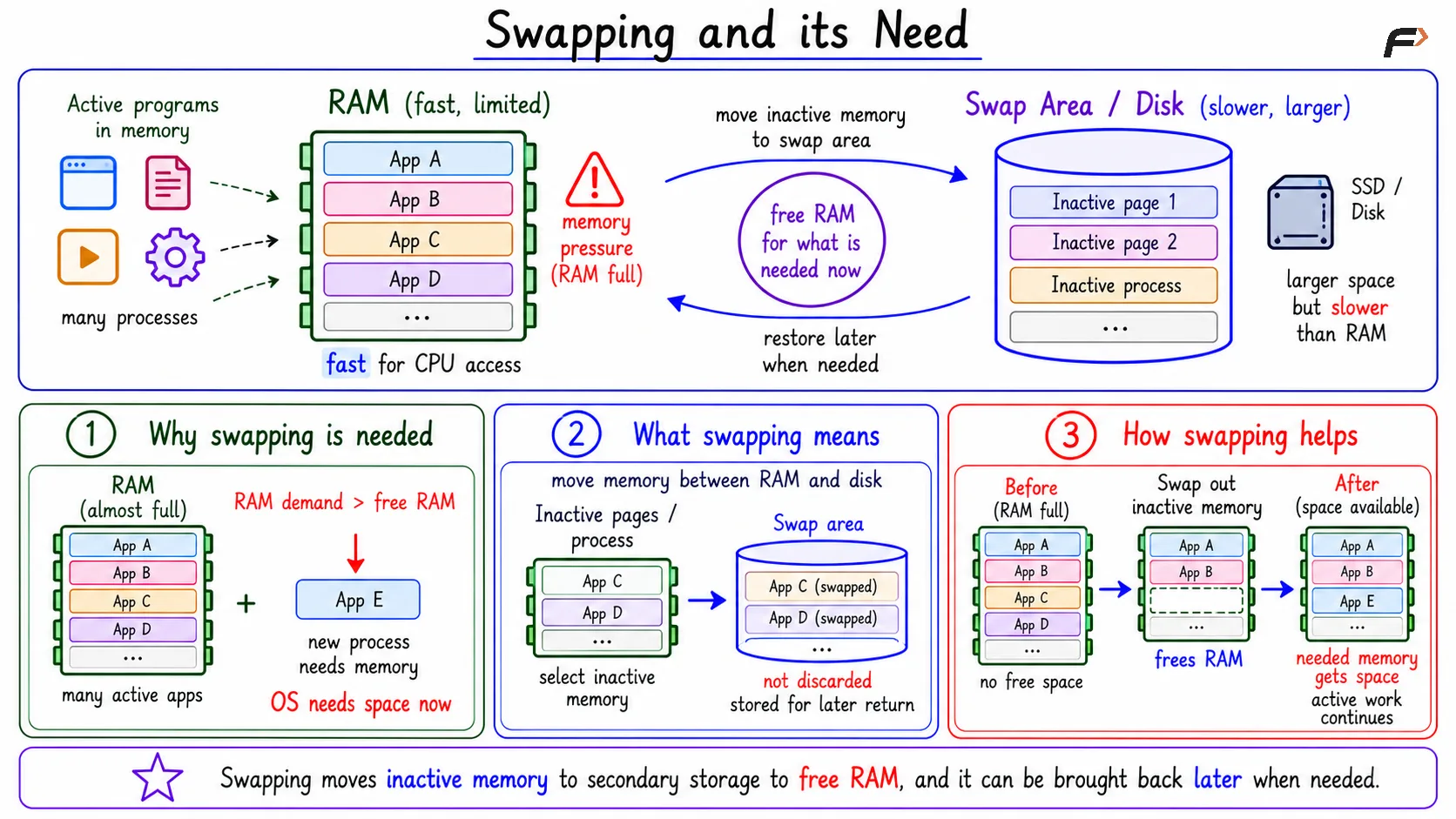
Swapping and its Need
RAM and Swap Space
Area | Meaning | Speed | Main Use |
|---|---|---|---|
RAM | Main memory used while programs run | Very fast | Holds active code and data |
Swap space | Disk or SSD area used for swapped memory | Slower than RAM | Stores inactive memory temporarily |
Secondary storage | Persistent storage such as disk or SSD | Slower than RAM | Stores files, programs, and swap area |
Swap space is not a real replacement for RAM. It only acts as a fallback when RAM is under pressure. The system can continue working, but memory access becomes slower when swapped data has to be read from storage.
Swap-Out and Swap-In Flow
Swapping has two main directions.
Swap-out: Inactive memory is moved from RAM to the swap area. This frees RAM for other active work.
Swap-in: Required memory is brought back from the swap area into RAM. This happens when a process again needs memory that was previously swapped out.
A compact swap-out flow is:
Memory pressure is detected: Available RAM is low.
Inactive memory is chosen: The OS selects memory that is not immediately needed.
Data is written to swap space: The selected contents are stored on disk or SSD.
RAM is freed: The old RAM space can now be reused.
A compact swap-in flow is:
A process accesses missing memory: The required content is not present in RAM.
The OS reads from swap space: The stored data is brought back.
Memory mapping is updated: The process can again access the data through its memory view.
Execution continues: The process resumes after the data is available.
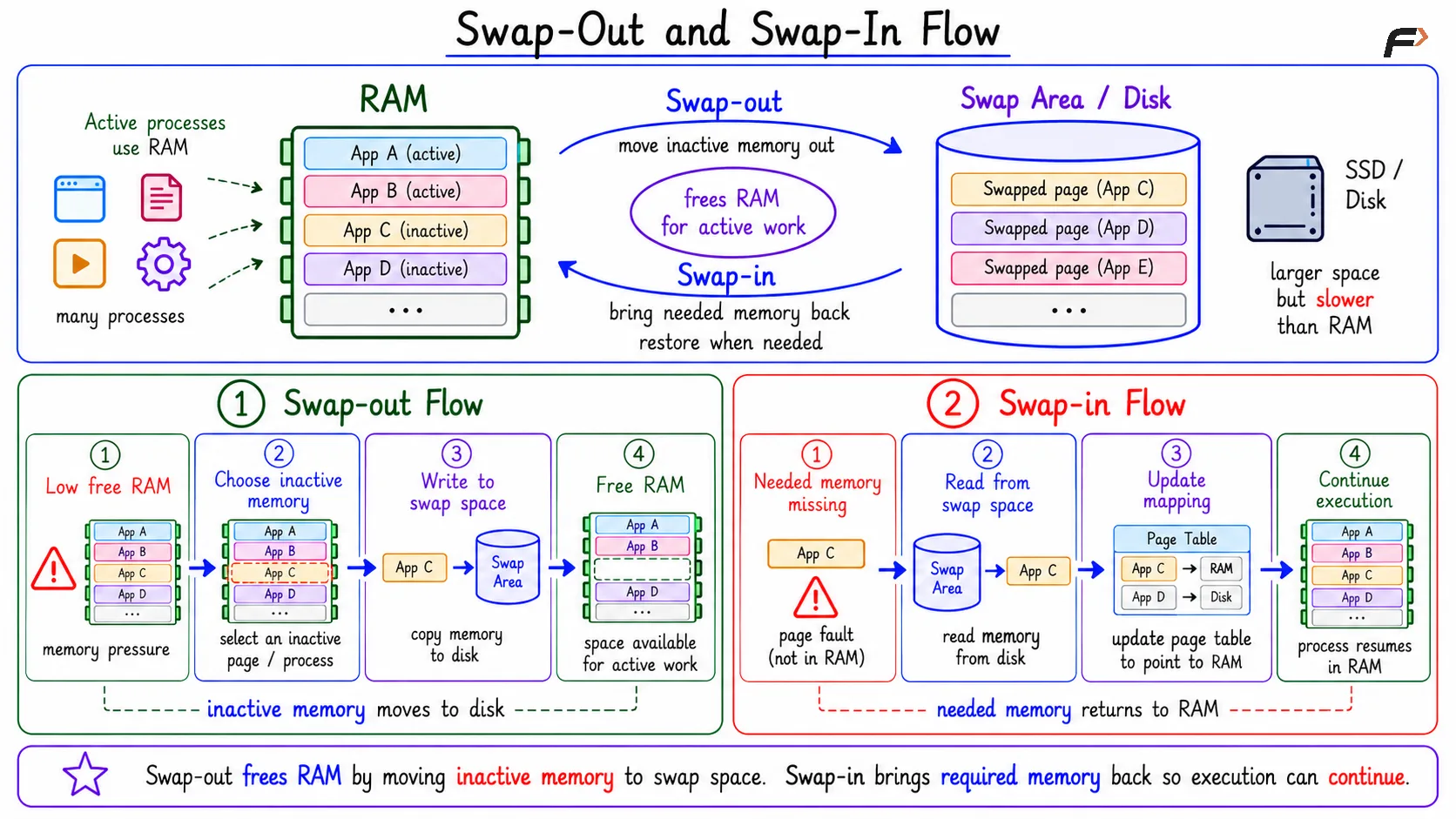
Swap-Out and Swap-In Flow
Whole-Process Swapping vs Page-Level Swapping
Earlier, swapping was often described as moving an entire process between RAM and secondary storage. That idea is useful for understanding the basic concept, but modern operating systems usually work more at the page level.
Instead of removing a whole application from RAM, the OS can move only memory pages that are not currently needed. This fits naturally with virtual memory, paging, page tables, and page replacement.
So the modern way to think about swapping is: inactive pages can be moved out, active pages can stay in RAM, and needed pages can be brought back later.
Performance Cost and Thrashing
Swapping trades speed for capacity. RAM access is extremely fast, while disk or SSD access is much slower. When a process needs swapped-out data, it must wait for that data to come back into RAM.
This creates latency. Occasional swapping can help the system survive temporary memory pressure, but constant swapping can make the whole system slow.
Thrashing happens when the system spends too much time moving pages between RAM and secondary storage instead of doing useful execution. A slow system with low CPU usage can still be suffering from memory pressure because the delay may be coming from storage activity, not CPU work.
Historical Note: Overlays
Before modern virtual memory became common, older systems sometimes used overlays. If a program was larger than available memory, the programmer manually divided it into parts.
Only the needed part was loaded into memory at a time. When another part was needed, the current part could be replaced by another overlay.
Modern operating systems make this much more automatic. Instead of the programmer manually deciding which program part should be loaded, the OS manages memory movement using virtual memory, paging, and swapping mechanisms.
Summary
Swapping is used when RAM is limited and memory pressure occurs. The operating system moves inactive memory from RAM to swap space, frees RAM for active work, and later brings the swapped memory back when required.
The benefit of swapping is that the system can handle more memory demand than RAM alone can support. The cost is performance: secondary storage is slower than RAM, and excessive swapping can lead to thrashing.
Be the first to add a comment.