Introduction
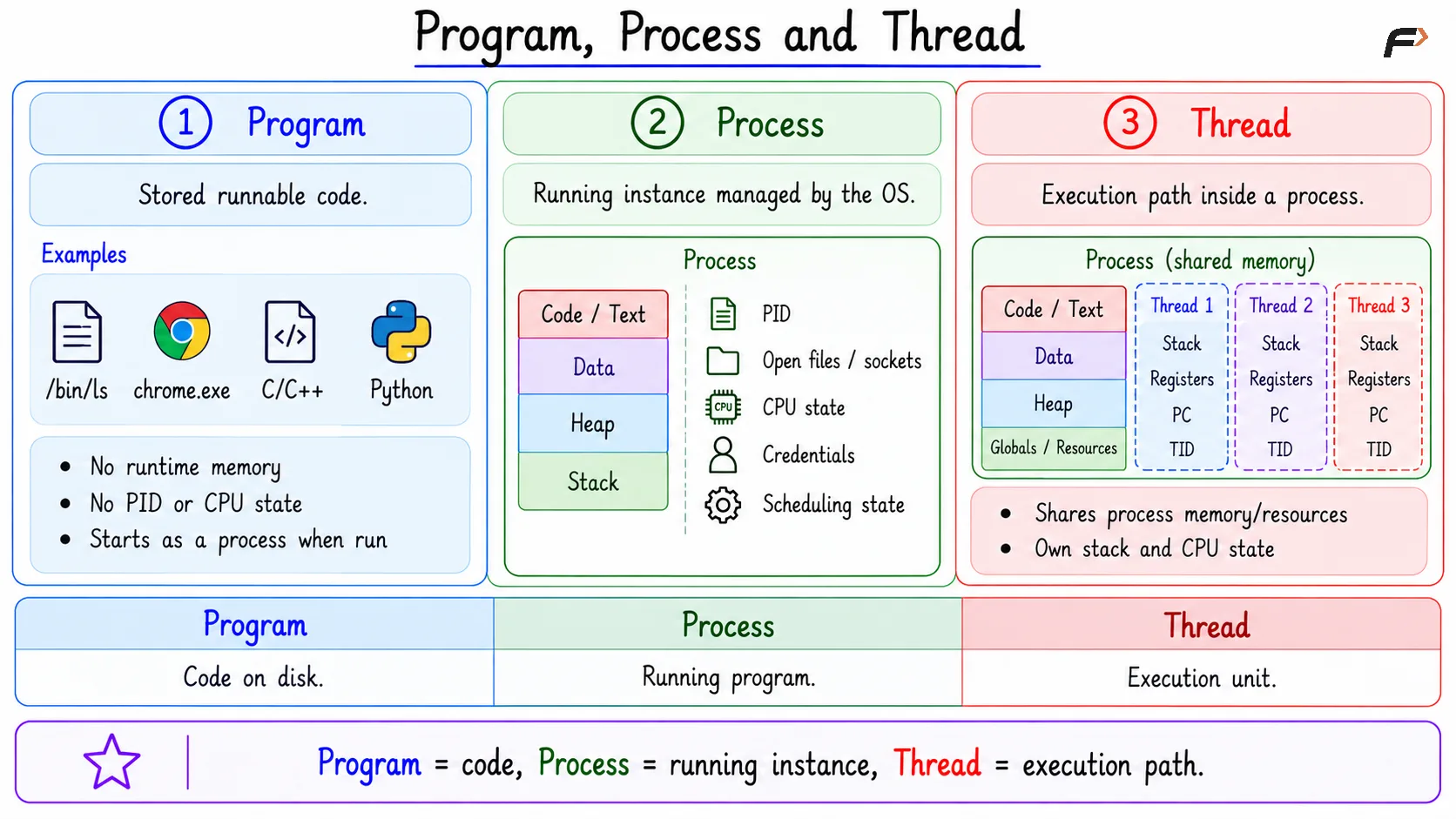
Program, process, and thread are closely related, but they are not the same thing. A program is stored software, a process is the running form of that software, and a thread is an execution path inside a process.
This difference matters in operating systems because scheduling, memory isolation, multitasking, browser design, backend workers, crashes, and debugging all depend on how programs, processes, and threads are organized.
Basic Meaning
A program is a passive executable file stored on disk. It contains code, data, and metadata, but it does not execute by itself.
A process is an active running instance of a program. When the operating system starts a program, it creates a process around it so the OS can manage execution, memory, resources, permissions, and cleanup.
A thread is a path of execution inside a process. A process needs at least one thread because the CPU executes threads, not a passive file sitting on disk.
The basic idea is: Program stored on disk => OS creates process => Process runs through one or more threads
Core Comparison
The clearest way to compare program, process, and thread is through storage, execution, memory, isolation, and sharing.
Point | Program | Process | Thread |
|---|---|---|---|
Meaning | Passive executable file | Running instance of a program | Execution path inside a process |
Location | Stored on disk | Exists in memory while running | Exists inside a process |
Execution | Does not execute by itself | Managed by OS for execution | Actually runs instructions |
Memory | No runtime memory of its own | Has its own address space | Shares process address space |
Isolation | Not applicable | Isolated from other processes | Not isolated from threads in same process |
Sharing | Not applicable | Limited sharing through IPC | Shares code, heap, globals, and open files |
Owns | Code and metadata as a file | PID, memory, resources, permissions | Stack, registers, program counter, TID |
Example |
| Running Chrome process | UI thread or network thread inside Chrome |
This table gives the main difference without needing to memorize long definitions. A program is stored, a process is managed, and a thread is the executing path.
Program
A program is stored software. It may be an executable file, a compiled binary, a script interpreter, a JAR file, or another form of runnable code depending on the system.
Examples of programs include /bin/ls , chrome.exe, a compiled C/C++ binary, the Python interpreter etc.
A program has no runtime memory of its own. It does not have a process ID, stack, registers, scheduling state, or open files until the operating system starts it.
Process
A process is an OS-managed execution container for a running program. It gives the operating system a clear unit to schedule, protect, track, pause, resume, terminate, and clean up.
A process usually contains:
PID: Unique process identity.
Address space: Private memory view for the process.
Code, data, heap, and stack: Runtime memory areas.
Open files and sockets: Resources used by the process.
CPU state: Registers and execution-related information.
Credentials: User identity and permissions.
Scheduling state: Running, ready, waiting, or stopped.
Thread
A thread is a sequence of execution inside a process. It is lightweight compared with a process because it does not create a completely separate address space.
Threads inside the same process share code, heap, global variables, open files and process address space.
Each thread still owns some private execution information such as stack, program counter, CPU registers and thread ID
The important thing to note is that a thread shares the process memory, but it does not share everything. Each thread needs its own stack and CPU state so it can execute independently.
Program, Process and Thread
Memory View
Memory is one of the easiest ways to understand the difference between processes and threads.
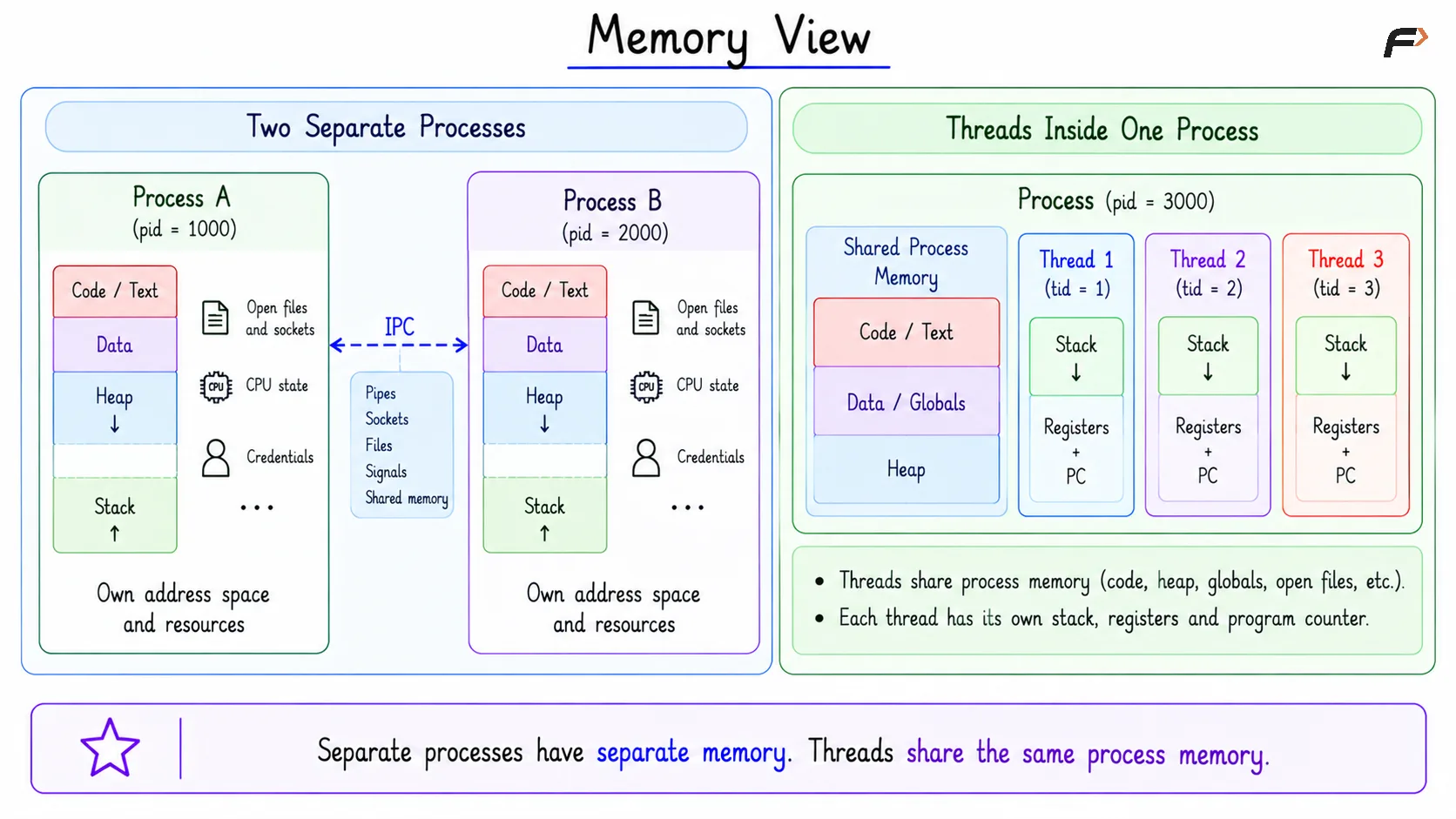
Two separate processes have separate address spaces. Each process has its own memory layout, heap, stack, open resources, and OS-managed identity. They can communicate, but usually through controlled IPC mechanisms such as pipes, sockets, files, signals, or shared memory.
Two threads inside one process share the same process address space. They can access the same heap, global variables, code, and open files, but each thread keeps its own stack, registers, and program counter.
This is why threads can communicate quickly, but they also need synchronization. Without proper synchronization, shared-memory bugs such as race conditions can happen.
Memory View
Real-System Examples
A browser is a good example because modern browsers often use multiple processes. The browser may have a main process, tab processes, GPU process, network process, and extension processes. This design improves isolation. If one tab or extension crashes, the entire browser may not need to crash with it.
A text editor may use one process with multiple threads. One thread may handle the user interface, another may index files, another may watch file changes, and another may run plugin work.
A backend server may use processes, threads, or an event loop depending on the design. Worker processes help with isolation and restartability, while threads help with shared memory and same-application concurrency.
When To Use Processes And Threads
Processes and threads solve different design problems. One is not always better than the other.
Use processes when:
Isolation matters: One task should not easily corrupt another.
Crash containment matters: Failure should stay limited.
Security boundary matters: Work should run with stronger separation.
Independent lifecycle matters: Each unit may start, stop, or restart separately.
Use threads when:
Shared memory is useful: Tasks need to work on common data.
Lower overhead matters: Creating threads is usually lighter than creating processes.
Same-app concurrency matters: Multiple tasks belong to the same application.
One task may wait: Another thread can continue while one waits for I/O.
A simple rule is: use processes for stronger separation, and threads for faster cooperation inside the same process.
Summary
A program is passive software stored on disk. A process is an OS-managed running instance of that program, with its own address space, resources, permissions, and process identity.
A thread is an execution path inside a process. Processes provide stronger isolation by default, while threads share process memory and support faster same-application concurrency.
Be the first to add a comment.