Introduction
Program loading explains what happens when exec replaces the current program inside a process. The process identity may remain, but the old runtime layout is removed and a new executable is prepared.
This topic connects process control, memory layout, linking, and dynamic libraries. The main question is how an executable file on disk becomes a running program in memory.
Program Image
A program image is the runtime layout of an executable inside a process address space. It is not just the executable file stored on disk; it is the usable memory layout created so the program can run.
A typical program image contains:
Code or text: The executable instructions of the program.
Data section: Initialized global and static data.
BSS section: Uninitialized global and static data, usually set up as zero-filled storage.
Heap: Runtime memory used for dynamic allocation.
Mapped libraries: Shared library code and data mapped when needed.
Stack: Runtime area used for function calls, local variables, arguments, and environment setup.
So when exec replaces a process image, it replaces the old program layout with a new one.
Program Loading Through exec
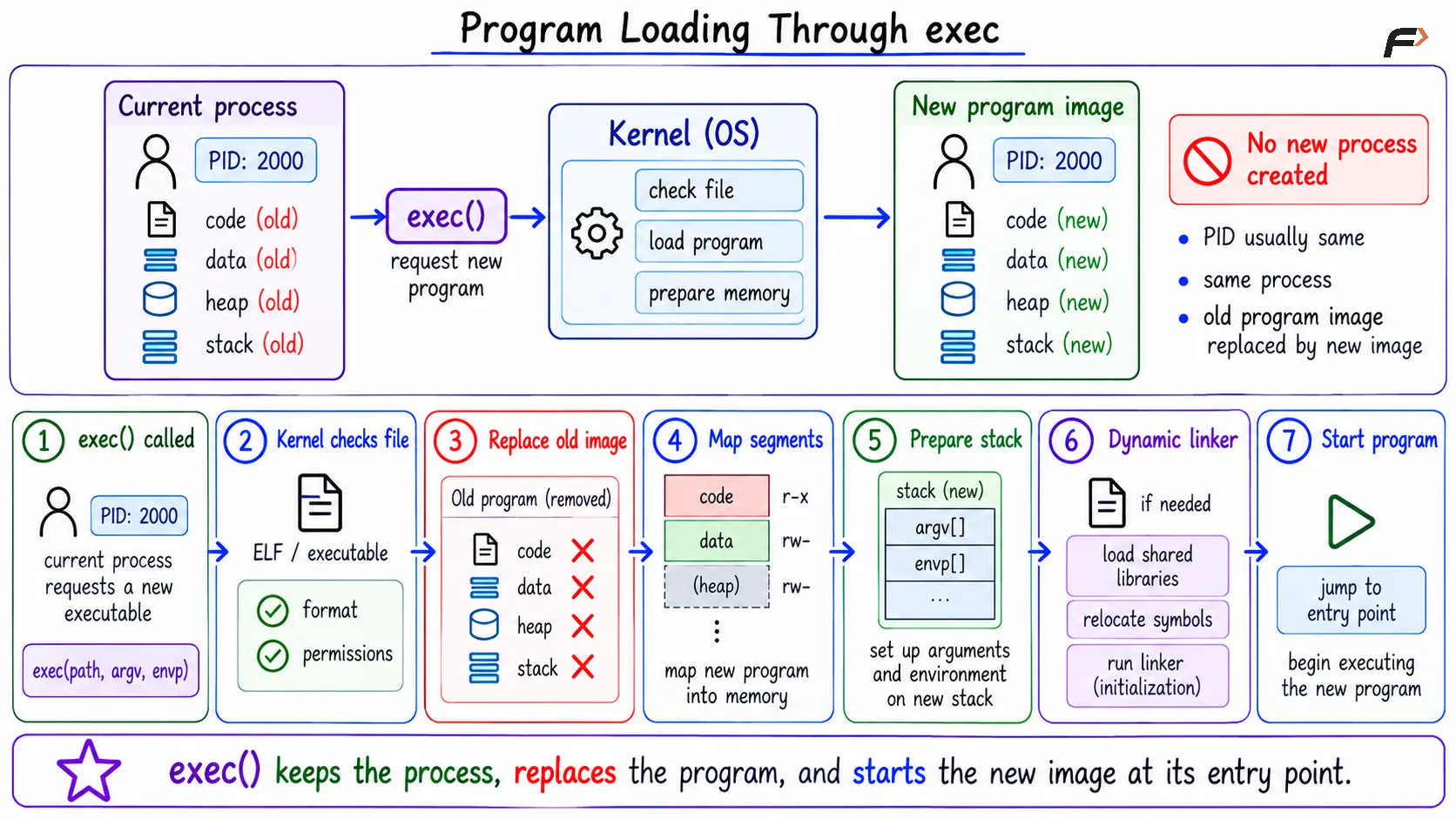
exec does not create a new process. It replaces the current process image with a new program image. The PID generally remains the same, but the old code, stack, heap, and data layout are replaced.
The basic flow is:
execis called: The process requests to run a new executable.Kernel checks the file: The OS validates the executable format and permissions.
Old image is replaced: The previous program layout is discarded.
Executable segments are mapped: Code and data are placed into the process address space with proper permissions.
Stack is prepared: Arguments and environment, such as
argvandenvp, are arranged.Dynamic linker may run: If the program needs shared libraries, runtime linking is prepared.
Program starts: Execution begins at the new program's entry point.
Program Loading Through exec
Static and Dynamic Linking
Linking connects compiled code with the functions and symbols it uses. If a program calls a library function, that reference must be connected to the actual library code.
Linking Type | When Library Code Is Connected | Main Idea |
|---|---|---|
Static linking | At build time | Copy needed library code into the executable |
Dynamic linking | At runtime or load time | Keep library code separate and connect it when the program runs |
In static linking, the executable carries the needed library code inside itself. This can make the program easier to run in some environments, but it usually increases executable size.
In dynamic linking, the executable does not contain all library code. Instead, it records dependencies, and the dynamic linker connects the program to shared libraries when the program starts or when a library is loaded.
Dynamic Libraries
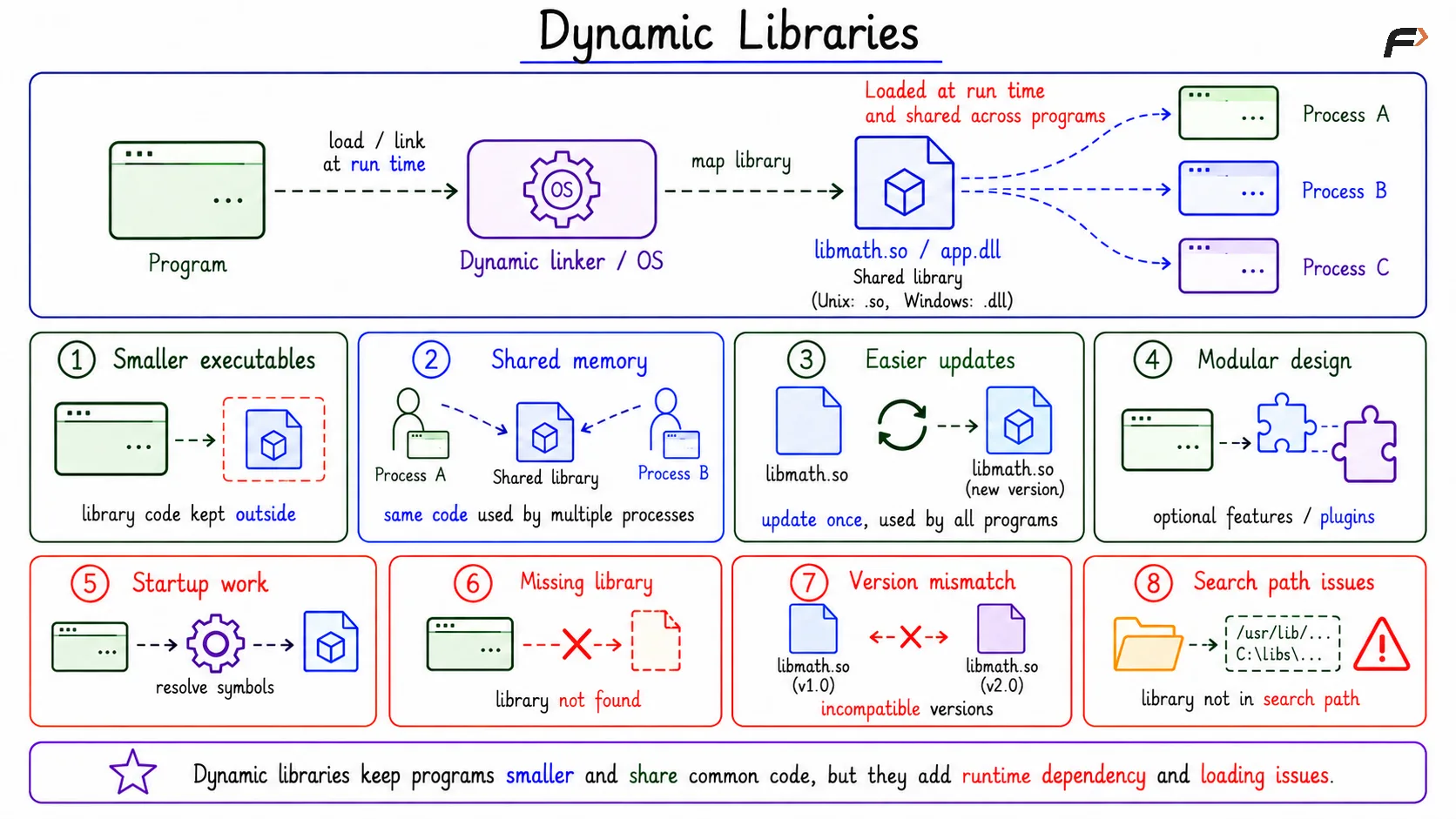
A dynamic library is a separate library file whose code is loaded or mapped when the program runs. On Unix-like systems, these are often shared objects, while Windows commonly uses dynamic-link libraries.
Dynamic libraries are useful because many programs may use the same library code. Instead of copying that code into every executable, the OS can map shared library code into multiple process address spaces.
Benefits include:
Smaller executables: Library code is not copied into every program.
Shared memory: Common library code can be shared among running processes.
Easier updates: A library can be updated without rebuilding every dependent program, when compatibility is preserved.
Modular design: Programs can use plugin-like or optional library loading patterns.
Dynamic Libraries
Tradeoffs of Dynamic Libraries
Dynamic libraries also introduce runtime dependencies. A program may fail to start if the required library is missing, incompatible, or found through the wrong search path.
Common tradeoffs include:
Startup work: The dynamic linker may need to resolve symbols and map libraries.
Missing libraries: The executable depends on external library files being present.
Version mismatch: An incompatible library version can break execution.
Search path issues: Wrong library paths can cause confusing runtime errors.
So dynamic linking saves space and improves sharing, but it adds dependency management.
Summary
Program loading prepares an executable to run by building a new program image inside a process address space. During exec, the old image is replaced, executable segments are mapped, the stack is prepared, dynamic linking may occur, and execution begins at the entry point.
Linking connects a program with the symbols and library functions it uses. Static linking copies library code into the executable, while dynamic linking connects separate shared libraries at runtime, giving smaller executables and code sharing with some dependency tradeoffs.
Be the first to add a comment.