Introduction
Many processes can exist at the same time, but a machine has only a limited number of CPU cores. So every process cannot execute on the CPU at every exact instant.
The operating system manages this using two related ideas: process state and the Process Control Block, or PCB. Process state tells what is happening right now, while the PCB stores what the OS must remember about the process.
Why Process States And PCB Are Needed
A system may have many processes present together. Some may be running, some may be ready for CPU time, some may be waiting for disk or network, and some may have already finished.
The operating system needs process states to decide how each process should be handled. It also needs a PCB for every process so that it can pause, resume, schedule, observe, and clean up processes correctly.
State is the process’s current situation. PCB is the kernel-side information that allows the OS to manage that process over time.
Basic Process States
A process moves through different states during its lifetime. These states help the OS decide whether the process can run, should wait, should be scheduled, or should be cleaned up.
State | Meaning |
|---|---|
New | The process is being created |
Ready | The process can run but is waiting for CPU time |
Running | The process is currently executing on a CPU core |
Waiting or Blocked | The process is waiting for an event or resource |
Terminated | The process has finished or was killed |
Ready Vs Waiting
The most common confusion is between ready and waiting. Both are not running, but they are not the same.
A ready process can run as soon as the scheduler gives it CPU time. It has everything it needs except the CPU.
A waiting or blocked process cannot run yet because it is waiting for some event. That event may be disk I/O, network data, keyboard input, a timer, a lock, or a child process.
For example, if a process is waiting for a 10-second timer, giving it the CPU during those 10 seconds will not help. Once the timer completes, the process can move back to ready.
Process State Transitions
A process usually starts in the new state. After the OS sets up its PID, memory, resources, and scheduling information, it can become ready.
The basic flow is: New => Ready => Running => Terminated
But real execution is not always a straight line. A running process may request I/O and move to waiting. When that event completes, it can become ready again and later run when the scheduler chooses it.
Important transitions include:
New to ready: The process has been created and can now wait for CPU.
Ready to running: The scheduler chooses the process.
Running to waiting: The process requests I/O or waits for an event.
Waiting to ready: The event completes.
Running to ready: The time slice ends or the process is descheduled.
Running to terminated: The process exits or is killed.
These transitions explain how the OS keeps many processes moving forward even when only limited CPU cores are available.
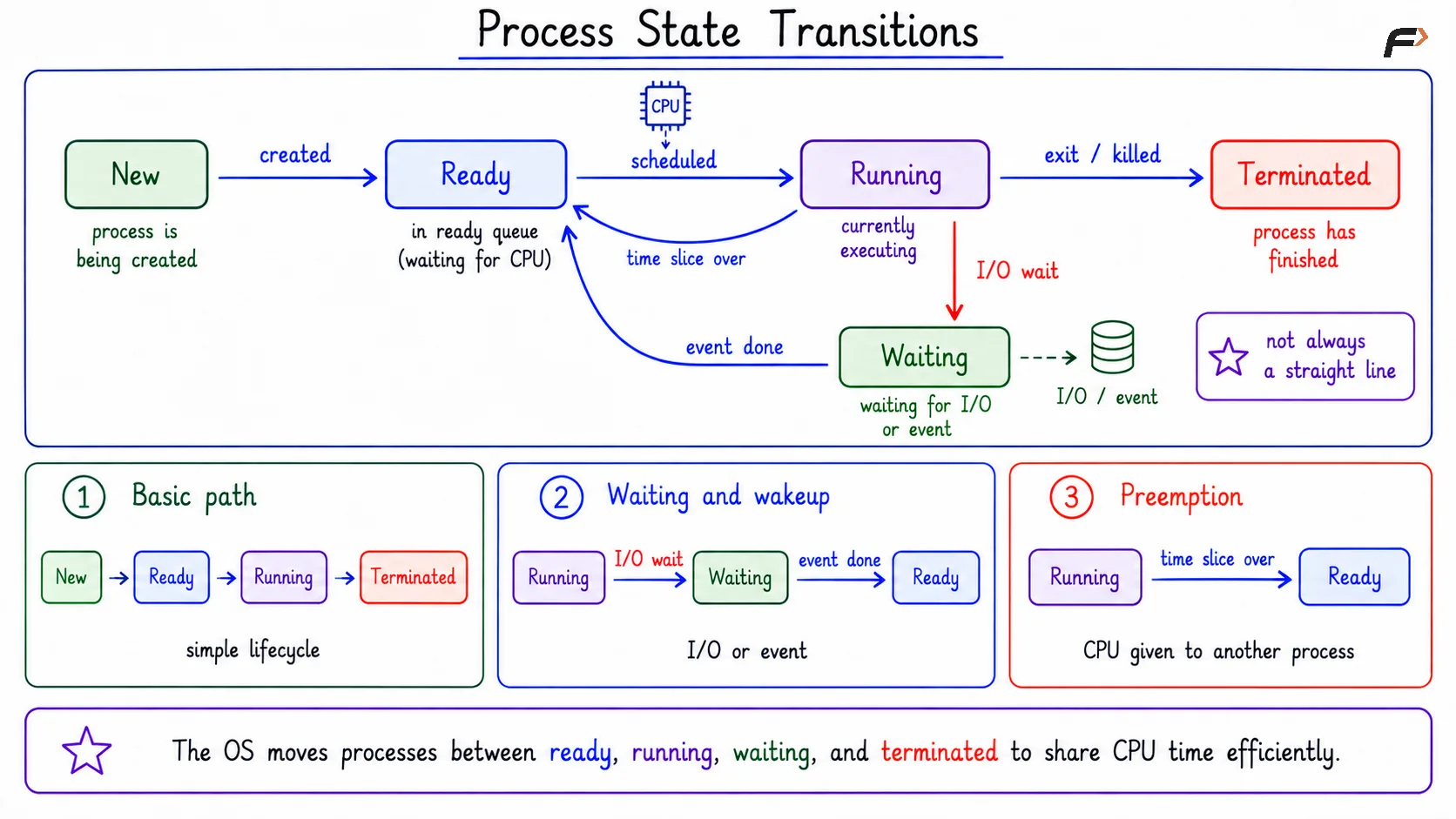
Process State Transitions
Time Slice And Descheduling
A process does not always run until it finishes. In a time-sharing system, the scheduler may give a process a small time slice and then move it back to ready.
This lets the OS rotate CPU time among many processes. For example, if P1 and P2 run for some time, the scheduler may later pause them and give CPU time to P3 and P4.
Because switching happens quickly, users feel that many processes are progressing together. Internally, the OS is carefully moving processes between ready, running, and waiting states.
CPU-Bound And I/O-Bound Processes
Process states also help explain different program behaviors. A CPU-bound process mostly needs CPU time, while an I/O-bound process often waits for input, disk, network, or other events.
Type | Common State Movement |
|---|---|
CPU-bound process | Ready => Running => Ready |
I/O-bound process | Running => Waiting => Ready => Running |
Linux Process States
Linux uses process state letters that can be seen through tools such as ps and top. These are practical labels for observing what processes are doing.
Common Linux process state letters include:
Letter | Meaning |
|---|---|
R | Running or runnable |
S | Interruptible sleep |
D | Uninterruptible sleep, often related to kernel or disk I/O wait |
T | Stopped |
t | Tracing stop |
Z | Zombie |
I | Idle kernel thread |
Zombie And Stopped Processes
A zombie process is a child process that has finished execution, but its parent has not collected its exit status yet. It is not running and does not use CPU, but a small kernel record still remains.
A stopped process is different. It is paused, often because of Ctrl+Z, SIGSTOP, or a debugger. It can be resumed later using SIGCONT.
What Is PCB?
PCB stands for Process Control Block. It is the kernel-side record that stores important information about a process. The OS keeps one PCB for every process. If there are ten processes, the OS maintains ten separate process records.
A PCB stores more than just the process state. It stores the information needed to identify, schedule, pause, resume, observe, and clean up a process.
What PCB Stores
The exact PCB structure differs across operating systems, but the main categories are similar.
PCB Information | What It Stores |
|---|---|
Identity | PID, PPID, UID, GID, process group, session |
Execution state | Current state, program counter, CPU registers, stack pointer |
Scheduling data | Priority, scheduling policy, CPU usage, run-queue links |
Memory details | Address-space metadata, mappings, page-table-related information |
Resources | Open files, sockets, current directory, I/O status |
Signals and limits | Signal information and resource limits |
Accounting | CPU time, memory usage, and cleanup information |
PCB And Context Switching
A context switch happens when the CPU stops executing one process and starts executing another. The PCB makes this possible because it stores the saved execution state of each process.
The basic flow is:
Process A is running: Its instructions are currently executing.
Interrupt or event occurs: A timer expires, A blocks, or the scheduler chooses to switch.
OS saves A: Registers, program counter, stack pointer, and state are saved in PCB(A).
OS chooses B: The scheduler selects another ready process.
OS restores B: Saved CPU state is loaded from PCB(B).
B continues: The CPU resumes B from where it previously stopped.
Without the PCB, the OS would not know where a paused process should continue. The program counter, registers, and stack pointer are especially important here.
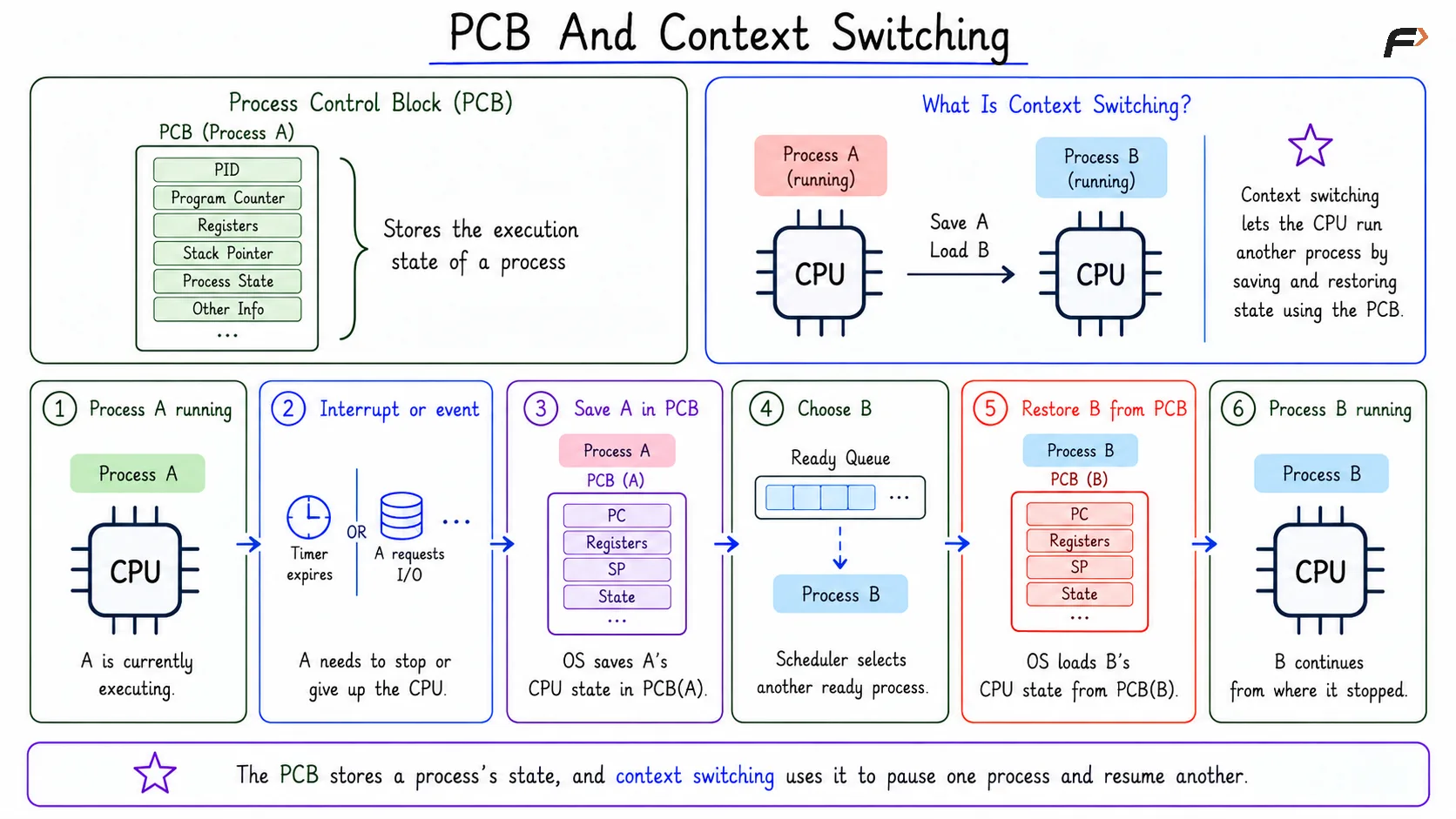
PCB And Context Switching
Why Program Counter, Registers, And Stack Pointer Matter
The program counter tells which instruction should execute next. If this value is lost, the OS cannot correctly resume the process.
Registers store current CPU working values. These may include temporary data, addresses, and intermediate results used by the process.
The stack pointer tracks the current stack position. This matters because function calls, local variables, and return addresses depend on the stack.
OS Queues And Lists
The operating system organizes processes using queues and lists in kernel memory. These structures help the scheduler and other OS components find the right process at the right time.
Common examples include:
Ready queue: Processes ready to run and waiting for CPU time.
Wait queue: Processes waiting for events such as I/O completion, a lock, or a signal.
Device queue: Processes waiting for a specific device operation.
Child list: Parent-child process relationships used for waiting and cleanup.
These queues are connected with process states. A ready process belongs in scheduling structures, while a waiting process belongs near the event or resource it is waiting for.
Summary
Process state tells what is happening to a process right now. The PCB stores what the operating system must remember about that process over time.
Ready means the process needs CPU, waiting means it needs an event, and running means it is executing on a CPU core. The PCB stores identity, execution state, scheduling data, memory details, resources, and the saved CPU state needed for context switching.
Be the first to add a comment.