Introduction
Process creation and termination explain how processes enter the system, run safely, and leave without leaving unmanaged state behind. The operating system controls this lifecycle so that every process has identity, resources, execution state, and cleanup rules.
This topic appears in terminal commands, shells, browsers, backend workers, build tools, test runners, containers, and service supervisors. A strong understanding of process lifecycle makes fork, exec, wait, zombies, orphans, and signals much easier to connect.
Why Process Creation And Termination Matter
A process is not started randomly. When the OS creates a process, it prepares the structures required to track and manage it.
During process creation, the OS usually handles:
Kernel structures: Creates records such as the PCB or process table entry.
PID assignment: Gives the process a unique process ID.
Parent-child relationship: Links the new process to the process that created it.
Address-space behavior: Prepares memory and mapping rules.
Scheduling state: Places the process where the scheduler can manage it.
File descriptor behavior: Sets up inherited or new file handles.
Credentials and limits: Applies user identity, permissions, and resource limits.
On typical Linux systems, the first user-space process during boot is usually init or systemd. Other processes then form a process tree below it.
Process Lifecycle
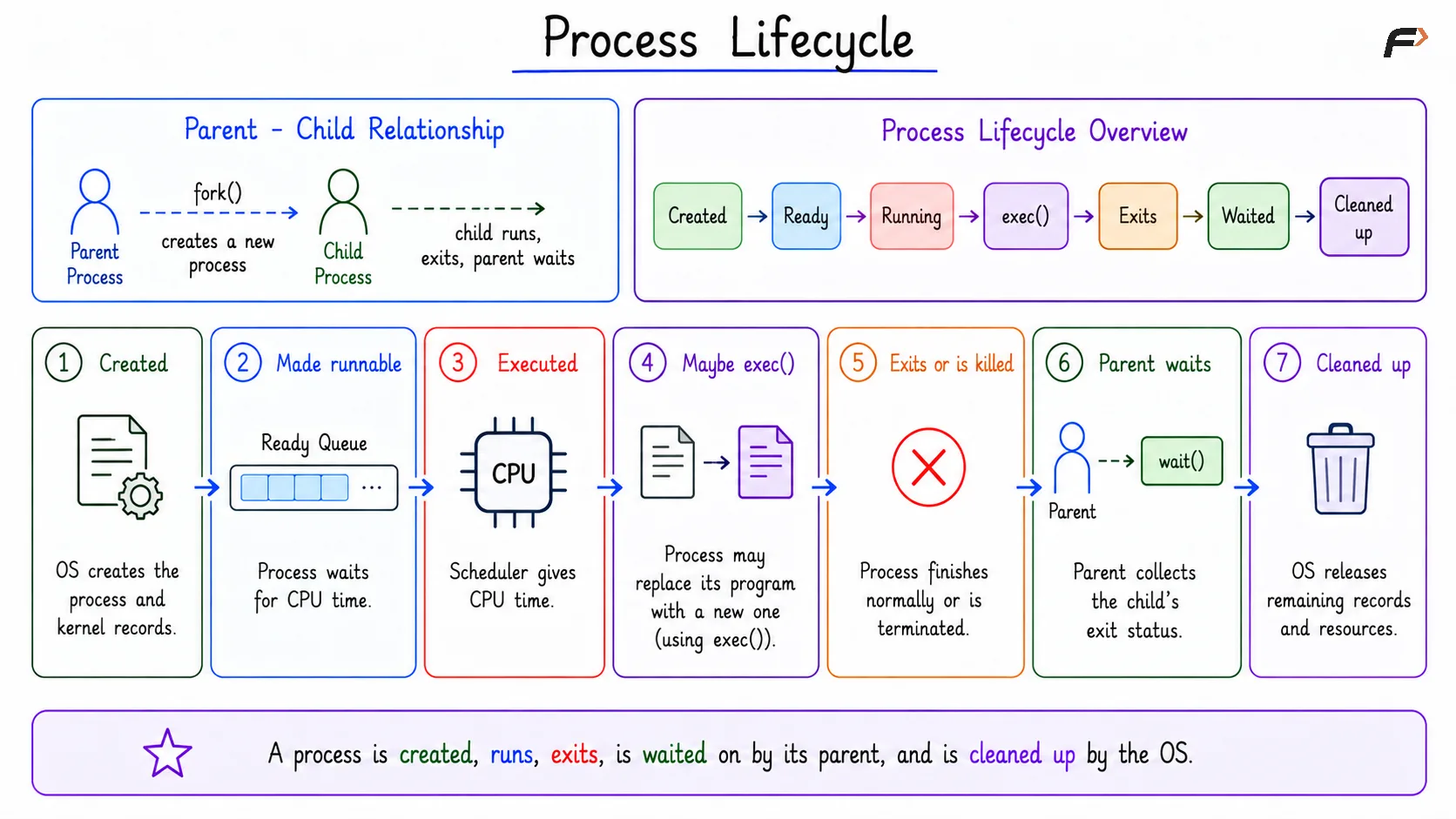
A process has a lifecycle. It is created, made runnable, executed, may run a new program, exits or is killed, may be waited on by its parent, and is finally cleaned up by the OS.
The basic flow is:
Created: The OS creates the process and prepares kernel-side records.
Made runnable: The process enters a ready state and waits for CPU time.
Executed: The scheduler gives it CPU time.
Maybe
exec()happens: The process may replace its current program with a new program.Exits or is killed: The process finishes normally or is terminated.
Parent waits: The parent collects the child’s exit status.
OS cleans up: Remaining process records and resources are released.
The parent-child relationship is central here. A parent creates a child, the child does work, the child exits, and the parent collects the result so the OS can finish cleanup.
Process Lifecycle
fork(): Creating A Child Process
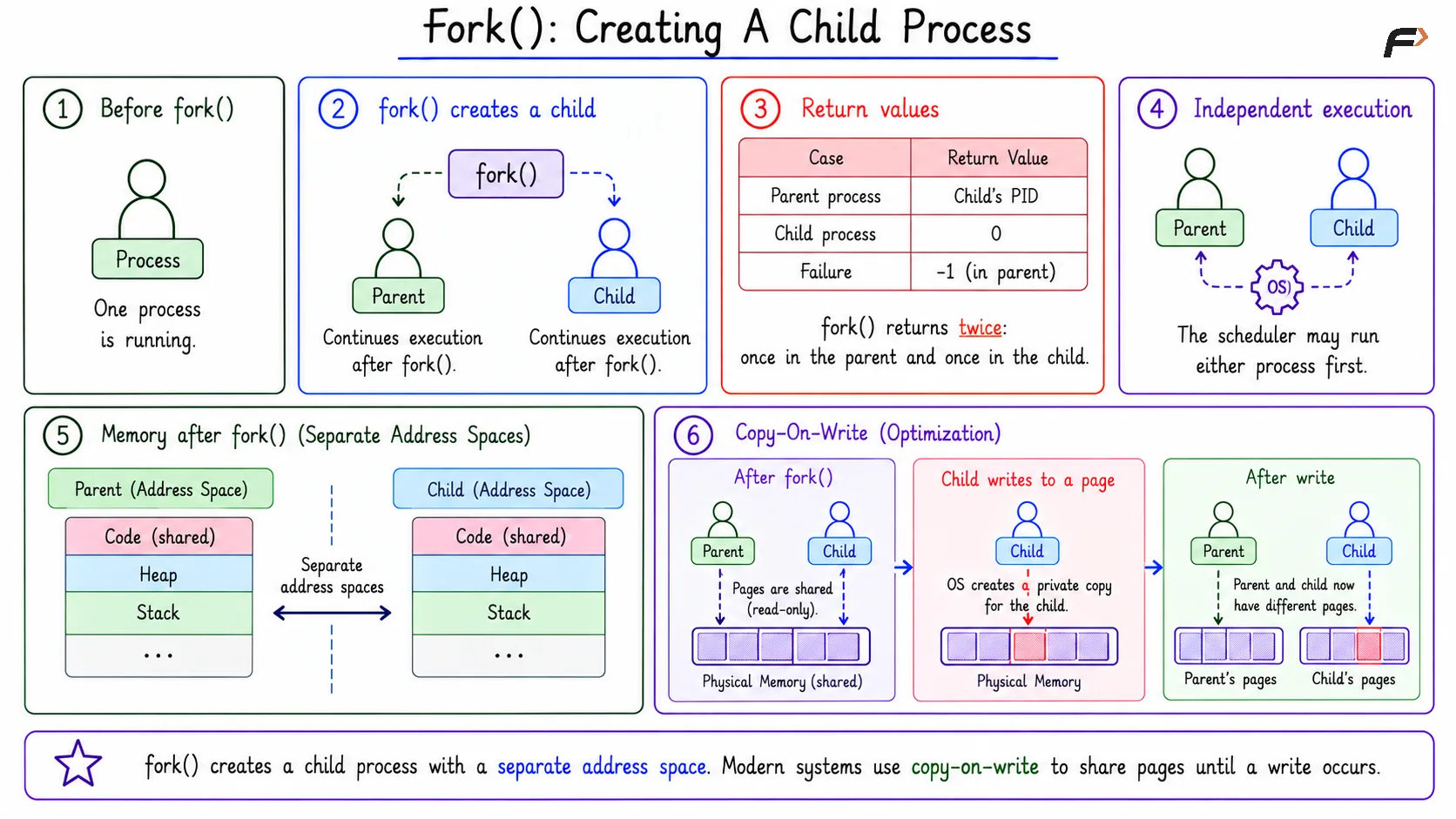
In Unix-like systems, fork() creates a child process by duplicating the calling process. Before fork(), there is one process. After fork(), there are two: the parent and the child.
Both processes continue execution after the fork() call, but they receive different return values:
Case | Return Value |
|---|---|
Parent process | Child’s PID |
Child process |
|
Failure |
|
This is why fork() is often described as returning twice: once in the parent and once in the child.
After fork(), the parent and child are separate processes. The scheduler may run the parent first or the child first, so correct code should not depend on a fixed execution order unless synchronization is used.
Memory And Copy-On-Write
After fork(), the parent and child have separate address spaces. If the child changes normal memory, it does not change the parent’s normal memory.
Modern Linux systems often optimize this using copy-on-write. Instead of copying all memory immediately, parent and child may safely share physical pages until one of them writes to a page.
fork(): Creating A Child Process
exec(): Replacing The Current Program
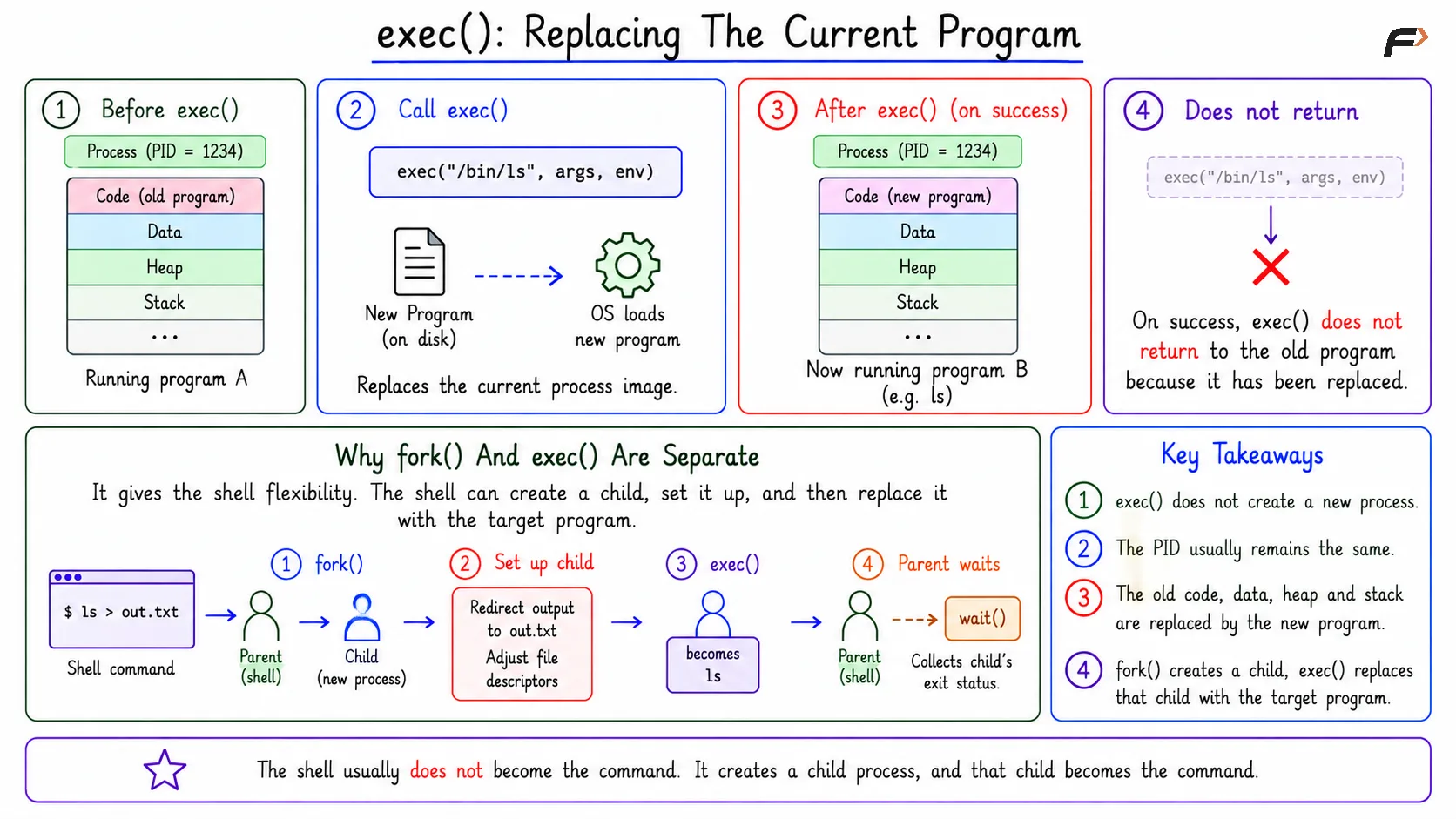
exec() does not create a new process. It replaces the current process image with a new program.
After a successful exec(), the PID usually remains the same, but the old code, data, heap, and stack are replaced by the new program’s image. New arguments and environment values are also used.
A successful exec() does not return to the old program code because the old program image has been replaced.
Why fork() And exec() Are Separate
Keeping fork() and exec() separate gives the shell flexibility. The shell can create a child first, prepare that child, and then replace the child with the target program.
For example, in ls > out.txt, the shell can:
create a child process
set up output redirection to
out.txtadjust file descriptors
call
exec()so the child becomeslslet the parent shell wait for the command to finish
The shell usually does not become the command itself. It creates a child process, and that child becomes the command.
exec(): Replacing The Current Program
Process Termination
A process may terminate normally or abnormally. Normal termination can happen when a program returns from main or calls exit(). Abnormal termination may happen because of a signal, crash, timeout, or external kill request.
Common termination cases include:
Normal exit: The program completes successfully.
Error exit: The program exits with a non-zero status.
Killed by signal: The process receives a signal such as
SIGTERMorSIGKILL.Crash: A fault such as invalid memory access may terminate the process.
Supervisor termination: A service manager or job runner stops the process.
When a process terminates, the OS stops it from running, releases most memory, closes or decrements resource references, records its exit status, and notifies the parent.
wait() And waitpid()
When a child process exits, the parent often needs to know what happened. wait() and waitpid() let the parent collect the child’s exit status.
They help the parent:
learn which child finished
collect the exit status
detect whether the child exited normally or by signal
allow the OS to remove the remaining child record
This is important because process termination is not only about stopping execution. It is also about reporting the result and cleaning up the remaining kernel record.
Zombies
A zombie is a child process that has terminated, but whose parent has not collected its exit status yet.
It is not running and does not consume CPU or other execution resources, but it retains minimal process information such as its PID and exit status. The zombie is removed when its parent process calls wait() or waitpid() to collect this status.
Zombie cleanup matters for long-running programs. Shells, servers, job runners, container entrypoints, and supervisors may create many children, so they must collect child statuses properly.
Orphans
An orphan is a child process whose parent has terminated while the child is still running. In Unix-like systems, the orphan is usually adopted by an init-like process or a subreaper.
This adoption gives the orphan a new parent that can later collect its status when it exits. The exact behavior can vary across operating systems, but the core idea is that the OS must still keep the child manageable.
Signals
Signals are a way to control process behavior. A process can receive signals for termination, pause, resume, child status changes, and other events.
Common signals include:
SIGTERM: Polite termination request.
SIGKILL: Forceful termination that cannot be ignored.
SIGSTOP: Pause the process.
SIGCONT: Resume a stopped process.
Process Creation Can Fail
Process creation is not guaranteed to succeed. The OS can reject a new process when resources, limits, or permissions do not allow it.
When creation fails, the OS returns an error to the calling process. This is why robust programs must handle process-creation failures.
Summary
Process creation and termination are about controlled entry and safe exit. The OS creates process records, assigns PIDs, manages parent-child relationships, prepares resources, and later cleans up after the process finishes.
In Unix-like systems, fork() creates a child process, exec() replaces the current program, and wait() or waitpid() lets the parent collect the child’s exit status. Zombies, orphans, signals, and creation failures are part of the same process lifecycle.
Be the first to add a comment.