Introduction
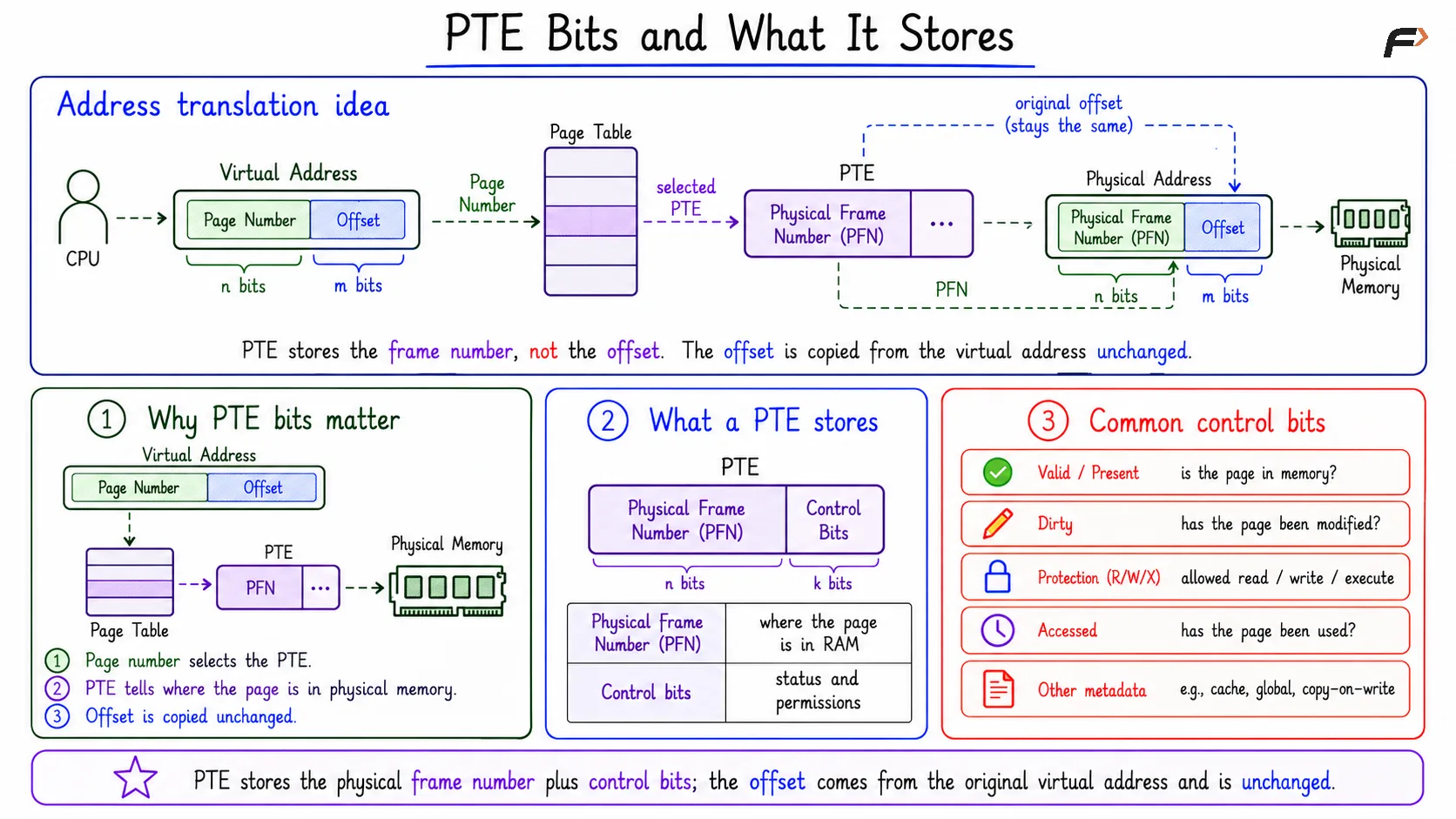
A Page Table Entry, or PTE, stores information needed to translate a virtual page into a physical frame. It is a fixed-size entry inside the page table.
The main numerical idea is to find how many PTE bits are used for the physical frame number. The remaining bits can then be used for valid, dirty, protection, accessed, and other control information.
Why PTE Bits Matter
During address translation, a virtual address is divided into a page number and an offset. The page number selects a page table entry, and that PTE gives the physical frame number.
The offset does not change during translation. It is taken from the original virtual address and combined with the physical frame number to form the physical address.
So, the PTE must store the physical frame number, not the offset.
What a PTE Stores
A Page Table Entry usually contains two broad types of information:
Part | Purpose |
|---|---|
Physical frame number | Tells where the page is stored in physical memory |
Control bits | Store status and permission information |
Common control bits include:
Valid or present bit: Shows whether the page table entry is usable.
Dirty bit: Shows whether the page has been modified.
Protection bits: Store access rules such as read, write, or execute.
Accessed bit: Shows whether the page was referenced.
Other metadata: Depends on the system design.
PTE Bits and What it Stores
Changed Numerical Example
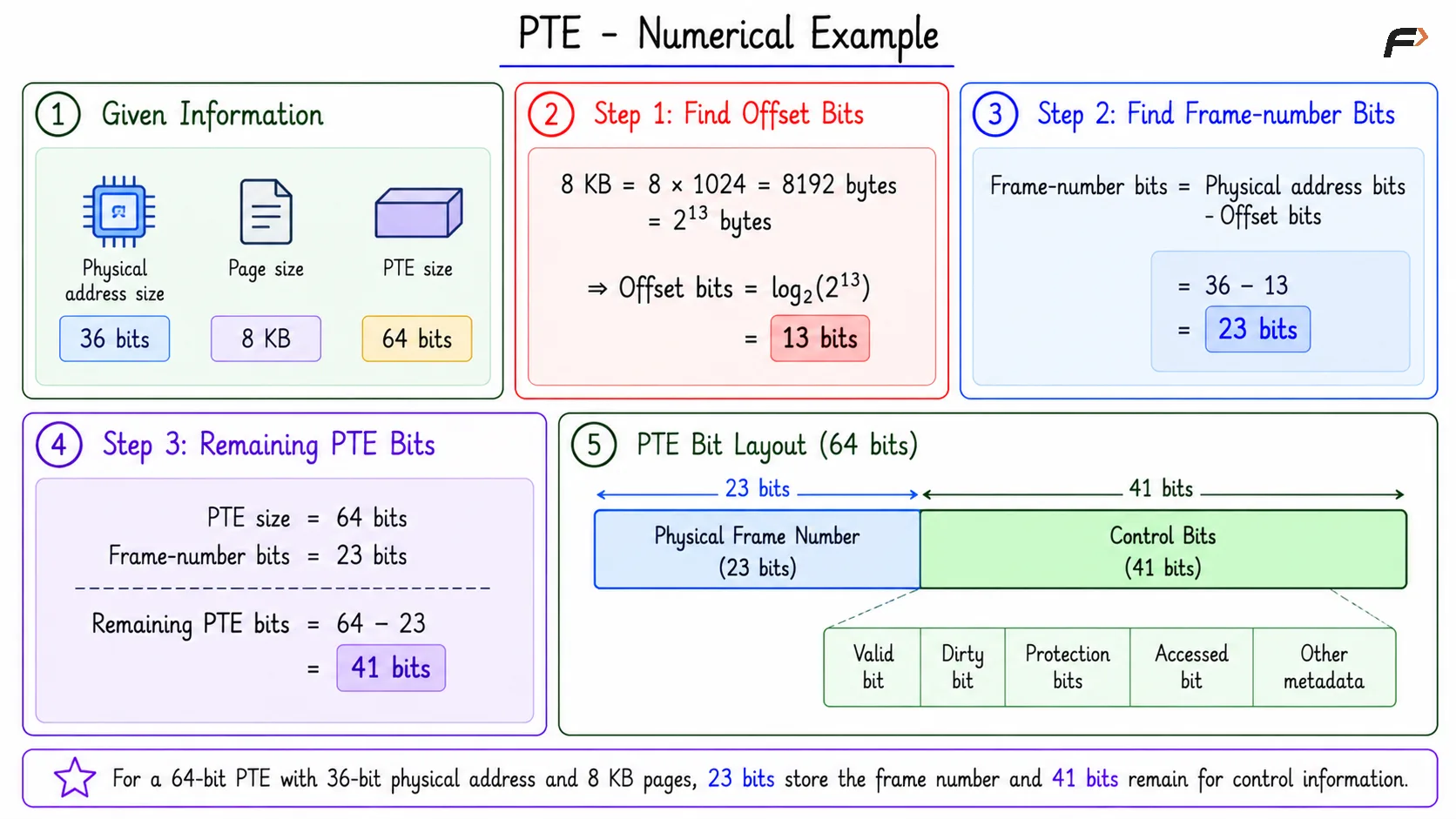
Consider these values:
Physical address size:
36 bitsPage size:
8 KBPTE size:
64 bits
We need to find how many bits remain in the PTE after storing the physical frame number.
First, calculate the offset bits. Since, 8 KB = 8 * 1024 bytes = 8192 bytes = 2^13 bytes
Therefore, offset bits are: log2(2^13) = 13 bits
Now calculate physical frame number bits using Frame-number bits = Physical address bits - Offset bits
Frame-number bits = 36 - 13 = 23 bits
The PTE size is 64 bits, and 23 bits are needed for the physical frame number.
Remaining PTE bits = 64 - 23 = 41 bits
So, 41 bits remain for valid, dirty, protection, accessed, and other control information.
PTE - Numerical
Why Offset Is Not Stored in PTE
The offset identifies the exact byte position inside a page or frame. Since page size and frame size are the same, the same offset works after translation.
For example, if the CPU wants byte position x inside a virtual page, it will still need byte position x inside the physical frame. Only the page number changes into a frame number.
That is why the PTE stores the physical frame number. The offset is already present in the address and does not need to be stored again.
Calculation Pattern
For PTE bit numericals, use this order:
Find page size in powers of 2: Example:
8 KB = 2^13 bytes.Find offset bits: Offset bits are
log2(page size).Find frame-number bits: Subtract offset bits from physical address bits.
Find remaining PTE bits: Subtract frame-number bits from PTE size.
The compact formula is: Remaining bits = PTE size - (Physical address bits - Offset bits)
This method works because the physical address is divided into frame number plus offset.
Summary
A Page Table Entry stores the physical frame number and control bits used in virtual memory management. It does not store the offset because the offset is taken directly from the original address and remains unchanged.
In the changed example, a 36-bit physical address with 8 KB pages has 13 offset bits and 23 frame-number bits. With a 64-bit PTE, the remaining space is 41 bits for valid, dirty, accessed, protection, and other metadata.
Be the first to add a comment.