Introduction
A page fault occurs when a memory access cannot be completed immediately and the operating system must step in. It is raised by hardware when the required virtual page cannot be used directly.
A page fault is not always a bug. It can be a normal virtual-memory event, such as loading a valid page on demand, or it can be a fatal error caused by an invalid or forbidden access.
What Is a Page Fault?
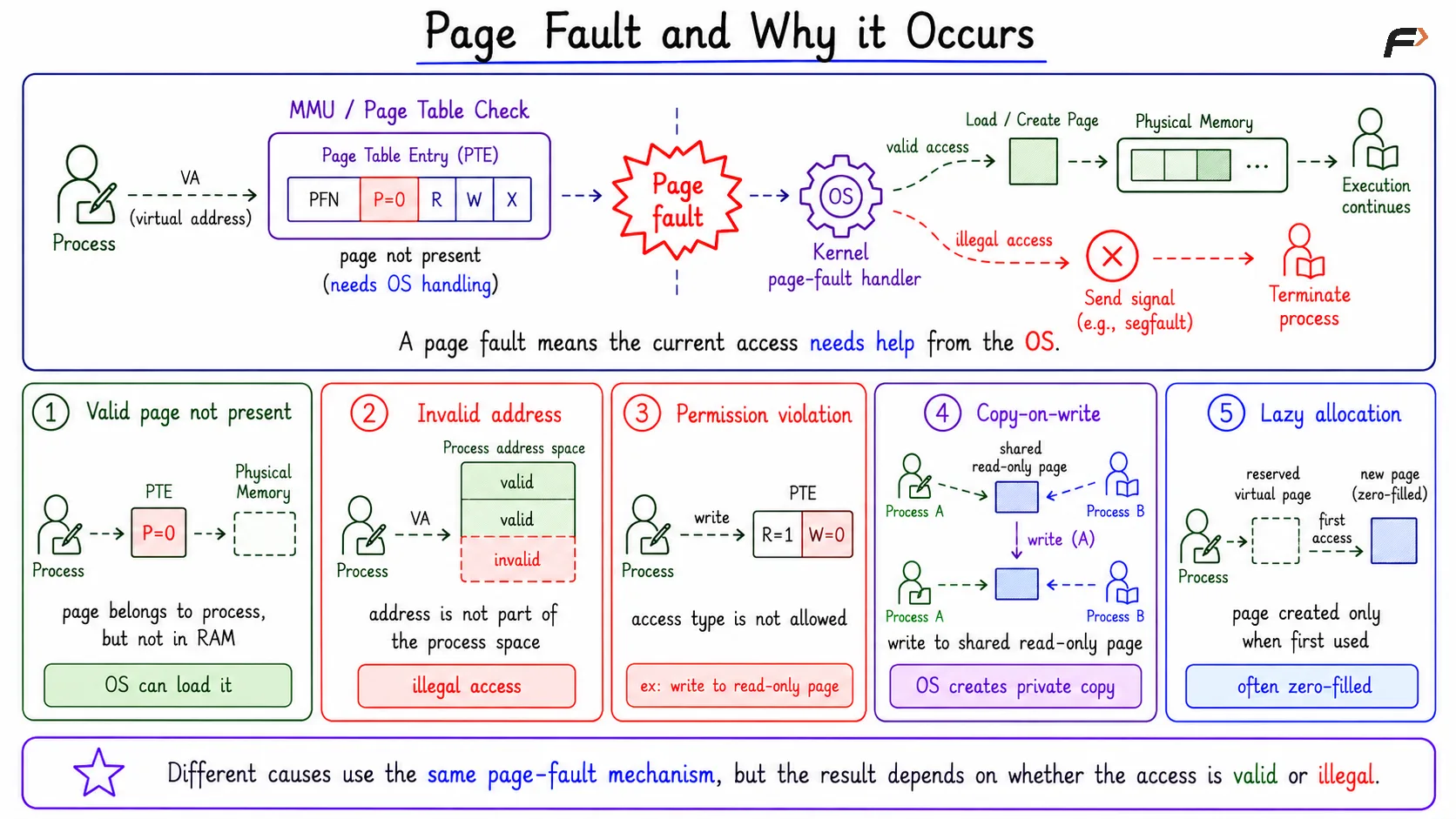
A page fault is a trap or exception raised when a virtual page cannot be used immediately for the current memory access.
The process tries to access a virtual address. The MMU checks the page table and finds that the access needs operating-system handling. Control then transfers to the kernel so the OS can decide what to do.
So, a page fault does not mean the “page is broken.” It means the current access needs help from the operating system.
Why Page Faults Occur
A page fault can happen for different reasons.
Valid page not present: The page belongs to the process, but it is not currently in RAM.
Invalid address: The process is trying to access memory that is not part of its address space.
Permission violation: The process is trying an access that is not allowed, such as writing to a read-only page.
Copy-on-write: A write to a shared read-only page requires the OS to create a private copy.
Lazy allocation: A page is created only when it is first touched.
These cases use the same page-fault mechanism, but the outcome is different. A valid missing page can be handled and execution can continue. An illegal access may cause the process to be signaled or terminated.
Page Fault and Why it Occurs
Normal vs Fatal Page Faults
Type | Meaning | Result |
|---|---|---|
Normal page fault | Access is valid, but OS work is needed | OS loads, creates, or copies the page |
Fatal page fault | Access is invalid or violates permissions | Process may be terminated or signaled |
Normal page faults are part of virtual memory. Demand paging, lazy allocation, file-backed mapping, and copy-on-write all depend on this mechanism.
Fatal page faults happen when the process has no legal right to complete the access. In that case, the OS does not “fix” the access by loading a page.
Page Fault Handling Flow
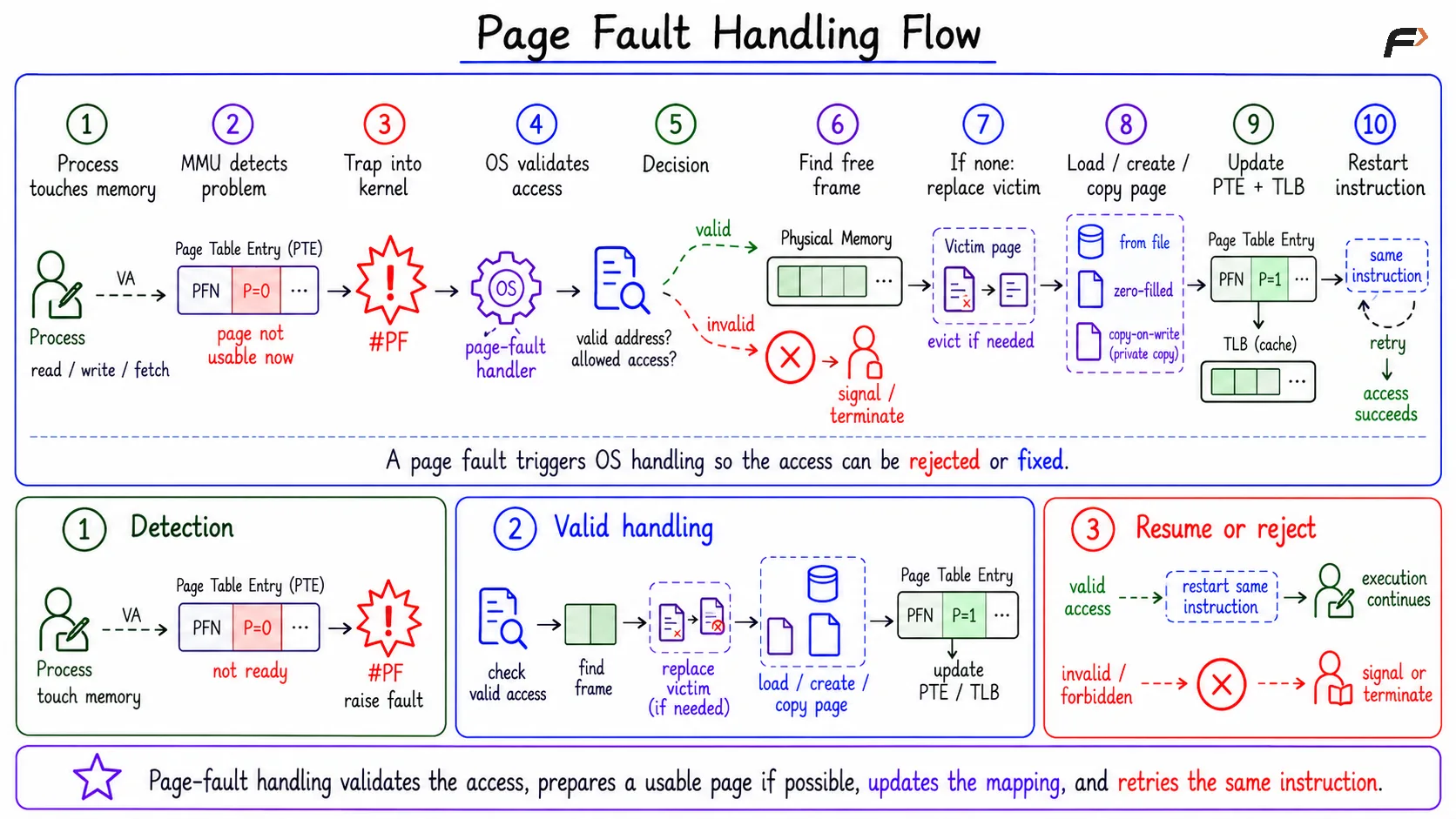
When a page fault occurs, the OS follows a structured sequence.
Process touches memory: A read, write, or instruction fetch uses a virtual address.
MMU detects a problem: The page cannot be used immediately.
Hardware traps into the kernel: Control moves to the page-fault handler.
OS validates the access: It checks the address and access type.
Illegal access is rejected: Invalid addresses or forbidden permissions cause termination or a signal.
A frame is found: The OS finds a free physical frame if the access is valid.
Page replacement may occur: If no free frame exists, a victim page is selected.
Page is loaded, created, or copied: The OS prepares the required page in RAM.
PTE and TLB are updated: The mapping is made usable.
Instruction is restarted: The original memory access is tried again.
Page Fault Handling Flow
Page Fault Handler Pseudocode
A simplified handler looks like this:
void handlePageFault(VirtualAddress address, AccessType accessType) { if (addressIsInvalid(address)) { terminateOrSignalProcess(); return; } PTE pte = pageTable.lookup(address.page); if (accessViolatesPermissions(pte, accessType)) { terminateOrSignalProcess(); return; } Frame frame = findFreeFrame(); if (frame == NONE) { frame = chooseVictimPage(); writeBackIfDirty(frame); } loadCreateOrCopyPage(address, frame); updatePTE(address.page, frame, true); restartFaultingInstruction();}The important separation is clear: illegal accesses are rejected, while legal faults are repaired so execution can continue.
Finding a Physical Frame
If the fault is valid, the OS needs a physical frame for the required page. If a free frame exists, the OS can use it directly. If no free frame exists, the OS selects a victim page using a page-replacement policy.
If the victim page is dirty, meaning it has been modified, it must be written back before the frame is reused. If it is clean, the frame may be reused without writing its contents back.
Loading, Creating, or Copying the Page
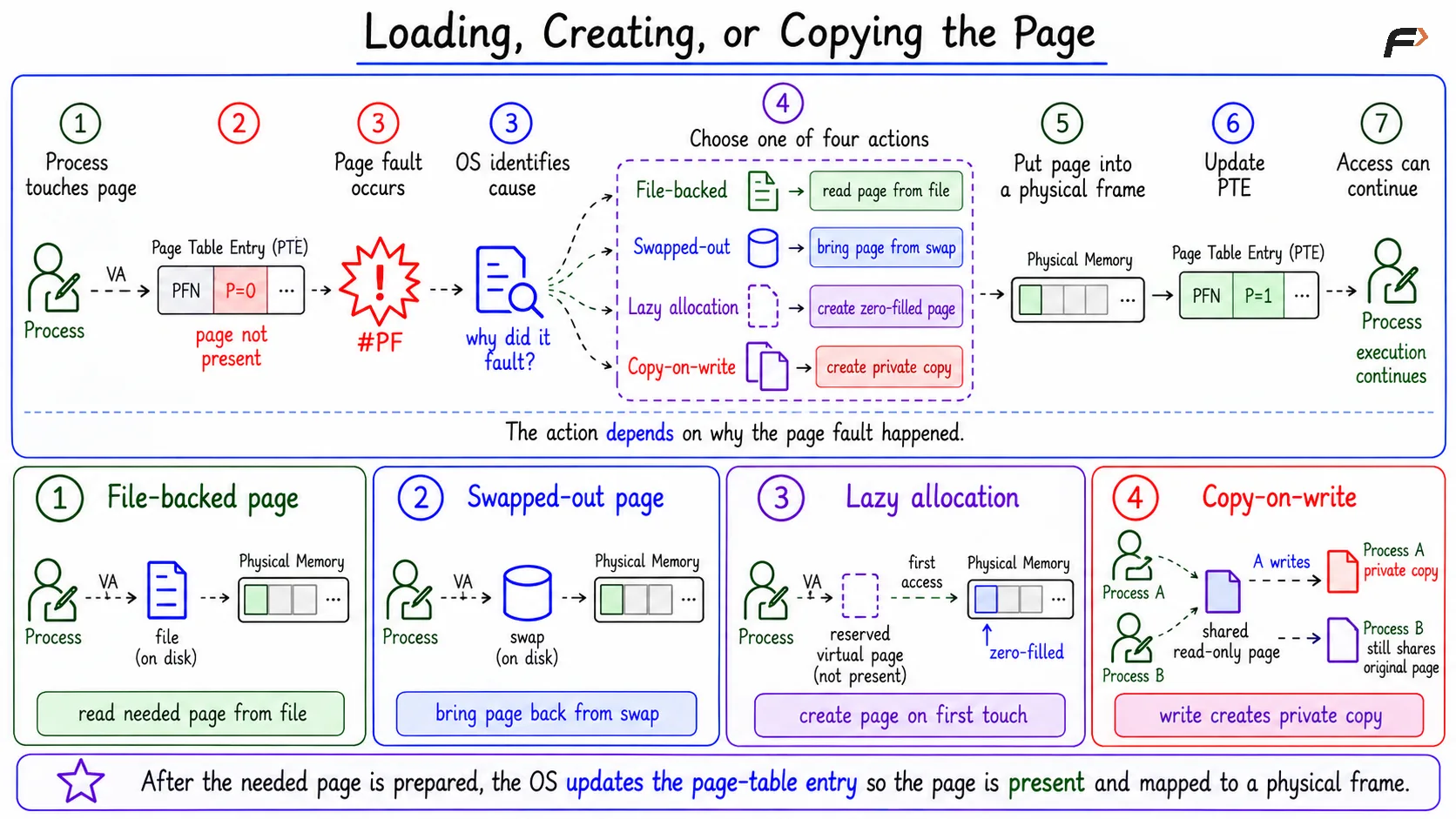
The OS does not always read a page from disk during a page fault. The action depends on the cause.
File-backed page: Read the required page from the corresponding file into memory.
Swapped-out page: Bring the page back from the swap area into a free frame.
Lazy allocation: Create a new zero-filled page only when the process actually accesses it.
Copy-on-write: Create a private copy of the page when the process tries to modify a shared page.
After this, the page-table entry is updated to mark the page as present and record the physical frame.
Loading, Creating, or Copying the Page
Minor and Major Page Faults
Not all page faults have the same cost. A minor page fault may happen when the page is already in memory but needs a mapping update, or when copy-on-write or lazy zero-page allocation can be handled without disk I/O.
A major page fault is more expensive because storage access is involved. Reading from disk or SSD is much slower than accessing RAM.
Page Fault Rate and Performance
Page faults affect average memory access time because a fault is much slower than a normal memory access.
A simple formula is: Average access time = (1 - p) * tmem + p * tfault
Here:
p is the page-fault rate.
tmem is normal memory access time.
tfault is page-fault service time.
Even a small page-fault rate can hurt performance because major page faults can be thousands or millions of times slower than normal RAM access.
Page Replacement and Thrashing
Page replacement matters because a poor victim choice can cause useful pages to be evicted too early. If those pages are needed again soon, they fault back in, causing extra work.
Thrashing occurs when the system spends too much time handling page faults and moving pages instead of executing useful instructions. When this cycle becomes excessive, CPU progress drops because memory management overhead dominates execution.
Summary
A page fault is a trap or exception raised when a virtual memory access cannot complete immediately. It may be normal, as in demand paging, lazy allocation, copy-on-write, or file-backed mapping, or fatal, as in invalid addresses and permission violations.
The OS handles a valid page fault by validating the access, finding or freeing a frame, loading, creating, or copying the page, updating the page table and possibly the TLB, and restarting the instruction. Minor faults avoid disk I/O, while major faults require storage access and can strongly affect performance.
Be the first to add a comment.