Introduction
The kernel is the protected core of an operating system. It manages the most sensitive parts of the system, including CPU time, memory, files, devices, interrupts, networking, and protection.
Applications do not directly control hardware or critical resources. They request services through system calls, and the kernel decides whether the request is allowed and how it should be completed.
Kernel as the Protected Core
The kernel runs with high privilege because it must perform operations that normal applications are not allowed to perform directly. This includes controlling hardware, managing memory, scheduling execution, and enforcing security boundaries.
This privilege makes the kernel powerful, but also risky. If an ordinary application crashes, usually only that application is affected. If kernel code fails badly, the whole system may crash because the kernel sits at the center of system control.
Core Responsibilities of the Kernel
The kernel works as both a resource manager and a protection boundary. It allocates resources, controls access, and checks whether applications are allowed to perform requested operations.
The core responsibilities of the kernel include CPU Management, Memory Management, File Management, Device Management, Interrupt Management, Networking Management, and Protection Management.
If an application tries to access a file, device, or memory area without permission, the kernel can reject the request. This is what prevents normal programs from freely touching sensitive system resources.
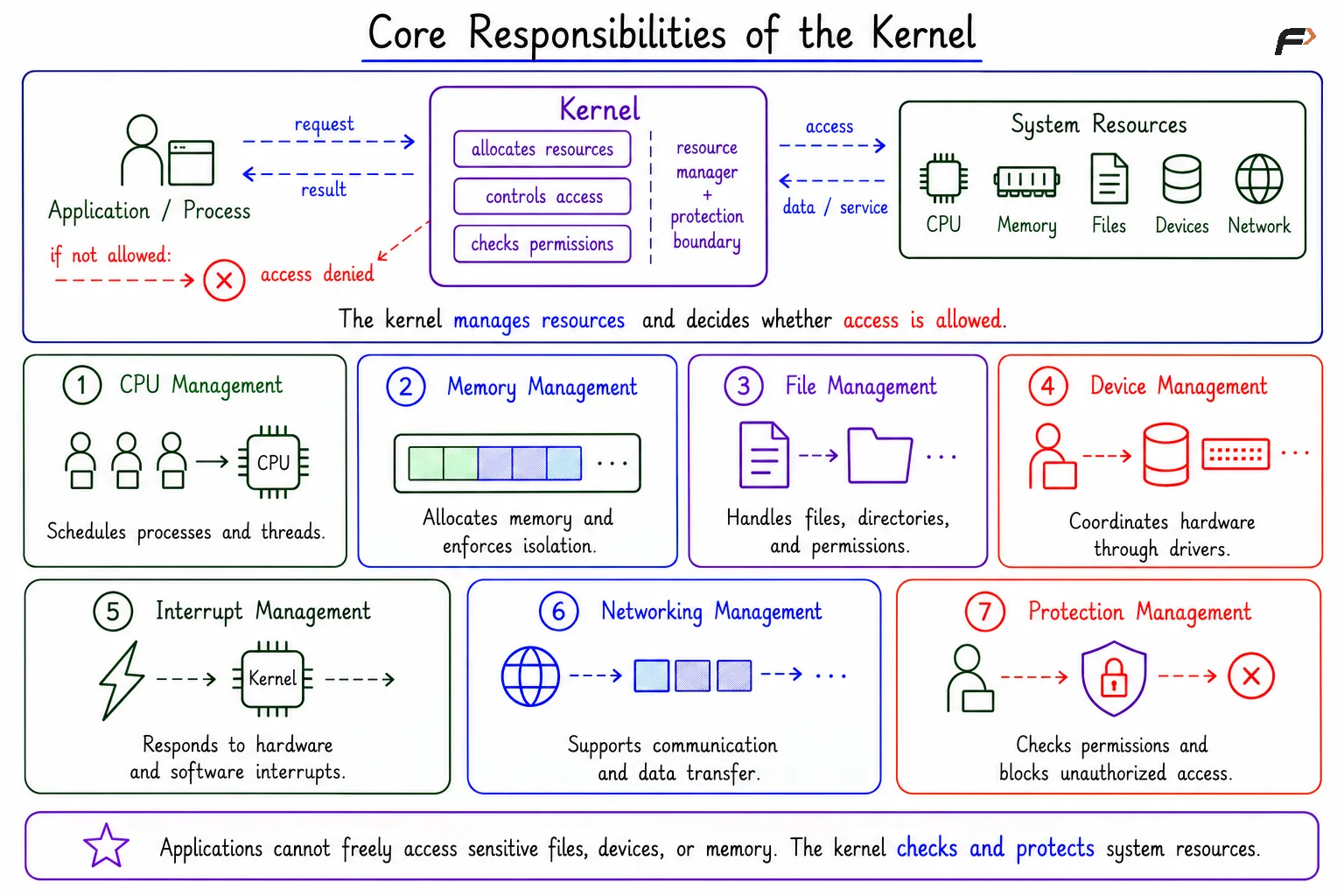
Core Responsibilities of the Kernel
Application and Kernel Interaction
Applications request kernel services through system calls. A system call is the controlled entry point from application code into kernel work.
The basic flow is:
Application request => System call => Kernel check => Protected operation => Result returned
This flow keeps application code separate from sensitive system control. Applications ask for work to be done, but the kernel validates the request and performs the operation only if it is allowed.
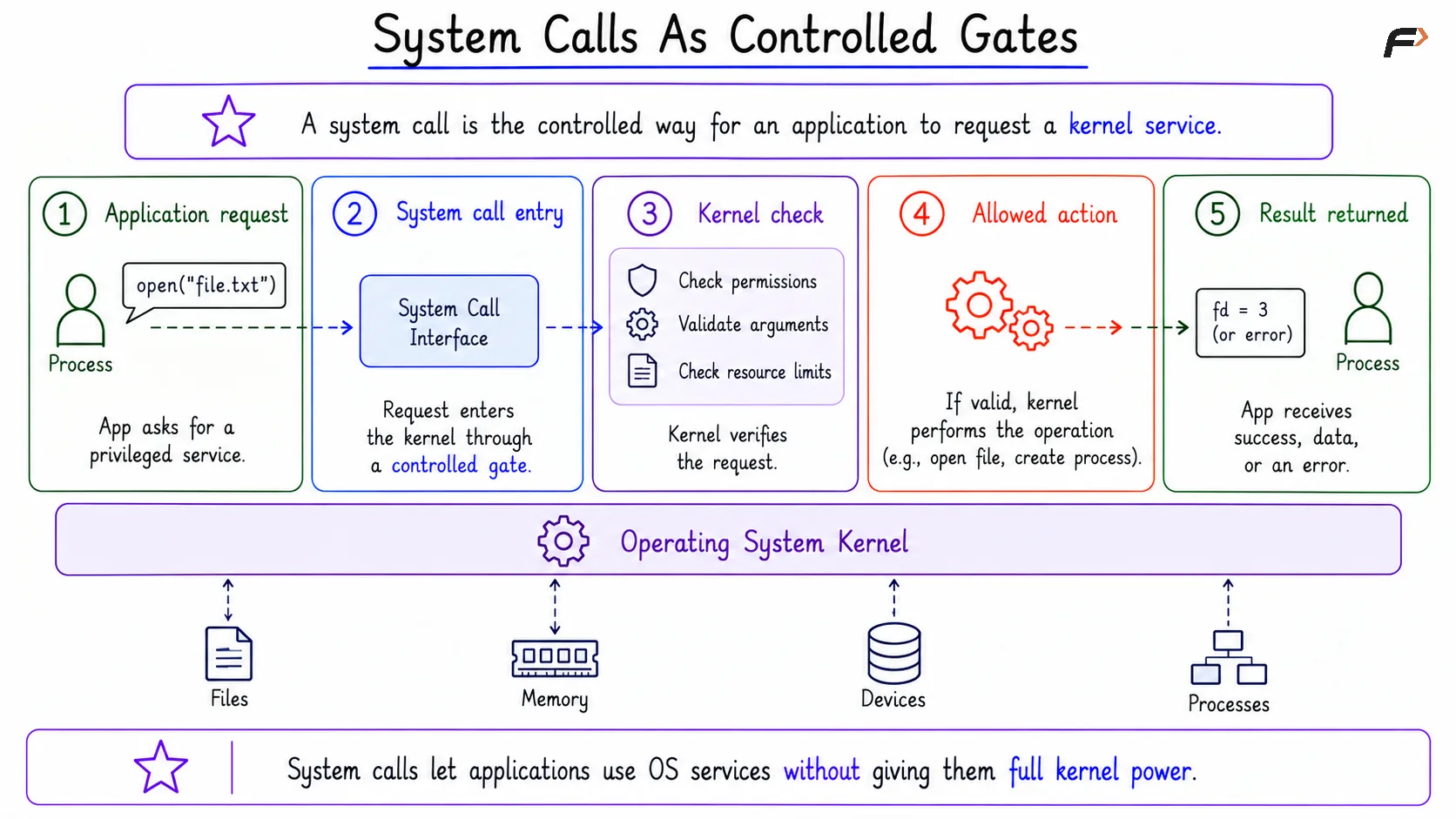
System Calls
User Mode and Kernel Mode
Modern operating systems separate execution into user mode and kernel mode. This boundary protects the system from accidental or malicious damage by normal applications.
Mode | Meaning |
|---|---|
User mode | Normal applications run with limited privileges |
Kernel mode | Trusted kernel code runs with high privileges |
In user mode, applications cannot directly modify page tables, access devices, read kernel memory, or control protected hardware features. If a program tries to access memory it is not allowed to use, the system may stop it with a fault.
In kernel mode, trusted kernel code can perform privileged work. A system call causes a controlled switch from user mode to kernel mode, and after the kernel finishes the work, control returns to the application in user mode.
What the Kernel Manages
The kernel manages the main internal services that make an operating system work:
Processes and threads: Tracks running work and provides the foundation for execution.
CPU scheduling: Decides which process or thread gets CPU time.
Memory and virtual memory: Gives applications controlled memory views and protects address spaces.
File systems and descriptors: Lets applications work with files through kernel-managed handles.
Device drivers and interrupts: Connects software requests to hardware behavior.
Networking stack: Handles network communication through controlled system services.
System calls: Provides the interface through which applications request protected operations.
Protection and isolation: Prevents applications from accessing resources they should not control.
These responsibilities are connected. For example, opening a file may involve permissions, file system metadata, memory buffers, device drivers, and later read or write operations.
Opening a File Through the Kernel
A file open operation looks simple from the application side, but the kernel performs several checks and internal actions before the application can use the file.
Example request:
int fd = open("data.txt", O_RDONLY);The compact flow is:
Application request: The application asks to open
data.txt.System call entry: Control enters the kernel through the system call interface.
Kernel checks: The kernel validates the path and checks permissions.
File system work: The kernel locates file metadata through the file system.
Driver work if needed: Storage drivers may be used to read required information.
Descriptor return: The kernel returns a file descriptor if the operation succeeds.
After that, the application uses the file descriptor for later operations such as:
read(fd, buffer, n);
write(fd, buffer, n);
close(fd);
The descriptor is not the file itself. It is a kernel-managed handle that tells the kernel which opened file the application is referring to.
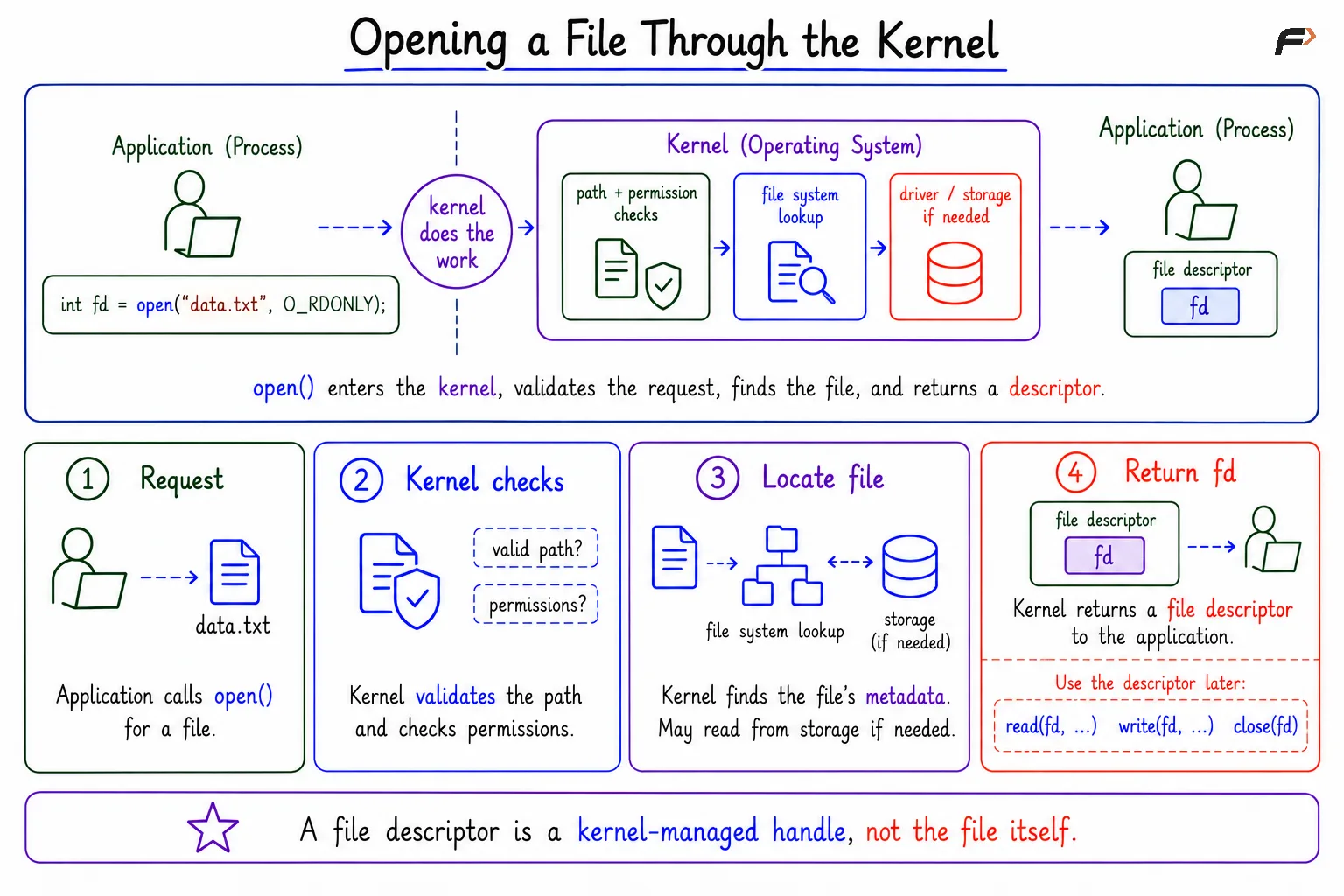
Opening a File Through the Kernel
Kernel vs Full Operating System
The kernel and the full operating system are related, but they are not the same thing. The kernel is the privileged core that manages protected resources and exposes system calls.
A full operating system includes the kernel plus user-space components such as utilities, libraries, background services, configuration tools, a shell, and sometimes a graphical user interface. These surrounding components make the system usable for users and applications.
Linux is a good example of this distinction. Strictly speaking, Linux is a kernel. A full Linux-based distribution such as Ubuntu or Debian includes the Linux kernel along with many user-space tools, services, libraries, and interfaces.
Summary
The kernel is the protected, privileged core of the operating system. It manages CPU, memory, files, devices, interrupts, networking, system calls, and protection while controlling access to sensitive resources.
Applications run in user mode and request kernel services through system calls. The kernel runs in kernel mode, checks permissions, performs protected work, and returns results. A full operating system includes the kernel plus user-space programs, services, utilities, libraries, shell, GUI, and configuration tools.
Be the first to add a comment.