Introduction
Journaling and crash consistency exist because file-system updates are usually not single-step operations. Creating, deleting, renaming, or modifying a file may require updates to directories, inodes, allocation bitmaps, metadata, and data blocks.
If a crash happens after some updates are written but before others, the file system can be left in an incomplete state. Crash consistency is about making sure the file system can recover to a valid state after such failures.
Why Crash Consistency Matters
A file-system operation may look simple to the user, but internally it may update several structures. For example, creating a file can involve:
Directory entry: Add the new filename to the parent directory.
Inode: Create metadata for the new file.
Inode bitmap: Mark the inode as allocated.
Data bitmap: Mark used data blocks as allocated.
Parent metadata: Update timestamps or directory size.
If a crash happens in the middle, one structure may say the file exists while another structure is not ready. That partial state can make the file system inconsistent.
What Is Crash Consistency?
Crash consistency means the file system can return to a valid recoverable state after a crash during an update. The goal is not always to preserve every latest user change. The main goal is to avoid broken file-system structures.
A consistent file system may either complete a committed update or ignore an incomplete one. It should not remain stuck in a half-updated state.
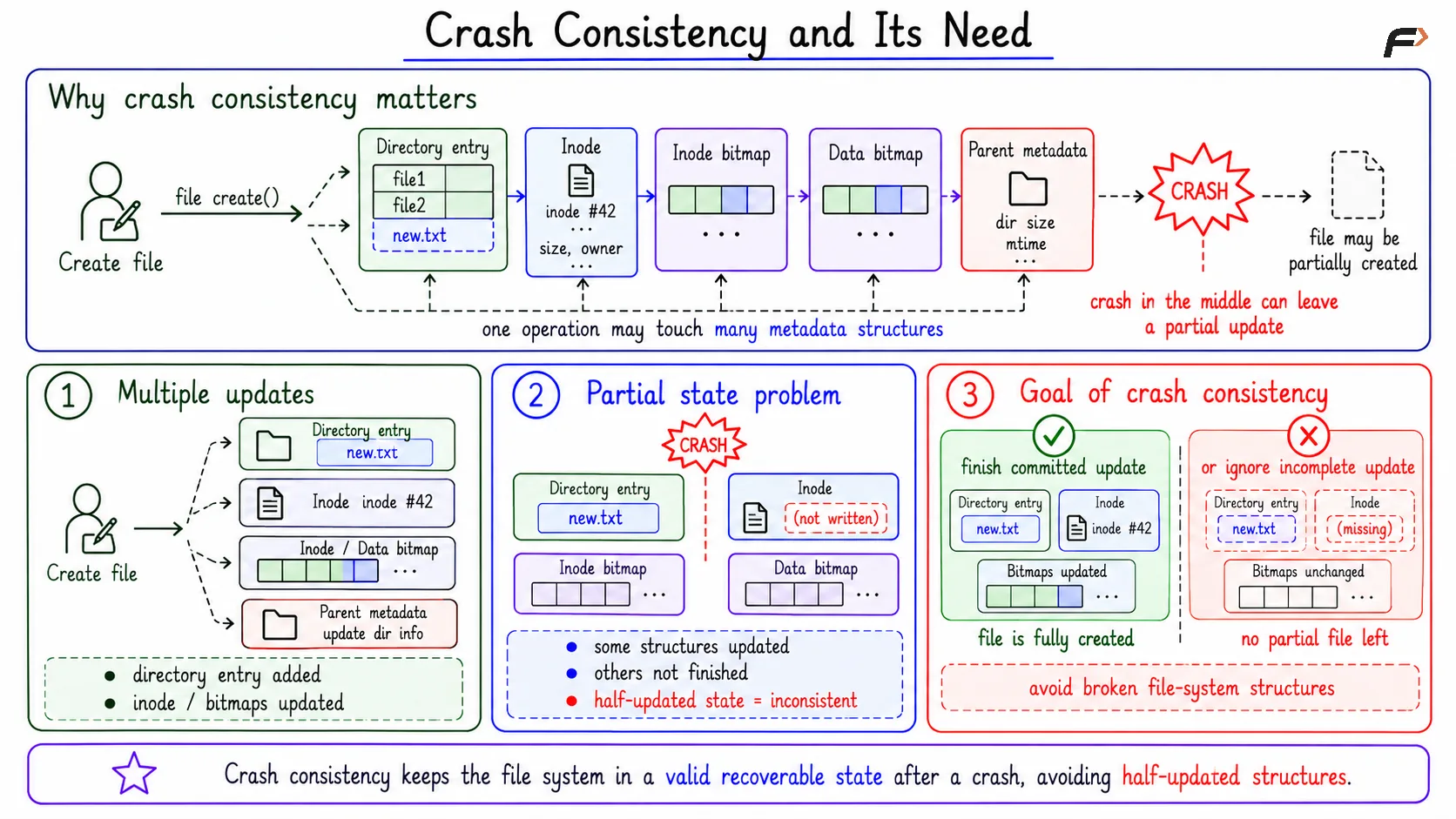
Crash Consistency and its Need
What Is Journaling?
Journaling is a technique where the file system writes update information to a journal, or log, before applying the update to final file-system locations.
A journal gives recovery code enough information to decide what to do after a crash. If an update was committed in the journal, it can be replayed. If it was incomplete, it can be ignored.
Journaling is mainly about consistency. It is not the same as backup, and it does not automatically undo accidental deletion.
Basic Journaling Flow
A journaling file system groups related updates into a transaction. The basic flow is:
Begin transaction: Group related file-system changes.
Write journal entry: Record the intended update in the journal.
Write commit record: Mark the journal transaction as safely committed.
Checkpoint: Apply the update to its final file-system location.
Recover if needed: Replay committed transactions after a crash.
The commit record is important because it tells recovery whether the journal entry was complete enough to trust.\
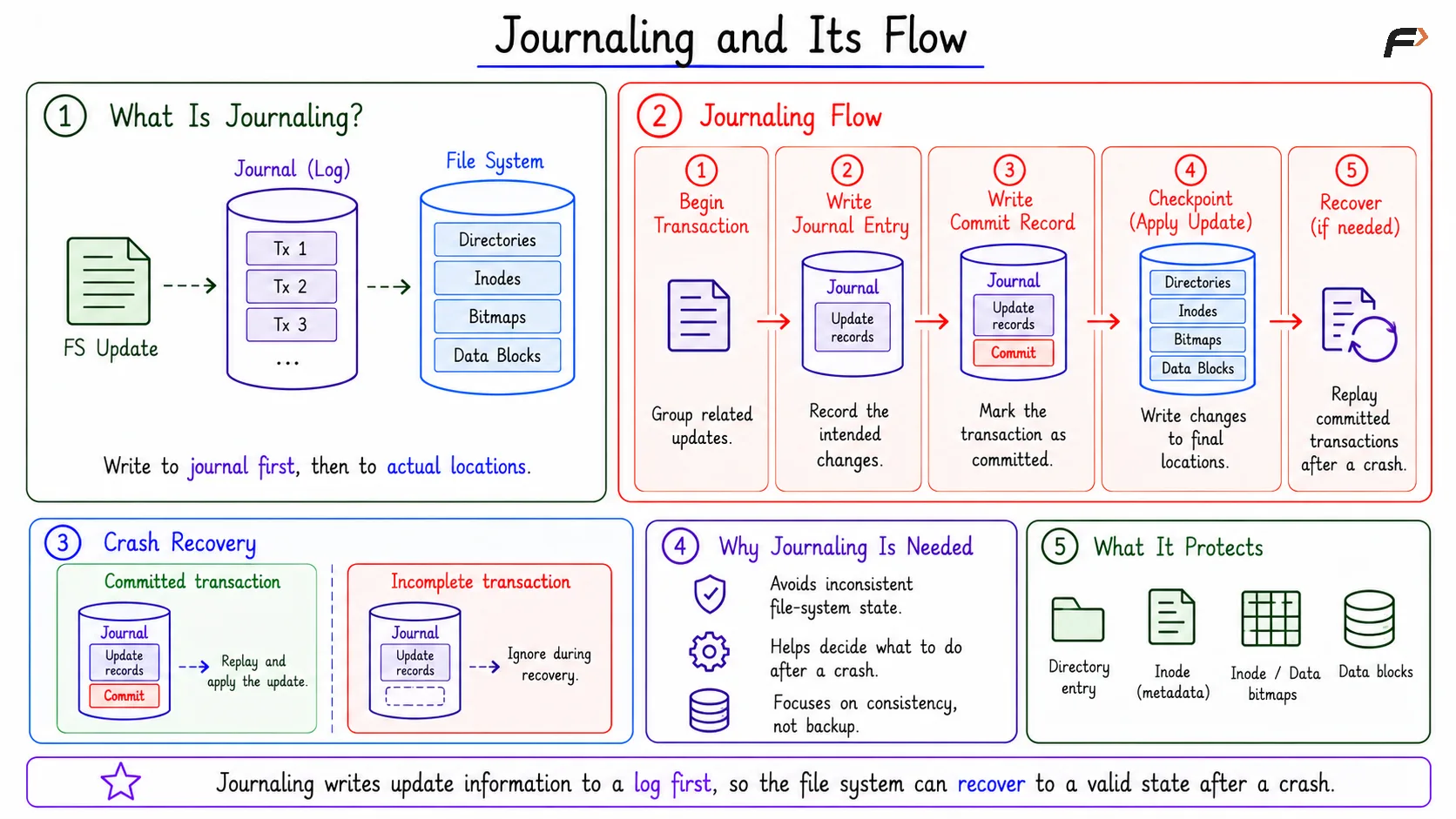
Journaling and its Flow
Recovery After a Crash
During recovery, the file system scans the journal.
Journal State | Recovery Action |
|---|---|
Valid committed transaction | Replay it if needed |
Incomplete transaction | Ignore it |
Already checkpointed transaction | No further action needed |
If a crash happens before the commit record, the transaction is ignored. If a crash happens after the commit record but before checkpointing finishes, recovery can replay it. This replay step is designed to complete committed work and restore a consistent file-system structure.
Limits of Journaling
Journaling improves crash recovery, but it does not solve every problem.
Not a backup: It does not restore accidentally deleted files by itself.
Not always latest data: A consistent file system may still lose recent data that was only in RAM.
Extra overhead: Journal writes add extra I/O.
Depends on ordering: Incorrect write ordering can still create durability surprises.
So journaling improves reliability, but it does not remove the need for backups, careful application design, or proper durability calls.
write, fsync, and Durability
A successful write() does not always mean data is already durable on disk or SSD. The data may have reached the operating system cache and still be waiting to be flushed.
fsync(fd) is different. It asks the OS to flush that file’s dirty data and required metadata to durable storage.
The distinction is:
write(): Accepts data into the file-system path, often into cache.
fsync(fd): Requests durable storage for that file’s pending data and needed metadata.
This matters for applications such as databases, editors, and systems that must survive crashes without losing committed work.
Log-Structured File System
A log-structured file system writes many updates sequentially into a log-like structure. Instead of updating many scattered locations immediately, it appends new updates in order.
This can improve write performance because sequential writes are often cheaper than random writes. The tradeoff is that old versions remain until cleaning or compaction reclaims space.
Log-structured design is related to journaling because both use log-like writing, but their goals are not identical. Journaling mainly protects consistency; a log-structured file system organizes most writes around the log itself.
Summary
Crash consistency protects the file system from broken partial updates after a crash. Journaling supports this by recording update information first, using a commit record, and replaying committed work during recovery.
Journaling improves consistency and recovery speed, but it is not backup and does not guarantee every recent write survived. For stronger durability, applications may need careful write ordering and calls such as fsync(fd).
Be the first to add a comment.