Introduction
File data stores the actual bytes of a file, but those bytes are not enough for the operating system. The OS also needs extra information to locate, protect, update, and manage the file.
This extra information is called file metadata. In many operating system discussions, the structure that stores this information is called an FCB, and in Unix/Linux-style systems, it is commonly called an inode.
What Is File Metadata?
File metadata is management information about a file. It tells the operating system what the file is, who can use it, how large it is, and where its actual contents are stored.
Common metadata includes:
File type: Regular file, directory, symbolic link, device file, and so on.
File size: Number of bytes in the file.
Owner and group: User and group associated with the file.
Permissions: Read, write, and execute rules.
Timestamps: Access time, modification time, and metadata-change time.
Block locations: Pointers or mappings to the file’s data blocks.
Link count: Number of directory entries pointing to the same file object.
Without metadata, the OS may have stored bytes, but it would not know how to manage them as a proper file.
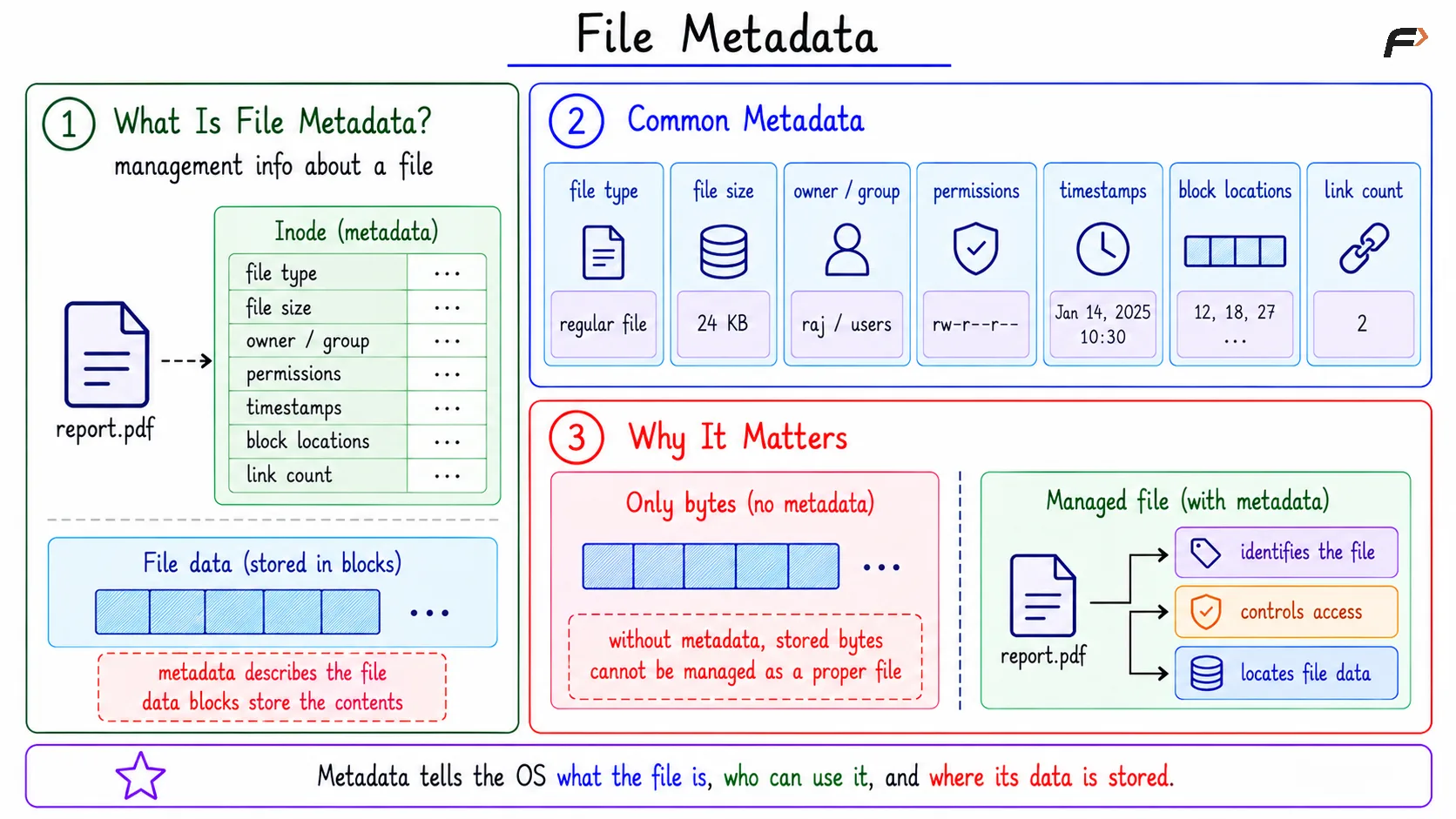
File Metadata
FCB and Inode
FCB stands for File Control Block. It is a general operating system term for the data structure that stores file-management information.
An inode is a Unix/Linux-style example of such a file-control structure. It stores the file’s metadata and information needed to find the file’s data blocks. So, an inode can be understood as a specific form of file control block used in Unix-like file systems.
Directory Entry vs Inode
A filename is usually not stored inside the inode. The filename lives in a directory entry, and that directory entry maps the name to an inode number. For example:
Directory Name | Inode Number |
|---|---|
file.txt | 12345 |
notes.pdf | 67890 |
photos | 11121 |
Here, the directory stores the names. The inode stores metadata such as size, owner, permissions, timestamps, link count, and data block pointers.
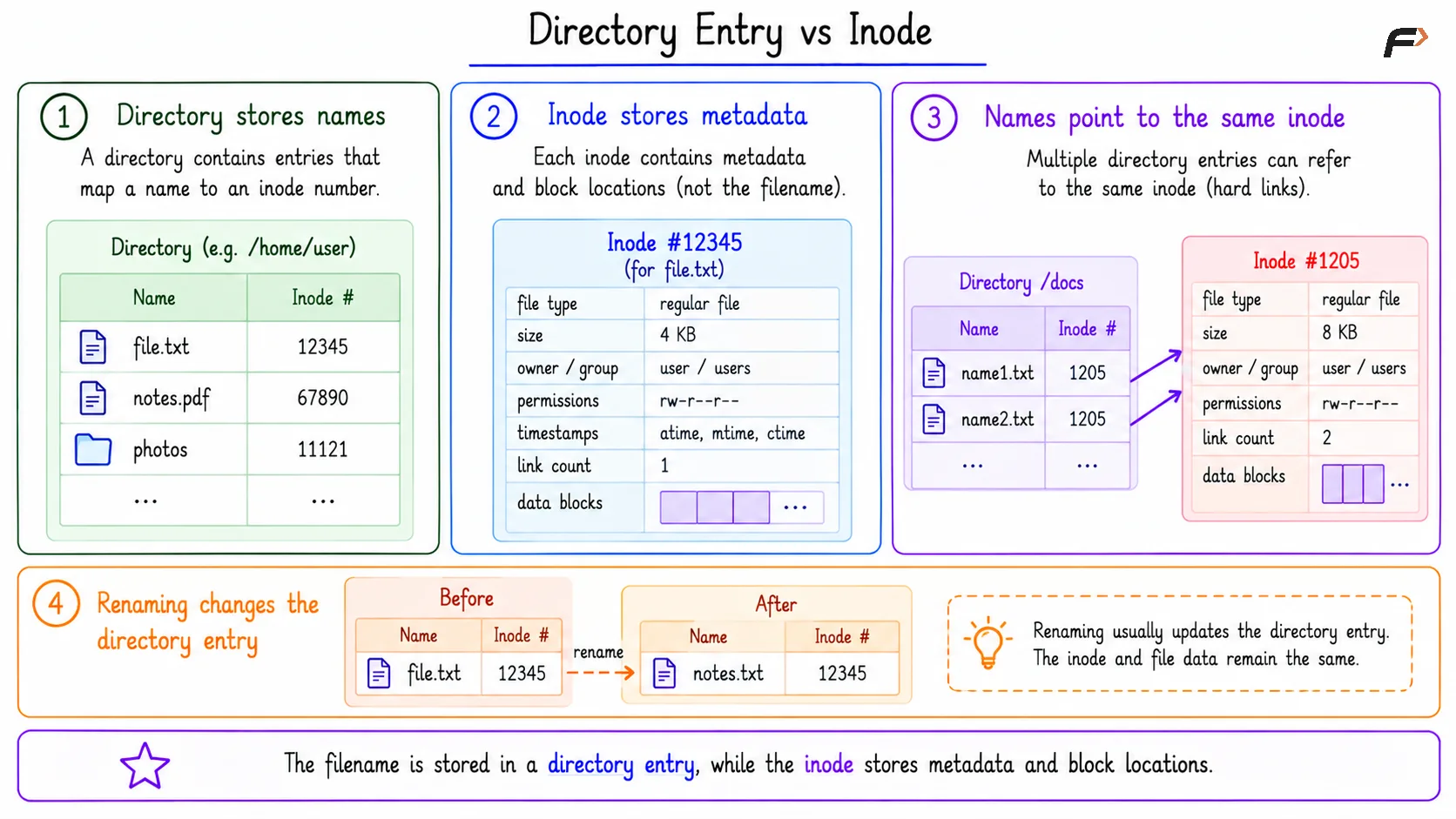
Directory Entry vs Inode
Why the Name Is Separate
The separation between directory entry and inode explains several file-system behaviors.
Renaming a file usually changes the directory entry, not the inode or the actual file contents. The file object can remain the same while its human-readable name changes. Hard links are also possible because more than one directory entry can point to the same inode. If name1.txt and name2.txt both point to inode 1205, both names refer to the same underlying file object.
This is why the link count belongs in the inode. It records how many directory entries currently point to that same file object.
Directory as a File-System Object
A directory also has metadata and an inode. The difference is in what its data blocks contain. For a regular file, data blocks contain user file content. For a directory, data blocks contain directory entries, such as: resume.pdf => inode 12345
Once the OS finds inode 12345, it can read that inode’s metadata and block mapping to reach the actual file data.
Inode Pointer Structure
Inode-based file systems often use direct and indirect pointers to locate data blocks.
Direct pointer: Points directly to a data block.
Single-indirect pointer: Points to a block that stores many data-block addresses.
Double-indirect pointer: Points to a block that points to indirect blocks, which then point to data blocks.
This structure lets small files be accessed simply through direct pointers while still allowing large files to grow using indirect levels.
Compact Maximum File Size Example
Suppose an inode has:
Block size:
4 KB = 4096 bytesBlock address size:
4 bytesDirect pointers:
12Single-indirect pointers:
1Double-indirect pointers:
1
One indirect block can store: 4096 / 4 = 1024 block addresses
Reachable data blocks: 12 + 1024 + (1024 * 1024) = 1,049,612 data blocks
Maximum file size: 1,049,612 * 4096 = 4,299,210,752 bytes
This is about 4 GB. The key is to count only reachable data blocks for file content; indirect blocks help store addresses, not user file data.
Summary
File metadata is the information the OS needs to manage file bytes. It includes file type, size, owner, permissions, timestamps, link count, and block-location information.
An FCB is the general file-control structure, while an inode is the Unix/Linux-style version of that idea. Directory entries store names and map them to inode numbers; inodes store the file’s real metadata and data-block mappings.
Be the first to add a comment.