Introduction
There is no fixed number of applications that can run at the same time. The answer changes from system to system because it depends on hardware resources, operating system scheduling, and the type of apps being used.
Many apps may be open, many processes may exist, and many threads may be waiting or ready. But only a limited number of threads can execute on the CPU at one exact instant.
Open Is Not The Same As Running
From the user’s side, it may look like many apps are running together. A browser, editor, terminal, music app, database, and background services may all be open at the same time.
From the operating system’s side, the picture is more precise. Some apps are waiting, some threads are ready, and only some threads are actually executing on CPU cores right now.
This is why the number of open apps can be much larger than the number of CPU cores. Most open apps are not continuously using the CPU.
How The OS Creates Multitasking
The operating system creates multitasking through CPU scheduling. The scheduler decides which thread gets CPU time, how long it runs, and when another thread should get a chance.
A thread is the basic unit of CPU execution. For a process to execute instructions, it needs at least one thread.
At a high level:
Many apps may be open: The user can keep several applications active.
Many processes may exist: Each app may create one or more processes.
Many threads may be ready or waiting: Some can run, while others wait for input, disk, network, timers, or locks.
Only limited threads execute now: The exact number depends mainly on available CPU execution slots.
So, multitasking is not the same as every app continuously executing. It is a mix of execution, waiting, and switching.
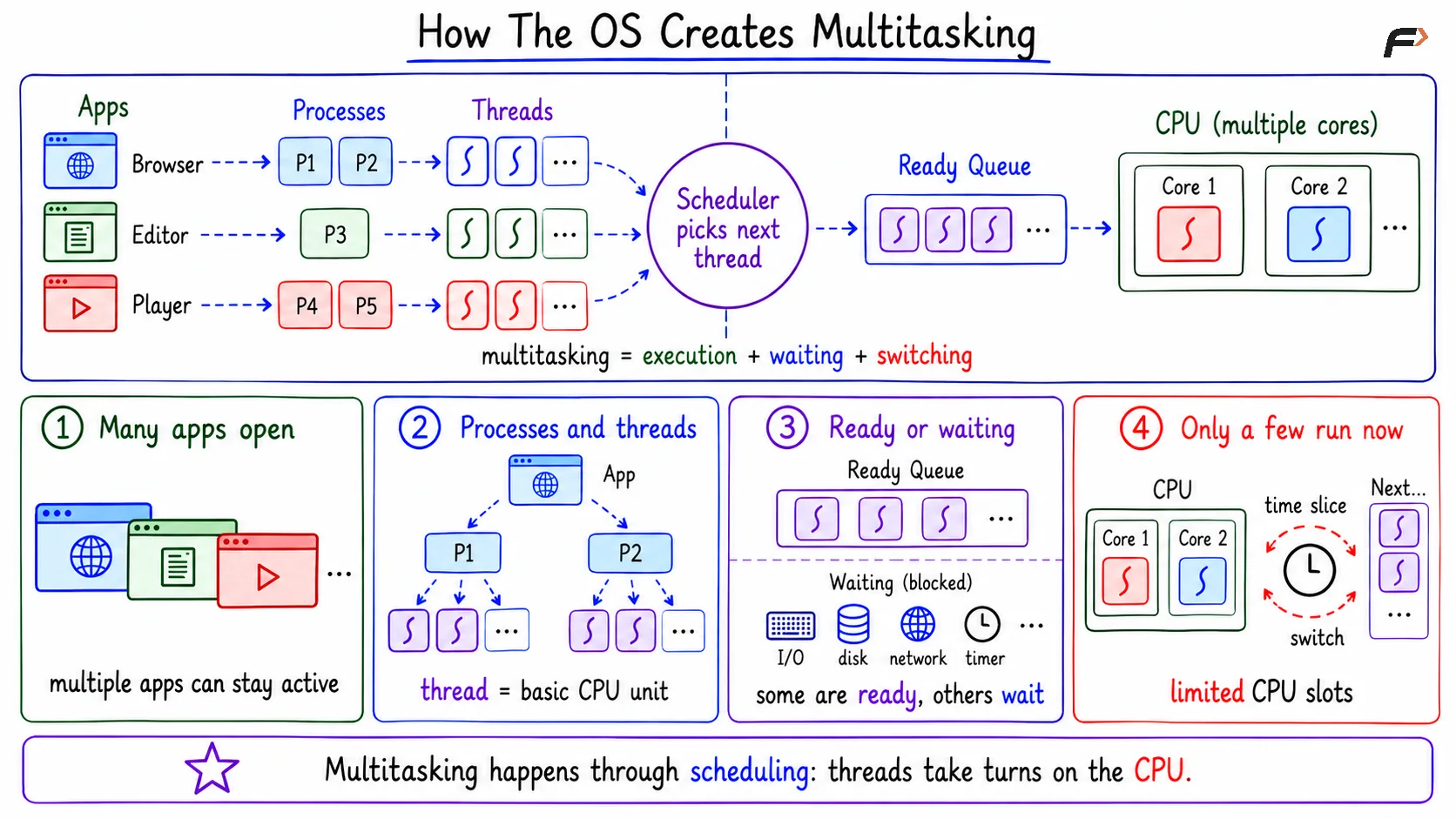
How The OS Creates Multitasking
Single-Core Multitasking
On a single-core CPU, only one thread can execute at one exact instant. This is the key rule for single-core execution.
Still, a single-core system can feel like it is running many apps together because the operating system switches quickly between them. This is called time sharing.
The basic flow is: App A runs => App B runs => App C runs => App A runs again
Each app gets a small slice of CPU time. Since switching happens quickly, the user usually feels that multiple apps are running together.
If one app is waiting for keyboard input, disk data, or network response, the OS does not need to keep the CPU assigned to it. The scheduler can give CPU time to another ready thread.
Multi-Core Execution
On a multi-core CPU, multiple threads can truly execute at the same instant. A dual-core CPU can execute around two threads at once, and an eight-core CPU can execute around eight hardware execution slots at once.
However, this does not mean an eight-core CPU can have only eight apps open. Many more apps can exist because several apps may be waiting, sleeping, or using very little CPU at that moment.
Cores decide how much real parallel execution can happen. The operating system decides which runnable threads get those cores.
Running, Runnable, And Waiting
To understand how many apps are truly running, separate these three states: running, runnable, and waiting.
State | Meaning | Example |
|---|---|---|
Running | Currently executing on the CPU | A thread actively using a CPU core |
Runnable or ready | Can run, but waiting for CPU time | A process waiting in the ready queue |
Waiting or blocked | Cannot run until an event happens | Waiting for disk, network, input, timer, or lock |
A browser may wait for network data, a terminal may wait for keyboard input, and a database may wait for disk I/O. When the event completes, the waiting thread can become runnable again.
What Decides The Practical Limit?
There is no universal number of apps that can run together. The practical limit depends on resources, operating system policies, and the workload.
Important factors include:
CPU cores: More cores allow more threads to execute at the same instant.
RAM size: More RAM allows more apps and processes to stay in memory comfortably.
Storage speed: Faster SSDs reduce waiting during disk reads, writes, paging, and app loading.
Process and thread count: More processes and threads increase scheduling and management work.
Open file limits: Some systems limit how many files, sockets, or handles a process can keep open.
Network load: Heavy network usage can slow apps even when CPU is not fully busy.
Scheduling policy: The scheduler decides priority, fairness, and responsiveness.
Container or cgroup limits: Containers may have CPU, memory, and I/O limits.
App heaviness: A few heavy apps can use more resources than many lightweight apps.
So, two systems with the same number of open apps may behave very differently. A text editor and terminal are not the same as several browsers, virtual machines, games, and databases.
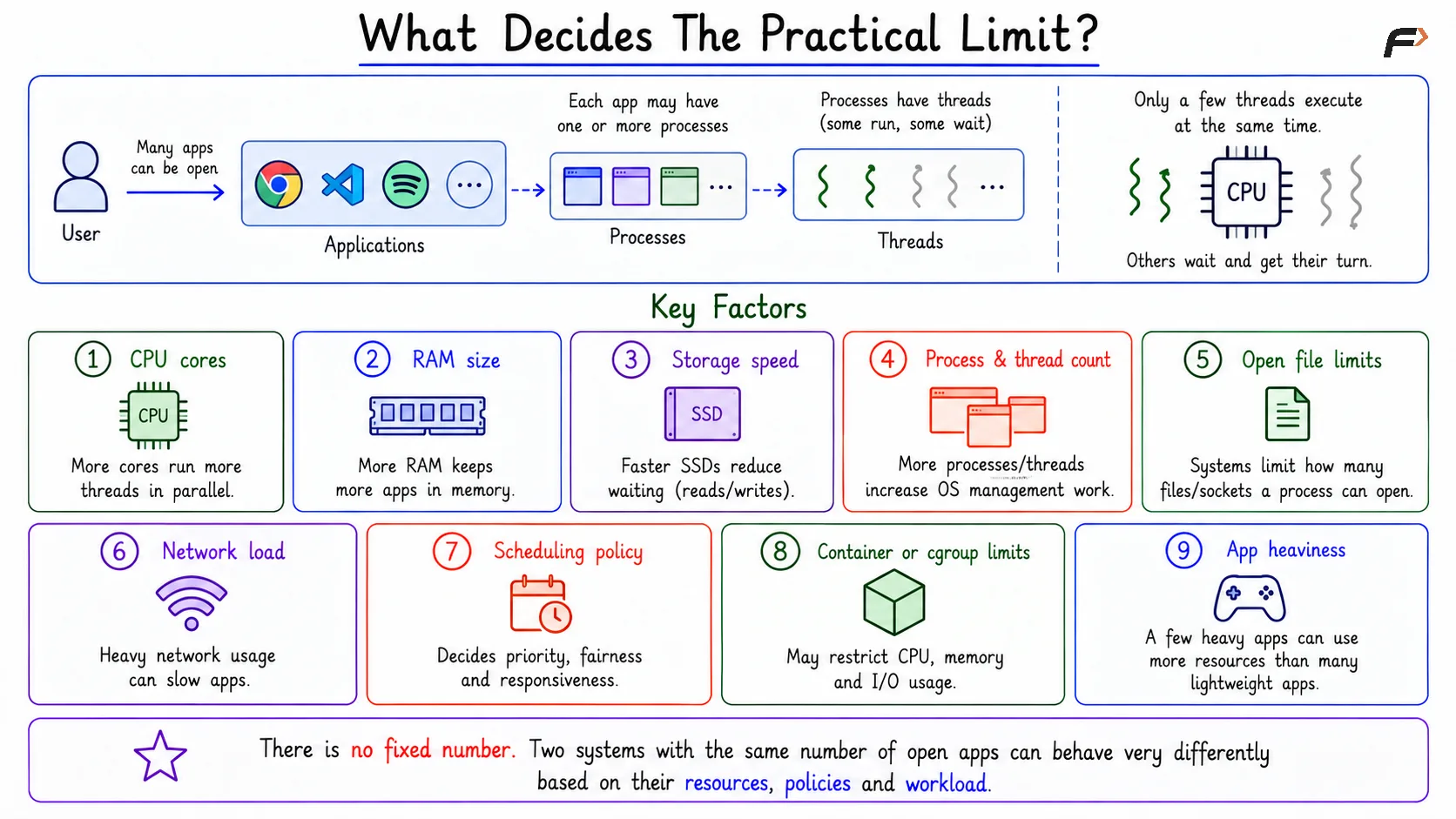
What Decides The Practical Limit
What Happens With Too Many Heavy Apps?
When too many heavy apps run together, the system starts facing resource pressure. The bottleneck may be CPU, RAM, disk, network, or I/O.
Common effects include:
CPU saturation: The CPU stays busy most of the time.
Memory pressure: RAM becomes insufficient for all active apps.
Swapping: The system uses disk as extra memory, which is much slower than RAM.
I/O wait: Apps wait for disk or device operations to finish.
Slow response: The system feels laggy or unresponsive.
Process killing: Under extreme memory pressure, the OS may terminate processes to protect the system.
This is why the practical answer is dynamic. The question is not only “how many apps are open,” but also “how much work are those apps doing?”
Real Examples Of Multitasking
Music while coding is a simple multitasking example. The editor may wait for input, the compiler may use CPU, the music app may use audio output, and the terminal may wait for commands.
A web server is another example. Some requests may execute on the CPU, while many others wait for database queries, disk reads, or network responses.
Concurrency Vs Parallelism
Concurrency means multiple tasks are in progress during the same time period. They may take turns and do not need to execute at the exact same instant.
Parallelism means multiple tasks execute at the exact same instant. This usually requires multiple CPU cores or hardware execution slots.
Concept | Meaning | Example |
|---|---|---|
Concurrency | Tasks make progress in the same time period | Single-core switching between apps |
Parallelism | Tasks execute at the exact same instant | Multiple cores running multiple threads |
On a single-core system, multitasking is mainly concurrency through fast switching. On a multi-core system, multitasking can include both concurrency and true parallelism.
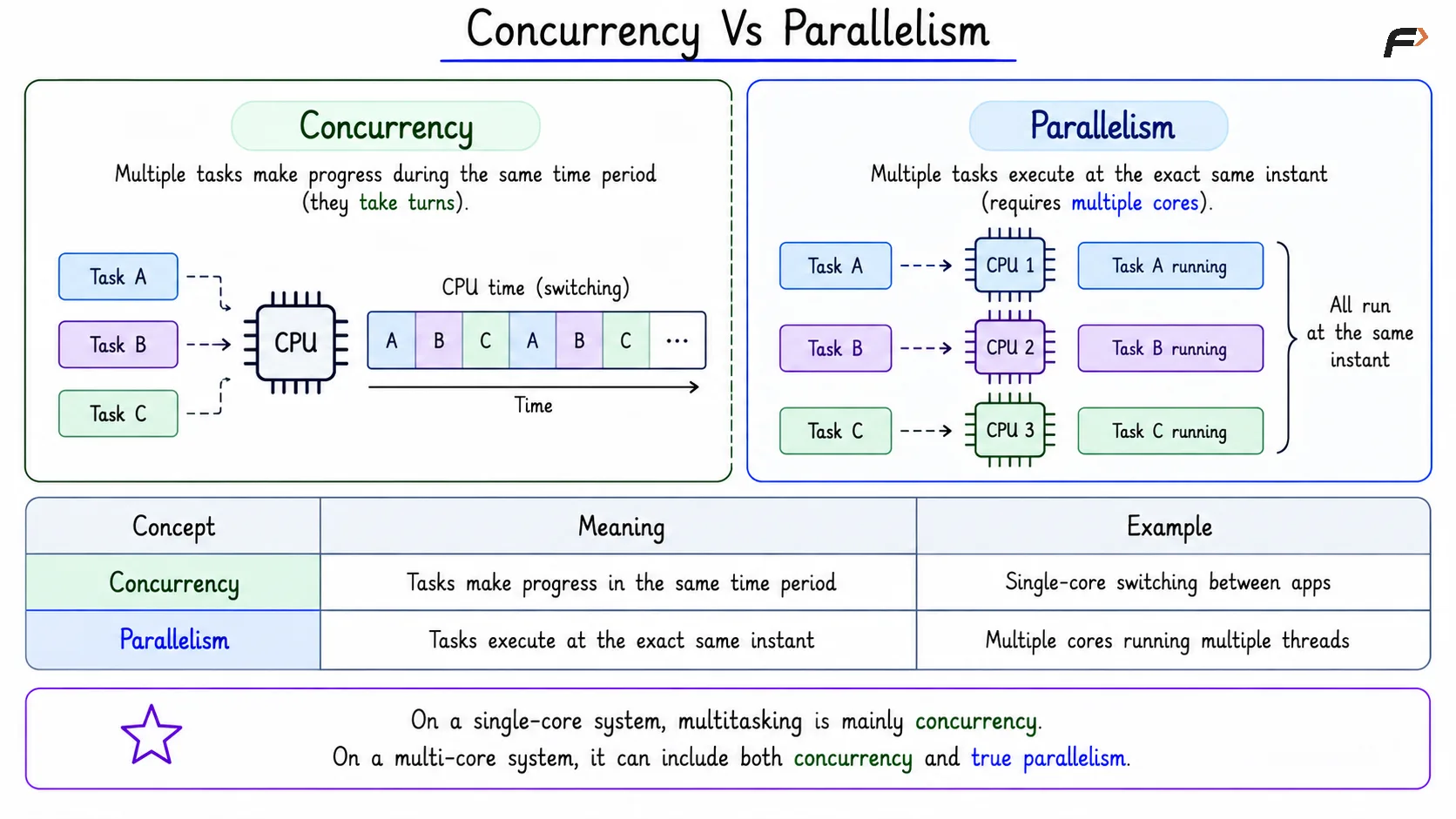
Concurrency Vs Parallelism
Practical Tools To Observe It
On Linux, several tools help observe multitasking and resource usage. These tools show whether processes are running, waiting, using CPU, using memory, or waiting for I/O.
Common tools include:
top or htop: Shows CPU usage, memory usage, and running processes.
ps -o pid,stat,comm: Shows process ID, state, and command.
uptime: Shows load average and how long the system has been running.
Summary
There is no fixed number of applications that can run at the same time. Many apps can be open, many processes can exist, and many threads can be ready or waiting.
Only a limited number of threads execute at one exact instant, usually around one per CPU core. The operating system creates multitasking by scheduling threads, switching quickly, and using waiting time efficiently.
Be the first to add a comment.