Introduction
Hard links and soft links are file-system mechanisms that let users refer to file content through more than one name or path. They are common in Unix-like operating systems.
The main difference is what the link connects to. A hard link points to the same inode, while a soft link stores a path to another target.
Why Links Are Used
Links are useful when one file needs to be reachable through different names or locations. Copying the file is not always ideal because a copy creates a separate file object with separate contents.
A link avoids that problem in different ways:
Hard link: Creates another name for the same inode.
Soft link: Creates a separate object that points to a target path.
This distinction controls how each link behaves during access, deletion, renaming, and traversal.
What Is a Hard Link?
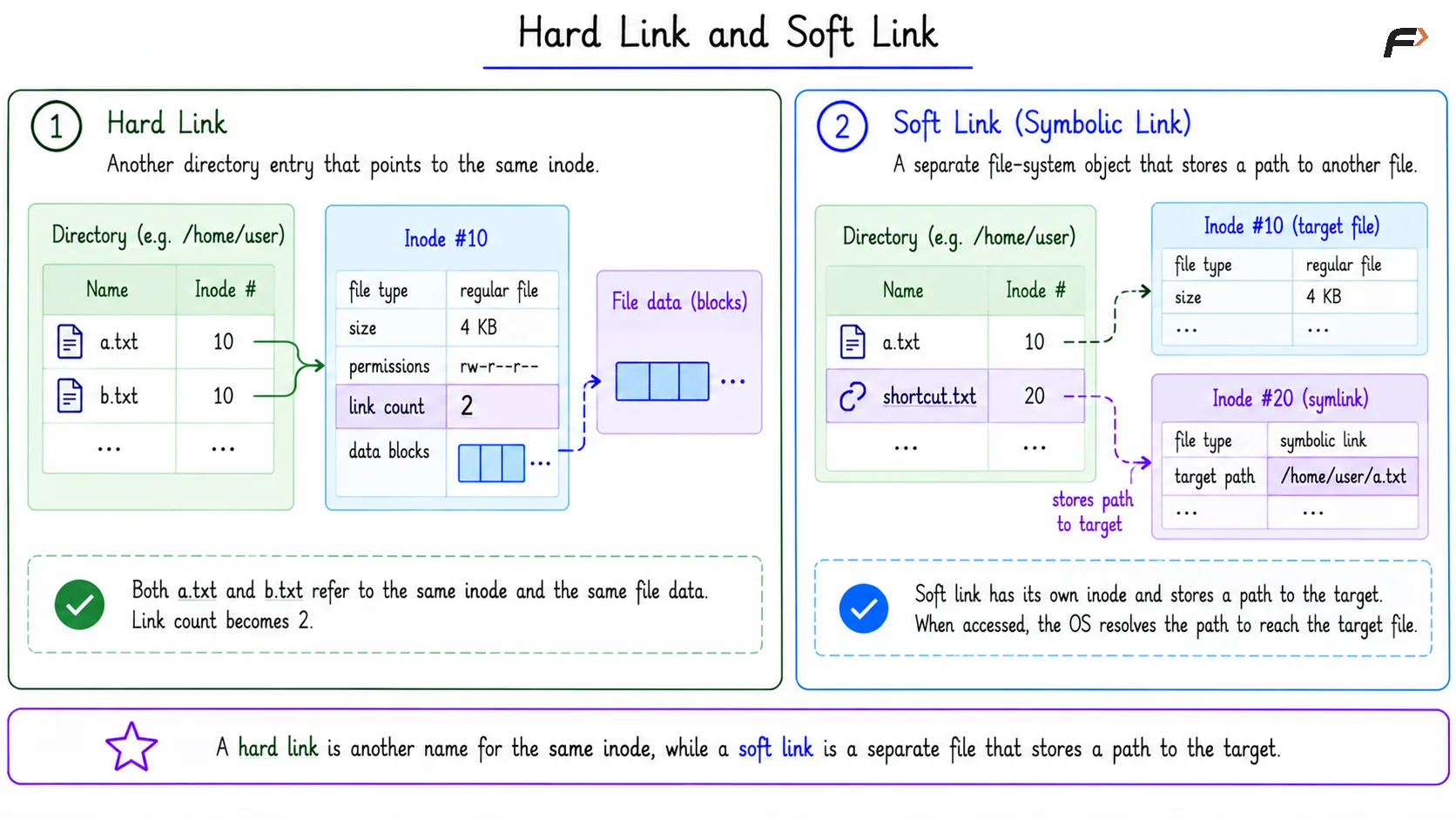
A hard link is another directory entry that points to the same inode as an existing file. It does not point to another filename.
For example, both a.txt and b.txt can point to the same inode 10. This means they are two different filenames that refer to the same underlying file and data. There is no special “original” name at the inode level; both names are equal directory entries.
When a hard link is created, the inode link count increases. If two names point to the same inode, the link count becomes 2.
What Is a Soft Link?
A soft link, also called a symbolic link or symlink, is a separate file-system object that stores a path to another target. For example: shortcut.txt => path "/home/user/a.txt"
The soft link has its own inode. When it is accessed, the operating system reads the path stored inside the symlink and then resolves that path to reach the target. So a soft link is closer to a shortcut. It depends on whether the stored target path can still be found.
Hard Link and Soft Link
Hard Link vs Soft Link
Point | Hard Link | Soft Link |
|---|---|---|
Basic meaning | Another name for the same inode | Separate object storing a path |
File identity | Shares target inode | Has its own inode |
Link count | Increases inode link count | Usually does not increase target link count |
Deleting original name | File still works through another hard link | Symlink may break if target path disappears |
Cross file system | Usually not allowed | Usually allowed |
Directory linking | Usually restricted | Can point to directories |
Broken link | Not in the same way, while inode still has links | Possible when target path is missing |
This table is the cleanest way to remember the difference: hard links are inode-based, while soft links are path-based.
Deletion Behavior
Deletion is where the difference becomes very clear.
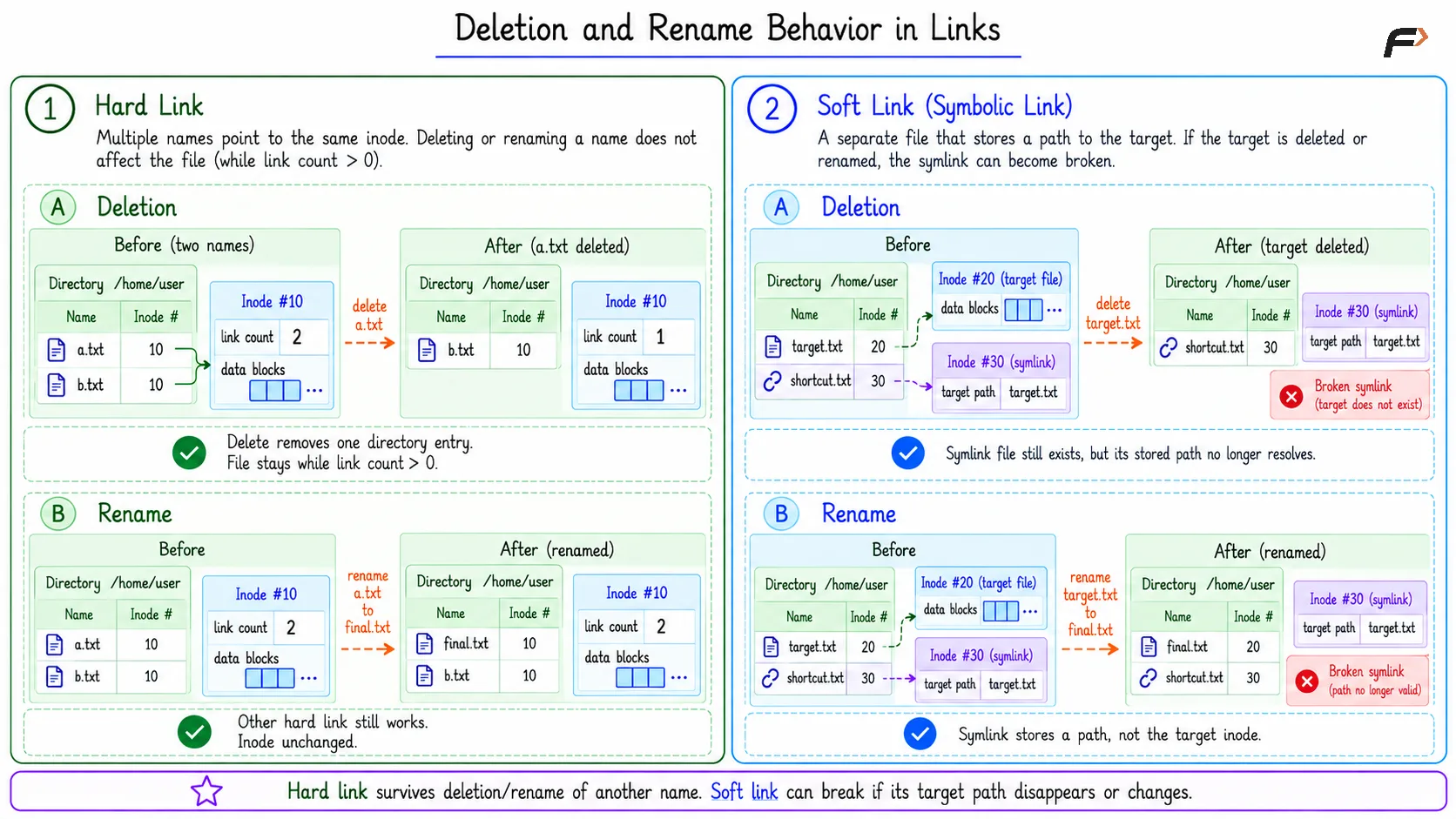
For a hard link, suppose both a.txt and b.txt point to the same inode 10. Both filenames therefore refer to the same underlying file, so changes made through either name affect the same data.
If a.txt is deleted, only that directory entry is removed. b.txt still points to inode 10, so the file data remains available. The inode is removed only when its link count becomes 0 and no process is still holding it open.
For a soft link, suppose target.txt points to inode 20, while shortcut.txt stores the path "target.txt". The soft link does not point directly to the target's inode; it stores the target's path instead.
If target.txt is deleted, shortcut.txt still exists as a symlink, but the path it stores no longer points to a valid file. Such a symlink is called a broken symlink.
Deletion and Rename Behavior in Links
Rename Behavior
A hard link is not affected just because another name for the same inode is renamed. Since both names point to the same inode, the remaining name still reaches the file object.
A soft link can be affected by renaming the target. If the symlink stores the path target.txt and that target is renamed to final.txt, the symlink still stores the old path. Unless the path is updated, it becomes broken.
Why Hard Links Have Restrictions
Hard links usually cannot cross file-system boundaries because inode numbers are meaningful only inside a particular file system.
Hard links to directories are also restricted in normal use. If ordinary users could freely hard-link directories, directory traversal could create cycles, making the hierarchy difficult and unsafe to manage.
Soft links avoid these restrictions because they store pathnames instead of sharing the target inode.
When to Use Each
Use a hard link when you want another real name for the same file object in the same file system. It is useful when both names should behave equally and the data should remain available as long as at least one hard link exists.
Use a soft link when you want a shortcut-like path reference. It is useful for linking across file systems, pointing to directories, or keeping a convenient path to a target location.
Summary
A hard link is another directory entry for the same inode, so hard-linked names share the same file identity, metadata, and data blocks. Removing one name does not remove the file as long as another hard link still exists.
A soft link is a separate file-system object that stores a path to a target. It can point across file systems and to directories, but it can become broken if the target path is deleted or renamed.
Be the first to add a comment.