Introduction
Files, directories and paths form the basic vocabulary of a file system. They help the operating system organize stored data into names, folders, and reachable locations.
A file is not just its visible name, and a path is not the file itself. The name helps users locate the object, while the file system manages the internal identity and metadata behind it.
What Is a File?
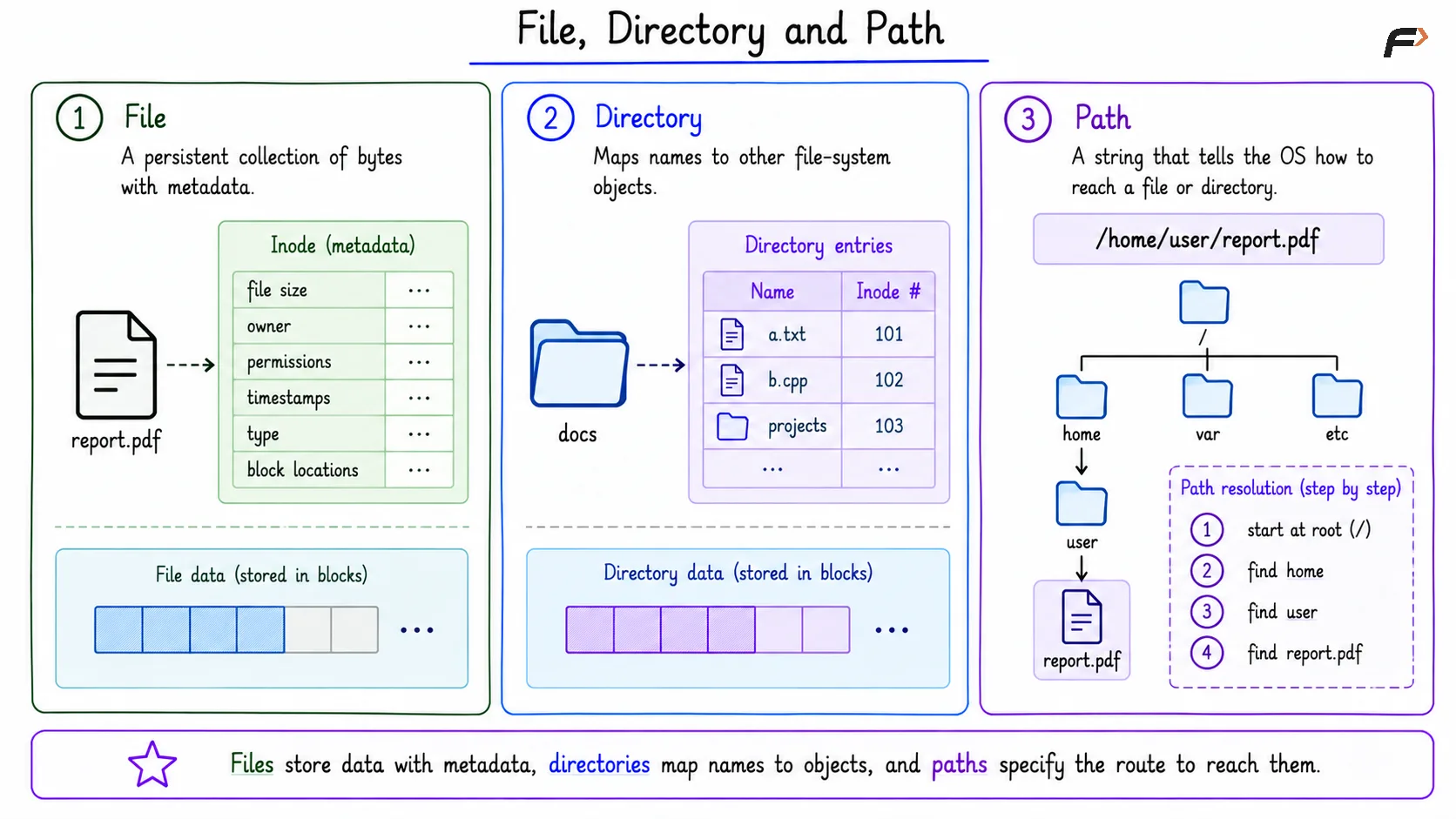
A file is a persistent collection of bytes with metadata. Persistent means the data can remain stored after a program exits or after the system restarts. The actual file contents are stored in storage blocks. The file system keeps metadata to manage those bytes, such as file size, owner, permissions, timestamps, type, and block locations.
In Unix-like systems, this metadata is commonly represented through an inode. The inode does not store the filename as the main identity; it stores information needed to manage the file object.
What Is a Directory?
A directory is a special file-system object that maps names to other file-system objects. These objects may be regular files or other directories. Directories create hierarchy. Instead of keeping every file in one flat list, the system can organize files under folders such as /home, /var, docs, or code.
A directory also has metadata. Its data blocks store directory entries, where each entry connects a name to an internal object such as an inode number.
What Is a Path?
A path is a string that tells the operating system how to reach a file or directory inside the hierarchy. It is the route used for lookup. For example, the path /home/user/report.pdf starts at the root directory, then moves into the home directory, followed by the user directory, and finally reaches the report.pdf file.
The OS resolves the path one component at a time. It searches each directory for the next name until it reaches the final file or directory.
File, Directory and Path
Name vs File Identity
A filename is human-readable, but it is not the internal identity of the file. The file system usually manages an internal object, such as an inode, that stores metadata and block pointers.
Filename: A human-readable name such as
report.pdf.Directory Entry: Maps the filename to its corresponding internal object.
Inode: An internal metadata object that stores information about a file in Unix-like systems.
Data Blocks: Storage blocks that contain the actual bytes of the file.
This distinction explains why changing a filename does not necessarily change the file’s internal object.
Absolute and Relative Paths
An absolute path starts from the root directory. It gives the complete route and does not depend on the current working directory. Example: /home/striver/code/main.cpp
A relative path starts from the current working directory. Its meaning depends on where the process currently is. Example of relative path is code/main.cpp. If the current directory is /home/striver, then code/main.cpp resolves to /home/striver/code/main.cpp.
Special Path Components
Two special components are common in relative paths:
.: Refers to the current directory...: Refers to the parent directory.
For example, ./main.cpp means main.cpp in the current directory. If the current directory is /home/user/code, then ../notes.txt means go to /home/user and then find notes.txt.
Path Traversal
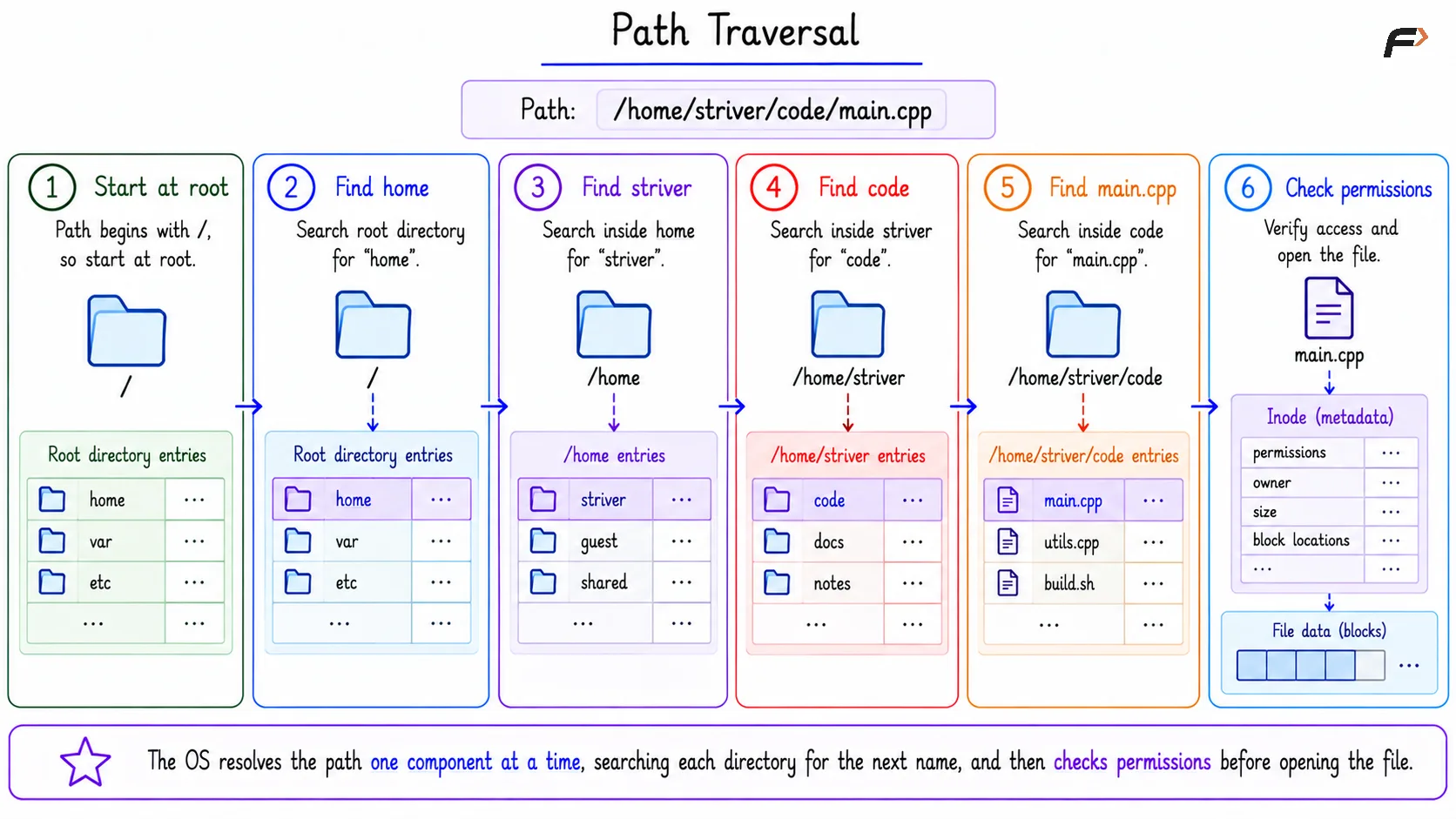
When opening /home/striver/code/main.cpp, the operating system does not jump directly to the file. It resolves the path step by step.
The lookup process is:
Start at root: Because the path begins with
/.Find
home: Search root directory entries.Find
striver: Search inside thehomedirectory.Find
code: Search inside thestriverdirectory.Find
main.cpp: Search inside thecodedirectory.Check permissions: Confirm the requested access is allowed.
After lookup succeeds, the OS can open the file and use its metadata to locate the actual data blocks.
Path Traversal
Summary
A file is a persistent collection of bytes with metadata. A directory maps names to files or other directories, and a path tells the operating system how to locate an object inside the file-system hierarchy.
The key idea is name versus identity. Users work with names and paths, while the file system manages internal objects such as inodes, directory entries, metadata, and storage blocks.
Be the first to add a comment.