Introduction
A file system is the part of an operating system that makes persistent storage usable. It converts raw disk or SSD blocks into named files, directories, metadata, permissions, and organized storage structures.
Without a file system, storage would still exist, but users and applications would have to manage block numbers directly. The file system hides that low-level detail and gives a safer, cleaner way to store and access data.
Why File Systems Are Needed
RAM is fast, but it is temporary. When power goes off, the system reboots, or a program exits, data kept only in RAM is lost.
Persistent storage solves that problem because disks and SSDs can keep data after shutdown. However, storage devices mainly provide blocks of space, not meaningful names like notes.txt or paths like /home/user/docs.
A file system exists to bridge this gap. It lets applications work with names, folders, permissions, and files instead of raw block locations.
File System Meaning
A file system is an OS component that organizes persistent storage into files and directories. It also stores metadata, maps file contents to storage blocks, tracks free space, checks permissions, and helps recover from failures.
In simple terms, the storage device provides blocks, while the file system provides structure. Files and folders are the abstraction users see; blocks are the actual storage units underneath.
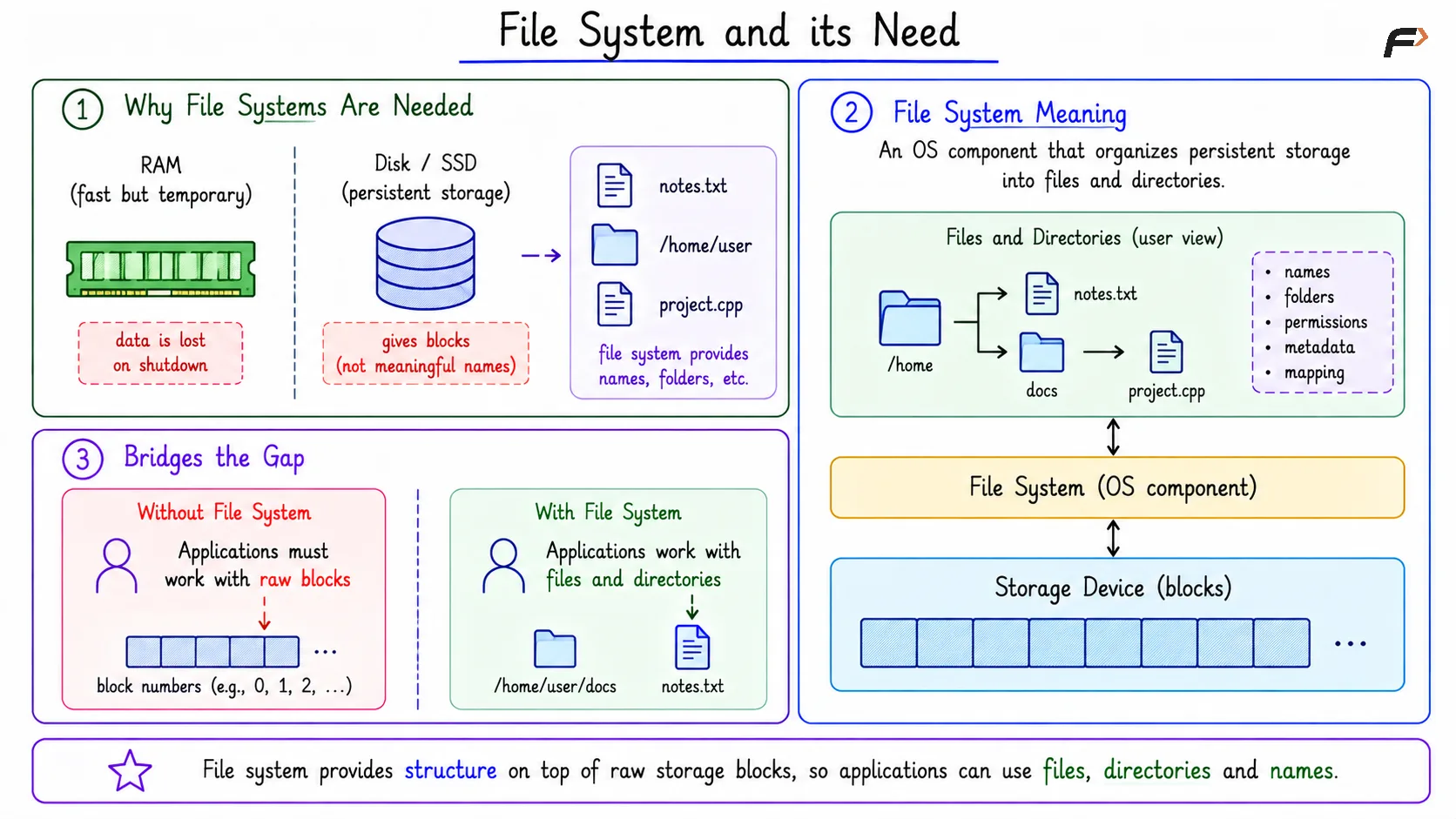
File System and its Need
Core Abstractions
File: A named collection of bytes stored persistently.
Directory: A structure that maps names to files or other directories.
Metadata: Information about a file or directory, such as its size, owner, permissions, timestamps, type, and block locations.
A file extension like .pdf, .jpg, or .cpp is mostly a convention for users and applications. The file system mainly stores bytes and metadata; other programs interpret those bytes as documents, images, code, or videos.
Files, Directories, and Metadata
A file stores data as a sequence of bytes. The operating system does not need to understand the meaning of those bytes in the same way an application does.
A directory provides hierarchy. Instead of storing every file in one flat list, directories allow paths such as /home/alice/notes.txt, where each part of the path helps locate the final object.
Metadata stores management details. In Unix-like systems, much of this metadata is stored in an inode, which may contain file size, owner, permissions, timestamps, type, and pointers to data blocks.
Main Responsibilities of a File System
A file system handles several important tasks at once:
Naming: Maps paths such as
/home/user/a.txtto internal file-system objects.Persistence: Keeps data available after reboot or power loss.
Allocation: Decides which storage blocks belong to which file.
Free-space tracking: Records which blocks are used and which are available.
Protection: Checks permissions before read, write, or execute operations.
Performance: Uses caching so repeated file access is faster.
Crash consistency: Tries to keep metadata and data structures valid after failures.
These responsibilities make the file system both a storage organizer and a reliability layer.
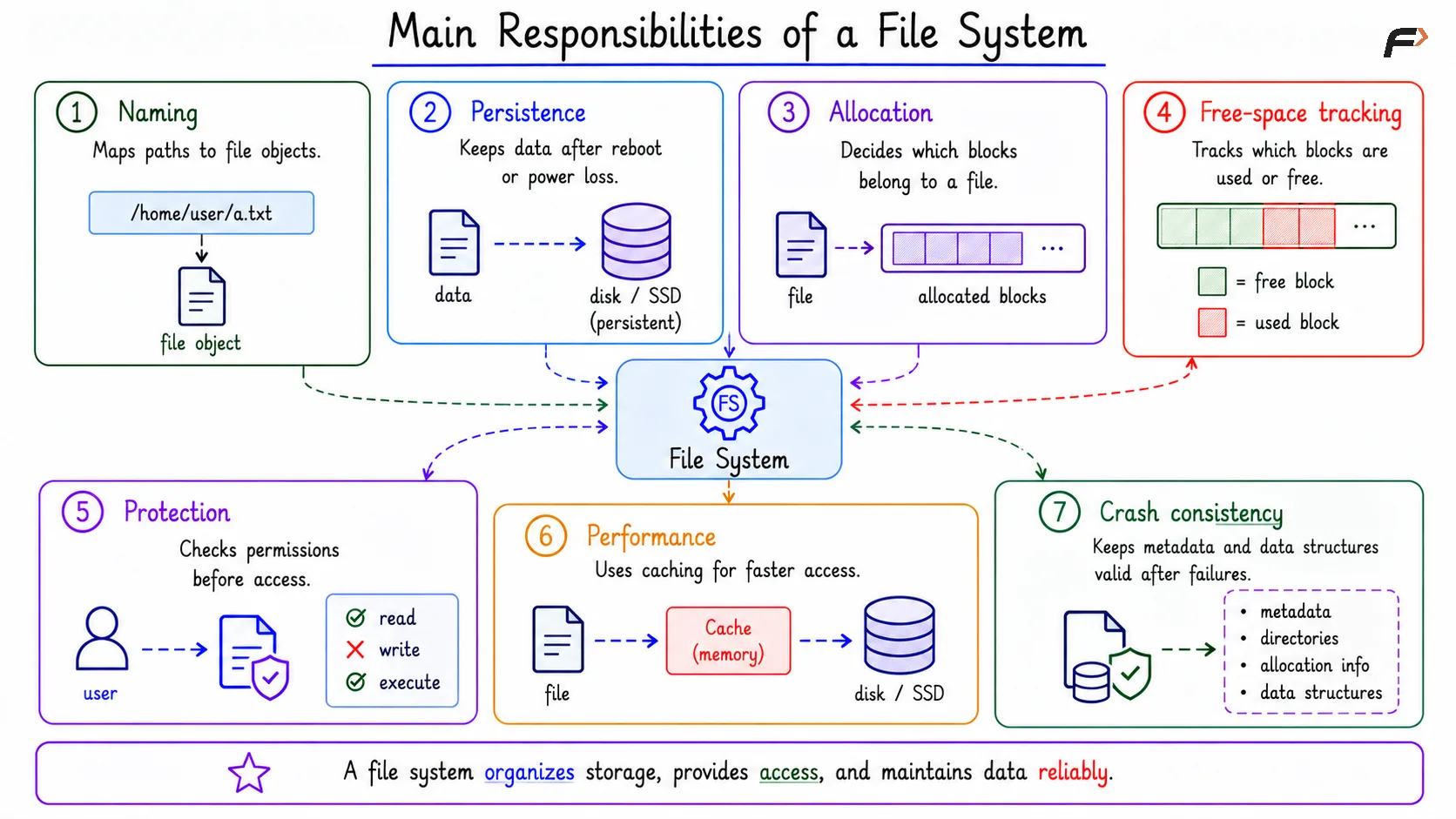
Main Responsibilities of a File System
Where RAM Fits In
File access does not always go directly from an application to the disk. The operating system keeps active file-system information in RAM to improve speed. Common in-memory structures include:
File descriptor table: Stores per-process handles for open files.
Open-file entry: Stores state such as current offset, access mode, and file status flags.
Cached metadata: Keeps active inode or file information in memory.
The durable copy of file data and metadata lives on persistent storage, but RAM helps file operations run faster.
File Descriptor
A file descriptor is a small integer handle used by a process to access an open file. For example, a program may open log.txt and receive descriptor 3.
Later, when the program calls write(3, data), the kernel uses descriptor 3 to find the corresponding open-file entry. The descriptor is not the file itself; it is a process-level handle that points the kernel toward the file’s open state.
Writing to a File
A file write usually passes through kernel structures and memory caches before becoming durable on storage. The basic flow is:
The application calls
write(fd, data).The kernel uses
fdto find the open-file entry.The open-file entry gives the current offset and metadata pointer.
If needed, the file system allocates new storage blocks.
Data and metadata are updated in RAM first.
Dirty data and metadata are later written back to disk or SSD.
A successful write() often means the OS has accepted the data into its file-system path. It does not always mean the data is already permanently stored; durability depends on flushing, journaling, or synchronization rules.
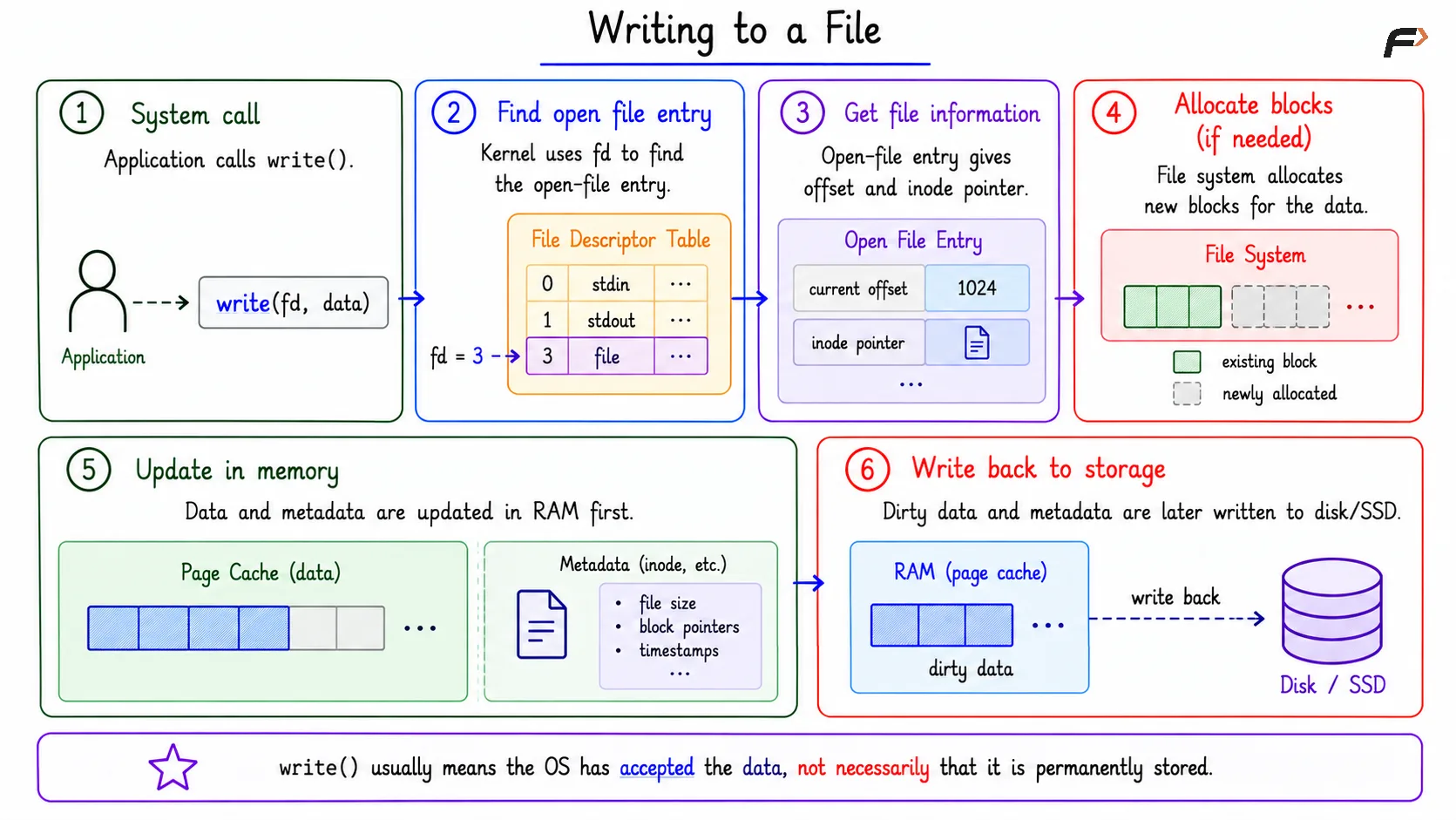
Writing to a File
Why Applications Should Not Manage Blocks Directly
If every application managed storage blocks on its own, the system would become unsafe and difficult to maintain. A buggy application could overwrite another program’s data, and every program would need to solve naming, allocation, permissions, and recovery separately.
The file system centralizes these responsibilities. It gives applications a common interface while the operating system enforces structure, ownership, and safety.
Summary
A file system turns raw persistent storage into usable files, directories, paths, permissions, metadata, and block mappings. It hides low-level storage details so users and applications can work with meaningful names instead of raw blocks.
It also manages allocation, free space, access control, caching, and crash consistency. RAM improves file-system performance through descriptors, open-file entries, cached metadata, and file-data caches, while SSDs or disks hold the durable copy.
Be the first to add a comment.