Introduction
File permissions are a file-system protection mechanism. They control whether a process can read, modify, execute, list, create, delete, or traverse files and directories.
The operating system acts as the checkpoint. When a process requests access, the OS checks the file or directory permissions before allowing or denying the operation.
Why File Permissions Are Needed
Files can store private data, logs, credentials, application data, and system binaries. Without permission checks, one user or process could freely read, overwrite, or delete another user’s important files.
The basic access flow is straightforward: the process requests access to a file, the OS checks whether the process has the required permissions, and then the OS either allows the operation or denies it based on the permission rules.
Permissions make the file system safer by separating users, protecting system files, and limiting what each process can do.
Basic Unix Permission Model
The Unix-like permission model has two main parts:
Classes: Owner, group, and others.
Actions: Read, write, and execute.
A permission string commonly has ten characters. The first character shows file type, and the next nine characters show permissions. Example: -rwxr-x---
Here, - means regular file. The permission part is split into three triplets: rwx | r-x | ---
Class | Permission | Meaning |
|---|---|---|
Owner |
| Can read, write, and execute |
Group |
| Can read and execute |
Others |
| No permission |
The order is always read, write, execute. If a permission is missing, a dash appears in that position.
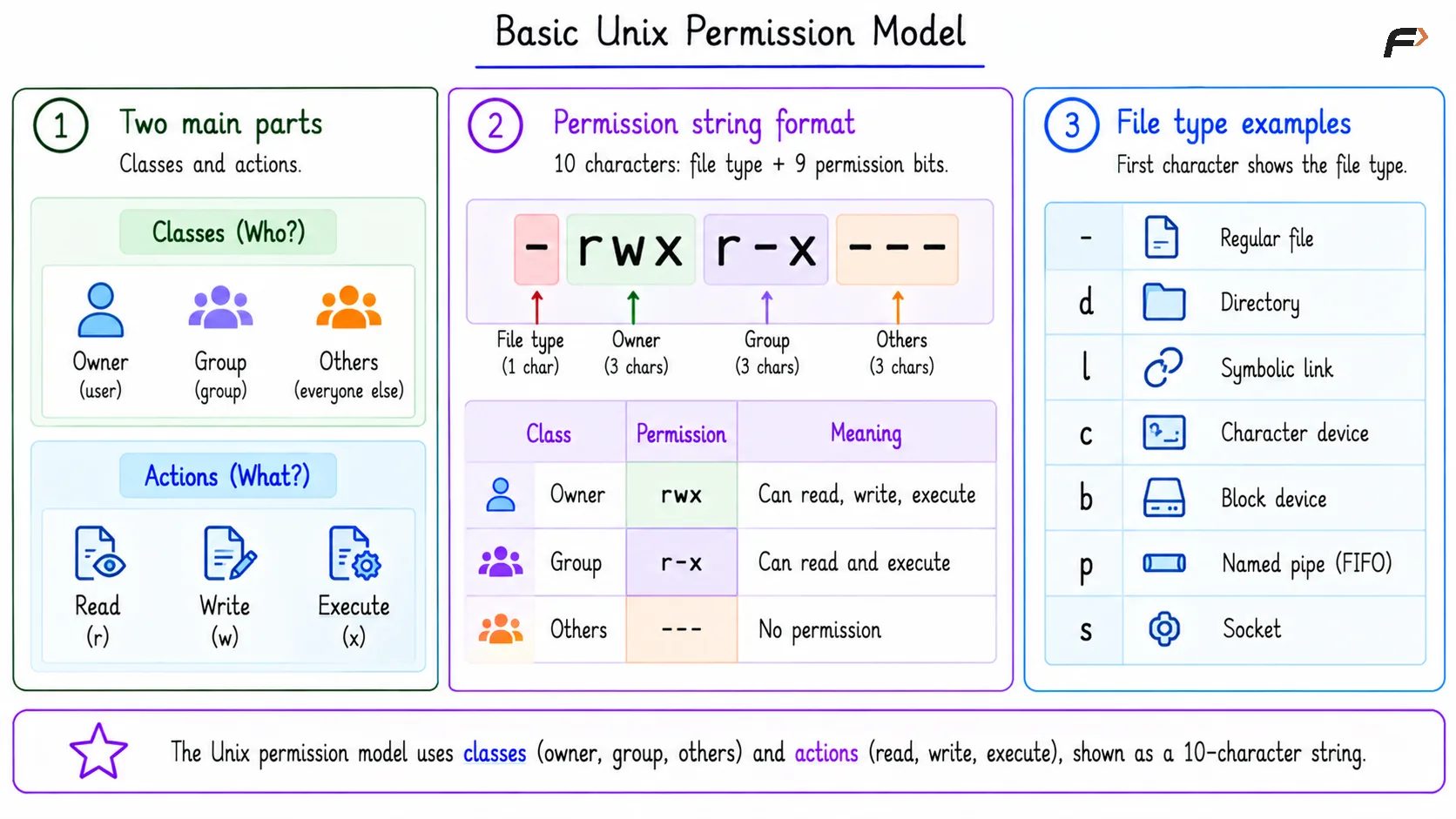
Basic Unix Permission Model
Numeric Permission Form
Permissions can also be written in numeric form. Each permission has a value:
Permission | Value |
|---|---|
Read | 4 |
Write | 2 |
Execute | 1 |
For -rwxr-x---:
Owner:
rwx = 4 + 2 + 1 = 7Group:
r-x = 4 + 0 + 1 = 5Others:
--- = 0
So the numeric permission is 750.
File Permissions vs Directory Permissions
The same r, w, and x letters are used for files and directories, but their meanings change.
Permission | On Regular File | On Directory |
|---|---|---|
| Read file contents | List names inside the directory |
| Modify file contents | Create, delete, or rename entries |
| Execute as a program/script | Traverse or search during path lookup |
The directory execute bit is especially important. It does not mean “run the directory”; it means the process can pass through that directory while resolving a path.
Path Lookup and Permission Checking
To access a file through a path, the OS must first traverse each directory in the path to locate the target file. For example, for /home/striver/code/main.cpp, the OS follows the path / => home => striver => code and then reaches the main.cpp file.
Each directory in this path prefix needs execute or search permission. After reaching the final file, the OS checks the requested operation on main.cpp.
Read-open: Final file needs
r.Write-open: Final file needs
w.Execution: Final file needs
x.
So a readable file may still be inaccessible if one of its parent directories does not allow traversal.
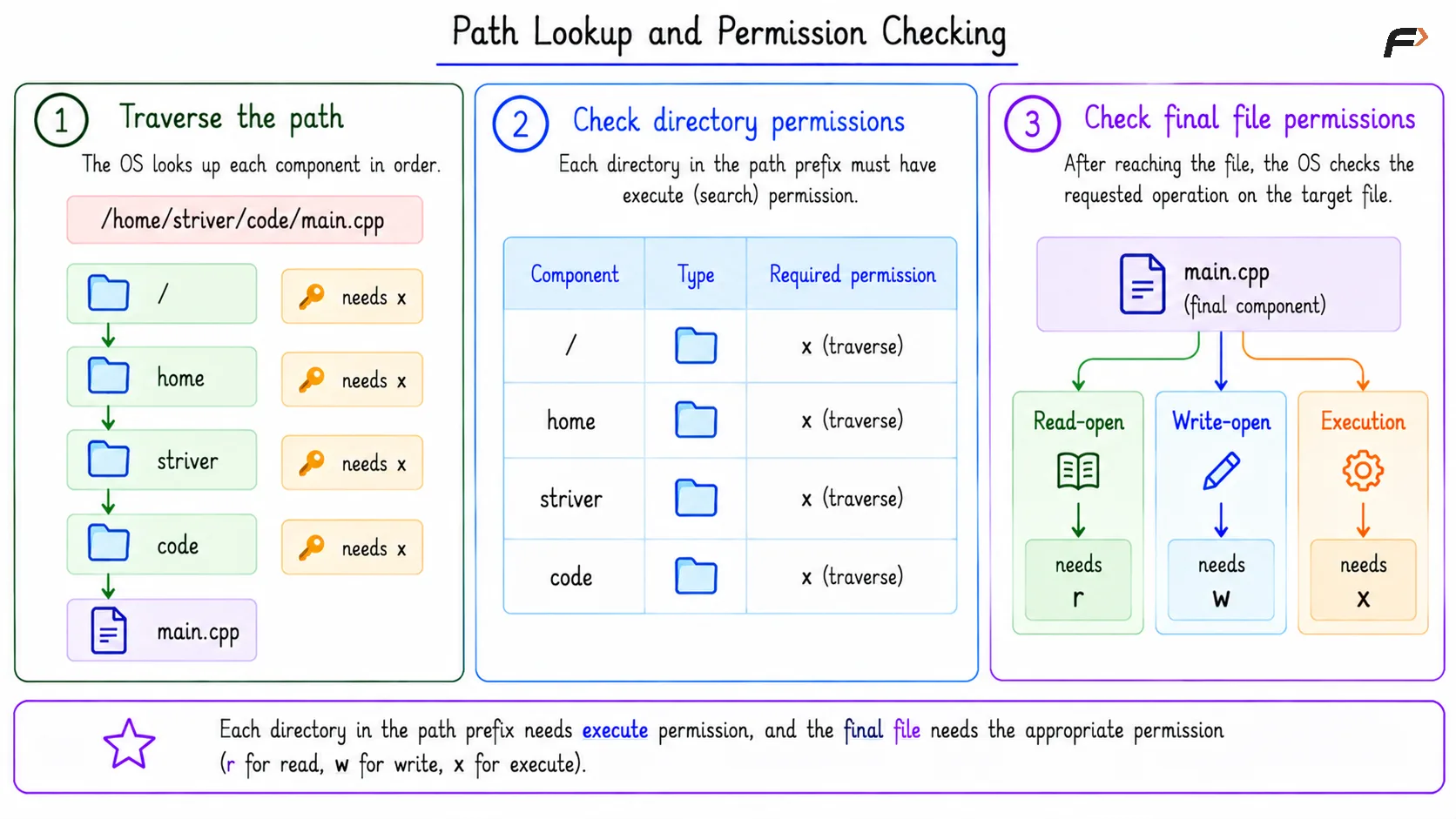
Path Lookup and Permission Checking
What Are ACLs?
ACL stands for Access Control List. It extends the basic owner-group-others permission model by allowing more specific rules for selected users or groups.
Basic permissions provide only three broad classes: owner | group | others
An ACL can express rules such as:
user:alice:readuser:bob:read,writegroup:backend:read
This is useful when the simple model is too coarse. For example, a file may need to be readable by one specific user without giving the same permission to the entire group or to all others.
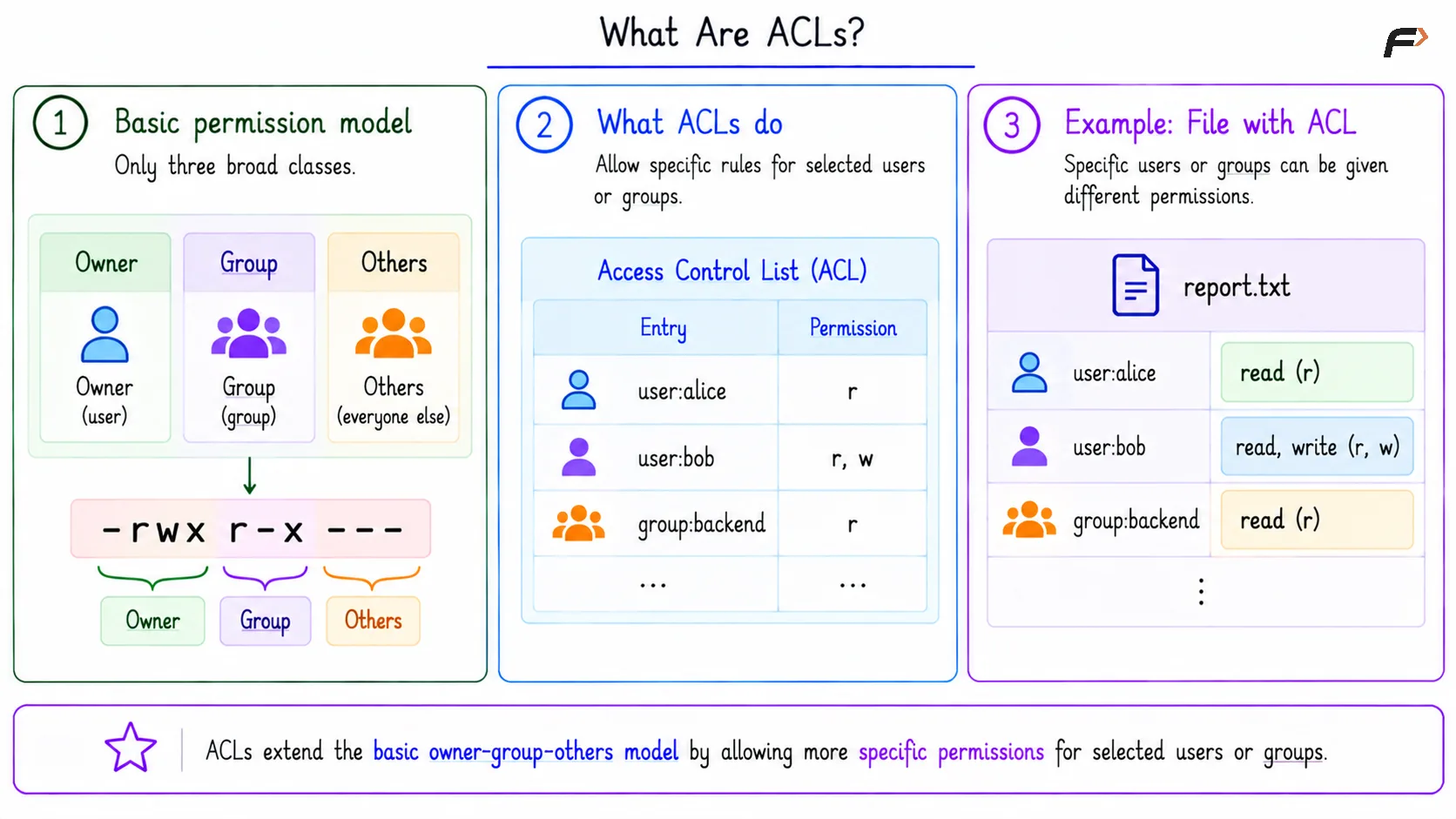
What Are ACLs?
Permissions vs ACLs
Point | Basic Permissions | ACL |
|---|---|---|
Main structure | Owner, group, others | Specific users and groups |
Permission style |
| Extra access entries |
Best for | Simple access control | Fine-grained access control |
Metadata role | Stored with file metadata | Stored as extended permission metadata |
Example |
|
|
ACLs do not replace the idea of permission checking. They give the OS a richer set of rules to use when deciding whether access should be allowed.
Summary
File permissions protect files and directories by controlling read, write, and execute access. In Unix-like systems, permissions are commonly organized as owner, group, and others, with strings like -rwxr-x--- and numeric forms like 750.
ACLs extend basic permissions by allowing access rules for specific users or groups. This makes them useful when owner-group-others is not detailed enough for real file-system protection needs.
Be the first to add a comment.