Introduction
Directory structure is the naming design of a file system. It decides how files and directories are arranged, how names are separated, and how paths lead to file-system objects.
Without directory structure, all files would sit in one flat list. That would create naming conflicts, messy lookup, and poor organization, especially in multi-user systems.
Why Directory Structure Matters
A directory maps names to file-system objects. Directory structure decides how those directories are arranged inside the file system.
If every file lived in one global list, names like notes.txt, data.csv, or report.pdf would collide easily. Different users and projects often need the same filenames for different content.
Directories solve this by creating separate naming areas. For example, work/notes.txt and personal/notes.txt can both exist because their full paths are different.
Single-Level Directory
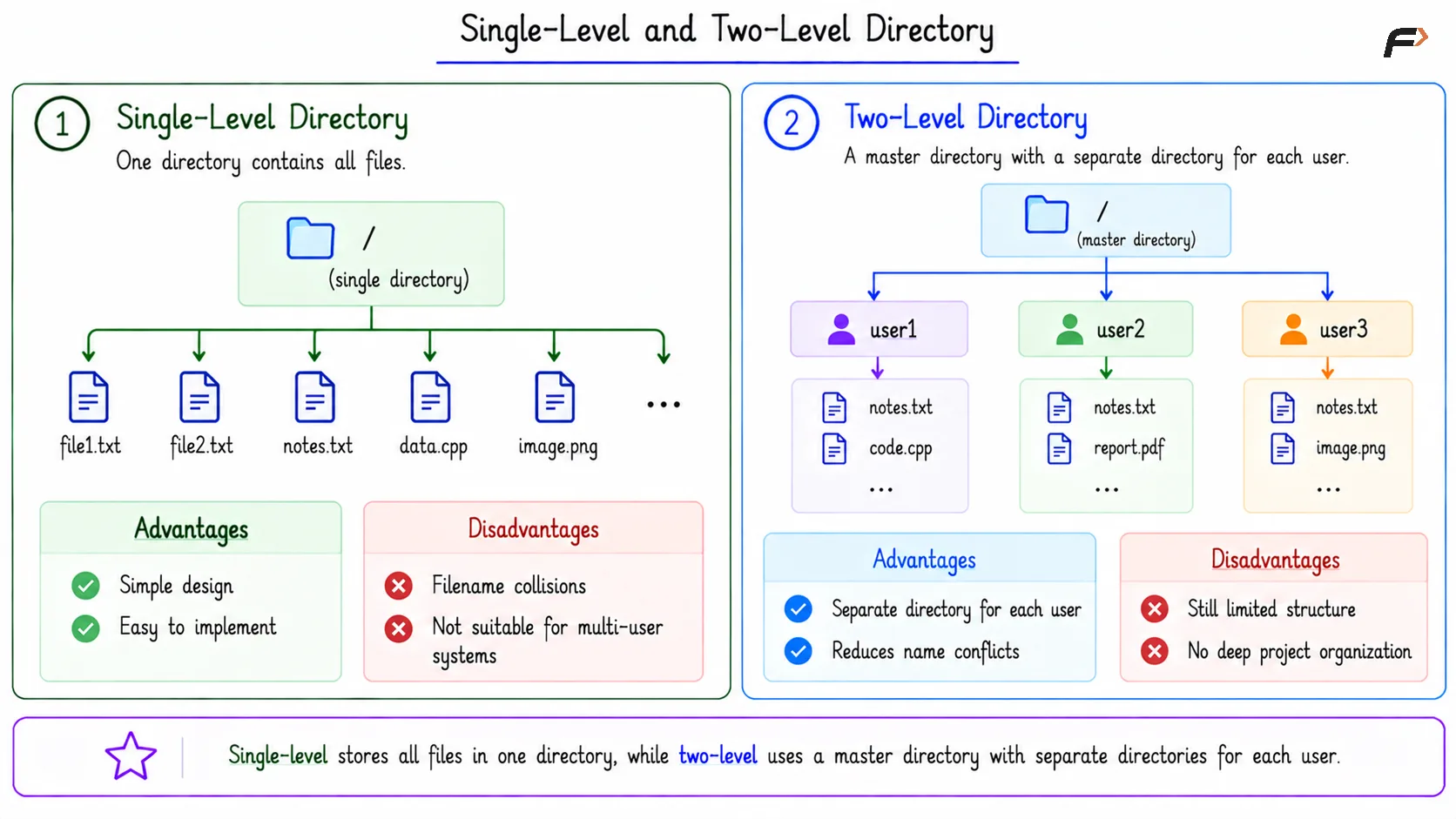
In a single-level directory structure, one directory contains all files. There are no subdirectories or separate user areas.
This model is simple, but it does not scale well.
Main idea: All files are stored in one directory.
Strength: Easy to implement and understand.
Weakness: Filename collisions are common.
Problem in multi-user systems: Different users cannot naturally separate their files.
Single-level directories are useful mainly for understanding the simplest possible file-system naming model.
Single-Level and Two-Level Directory
Two-Level Directory
In a two-level directory structure, there is a master directory, and each user gets a separate user directory. This reduces name conflicts because two users can have files with the same name inside their own directories.
For example, /user1/notes.txt and /user2/notes.txt can both exist with the same filename because they belong to different user directories. The separate directories allow each user to maintain their own files without causing naming conflicts.
However, this model is still limited because it does not support deep project-based organization inside each user area.
Tree-Structured Directory
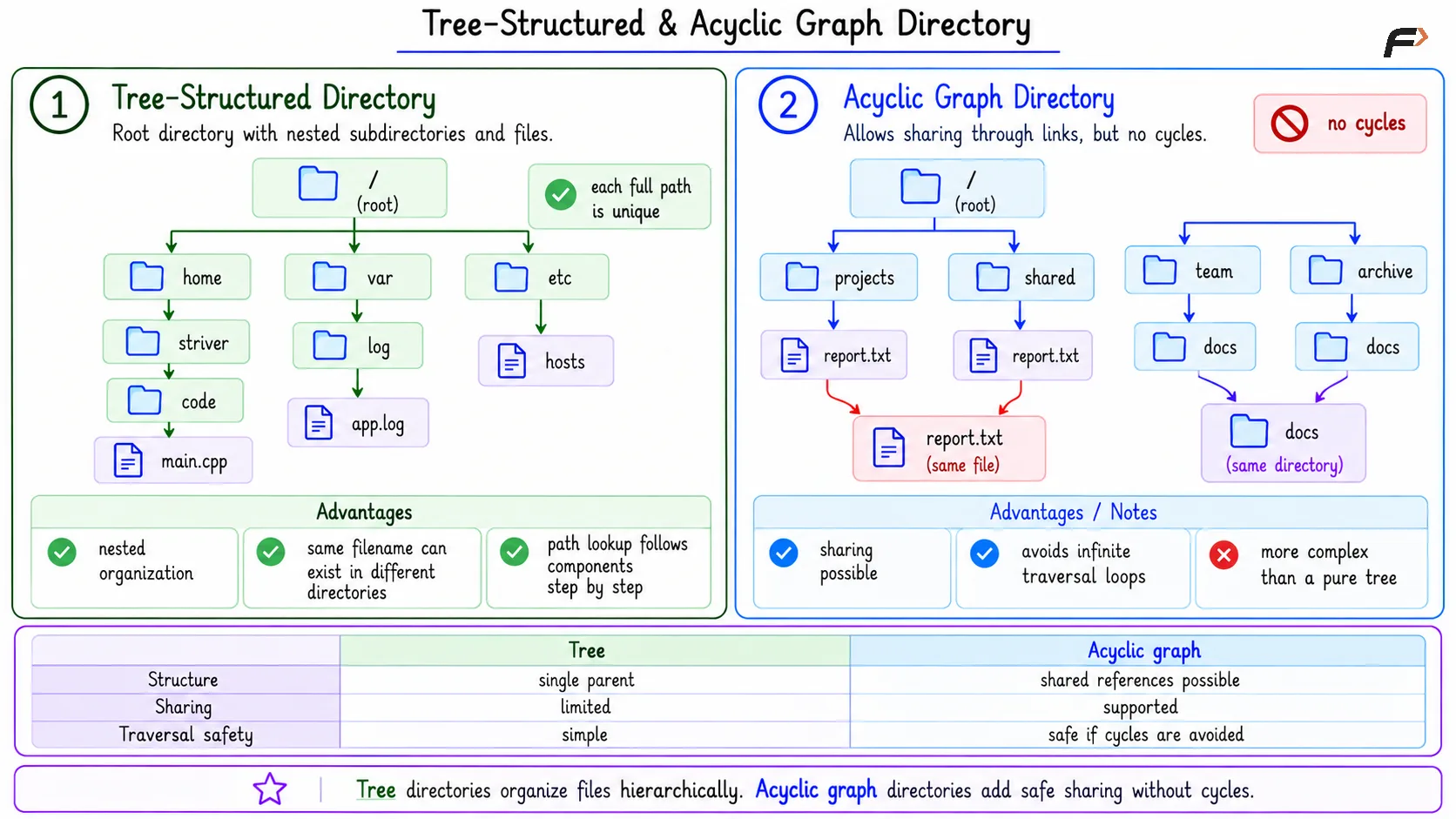
A tree-structured directory allows directories to contain both files and subdirectories. The hierarchy begins from a root directory and grows into branches. This is the common model used in most modern operating systems.
For example, /home/striver/code/main.cpp, /var/log/app.log, and /etc/hosts are all paths in a tree-structured directory. Each path starts from the root directory / and follows a hierarchy of directories until it reaches the target file.
Tree structure is useful because it supports nested organization. Users can group files by project, purpose, application, or system role. The same filename can also appear in different directories because each full path is unique.
During path lookup, the OS follows directory entries step by step from one component to the next.
Tree-Structured & Acyclic Graph Directory
Acyclic Graph Directory
An acyclic graph directory allows sharing through links, but avoids cycles. This means a file or directory can be reachable from more than one place without creating a loop.
This model is more flexible than a pure tree because shared content does not need to be copied.
Sharing is possible: Multiple paths can refer to shared content.
Cycles are avoided: Traversal does not loop back forever.
Management is harder than a tree: The OS must handle shared references carefully.
Acyclic graph structures are useful for understanding how links can extend a tree while still keeping traversal safe.
General Graph Directory
A general graph directory allows cycles. This gives more flexibility, but it also creates more complexity. A cycle means traversal can return to a directory already visited. If a program follows links blindly, it may loop forever.
Because of this, general graph directories need extra management, such as cycle detection or careful traversal rules. They are mainly important as a comparison point: more flexibility can also mean harder file-system management.
Mount Points
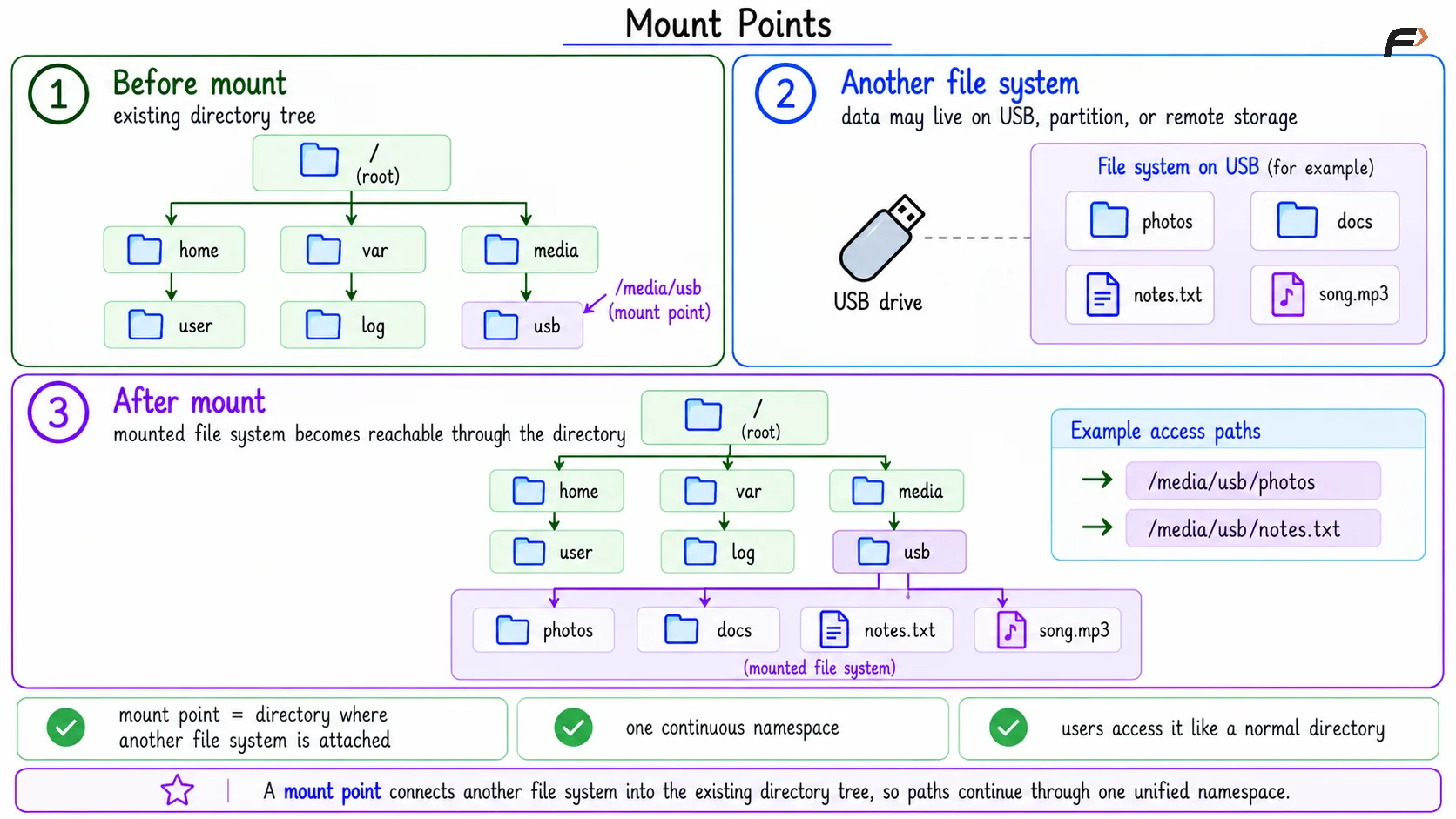
A mount point is a directory in the existing directory tree where another file system is connected. For example, when a USB drive is mounted at /media/usb, users can access its files through that path just like any other directory. However, the actual data may be stored on a USB drive, a separate disk partition, or even remote storage.
The basic idea is that the system starts with one root namespace, attaches another file system at a mount point, and then allows paths to continue into that file system through the mounted directory.
Mount points help the OS present one continuous namespace even when data is stored across different devices or file systems.
Mount Points
Summary
Directory structure is the way an operating system organizes filenames, directories, paths, and file-system objects. It prevents everything from becoming one flat list and helps users organize files by user, project, purpose, or device.
Single-level and two-level structures are simple but limited. Tree-structured directories are the common modern model, while acyclic graphs, general graphs, and mount points explain sharing, cycles, and how multiple file systems can appear under one namespace.
Be the first to add a comment.