Introduction
Debugging concurrency bugs starts with symptoms, not labels. A system may show hanging requests, blocked threads, high CPU usage, repeated retries, or one task falling behind while others continue.
The main goal is to understand ownership, waiting, and progress. Once those relations are clear, bugs like deadlock, livelock, starvation, and priority inversion become much easier to separate.
What Debugging Concurrency Bugs Means
Debugging concurrency bugs means identifying which execution flows are blocked, running, retrying, or unfairly delayed. After that, the behavior must be mapped back to shared resources, locks, scheduling, and waiting relationships.
The basic flow is:
Diagnose: Start from the symptom, identify a possible progress issue, and check waiting and resource ownership.
Recover: Inspect the code to find the cause, then perform recovery carefully to avoid making the problem worse.
This order matters. If the system is only restarted without understanding who was waiting for whom, the service may recover temporarily while the actual bug remains.
Start From Symptoms
Different symptoms point toward different concurrency problems. The first step is to observe what the system is doing, not to guess the bug name immediately.
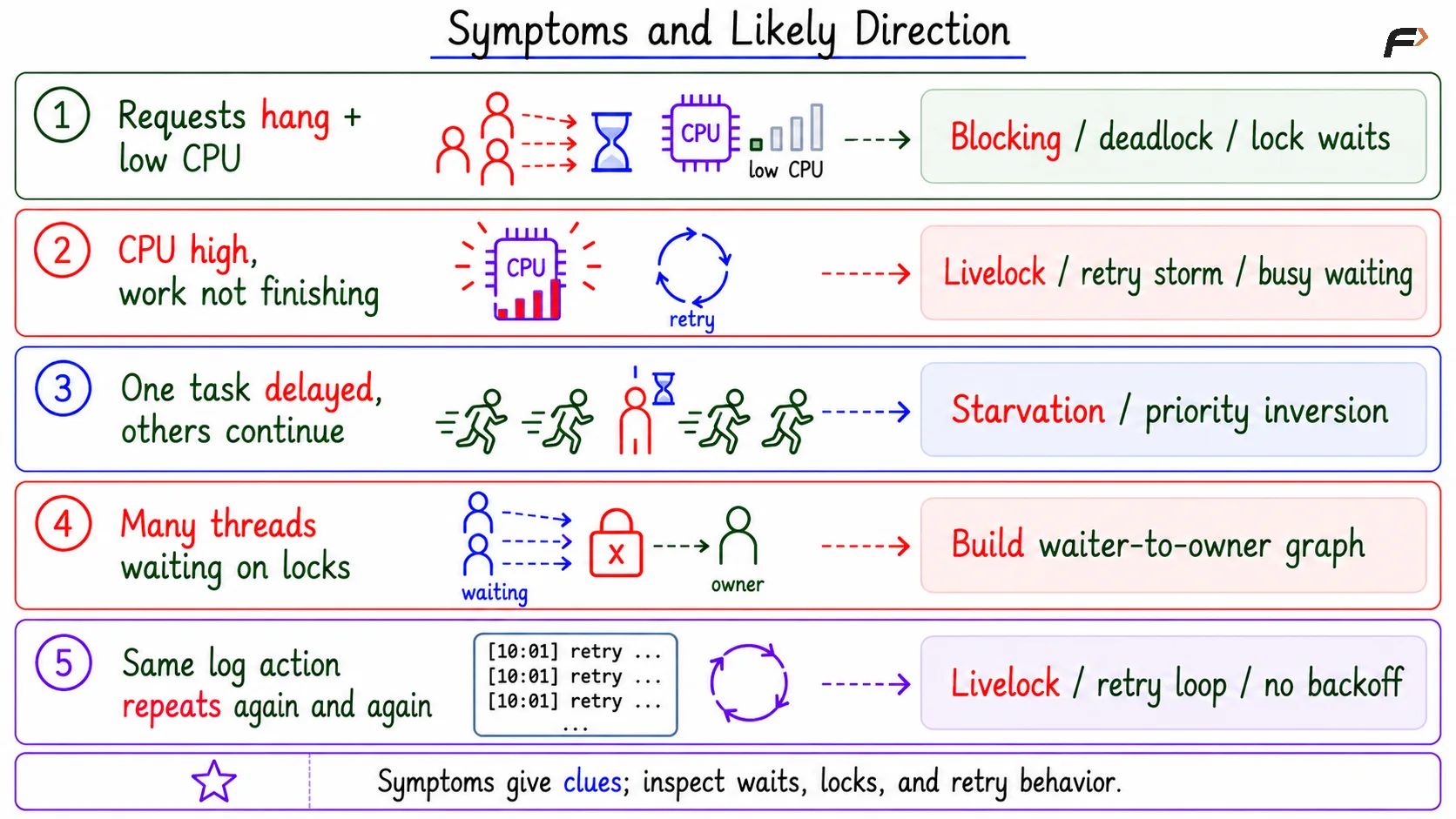
Symptom and Likely Direction
This gives a practical starting point. Low CPU with many waits suggests blocked progress, while high CPU with no useful completion suggests active but ineffective work.
Deadlock Debugging Flow
For deadlock-like symptoms, the goal is to find a waiting cycle. This is similar to building a wait-for graph, but from real debugging evidence such as thread stacks, lock owners, and blocked states.
A compact deadlock debugging flow is:
Find blocked threads: Identify which threads or processes are waiting.
Record the wait: Note the lock, resource, queue, or event each one is waiting for.
Record the owner: Find who currently owns or controls that resource.
Build waiter-to-owner edges: If T1 waits for a resource owned by T2, draw
T1 => T2.Check for a cycle: A cycle strongly suggests deadlock.
Inspect the code path: Look at how the involved locks or resources were acquired.
For example, if T1 waits for T2, and T2 waits for T1, the system has a circular wait pattern. The next step is to inspect the code paths that created that cycle.
What to Inspect in Code
Concurrency bugs often hide around resource ownership and release paths. After classifying the symptom, inspect the code that acquires, holds, waits on, releases, and retries around shared resources.
Important checks include:
Inconsistent lock order: Different parts of the code acquire the same locks in different orders.
Waiting while holding a lock: A thread holds one resource while waiting for another event or resource.
External call inside a critical section: A slow service call or I/O operation delays all threads needing that lock.
Callback while holding a lock: Unknown callback code may block, re-enter, or acquire another lock.
Retry loop without backoff: Immediate repeated retries can create livelock or high CPU usage.
The aim is not only to find where the program stopped, but also why that resource could not be released or acquired.
Strong Debugging Workflow
A strong debugging workflow is disciplined: collect evidence first, then classify the progress failure, then recover carefully if needed.
A useful sequence is:
Capture thread stacks: See where threads are blocked or running.
Identify blocked and active threads: Separate waiting, running, retrying, and idle flows.
Map waiter to owner: Find who owns the needed resource.
Inspect lock order and release paths: Confirm the code-level cause.
Check retry and fairness behavior: Look for livelock, starvation, or priority inversion.
Recover carefully: Restore service without corrupting state or hiding the root cause.
This keeps debugging grounded in evidence. It also prevents the common mistake of treating every hang as a deadlock.
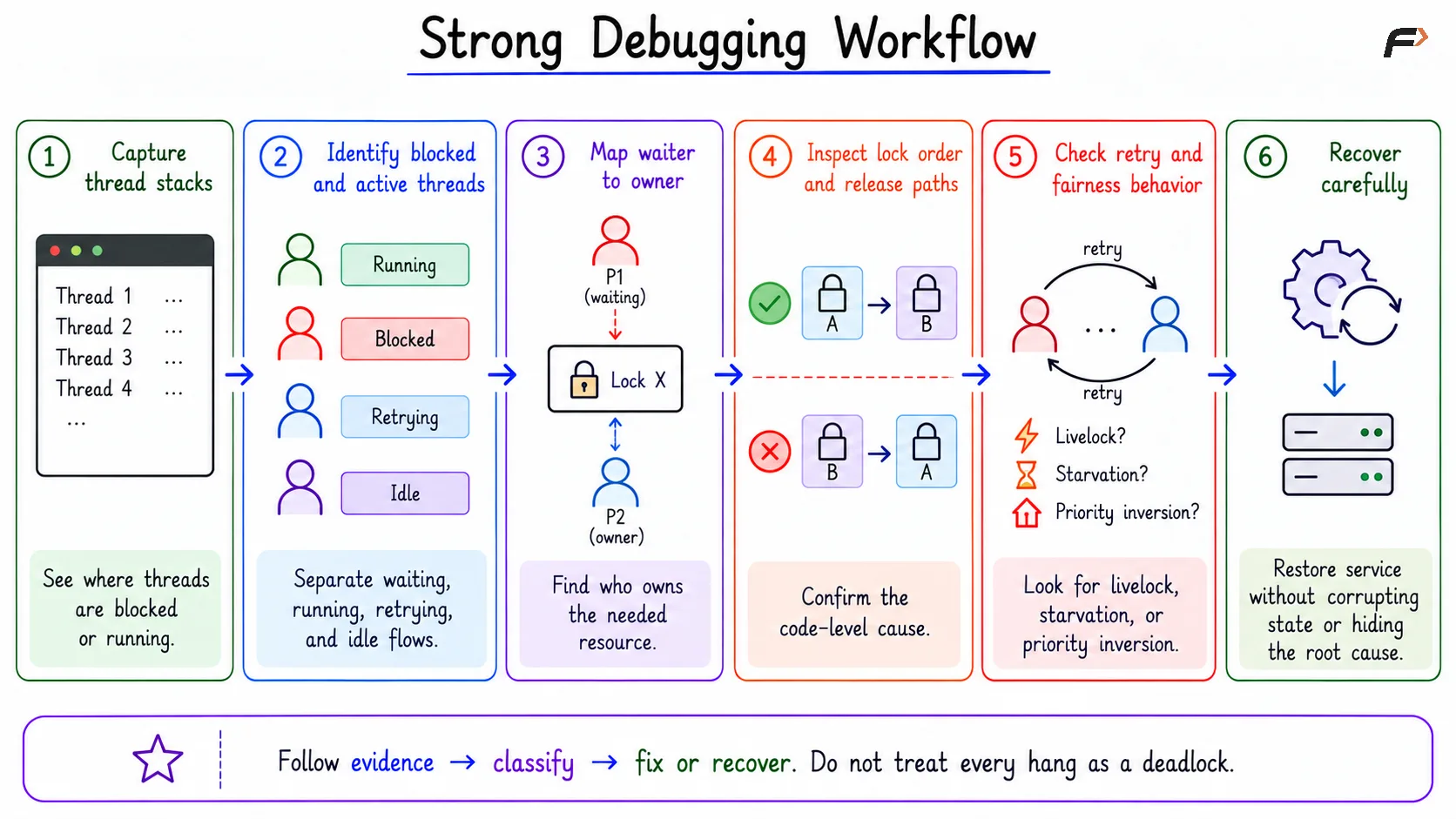
Strong Debugging Workflow
Diagnosis Versus Recovery
Diagnosis and recovery are related, but they are not the same. Diagnosis explains the bug; recovery restores service.
Killing a process, restarting a service, or timing out an operation may reduce immediate impact. But those actions do not prove why the bug happened. The same issue can return if the wait relation, lock order, or unfair policy is not fixed.
Recovery should also respect system state. If a process is terminated while holding resources or modifying data, rollback or cleanup may be needed to avoid inconsistent state.
Summary
Debugging concurrency bugs means moving from symptoms to ownership and waiting. Hanging requests, blocked threads, high CPU, repeated retries, and unfair delays each point toward a different kind of progress failure.
A clean workflow is to capture evidence, classify the symptom, build the wait relation, inspect lock and release paths, and then recover carefully. The best debugging does not just restart the system; it explains why progress failed.
Be the first to add a comment.