Introduction
Deadlock detection is used when a system does not prevent or avoid every possible deadlock. Instead, it allows normal resource allocation and checks later whether some processes have become permanently stuck.
This approach is reactive. It does not stop deadlock before it forms, so detection must usually be followed by recovery such as termination, rollback, or resource preemption.
What Deadlock Detection Means
Deadlock detection is a strategy where the system checks whether a deadlock has already occurred. It is useful when prevention is too restrictive or avoidance is too costly for every request.
Detection alone is not enough. It can identify the deadlocked processes, but the system still needs a recovery method to break the deadlock and restore progress.
Single-Instance Resource Detection
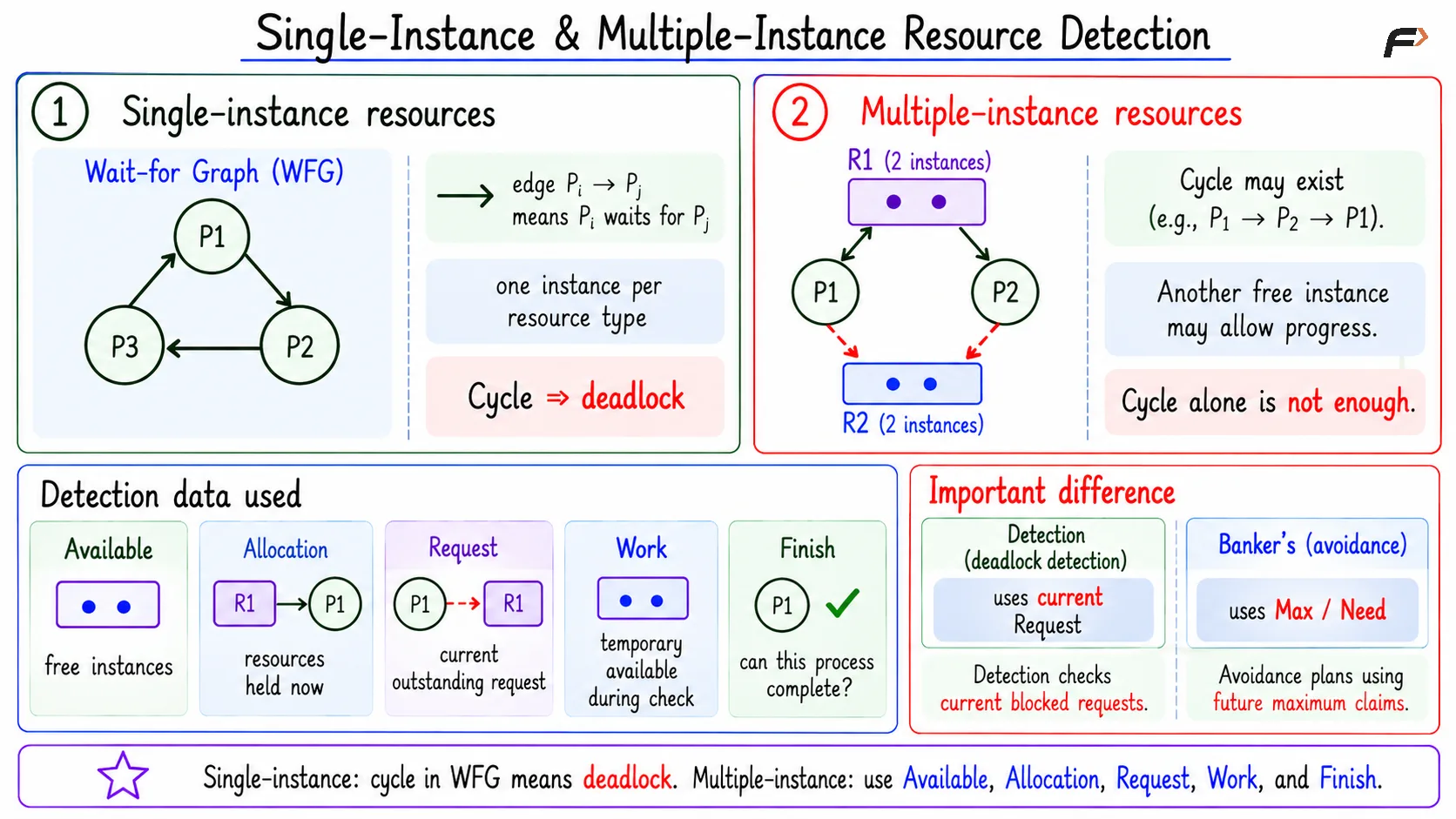
If each resource type has only one instance, deadlock detection can use a wait-for graph. A wait-for graph contains only processes, and an edge shows that one process is waiting for another.
An edge P1 => P2 means P1 is waiting for a resource currently held by P2.
For example: P1 => P2 => P3 => P1
This is a directed cycle. Each process in the cycle waits for another process in the same cycle. When resources have single instances, a cycle in the wait-for graph indicates deadlock.
Single-Instance & Multiple-Instance Resource Detection
Multiple-Instance Resource Detection
When resource types have multiple instances, cycle detection alone is not enough. A cycle may exist, but another available instance might still allow progress.
For multiple-instance resources, the detection algorithm uses:
Available: Free instances of each resource type.
Allocation: Resources currently held by each process.
Request: Current outstanding request of each process.
Work: Temporary available resources used during the check.
Finish: Whether a process can be treated as completed in the detection test.
This algorithm uses current Request, not maximum possible need. That is an important difference from Banker's Algorithm, which uses maximum claims for avoidance.
Detection Numerical Example
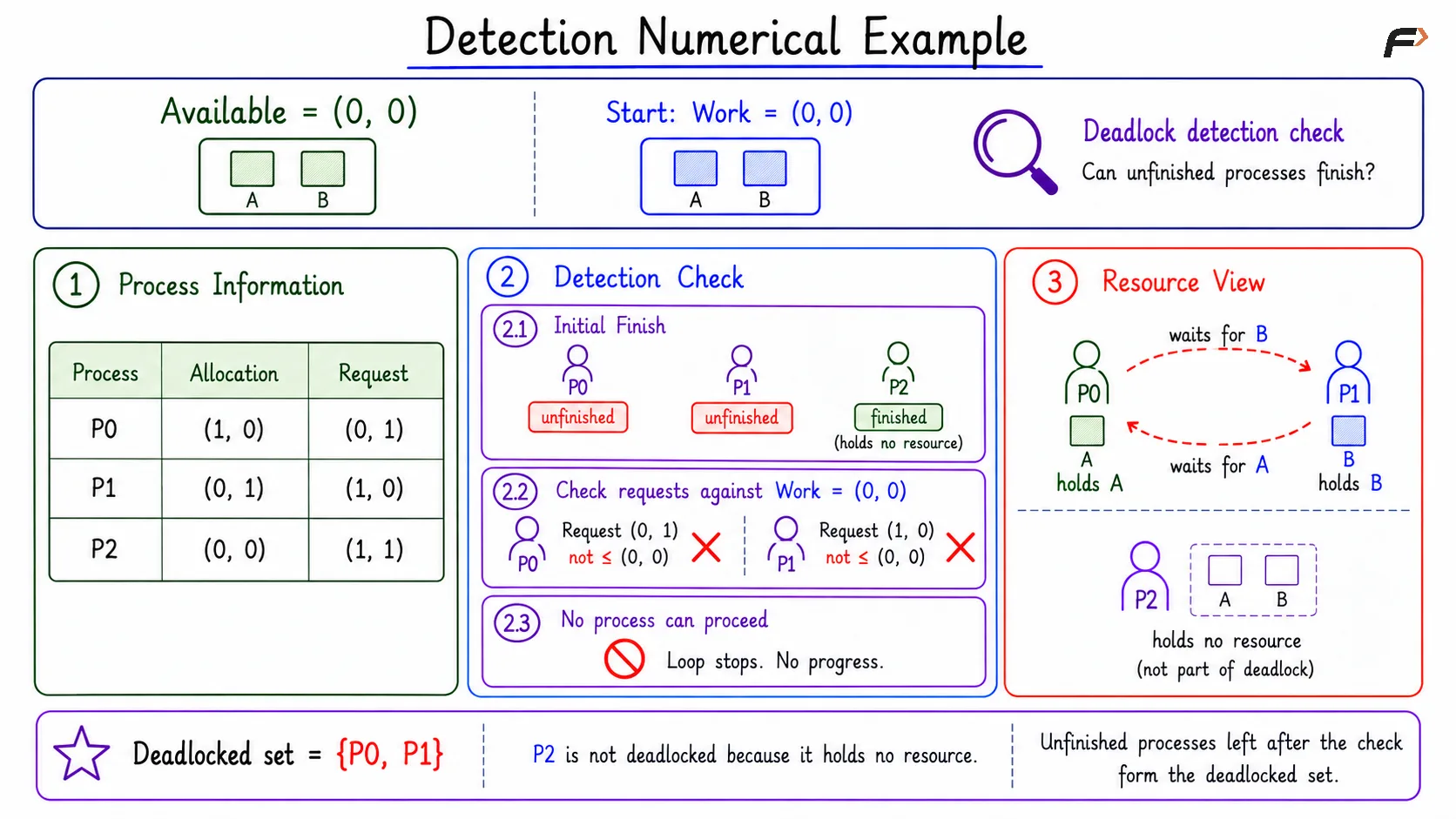
Suppose: Available = (0, 0)
Process | Allocation | Request |
|---|---|---|
P0 | (1, 0) | (0, 1) |
P1 | (0, 1) | (1, 0) |
P2 | (0, 0) | (1, 1) |
Start with Work = (0, 0). Since P0 and P1 hold resources, mark them unfinished. Since P2 holds no resource, mark it finished for detection.
Now check unfinished processes:
P0: Request
(0, 1)cannot be satisfied by Work(0, 0).P1: Request
(1, 0)cannot be satisfied by Work(0, 0).
No unfinished process can proceed, so the loop stops. P0 and P1 remain unfinished, so they form the deadlocked set.
P2 is not included in the deadlock because it holds no resource. It may be waiting, but it is not part of the circular hold-and-wait group.
Detection Numerical
Detection Frequency
Running deadlock detection after every request gives quick results, but it can be expensive. Running it rarely reduces overhead, but deadlocked processes may remain stuck for longer.
Common triggers include:
Periodic checks: Run detection after a fixed interval.
Timeouts: Check when a process waits too long.
Watchdogs: Monitor stuck components and trigger detection.
Throughput drop: Detect when the system is doing much less useful work.
The system must balance detection cost against the cost of leaving processes stuck.
Summary
Deadlock detection allows normal resource allocation and checks later whether deadlock has occurred. It is reactive, so it must be paired with recovery to restore progress.
For single-instance resources, detection uses a wait-for graph and looks for cycles. For multiple-instance resources, the detection algorithm uses Available, Allocation, Request, Work, and Finish; processes left unfinished at the end form the deadlocked set.
Be the first to add a comment.