Introduction
CPU scheduling answers a simple but important question: when many processes are ready to run, which one should get the CPU next? This decision affects how fast programs finish and how responsive the system feels.
Before studying algorithms like FCFS, SJF, Round Robin, or Priority Scheduling, it is important to understand the basic terms, workload types, and metrics used to judge a schedule.
Core Idea of CPU Scheduling
In a multiprogramming operating system, several processes may be present in the ready queue at the same time. Since a single CPU core can run only one process at a time, the operating system needs a CPU scheduler to choose the next process.
A scheduler cannot make every metric perfect at once. For example, improving response time may require more frequent switching, which increases overhead. This is why different CPU scheduling algorithms are designed for different workloads and system goals.
What CPU Scheduling Tries to Balance
A good scheduling policy tries to keep the CPU busy while also giving processes a fair chance to run. The main goals are:
CPU utilization: Keep the CPU active instead of idle.
Throughput: Complete more processes per unit time.
Turnaround time: Reduce the total time from process arrival to completion.
Waiting time: Reduce the time spent waiting in the ready queue.
Response time: Reduce the delay before a process gets the CPU for the first time.
Fairness: Give processes a reasonable share of CPU time.
Starvation prevention: Avoid situations where a process waits indefinitely.
No scheduler is best for every situation. A batch system may care more about throughput, while an interactive system usually cares more about response time.
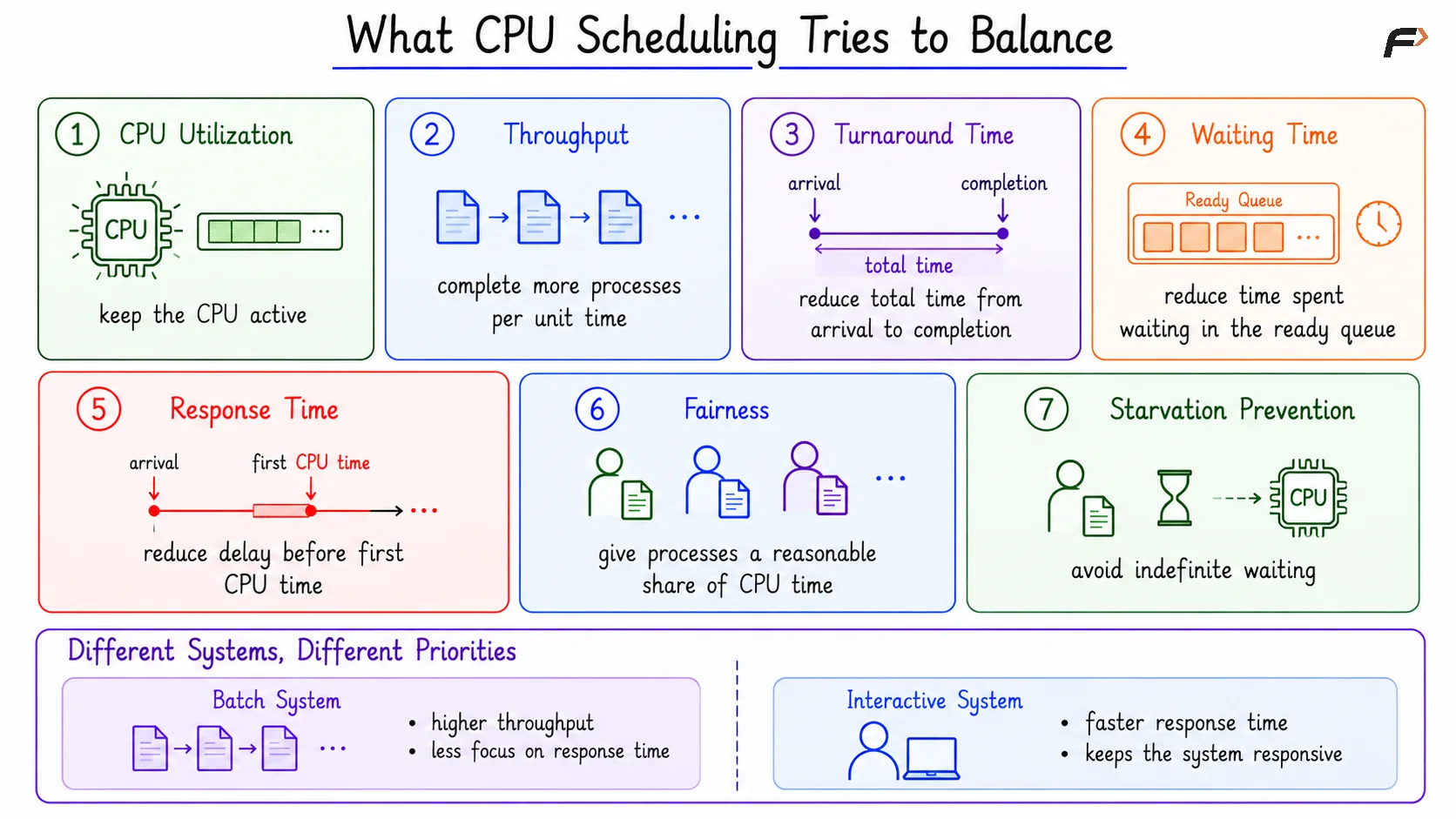
What CPU Scheduling Tries to Balance
Preemptive and Non-Preemptive Scheduling
CPU scheduling is commonly divided into two broad types: preemptive and non-preemptive scheduling.
Basis | Non-Preemptive Scheduling | Preemptive Scheduling |
|---|---|---|
CPU control | A running process keeps the CPU until it blocks, exits, or gives it up | The OS can interrupt a running process |
Overhead | Lower, because switching is less frequent | Higher, because context switching may happen often |
Responsiveness | Can be poor if one process runs for too long | Usually better for interactive systems |
Requirement | Simpler scheduling mechanism | Needs timer interrupts and context switching |
Examples | FCFS, non-preemptive SJF, HRRN | SRTF, Round Robin, preemptive priority, MLFQ |
Important Scheduling Metrics
Scheduling algorithms are compared using standard metrics. These values are often calculated from a Gantt chart.
Arrival Time (AT): Time at which the process enters the ready queue.
Burst Time (BT): Total CPU time required by the process.
Completion Time (CT): Time at which the process finishes execution.
Turnaround Time (TAT): Total time from arrival to completion, so
TAT = CT - AT.Waiting Time (WT): Total time spent waiting in the ready queue, so
WT = TAT - BT.Response Time (RT): Time from arrival until the process gets the CPU for the first time.
Throughput: Number of processes completed per unit time.
Completion time is a point on the timeline. Turnaround time, waiting time, response time, and burst time are durations.
Gantt Chart Example
A Gantt chart shows which process runs on the CPU during each time interval. Consider this single-core CPU schedule:
Time Interval | Running Process |
|---|---|
0 to 2 | P2 |
2 to 5 | P3 |
5 to 7 | P1 |
7 to 9 | P4 |
9 to 11 | P1 |
For process P1, assume:
Arrival time: 2
First CPU start: 5
Completion time: 11
CPU running intervals: 5 to 7 and 9 to 11
Now the main metrics are:
Metric | Calculation | Value |
|---|---|---|
Completion Time |
| 11 |
Turnaround Time |
| 9 |
Response Time |
| 3 |
Waiting Time |
| 5 |
Burst Time |
| 4 |
The key point is that response time counts only the wait before the first CPU allocation. Waiting time counts all waiting in the ready queue, including waiting again after preemption.
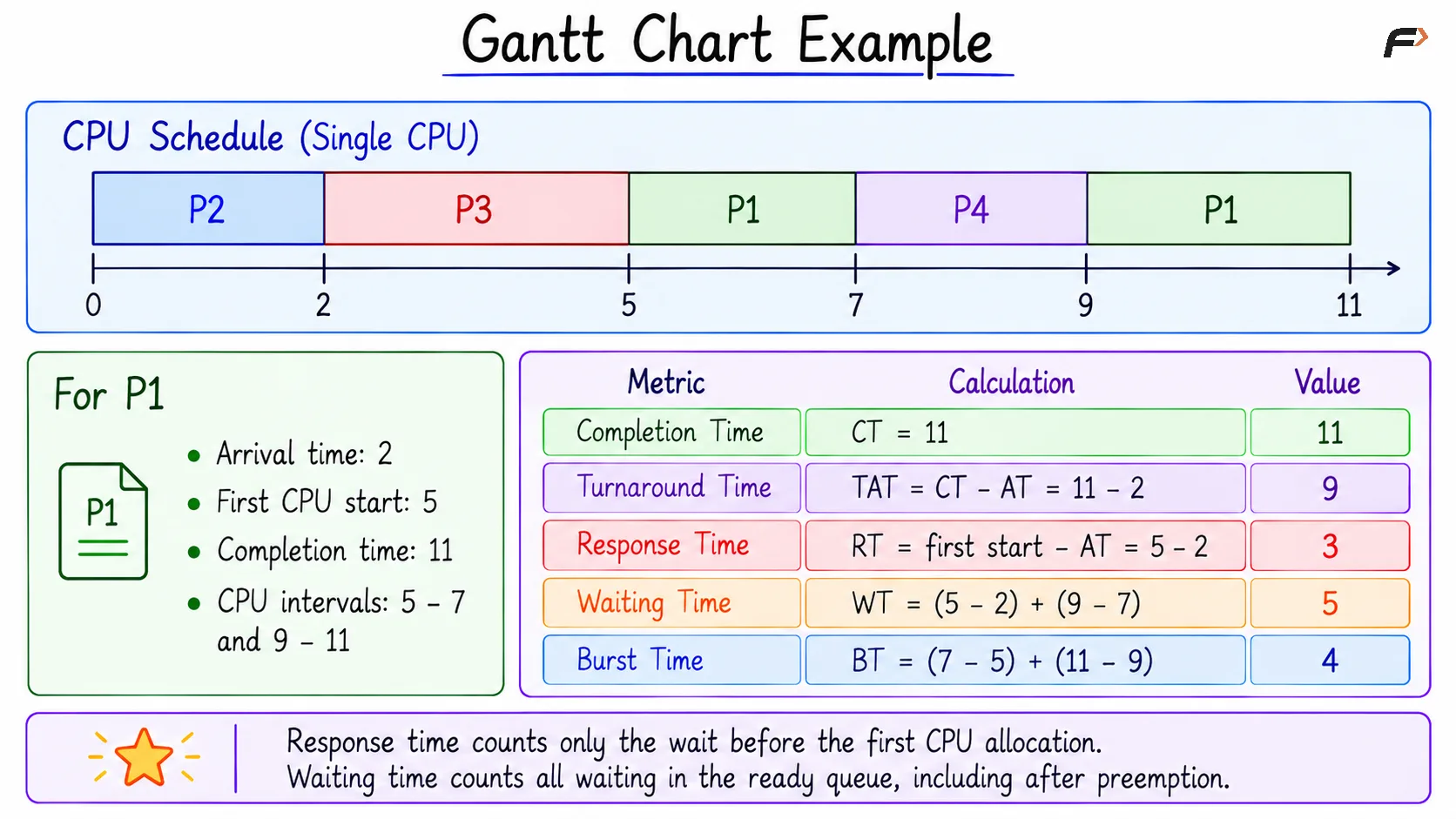
Gantt Chart Example
Why Metrics Can Conflict
Scheduling decisions usually involve tradeoffs. A scheduler that gives short jobs priority may reduce average waiting time, but long jobs may suffer if short jobs keep arriving. A scheduler that switches very frequently may improve response time, but too many context switches waste CPU time.
This is why scheduling algorithms are judged according to the workload and goal. Throughput, fairness, response time, and starvation prevention all matter, but their importance changes from one system to another.
Summary
CPU scheduling decides which ready process gets the CPU next. It uses the ready queue, scheduling policy, and system goals to balance CPU utilization, throughput, turnaround time, waiting time, response time, fairness, and starvation prevention.
Preemptive scheduling improves responsiveness but adds context-switching overhead. Non-preemptive scheduling is simpler but may increase waiting time. Gantt charts make scheduling metrics easier to understand because they show exactly when each process runs and waits.
Be the first to add a comment.