Introduction
Multicore scheduling is not only about deciding which task should run next. Once a system has multiple CPU cores, the operating system must also decide where that task should run.
This placement decision matters because different CPU choices can produce different performance. Cache warmth, CPU affinity, memory location, and NUMA effects all influence how efficiently a task runs.
Why Hardware Placement Matters
In a simple scheduling model, the scheduler mainly asks: which ready task should get CPU time? In a multicore system, it also asks: which core should run this task?
This matters because modern hardware has structure. CPU caches store recently used data, and NUMA systems may have memory that is closer to some CPUs than others.
Good placement can improve performance, but strict placement can also create imbalance. The scheduler must use available CPU capacity without destroying locality through unnecessary movement.
CPU Affinity
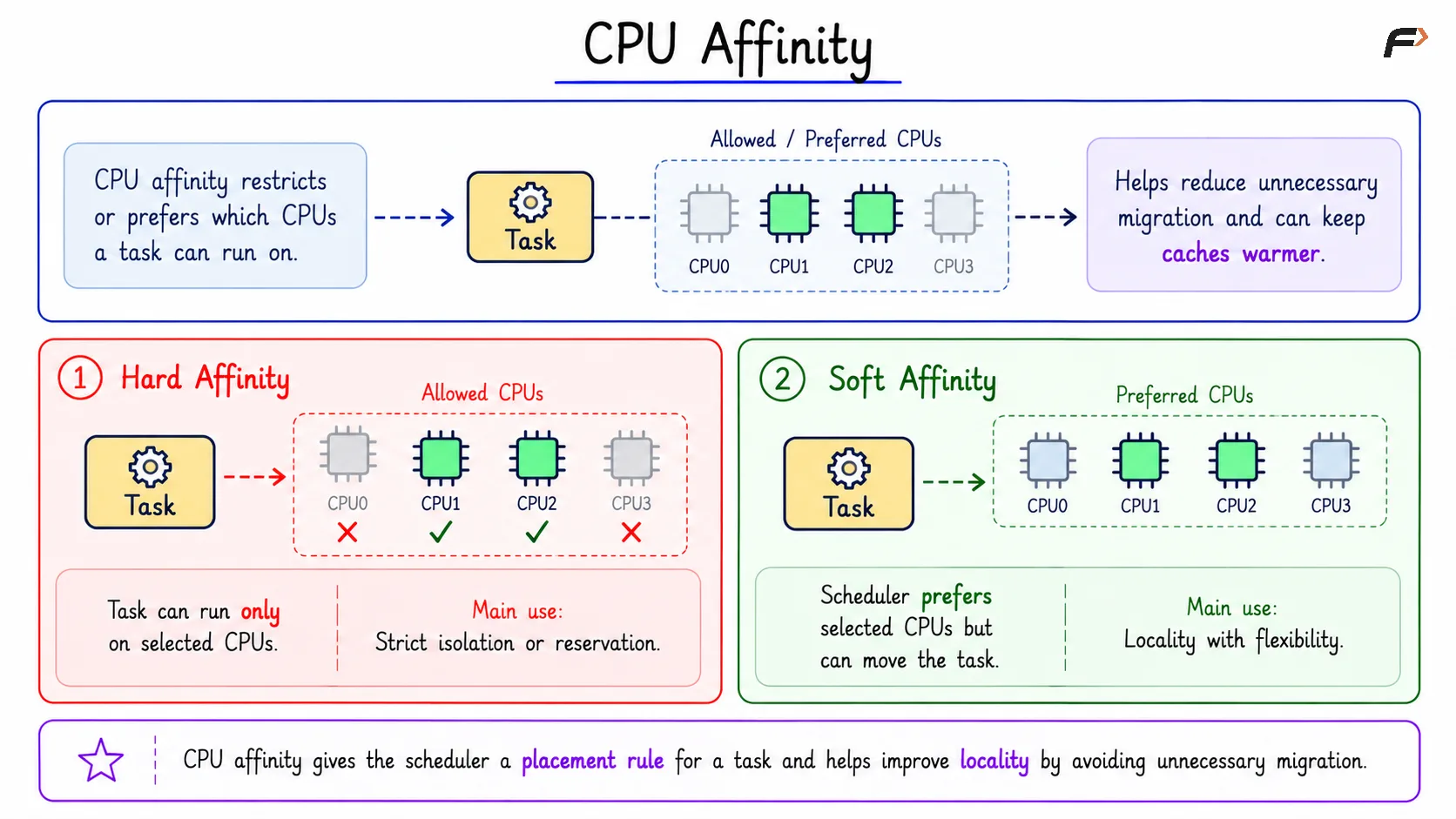
CPU affinity restricts or prefers which CPUs a task can run on. It gives the scheduler a placement rule for that task.
Affinity is useful because it can reduce unnecessary migration. If a task keeps running on the same CPU or CPU group, it may reuse warmer caches and stay closer to the memory it frequently accesses.
Type | Meaning | Main Use |
|---|---|---|
Hard affinity | Task can run only on selected CPUs | Strict isolation or reservation |
Soft affinity | Scheduler prefers selected CPUs but can move the task | Locality with flexibility |
Hard affinity is a strong rule. If a task is allowed only on CPU1 and CPU2, the scheduler cannot freely move it to CPU0 or CPU3 even if those CPUs are idle.
Soft affinity is more flexible. The scheduler tries to keep the task near its preferred CPU, but it can move the task if load balancing or availability makes movement useful.
CPU Affinity
Uses and Risks of CPU Affinity
CPU affinity is useful when the placement rule matches the workload goal.
Good uses include:
Reducing migration: Keeps a task near the same CPU or CPU group.
Improving locality: Helps reuse cache and memory placement.
Isolating workloads: Keeps noisy work away from sensitive tasks.
The risk is that affinity can reduce scheduler freedom. If too many tasks are pinned to one CPU, that CPU may become overloaded while other CPUs remain idle.
Affinity should be treated as an optimization, not a universal fix. It helps when the workload needs predictable placement, but it can hurt when it blocks useful load balancing.
Cache Locality
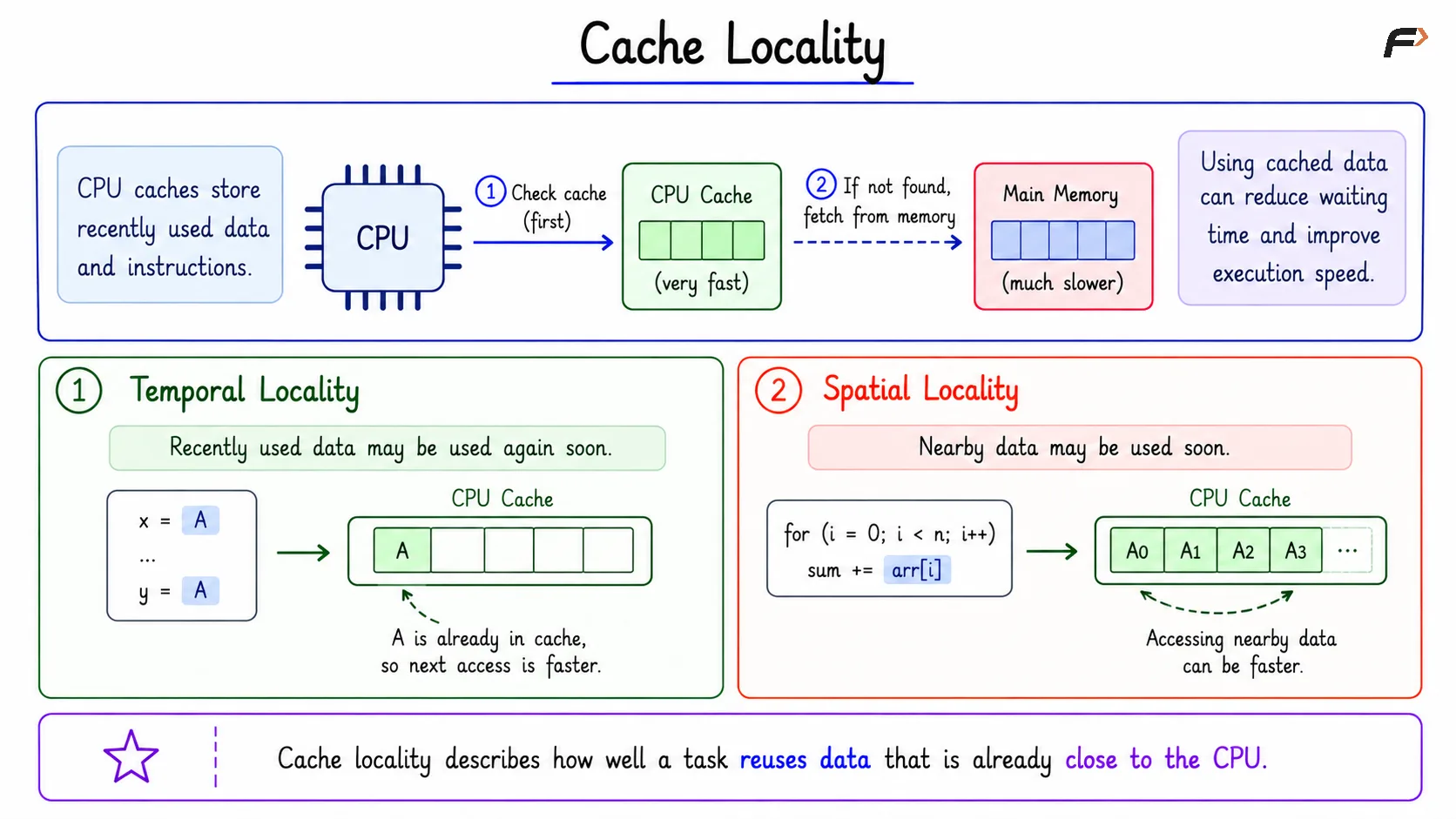
CPU caches store recently used data and instructions. They are much faster than main memory, so using cached data can reduce waiting time and improve execution speed.
Cache locality describes how well a task reuses data that is already close to the CPU.
Locality Type | Meaning |
|---|---|
Temporal locality | Recently used data may be used again soon |
Spatial locality | Nearby data may be used soon |
For example, if a task accesses data item A and then uses A again shortly after, temporal locality helps. If it accesses array locations one after another, spatial locality helps because nearby data may already be in cache.
Cache Locality
Same Core vs Migration
If a task runs again on the same core, that core may still have useful cached data from the task’s previous execution. This is often called a warm cache.
If the task migrates to another core, the new core may not have that useful data. The task may face more cache misses until the new core builds up useful cache state.
This is why migration is a tradeoff. Moving a task may improve load balancing, but it can also reduce locality.
What Happens on a Cache Miss
A cache miss happens when the CPU needs data that is not present in the cache. The system must fetch that data from a slower memory level before execution can continue.
Cache misses add delay. A system can show high CPU activity and still perform poorly if tasks keep losing locality and repeatedly wait for data.
NUMA Intuition
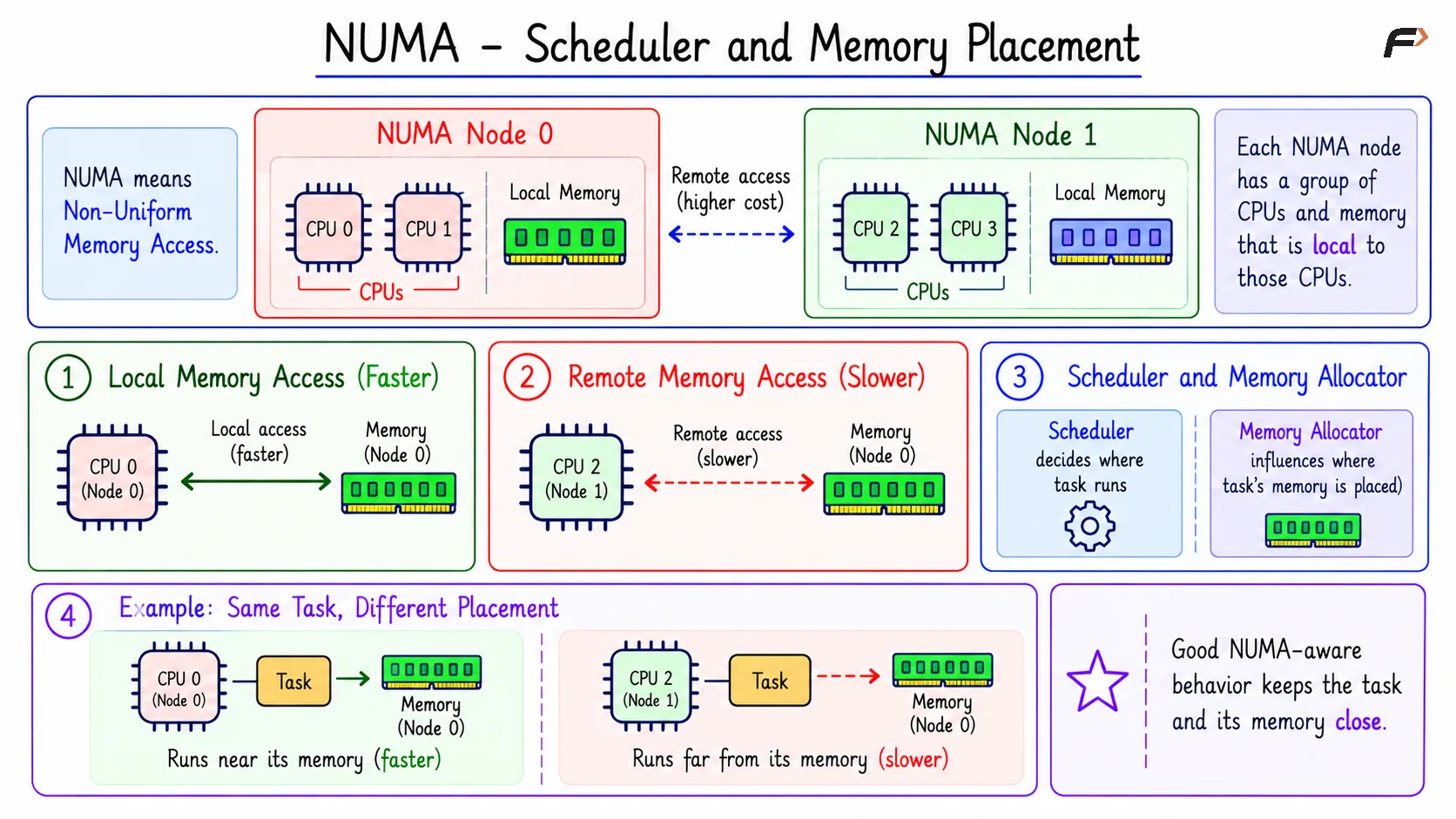
NUMA stands for Non-Uniform Memory Access. In a NUMA system, not all memory is equally close to every CPU.
A NUMA machine may have multiple NUMA nodes. Each node contains a group of CPUs and memory that is local to those CPUs.
Access Type | Meaning | Performance |
|---|---|---|
Local memory access | CPU accesses memory from its own NUMA node | Faster |
Remote memory access | CPU accesses memory from another NUMA node | Slower |
For example, if a task running on NUMA Node 0 mostly uses memory from Node 0, access is local. If the same task runs on Node 1 while its memory remains on Node 0, it may pay remote memory access cost.
Scheduler and Memory Placement
The scheduler and memory allocator both matter in NUMA systems. The scheduler decides where the task runs, while the memory allocator influences where the task’s memory is placed.
A task can be assigned to a free CPU and still run inefficiently if that CPU is far from the memory the task uses most. Good NUMA-aware behavior tries to keep the task and its memory close.
This is especially important on multicore servers. Moving a task across sockets or NUMA nodes can improve CPU balance, but it may hurt memory locality.
NUMA - Scheduler and Memory Placement
Good and Bad Affinity Uses
Affinity works well when there is a clear reason for controlling placement.
Good uses include:
Low-latency work: Pinning can reduce migration noise.
Database workers: Grouping can improve locality.
Real-time audio: Stable placement can reduce jitter.
Workload isolation: Dedicated CPUs can protect sensitive tasks.
Bad uses include:
Accidental over-pinning: Too many workers pinned to one CPU.
Artificial bottlenecks: A container limited to too few CPUs.
Blocked balancing: Idle CPUs cannot help because affinity prevents movement.
Poor NUMA placement: Task runs far from the memory it uses.
Affinity is powerful because it controls placement. That same power makes it risky when the placement rule does not match the workload.
Summary
CPU affinity, cache locality, and NUMA explain why multicore scheduling depends on placement. The scheduler must decide not only which task should run, but also which CPU and memory location make sense for that task.
Hard affinity gives strict CPU limits, while soft affinity gives placement preference. Cache locality rewards staying near useful cached data, and NUMA rewards staying near local memory. Good scheduling balances load, locality, migration cost, and workload goals together.
Be the first to add a comment.