Introduction
Caching and buffering exist because persistent storage is much slower than RAM. Files live on storage devices such as SSDs or HDDs, but repeatedly going to storage for every read and write would make file operations slow.
The operating system uses RAM as a fast helper layer. File data and metadata can stay in memory temporarily, so many operations can be served faster than direct storage access.
Why Caching and Buffering Are Needed
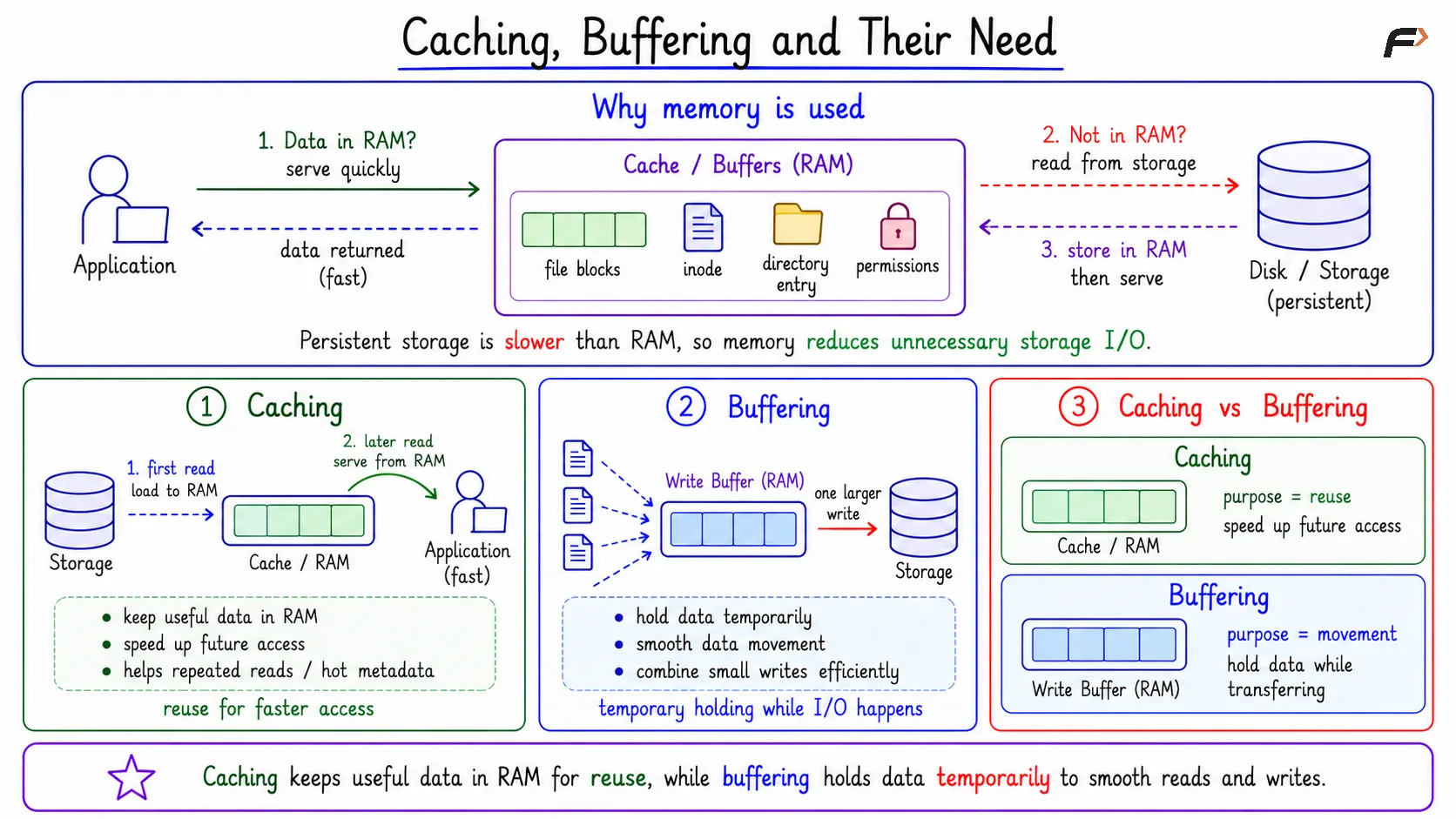
Persistent storage keeps data after shutdown, but it is slower than RAM. The file system therefore uses memory to reduce unnecessary storage I/O.
The basic idea is that when an application requests data, the system first checks whether the required data is already available in RAM. If it is not available, the system accesses storage to retrieve the data and may keep it in RAM for faster access later.
This helps with both file data and metadata. File contents, inode information, directory entries, permissions, and block mappings may be kept in memory if they are likely to be useful soon.
Caching vs Buffering
Caching and buffering both use memory, but their purpose is different.
Concept | Main Purpose | Simple Meaning |
|---|---|---|
Caching | Speed up future access | Keep useful data in RAM for reuse |
Buffering | Smooth data movement | Hold data temporarily while it moves |
Caching focuses on reuse. If a file block was recently read, keeping it in RAM may make the next read much faster. Buffering focuses on movement. If many small writes are happening, the OS can hold them temporarily and write them to storage more efficiently later.
Caching, Buffering and their Need
Page Cache and Buffer Cache
The page cache is a modern OS cache used to keep file data in memory. If a process reads a file block and that block is already in the page cache, the OS can serve it from RAM.
The term buffer cache is often used in OS discussions for block-level caching. In many modern systems, the exact implementation may be unified, but the learning idea remains the same: memory is used to reduce repeated storage access.
Read Path: Cache Hit and Cache Miss
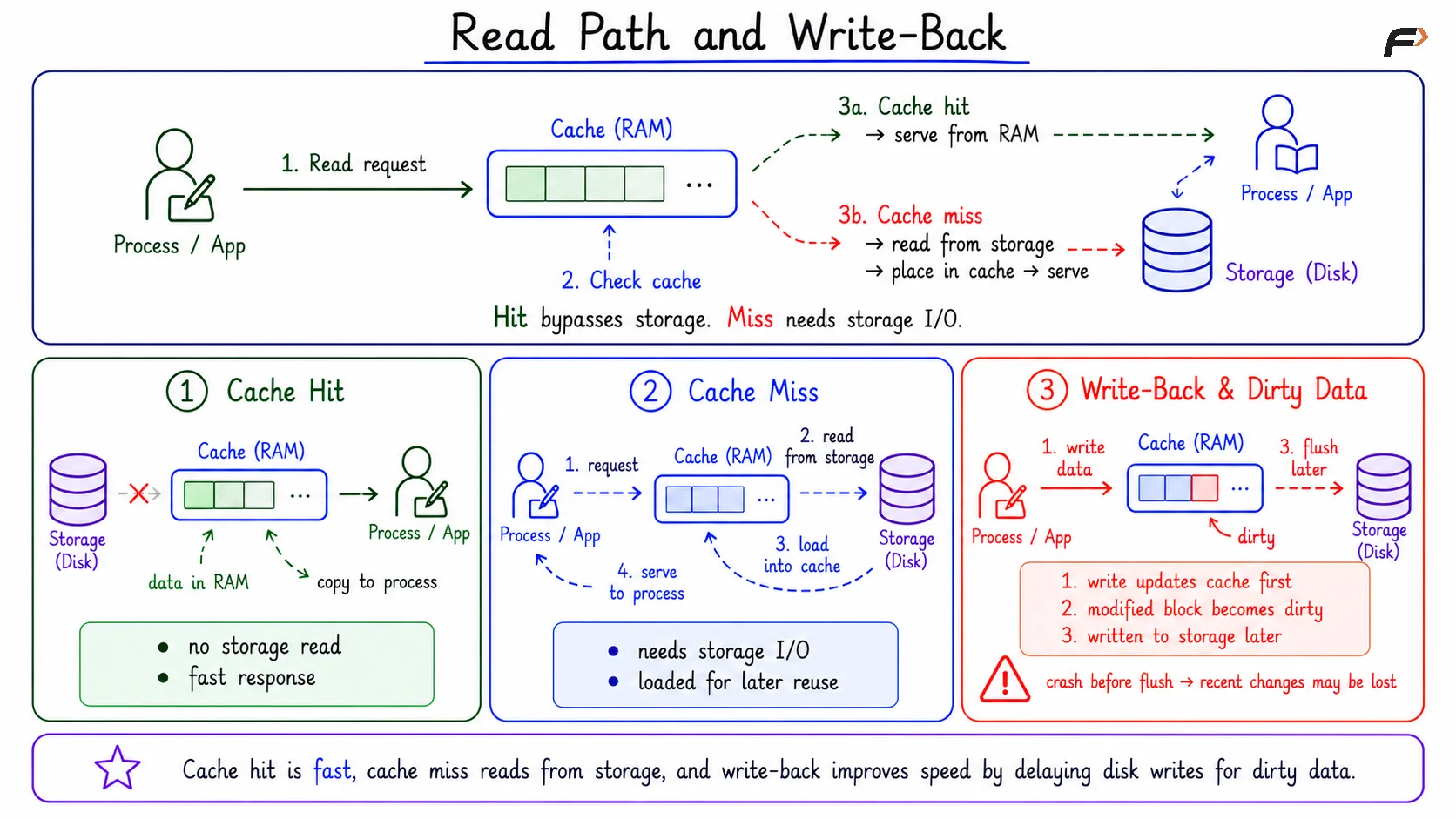
A cache hit happens when requested file data is already in memory. In that case, the OS can copy data from the cache to the process buffer without reading from storage. A cache miss happens when the requested data is not in memory. Then storage I/O is needed.
A cache hit is faster because storage is bypassed. A cache miss is slower, but the loaded data may remain cached for future reads.
Write-Back Caching and Dirty Data
In write-back caching, a write may update memory first, while the actual storage write happens later. This improves performance because the OS can batch or reorder storage writes.
Dirty data means modified cached data that has not yet been written to persistent storage.
The basic write-back flow is:
Program writes data: The application issues a write request.
Cache is updated: The OS updates memory first.
Data is marked dirty: The cached version is newer than the storage version.
Write-back happens later: Dirty data is eventually flushed to storage.
This is fast, but it has a durability risk. If the system crashes before dirty data is written to storage, recent changes may be lost.
Read Path and Write Back
Flushing, sync, and fsync
Flushing means writing pending dirty data from memory to persistent storage. It reduces the risk of losing modified data during a crash.
sync: Requests broader flushing of pending file-system writes.
fsync(fd): Requests flushing for a specific opened file and required metadata.
Dirty data: Data that is updated in memory but not yet durable on storage.
A successful write() does not always mean data is already physically stored on disk or SSD. It often means the OS has accepted the data into the file-system path, commonly through memory. Durability needs flushing or file-system write-back.
Read-Ahead
Read-ahead is an optimization for predictable access. If a program reads block 10, then block 11, then block 12, the OS may guess that block 13 will be needed soon.
This is especially useful for sequential access, such as reading logs, scanning files, or streaming media. Random access is harder to predict, so read-ahead is usually less effective there.
Summary
Caching and buffering both use RAM to improve file-system performance. Caching keeps useful file data or metadata in memory for future reuse, while buffering temporarily holds data to smooth transfer and reduce small storage operations.
Cache hits avoid storage I/O, cache misses require storage access, and write-back caching can delay physical writes through dirty data. Flushing through mechanisms such as sync and fsync helps move pending changes from memory to durable storage.
Be the first to add a comment.