Introduction
An operating system is needed because applications cannot safely and conveniently use hardware on their own. Every application depends on hardware such as the CPU, RAM, storage, keyboard, screen, and network devices.
But hardware is raw, shared, and risky to control directly. The operating system sits between applications and hardware so that programs can run in a controlled, simple, and protected environment.
Why Applications Need An Operating System
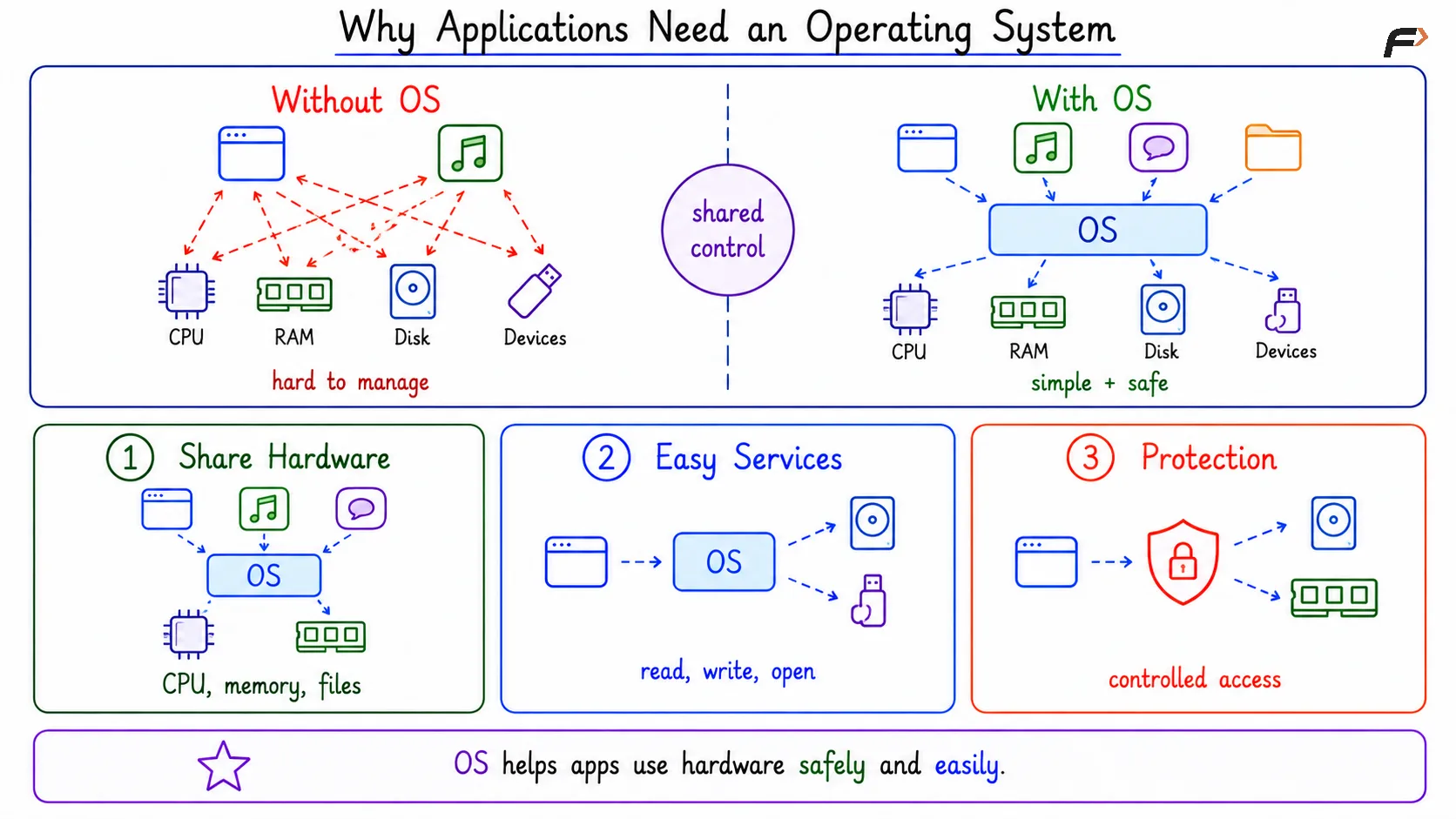
Hardware gives the physical power to run software, but it does not give a friendly environment to applications. A CPU can execute instructions, RAM can store temporary data, and storage can keep files permanently, but applications should not be forced to manage all these details directly.
If every application had to control CPU, memory, disk, keyboard, screen, and network hardware by itself, software development would become much harder. The operating system hides this complexity and gives applications cleaner services to use.
Hardware Is Shared
The same hardware is used by many applications at the same time. A browser, music player, messaging app, file manager, and background services may all need CPU time, memory, storage, and network access.
Since these resources are limited, someone must decide how they are shared. The operating system performs this job by allocating resources and preventing one application from taking over the whole system.
For example:
CPU: The OS decides which process gets CPU time.
Memory: The OS gives memory space to each running program.
Files: The OS controls how files are created, opened, read, and written.
Devices: The OS manages devices such as keyboard, monitor, printer, and network card.
Direct Hardware Access Is Dangerous
If applications directly controlled hardware, one program could easily harm another program or the whole system. A buggy application could overwrite another program’s memory, block the CPU, damage device state, or access private files.
This is why modern systems do not allow normal applications to freely touch hardware. Applications make controlled requests, and the operating system checks and handles those requests safely.
Why Applications Need An Operating System
Simple Definition Of Operating System
An operating system is system software that manages computer hardware and provides services to application programs. It works as a controlled layer between applications and hardware.
The most privileged core part of the operating system is called the kernel. The kernel manages important tasks such as CPU scheduling, memory management, device handling, file operations, and system calls.
Three Main Roles Of Operating System
The need for an operating system becomes clear when we look at its three main roles: manager, abstraction layer, and guard. These roles explain what the OS actually does beyond being a simple interface.
Role | Meaning | Example |
|---|---|---|
Manager | Shares limited resources among programs | Allocating CPU time and memory |
Abstraction layer | Hides hardware complexity | Giving applications files instead of raw disk blocks |
Guard | Protects programs and users | Stopping one process from accessing another process’s memory |
Operating System As An Abstraction Layer
Hardware details are often complex and device-specific. The operating system gives applications simpler concepts so that programs do not need to understand every hardware detail.
Some important operating system abstractions are:
Process: A running program.
Thread: A path of execution inside a process.
File: Named data stored permanently.
Virtual memory: A memory view that makes each process feel isolated.
Socket: A communication endpoint used for networking.
System call: A controlled request from an application to the kernel.
These abstractions make application development easier. For example, an application can open a file without knowing the exact disk blocks where the file is stored.
Operating System As A Guard
The operating system protects the system by controlling what applications are allowed to do. Normal applications usually run in user mode, while the kernel runs in kernel mode with privileged access.
Applications cannot directly perform sensitive operations such as changing hardware settings or accessing another process’s memory. They must use system calls, so the kernel can check whether the request is valid.
Why Applications Use System Calls
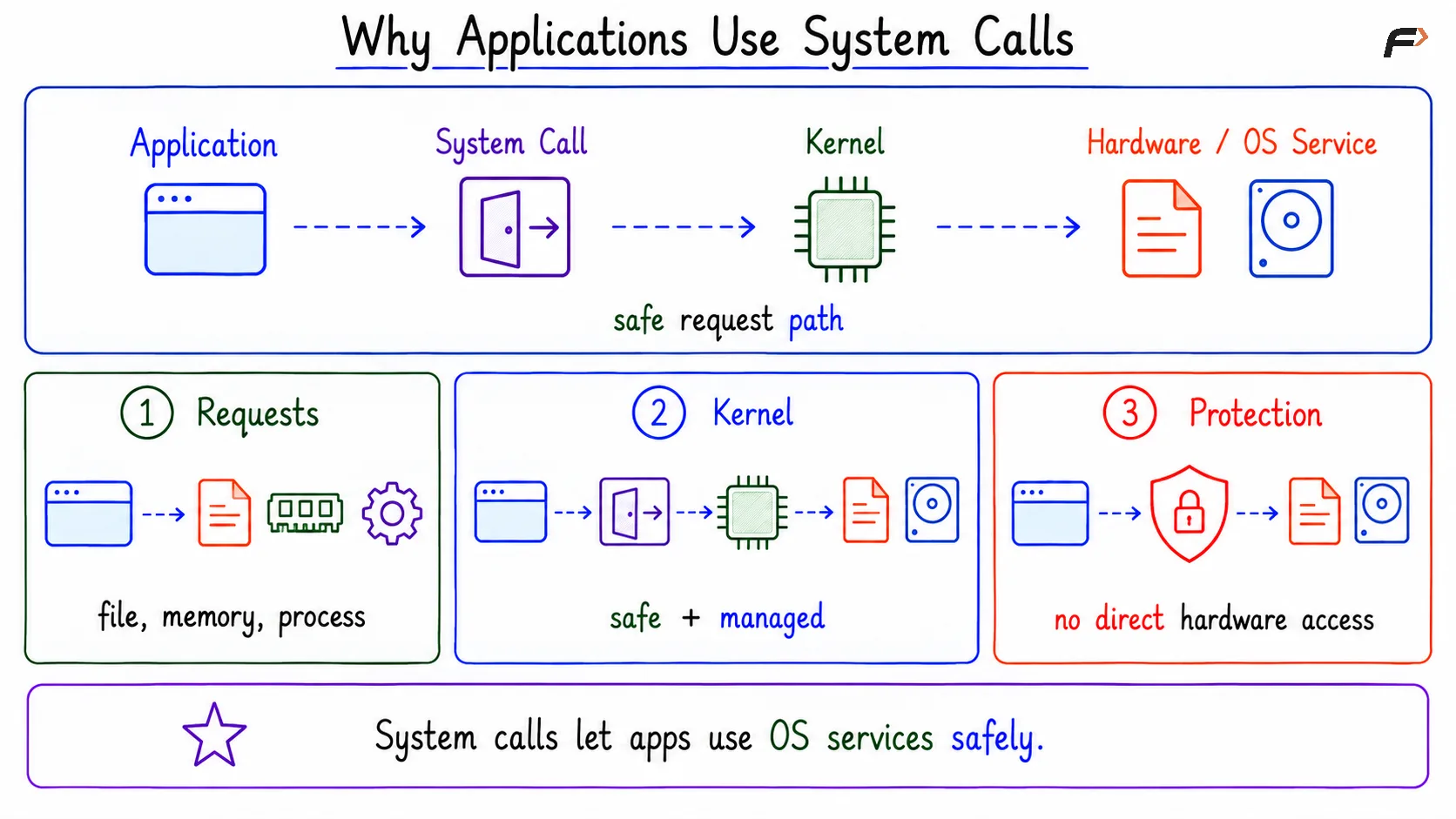
A system call is the safe path through which an application requests operating system services. Applications use system calls for tasks such as creating a process, opening a file, allocating memory, sending network data, or using a device.
The basic idea is simple: Application => System call => Kernel => Hardware or OS service
This keeps hardware access controlled. The application gets the service it needs, but the kernel remains responsible for safety, permission, and resource management.
Why Applications Use System Calls
Operating System And Application Compatibility
Different operating systems provide different services, system calls, libraries, and execution environments. This is why an application built for one operating system may not run directly on another.
For example, an Android app is designed for Android’s operating system environment. The same app cannot automatically run on iOS because iOS provides a different environment, different APIs, and different rules for application execution.
Can Software Run Without An Operating System?
Yes, software can run without an operating system. Such software is called bare metal software because it talks directly to the hardware.
Examples include:
Firmware: Low-level software that runs when a device starts.
Bootloader: Software that loads the operating system kernel into memory.
Embedded programs: Some simple devices run one dedicated program directly on hardware.
Bare metal software is useful in specific cases, but it does not provide normal OS facilities such as process management, file systems, scheduling, memory protection, and easy application development.
Firmware, Bootloader, And Booting
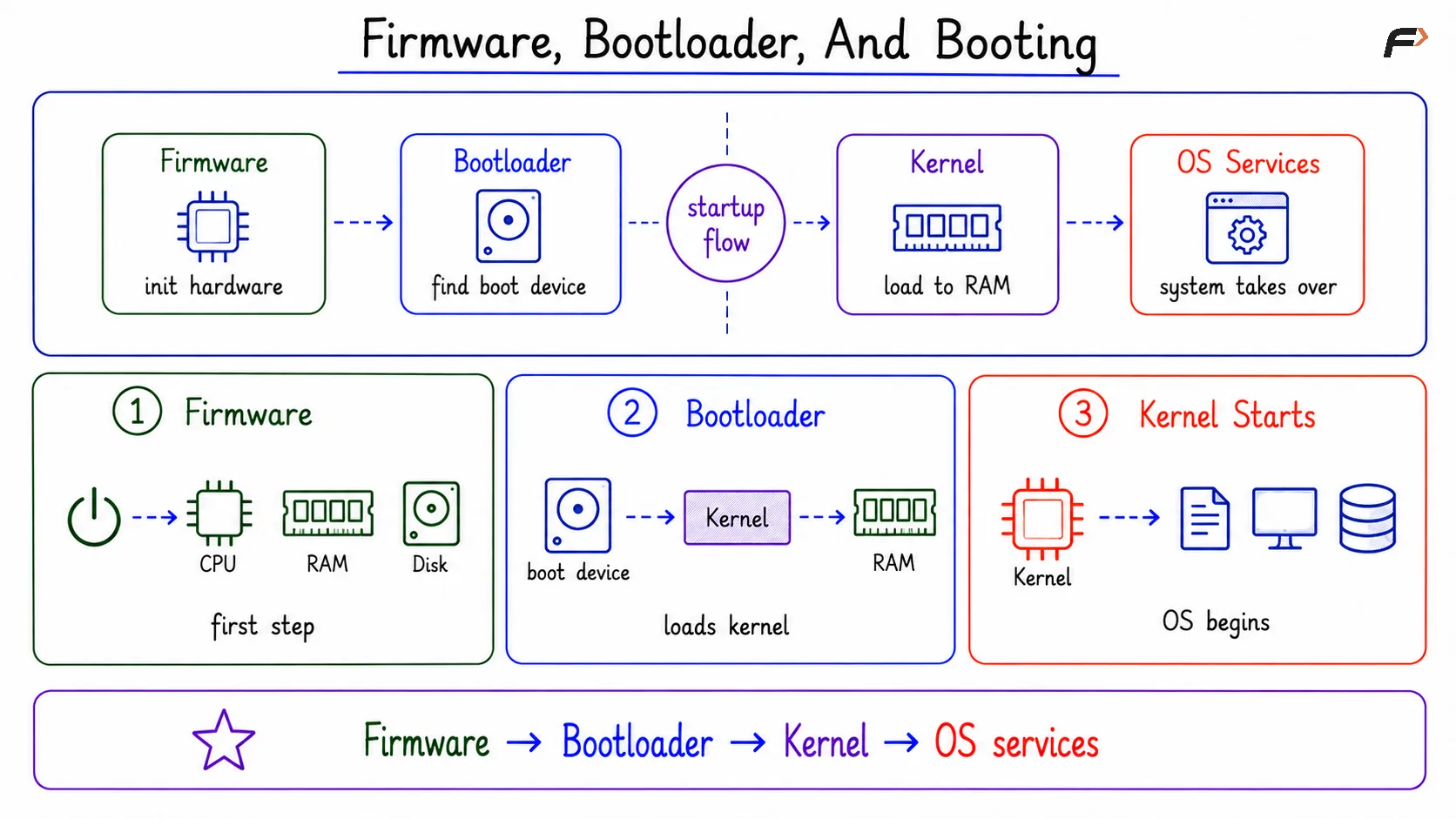
When a computer starts, firmware runs first and initializes basic hardware. It then finds a bootable device that contains an operating system.
After that, the bootloader loads the operating system kernel into RAM and transfers control to it. Once the kernel starts running, the operating system takes over the system.
The flow is: Firmware => Bootloader => Kernel => Operating system services
Firmware, Bootloader, And Booting
Operating System Vs Kernel
The kernel is the core privileged part of the operating system, but the full operating system can include more than the kernel. The OS may also include shell programs, system utilities, services, libraries, desktop components, and package tools.
Term | Meaning |
|---|---|
Kernel | Core part that manages CPU, memory, devices, files, and system calls |
Operating system | Complete system software environment built around the kernel |
So, when we say the operating system manages memory or handles system calls, the kernel is usually doing the main work.
Summary
An operating system is needed because hardware is raw, shared, and unsafe for applications to control directly. It makes hardware easier to use by giving applications services such as process management, memory management, file handling, device access, and networking.
The OS acts as a manager, abstraction layer, and guard. The kernel performs the core privileged work, while the complete operating system provides the environment that allows modern applications to run safely and conveniently.
Be the first to add a comment.