Introduction
Operating system types exist because different systems optimize for different goals. A laptop, server, phone, flight controller, and embedded device do not all need the same behavior from the OS.
These types are not completely separate worlds. A modern phone OS, for example, can be mobile, multitasking, multiprocessing, and security-focused at the same time.
Why OS Types Exist
An operating system cannot optimize every goal equally. Some systems need responsiveness, some need throughput, some need predictable timing, and some need a small memory footprint.
For example:
Laptop: Responsiveness and smooth multitasking.
Server: Throughput, fairness, and reliability.
Flight controller: Predictable deadlines.
Phone: Battery life, sensors, wireless support, and app isolation.
Embedded device: Small footprint and reliability.
Batch Operating System
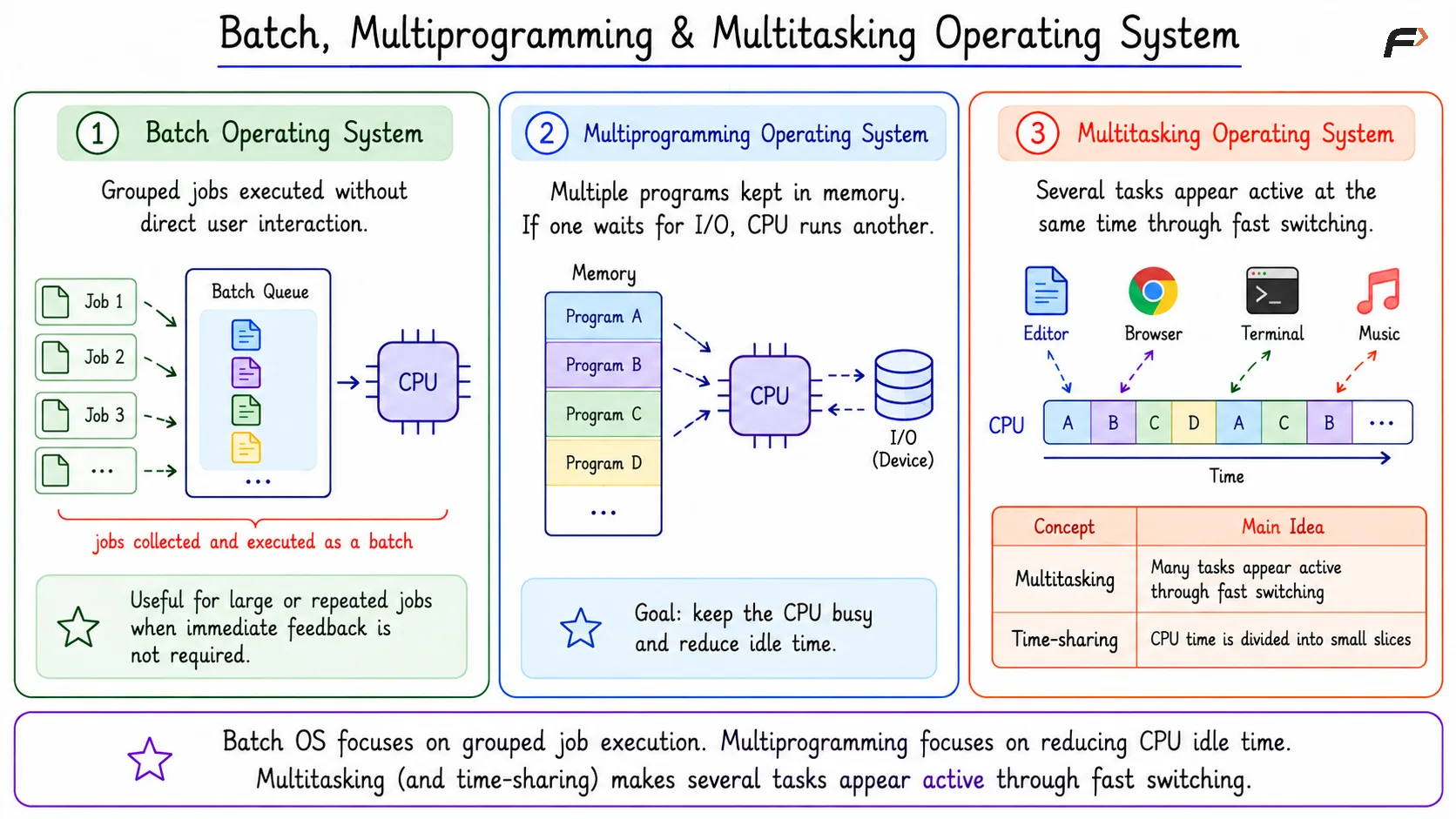
A batch operating system runs grouped jobs with little or no direct user interaction. Jobs are collected, arranged, and executed as a batch.
Batch OS design is useful when large or repeated jobs must be processed, and immediate user feedback is not the main concern.
Batch, Multiprogramming & Multitasking Operating System
Multiprogramming Operating System
A multiprogramming OS keeps multiple programs in memory at the same time. If one program waits for I/O, the CPU can run another program instead of staying idle.
The main goal is CPU utilization. The OS tries to keep the CPU busy by switching to another ready program when the current one cannot continue.
Batch OS focuses on grouped job execution. Multiprogramming focuses on reducing CPU idle time.
Multitasking and Time-Sharing OS
Multitasking makes several tasks appear active at the same time. On a single-core CPU, this does not mean all tasks are truly running at the exact same instant.
The OS switches quickly between tasks. Because the switching is fast, users feel that the editor, browser, terminal, and music application are all active together.
Time-sharing is closely related. It divides CPU time into small slices so tasks or users get turns.
Concept | Main Idea |
|---|---|
Multitasking | Many tasks appear active through fast switching |
Time-sharing | CPU time is divided into small slices |
Multitasking does not require multiple CPU cores. Multiple cores help, but the basic effect can be created through fast switching on one core.
Multiprocessing Operating System
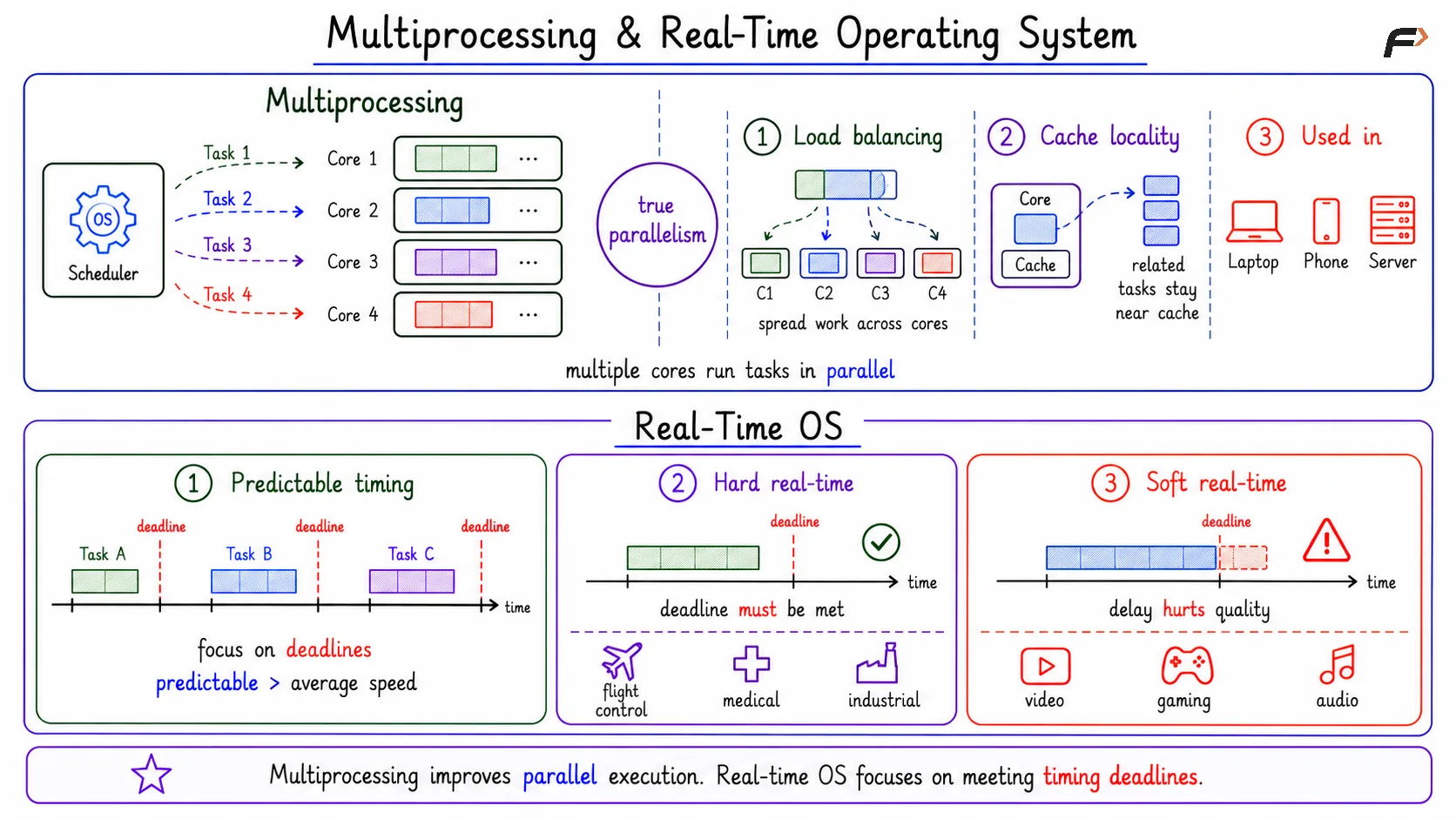
Multiprocessing means the system has multiple CPUs or cores. With multiple cores, tasks can truly run at the same time.
The scheduler now has more work to do. It must decide which task should run and which core should run it.
Key points:
True parallelism: Different tasks can run at the same time.
Load balancing matters: Work should be spread across cores.
Cache locality matters: Keeping related work near the same core can improve performance.
Modern laptops, phones, and servers are usually multicore systems.
Real-Time Operating System
A real-time operating system focuses on deadlines. It is not simply about being fast; it is about being predictable.
For real-time systems, average speed is less important than whether required work happens within its timing limit.
Type | Meaning | Examples |
|---|---|---|
Hard real-time | Missing a deadline can cause serious failure | Flight control, medical devices, industrial controllers |
Soft real-time | Missing a deadline reduces quality but is not catastrophic | Video playback, gaming, audio processing |
In a hard real-time system, a deadline must be met. In a soft real-time system, timing still matters, but occasional delay usually affects quality rather than safety.
Multiprocessing & Real-Time Operating System
Distributed and Network Operating Systems
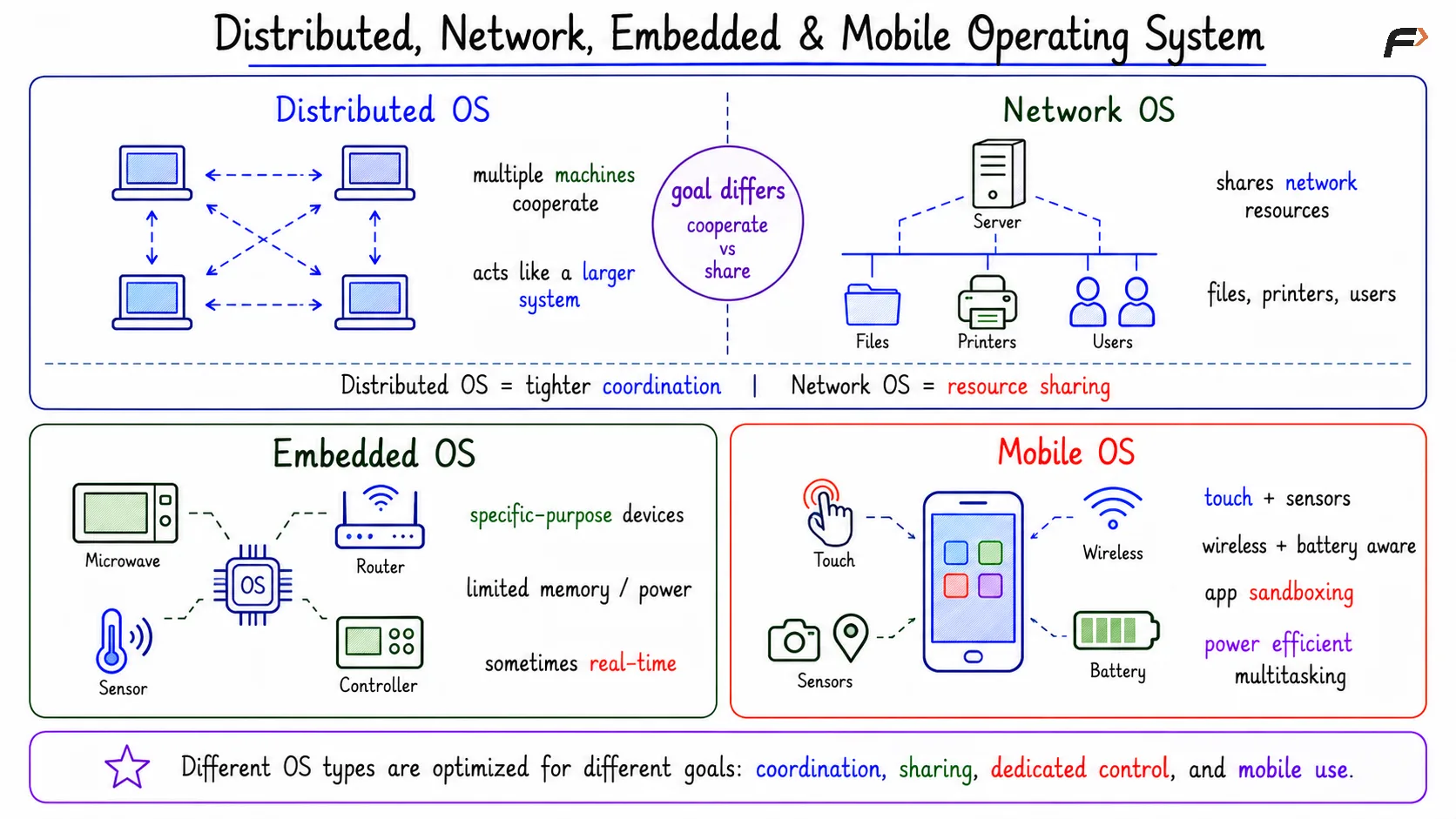
A distributed OS coordinates multiple machines so they can work together as part of a larger system. The focus is coordination across computers.
A network OS provides network-based resource sharing. It allows connected systems to access shared services such as files, printers, users, or other network resources.
The difference is in the goal. Distributed OS design tries to make multiple machines cooperate more tightly, while network OS design focuses on making shared resources available through the network.
Embedded Operating System
An embedded OS runs inside constrained devices. These systems often have limited memory, limited processing power, and a specific purpose.
Examples include devices such as microwaves, refrigerators, routers, controllers, sensors, and other dedicated systems.
Some embedded systems use a real-time OS when timing guarantees are important.
Distributed, Network, Embedded & Mobile Operating System
Mobile Operating System
A mobile OS is designed for phones and similar devices. It must handle touch input, sensors, wireless communication, battery limits, and app isolation.
App sandboxing is especially important. Each app should be isolated so it cannot freely access another app’s private data or sensitive system resources.
A mobile OS often overlaps with other categories. It is usually multitasking, multiprocessing, security-focused, and optimized for power efficiency.
Summary
Operating system types exist because different systems have different priorities. Batch systems focus on grouped jobs, multiprogramming improves CPU utilization, multitasking and time-sharing improve responsiveness, and multiprocessing uses multiple cores for parallel execution.
Real-time systems focus on deadlines, distributed systems coordinate machines, network systems share resources, embedded systems fit constrained devices, and mobile systems optimize for battery, sensors, wireless behavior, and app isolation. Modern operating systems often overlap across these categories.
Be the first to add a comment.