Introduction
A Resource Allocation Graph, or RAG, is a visual way to understand deadlock in an operating system. Instead of reading long locking situations in words, the graph shows ownership and waiting relationships directly.
This makes deadlock analysis easier because the problem becomes a directed-cycle check. The main questions are: who is holding a resource, and who is waiting for a resource?
What a Resource Allocation Graph Shows
A Resource Allocation Graph represents processes, resource types, resource instances, current allocations, and current requests. It is a directed graph, so the direction of each edge is very important.
The basic components are:
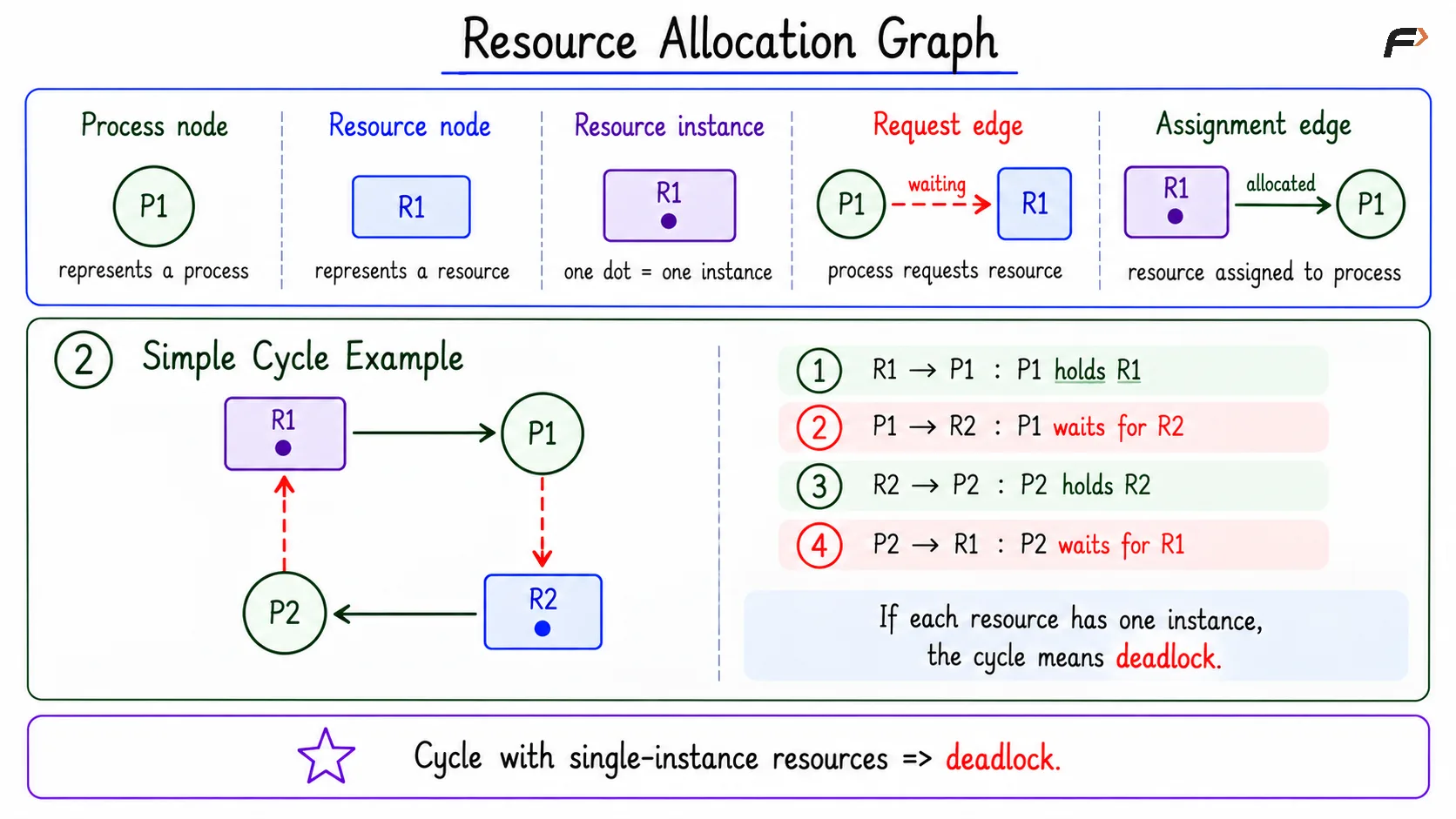
Process node: Represents an active process or thread, usually written as P1, P2, P3, and so on.
Resource node: Represents a resource type such as a lock, file, printer, memory block, or database row.
Resource instance: A dot inside a resource node shows one available instance of that resource type.
Request edge: Shows that a process is waiting for a resource.
Assignment edge: Shows that a resource instance is currently allocated to a process.
Request and Assignment Edges
Edges decide the meaning of the Resource Allocation Graph. A process-to-resource edge means waiting, while a resource-to-process edge means ownership.
Edge Type | Form | Meaning |
|---|---|---|
Request edge | P1 => R1 | Process P1 is requesting resource R1 |
Assignment edge | R1 => P1 | Resource R1 is assigned to process P1 |
Simple Cycle Example
Consider this directed cycle: R1 => P1 => R2 => P2 => R1
This graph can be read as a chain of ownership and waiting:
R1 => P1: R1 is assigned to P1, so P1 holds R1.
P1 => R2: P1 is requesting R2.
R2 => P2: R2 is assigned to P2, so P2 holds R2.
P2 => R1: P2 is requesting R1.
So P1 holds R1 and waits for R2, while P2 holds R2 and waits for R1. If R1 and R2 each have only one instance, this cycle means deadlock exists.
Resource Allocation Graph
Cycle Meaning in RAG
A cycle in a Resource Allocation Graph is important, but it must be interpreted carefully. The meaning depends on how many instances each resource type has.
No cycle : No deadlock
Cycle with one instance per resource type : Deadlock exists
Cycle with multiple resource instances : Deadlock is possible, but not guaranteed
If there is no cycle, there is no circular waiting chain, so deadlock is not present. If there is a cycle and each resource type has only one instance, every needed resource is already held inside the cycle.
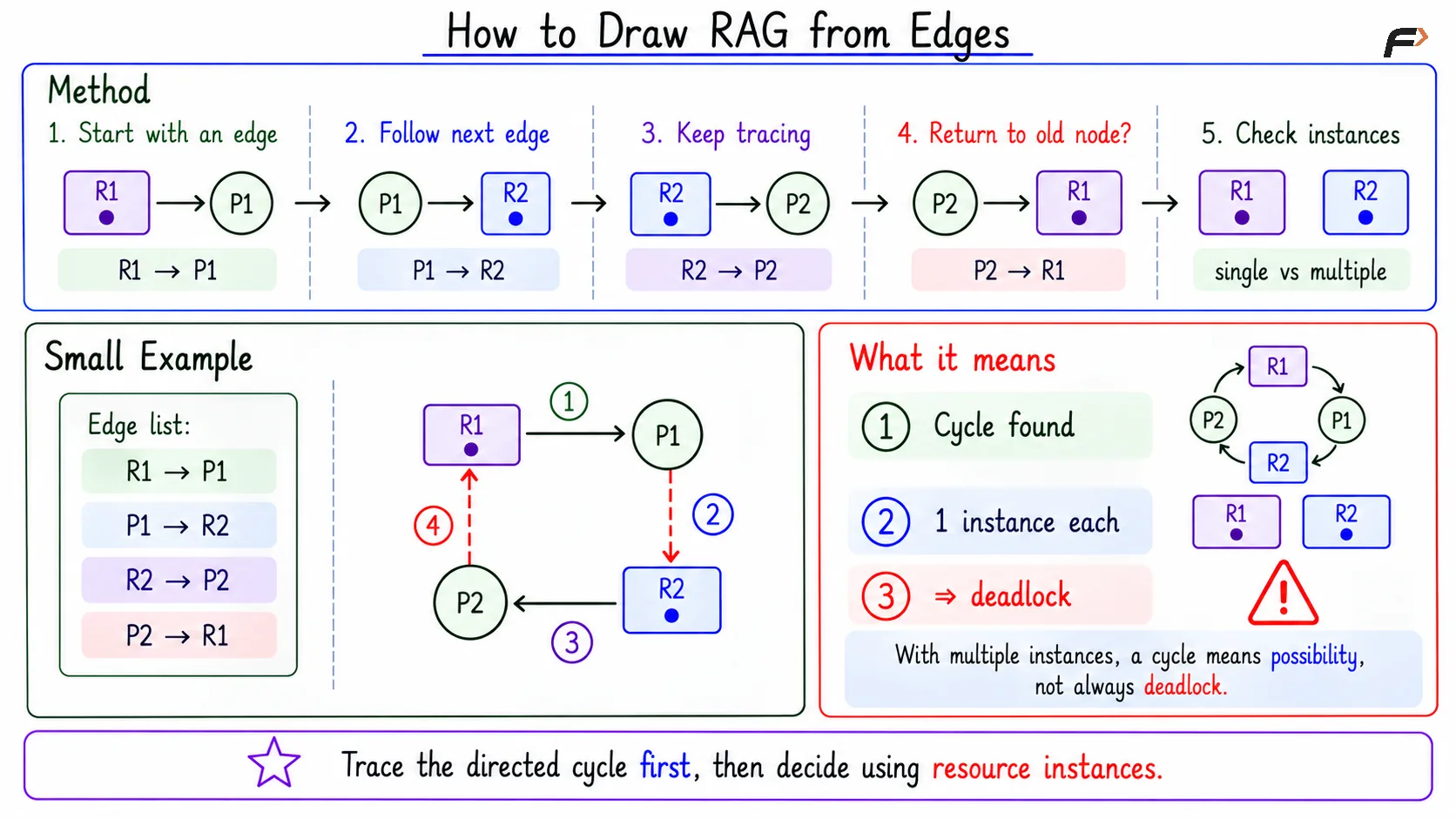
With multiple instances, the decision is not automatic. Another available instance may allow a waiting process to continue, so a cycle alone does not always prove deadlock.
How to Draw RAG from Edges
When edges are given in list form, draw or trace them one by one in the same direction. Start with any edge, then keep following the next edge from the current node.
A simple method is:
Start with an edge: For example,
R1 => P1.Follow the next outgoing edge: If
P1 => R2exists, continue to R2.Keep expanding: Move from resource to process and process to resource based on edge direction.
Check for return: If the path comes back to an earlier node, a directed cycle is found.
Check instances: Decide deadlock based on whether resources are single-instance or multiple-instance.
This keeps the solution clean. First find the directed cycle, then decide what that cycle means.
How to Draw RAG from Edges
Summary
A Resource Allocation Graph is used to analyze deadlock by showing processes, resource types, resource instances, request edges, and assignment edges. It converts deadlock reasoning into a directed-cycle problem.
No cycle means no deadlock. A cycle with one instance per resource type means deadlock exists, while a cycle with multiple resource instances means deadlock is possible but not guaranteed.
Be the first to add a comment.