Introduction
An address space is the memory view given to a process. It lets the operating system run many processes together while still keeping their memory protected from one another.
Instead of exposing raw physical RAM directly, the OS gives each process a controlled virtual view. The process works with virtual addresses, while the OS and hardware manage what those addresses actually map to.
What Address Space Means
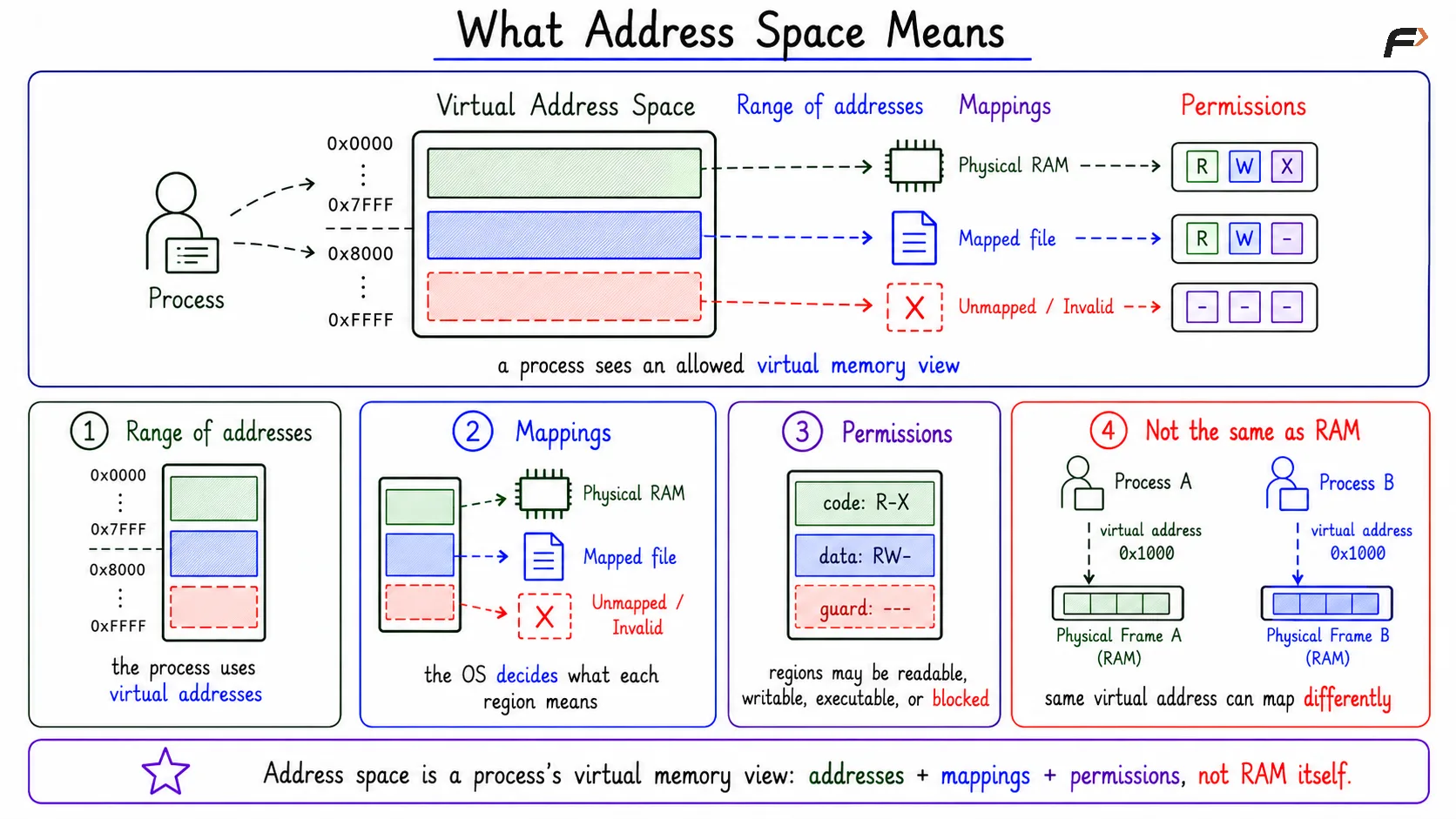
An address space is the range of memory addresses a process can use, along with the mappings and permissions that define what those addresses mean.
It has three important parts:
Range of addresses: The process sees a set of virtual addresses it can use.
Mappings: The OS decides what each virtual region points to, such as RAM, a mapped file, or an invalid region.
Permissions: Regions may be readable, writable, executable, or inaccessible.
So an address space is not just a list of numbers. It is the process's allowed memory view, controlled by the operating system.
What Address Space Means
Address Space Is Not RAM
The most important distinction is that address space is a virtual view, while RAM is physical memory. A process uses virtual addresses, but actual data lives in physical memory or may be brought into RAM only when needed.
Two processes may both use a virtual address like 0x1000. That does not mean they are using the same physical memory. Process A's 0x1000 may map to one physical frame, while Process B's 0x1000 may map to another.
This is why one process normally cannot read or overwrite another process's memory directly.
Same Address Does Not Mean Same Memory
A common confusion appears when two processes print similar-looking addresses. The addresses may look identical, but they are virtual addresses inside separate address spaces.
Same virtual address: Two processes may show the same address value.
Different mappings: Those addresses can point to different physical memory.
Separate protection: Each process has its own permissions and mapping rules.
Shared memory exception: Processes share memory only when the OS intentionally maps the same underlying region into both address spaces.
The rule is simple: virtual address equality does not prove physical memory sharing.
What Lives Inside an Address Space
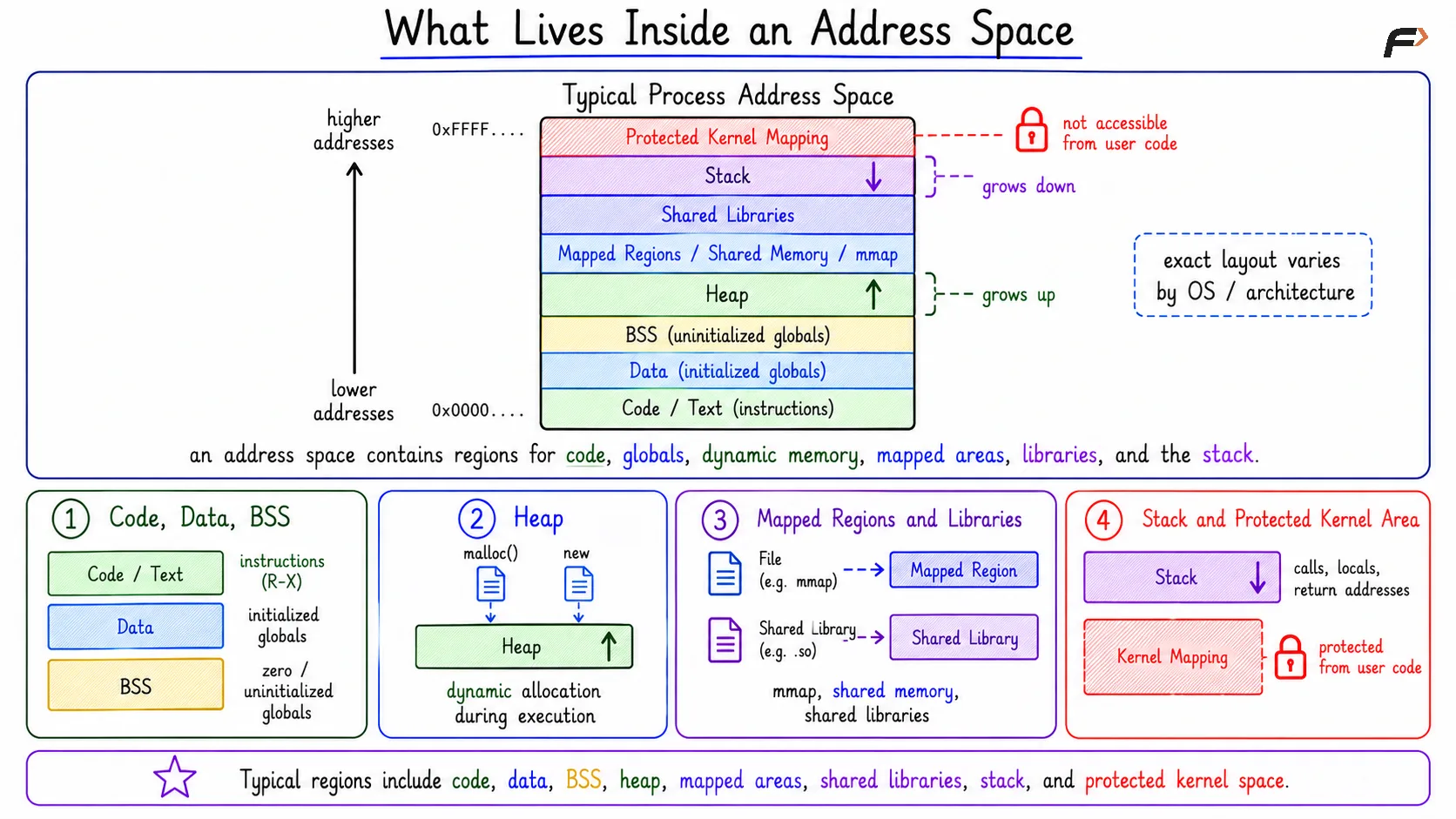
A process address space is often shown as a layout of regions. The exact arrangement differs by operating system, CPU architecture, executable format, and security settings, but the main regions are common.
Typical regions include:
Code or text: Program instructions, usually read-only and executable.
Data: Initialized global and static variables.
BSS: Zero-initialized or uninitialized global and static variables.
Heap: Dynamic memory used during execution.
Shared libraries: Runtime library code and data mapped into the process.
Mapped regions: Memory-mapped files, shared memory, or anonymous mappings.
Stack: Function-call data, local variables, and return addresses.
Protected kernel mapping: Some systems map kernel-related regions that user code cannot freely access.
This layout helps explain where program instructions, globals, dynamic allocation, mapped files, and function-call data live.
What Lives Inside an Address Space
Why Address Spaces Matter
Address spaces give the operating system a clean way to control memory. They make programs easier to write and safer to run together.
Main benefits include:
Protection: The OS can block invalid or unsafe memory access.
Isolation: One process cannot freely corrupt another process.
Convenience: A program can behave as if it has its own clean memory view.
Relocation: The OS can place physical memory wherever it wants while the program uses stable virtual addresses.
Virtual memory support: Some regions can be loaded, mapped, or backed by storage only when needed.
The process sees a clean memory model. Underneath, the OS may map pages to different physical frames, files, shared regions, or nothing at all.
Address Space and Virtual Memory
Address space is closely connected to virtual memory. Virtual memory is the OS mechanism that makes the process's private memory view possible.
Not every virtual address must be backed by physical RAM at all times. Some pages may be loaded only when accessed, and some regions may be backed by files or shared memory objects.
This is why address space prepares the ground for paging, demand paging, memory-mapped files, shared libraries, and process isolation.
Summary
An address space is the private memory view given to a process. It includes virtual addresses, mappings, and permissions that define which regions are valid and how they may be used.
Address spaces separate what a program sees from physical RAM. This gives the operating system protection, isolation, relocation, and virtual memory support while allowing each process to run as if it has its own controlled memory layout.
Be the first to add a comment.