Introduction
Pipes and named pipes are Inter-Process Communication mechanisms used for simple byte-stream communication. They let one process write data while another process reads that data through an operating-system-managed channel.
This idea is common in shell pipelines. In a command like ls | grep ".txt", one process produces output and another process consumes it as input.
What Is a Pipe?
A pipe is a kernel-managed byte buffer with two ends: one end for reading and one end for writing. The writer sends bytes into the pipe, and the reader consumes those bytes from the pipe.
The usual descriptor view is:
fd[0]: Read end of the pipe.fd[1]: Write end of the pipe.
A pipe is a byte stream. It does not preserve high-level message structure by itself, so the reader receives bytes in the order they were written.
Why Pipes Are Needed
Processes have separate address spaces, so one process cannot simply write into another process's memory. A pipe gives them a controlled IPC path without breaking process isolation.
For example, ls normally writes output to the terminal. If we want grep ".txt" to filter that output, the output of ls must become the input of grep.
A pipe solves this by connecting the standard output of one process to the standard input of another process.
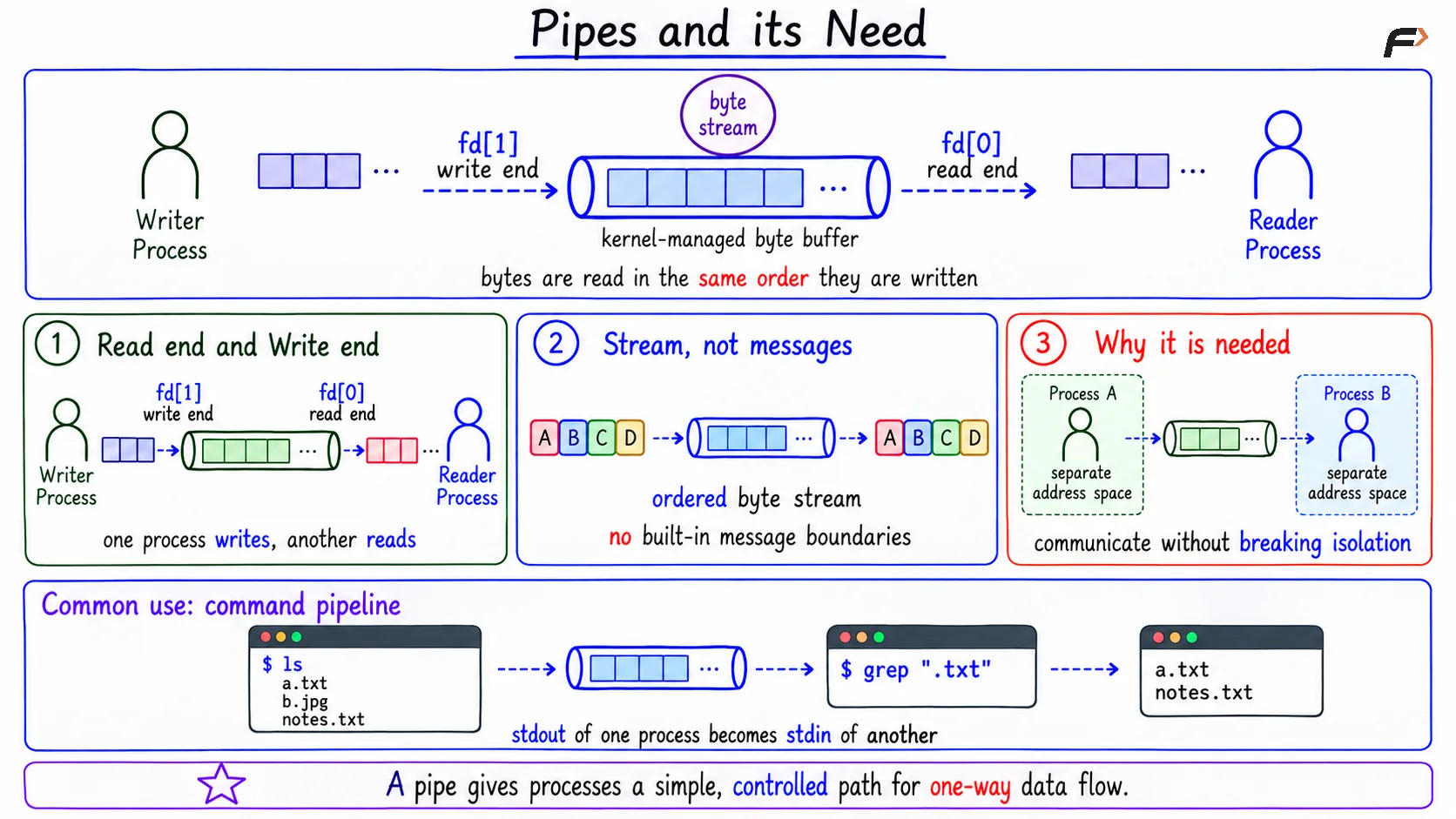
Pipes and its Need
Pipe Flow with fork
Anonymous pipes are commonly used between related processes. A parent creates the pipe first, then calls fork, so the child inherits the pipe file descriptors.
A compact shape is:
int fd[2];pipe(fd);pid_t pid = fork();if (pid == 0) { // Child: reads from the pipe close(fd[1]); read(fd[0], buffer, sizeof(buffer));}else if (pid > 0) { // Parent: writes to the pipe close(fd[0]); write(fd[1], message, strlen(message));}else { // fork() failed handle_fork_failure();}After fork, the parent and child are separate processes, but their inherited descriptors can refer to the same kernel pipe. One side writes using fd[1], and the other reads using fd[0].
Why Unused Ends Must Be Closed
Closing unused pipe ends is important because it affects blocking and EOF behavior.
If the reader keeps a write end open, or some other process still has a write end open, the reader may not see EOF. The kernel may assume that more data can still arrive.
The basic behavior is:
Pipe empty but write end open: A read may block because data may arrive later.
Pipe buffer full: A write may block until the reader consumes data.
All write ends closed: The reader can detect EOF after buffered data is consumed.
So in a simple parent-writer and child-reader setup, the writer closes the read end, and the reader closes the write end.
Shell Pipeline Example
For a pipeline such as ls | grep ".txt" the shell creates the pipe before forking the command processes. Then it connects the commands using file descriptor redirection.
The basic flow is:
Shell creates a pipe: It gets a read end and a write end.
Shell forks the
lschild:lsuses the pipe write end as standard output.Shell forks the
grepchild:grepuses the pipe read end as standard input.Unused ends are closed: Each process closes the ends it does not need.
Data flows:
lswrites directory output, andgrepreads and filters it.EOF arrives: When all write ends close,
grepcan finish.
This is why the pipe must be created before the child processes are forked. The children need to inherit descriptors connected to the same kernel pipe object.
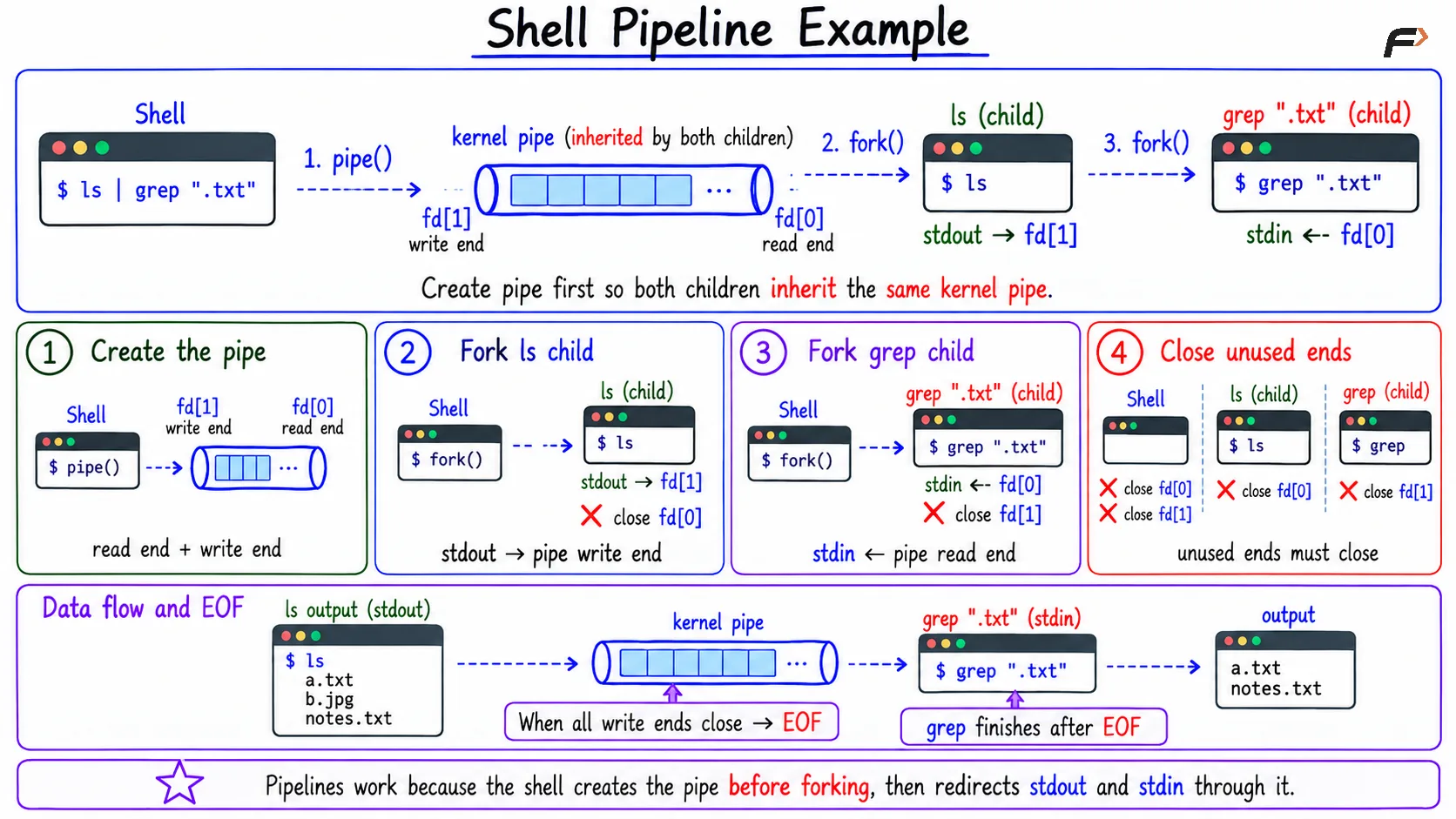
Shell Pipeline
Named Pipe or FIFO
A named pipe, also called a FIFO, gives pipe-like behavior through a name in the filesystem. It is still an IPC object, but processes can open it by path. For example: mkfifo mypipe
After this, one process can open mypipe for writing, and another process can open it for reading. The processes do not need to have a parent-child relationship.
The filesystem name identifies the FIFO. The bytes are not stored like ordinary file contents in that path; they pass through a kernel-managed pipe buffer and are consumed when read.
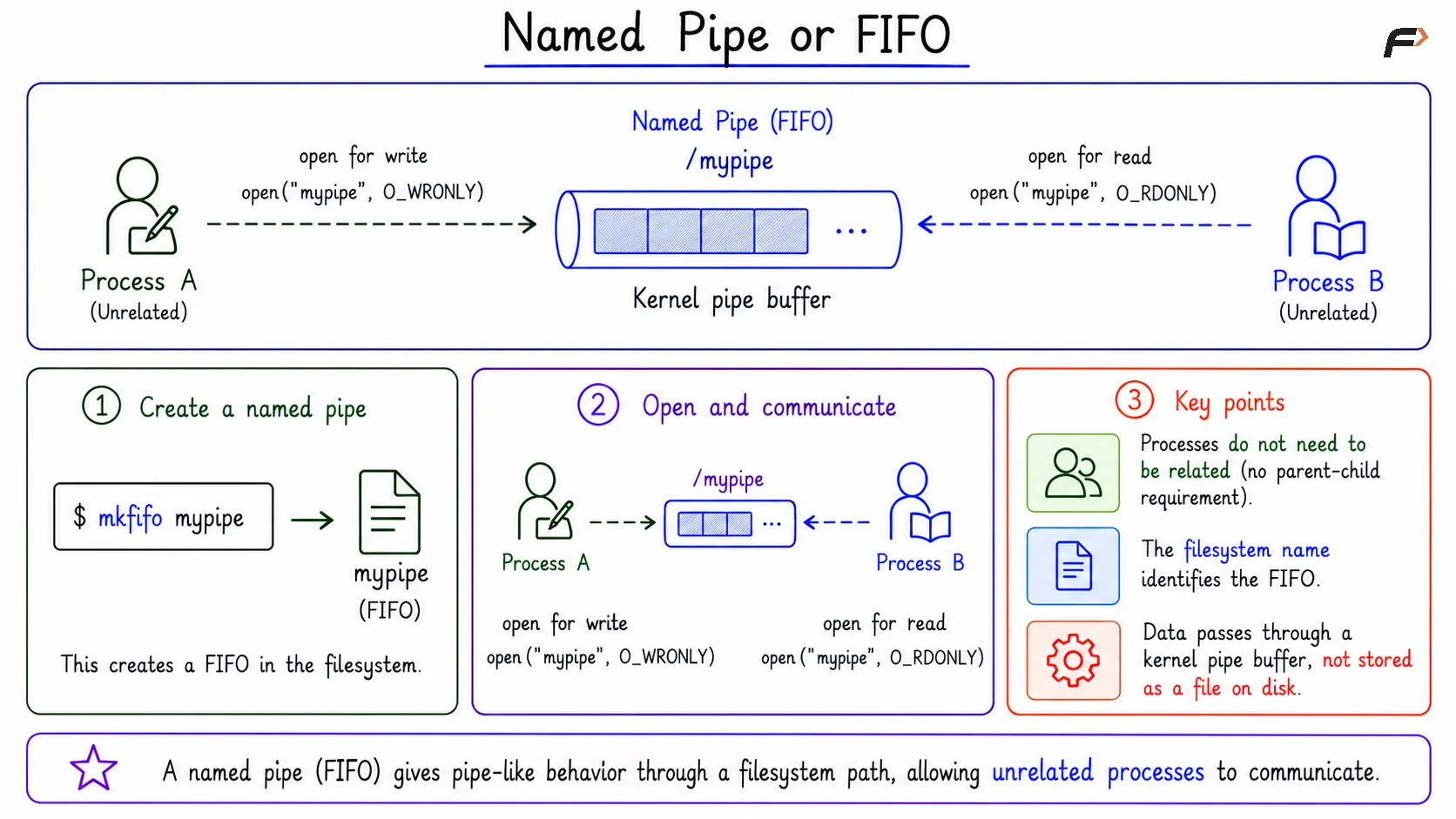
Named Pipe or FIFO
Anonymous Pipe vs Named Pipe
Point | Anonymous Pipe | Named Pipe / FIFO |
|---|---|---|
Name | No filesystem name | Has a filesystem path |
Common use | Related processes through inheritance | Related or unrelated local processes |
Access method | Inherited file descriptors | Opened by path |
Data style | Byte stream | Byte stream |
Anonymous pipes are natural for shell pipelines and parent-child communication. Named pipes are useful when independently started processes need a common local IPC endpoint.
When Pipes Fit Well
Pipes are a good choice when communication is simple and stream-based. They work especially well for local process composition. Good fits include:
Simple byte stream: One process writes bytes, another reads them.
One-way flow: Data naturally moves from producer to consumer.
Shell-style composition: One command's output becomes another command's input.
Local IPC: Communication happens on the same machine.
Pipes are not the best choice when the system needs structured messages, many clients, persistent stored data, or network communication. In those cases, message queues, sockets, shared memory, or another IPC mechanism may fit better.
Summary
Pipes are IPC mechanisms for local byte-stream communication. An anonymous pipe has a read end and write end, usually accessed through inherited file descriptors such as fd[0] and fd[1].
A named pipe, or FIFO, provides similar stream behavior through a filesystem name, so unrelated processes can open the same IPC object. Pipes fit simple one-way byte streams and shell pipelines, but they are not ideal for structured messages, many clients, or network communication.
Be the first to add a comment.