Introduction
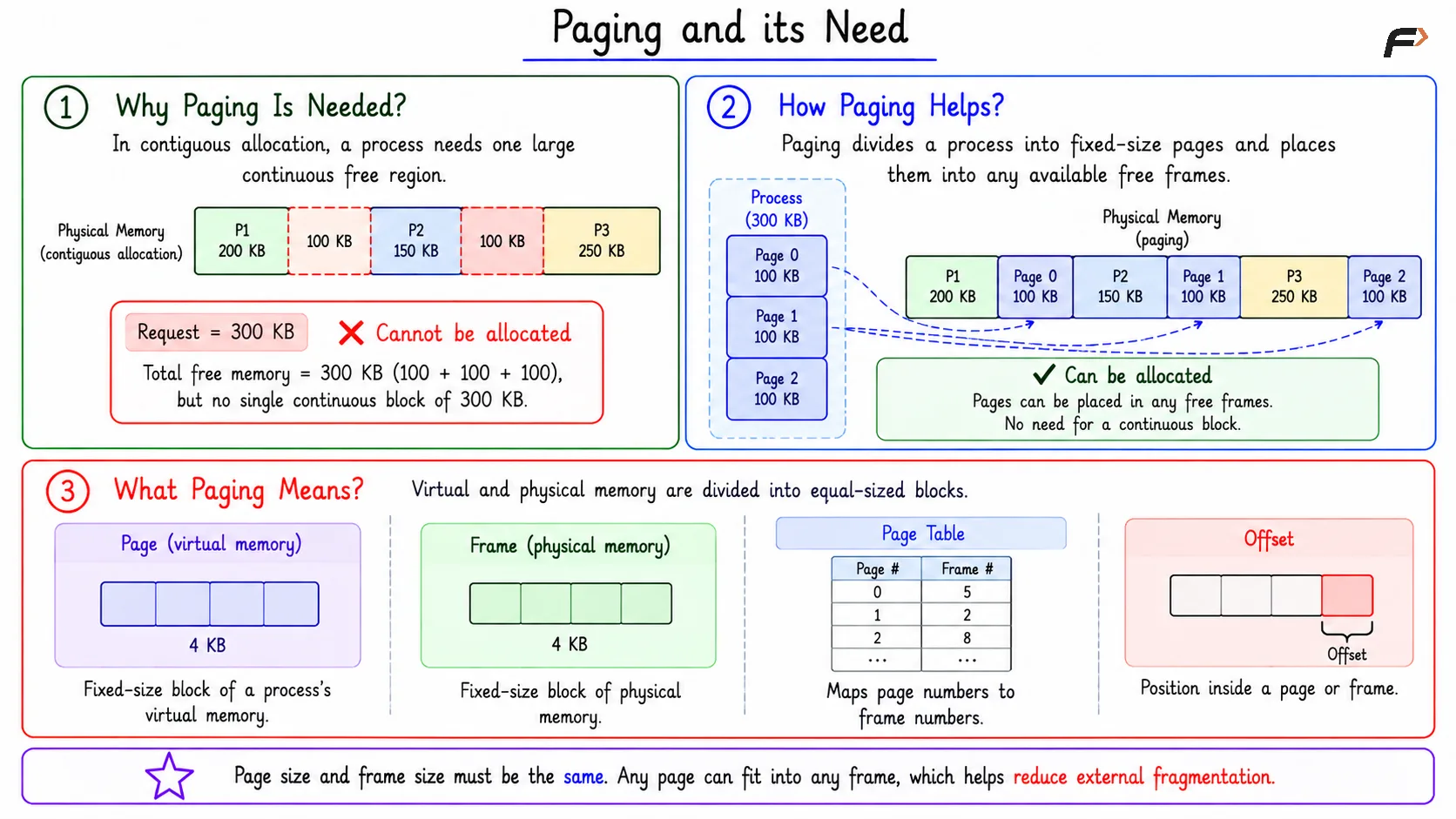
Earlier memory allocation expected a process to fit inside one continuous block of physical memory. Over time, RAM can become scattered into small free holes, so a large process may fail to fit even when enough total memory exists.
Paging solves this by dividing memory into fixed-size units. A process is divided into pages, RAM is divided into frames, and each page can be placed in any available frame.
Why Paging Is Needed
In contiguous allocation, a process needs one large continuous free region. This becomes difficult when memory has many small holes between allocated blocks.
For example, a process may need 300 KB, and RAM may have 300 KB free in total. But if that memory is scattered across several holes, the process still cannot be allocated as one continuous block.
Paging changes the rule:
Process is divided into pages: Its memory is divided into fixed-size blocks called pages.
Pages are placed into free frames: Each page can be placed into any available fixed-size frame in physical memory.
The process no longer needs consecutive physical frames. This is the main reason paging helps reduce external fragmentation.
What Paging Means
Paging is a memory management technique where virtual memory and physical memory are divided into equal-sized blocks.
Page: A fixed-size block of a process's virtual memory.
Frame: A fixed-size block of physical memory.
Page Table: A table that maps page numbers to frame numbers.
Offset: The position of a byte or instruction inside a page or frame.
Page size and frame size must be the same. If the page size is 4 KB, then each frame must also be 4 KB, so any page can fit exactly into any frame.
Paging and its Need
Pages and Frames
A page belongs to the logical or virtual address space of a process. A frame belongs to physical RAM.
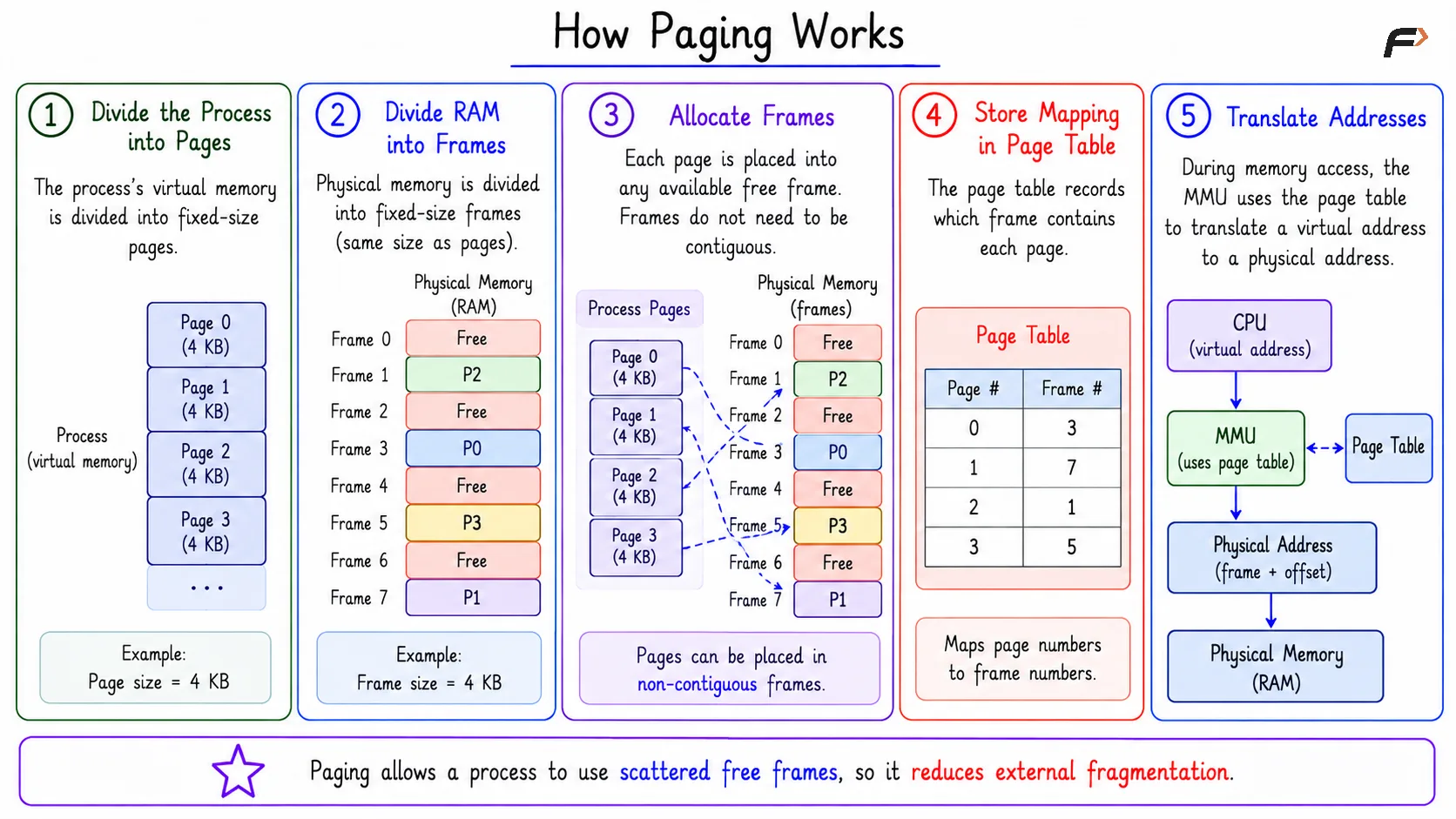
Suppose a process has pages 0, 1, 2, 3. These pages do not need to be stored in consecutive frames. The page table may store mappings such as:
Page 0 => Frame 3
Page 1 => Frame 0
Page 2 => Frame 5
Page 3 => Frame 2
The page number and frame number do not need to match. The page table tells the system where each virtual page is actually stored in physical memory.
How Paging Works
The basic paging flow is:
Divide the process: The process's virtual memory is divided into fixed-size pages.
Divide RAM: Physical memory is divided into fixed-size frames.
Allocate frames: Each page is placed into any available frame.
Store mapping: The page table records which frame contains each page.
Translate addresses: The MMU uses the page table during memory access.
Because pages can go into non-contiguous frames, scattered free frames can still be used effectively.
How Paging Works
Address Translation in Paging
The CPU generates a logical address, also called a virtual address. In paging, this address is divided into two parts:
Page number: Identifies which page contains the address.
Offset: Identifies the exact position inside that page.
The page number is translated into a frame number using the page table. The offset remains unchanged.
The formula is:
Page number = Logical address / Page sizeOffset = Logical address % Page sizePhysical address = Frame number * Page size + Offset
The key rule is simple: paging changes the page number into a frame number, but the offset stays the same.
Compact Worked Example
Suppose page size = 1024 bytes, logical address = 5196, and Page 5 is mapped to Frame 9.
First, find the page number and offset:
Page number = 5196 / 1024 = 5 and Offset = 5196 % 1024 = 76
The page table says Page 5 => Frame 9. Now compute the physical address:
Physical address = 9 * 1024 + 76 = 9216 + 76 = 9292
So the final physical address is 9292.
Internal Fragmentation in Paging
Paging removes the need for one continuous physical memory block, but it can still create internal fragmentation.
This happens when the last page of a process is not completely filled. For example, if the page size is 4 KB and a process needs 301 KB, it needs 76 pages. The first 75 pages use 300 KB, and the last page uses only 1 KB.
The remaining 3 KB inside the last allocated page is internal fragmentation.
Summary
Paging divides virtual memory into pages and physical memory into frames. Since pages can be placed in any free frames, a process does not need one continuous block of RAM.
The page table maps page numbers to frame numbers, and address translation uses the page number and offset. Paging reduces external fragmentation, but the last page of a process can still have internal fragmentation.
Be the first to add a comment.