Introduction
Paging translates a process’s virtual memory into physical memory using a few core components. The most important ones are page, frame, page table, and Page Table Entry, or PTE.
A page belongs to virtual memory, a frame belongs to physical memory, and the page table connects them. The PTE stores the exact mapping and the control information needed to use that mapping safely.
Page
A page is a fixed-size block of virtual memory. The operating system divides a process’s virtual address space into equal-sized pages.
For example, a system may use a page size of 4 KB, 8 KB, or a larger size such as 2 MB, depending on the hardware and OS design. Whatever size is chosen, all normal pages of that type have the same size.
Pages matter because they give the virtual-memory side of paging a regular structure. Each page is identified using a virtual page number.
Frame
A frame is a fixed-size block of physical memory. RAM is divided into frames, just as virtual memory is divided into pages.
The page size and frame size must match. If each page is 4 KB, then each frame must also be 4 KB, so any page can fit into any free frame.
The basic relationship is:
Component | Belongs To | Meaning |
|---|---|---|
Page | Virtual memory | Fixed-size block of a process address space |
Frame | Physical memory | Fixed-size block of RAM |
Page size = Frame size | Paging system | Allows pages to fit exactly into frames |
This equal-size rule is what makes paging flexible.
Page Table
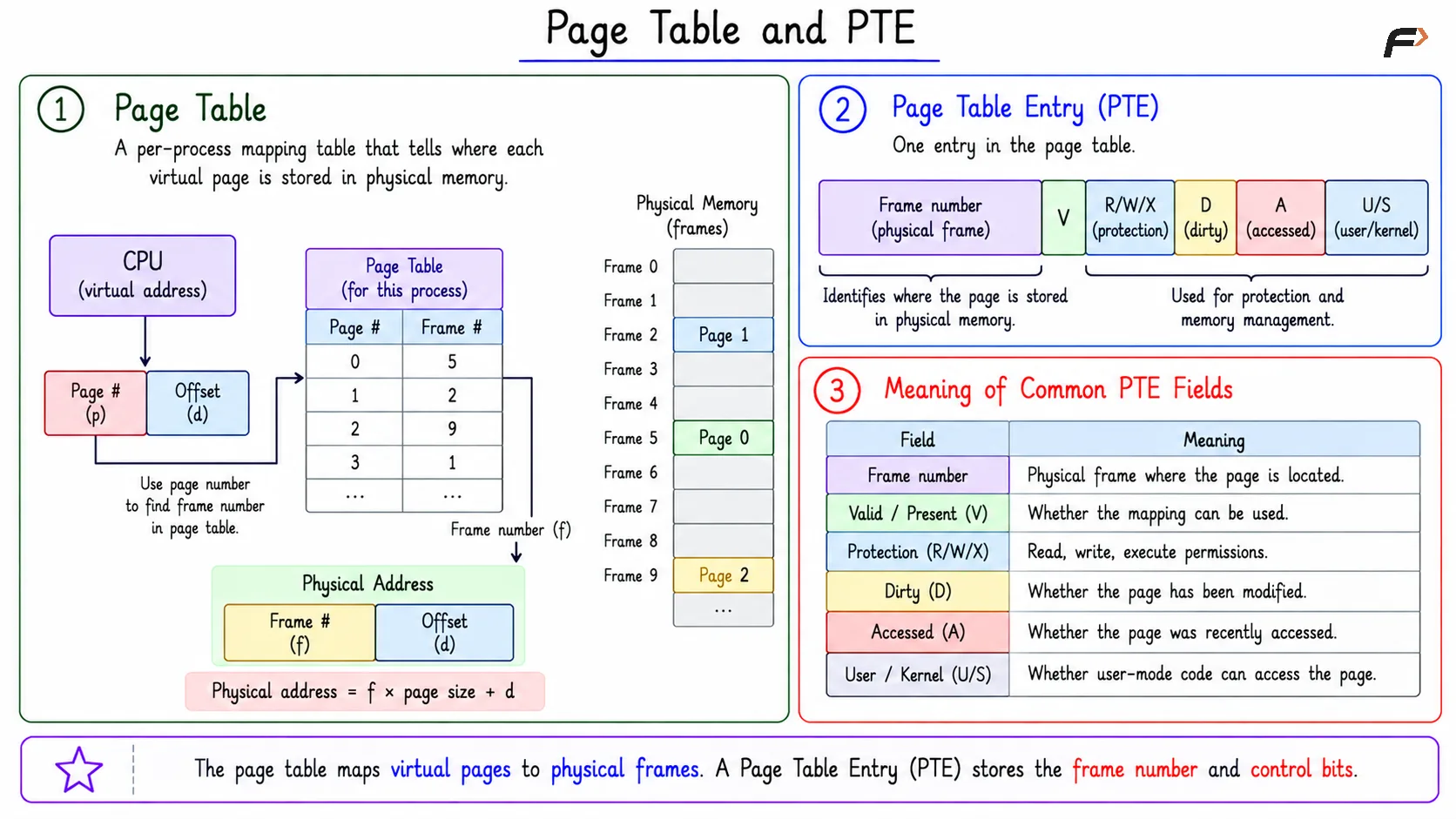
A page table is a per-process mapping table that tells where each virtual page is stored in physical memory.
A simple page table may contain mappings like:
Virtual page 0 => Frame 5
Virtual page 1 => Frame 2
Virtual page 2 => Frame 9
When the CPU generates a virtual address, the page number is used to find the correct page table entry. That entry gives the frame number needed to build the physical address.
So, the page table is the bridge between virtual pages and physical frames.
Page Table Entry
A Page Table Entry, or PTE, is one entry inside the page table. If the page table is the full mapping structure, a PTE is one row of that structure.
A PTE usually stores:
Frame number: Identifies the physical frame where the page is located.
Valid/present bit: Shows whether the mapping can currently be used.
Protection bits: Control read, write, and execute permissions.
Dirty bit: Shows whether the page has been modified in memory.
Reference/accessed bit: Shows whether the page was recently accessed.
User/kernel bit: Shows whether user-mode code is allowed to access the page.
The frame number supports address translation. The other bits help with protection, page replacement, and memory-management decisions.
Page Table and PTE
How These Components Work Together
The paging components form a simple lookup chain.
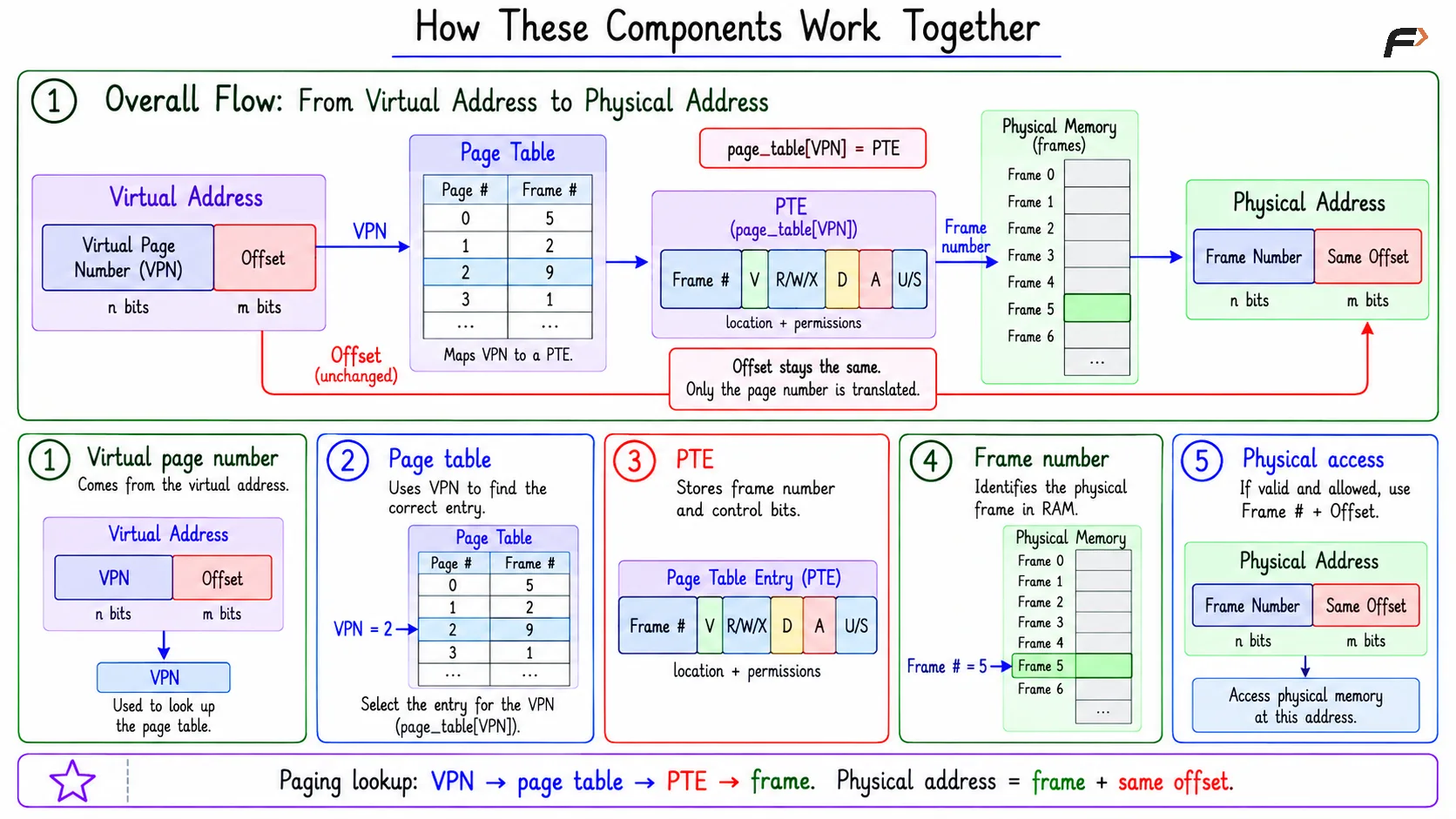
The basic flow is: Virtual page number => Page table => PTE => Frame number => Physical frame
In practical terms:
Virtual page number: Comes from the virtual address.
Page table: Uses the page number to find the right entry.
PTE: Provides the frame number and control bits.
Frame number: Identifies the physical frame in RAM.
Offset: Stays the same inside the page and frame.
A compact way to remember this is: page_table[virtual_page_number] = PTE
The PTE then tells the system where the page is and whether the access is allowed.
How These Components Work Together
Why Page Tables Can Become Large
A simple linear page table can become large because it may contain one PTE for every virtual page in the virtual address space.
The number of virtual pages is:
Number of virtual pages = Virtual address space size / Page size
The page table size is: Page table size = Number of virtual pages * PTE size
So: Page table size = (Virtual address space size / Page size) * PTE size
This is why large virtual address spaces can require large page tables, especially when the page size is small or each PTE is large.
Compact Page Table Size Example
Suppose the virtual address size is 32 bits, the page size is 4 KB, and the PTE size is 4 bytes.
A 32-bit address space has: Virtual address space = 2^32 bytes and Page size = 4 KB = 2^12 bytes
So the number of virtual pages is: 2^32 / 2^12 = 2^20 pages
Each page needs one PTE, and each PTE is 4 bytes.
Therefore, Page table size = 2^20 * 4 bytes = 2^22 bytes = 4 MB
So a simple single-level page table would require 4 MB per process in this example.
Link to Multilevel Paging
A large single-level page table may reserve entries even for virtual pages that are unused. This wastes memory when a process uses only a small portion of its virtual address space.
Multilevel paging reduces this problem by organizing the page table into levels. Instead of requiring one large flat table for everything, it allows unused regions of the virtual address space to avoid having full lower-level tables allocated.
The key reason for multilevel paging is therefore simple: large virtual address spaces can make simple page tables too large.
Summary
A page is a fixed-size block of virtual memory, and a frame is a fixed-size block of physical memory. Page size and frame size match so that any page can fit into any frame.
A page table maps virtual pages to physical frames, and each PTE stores one page’s frame number plus useful control bits. These bits help with validity, protection, modification tracking, access tracking, and user/kernel separation.
Be the first to add a comment.