Introduction
An operating system is not only a resource manager. It is also a safety boundary that controls what applications are allowed to do.
Protection is needed because a system contains private files, memory, devices, CPU time, and kernel data. Without OS protection, one app’s bug or attack could harm other apps, users, or the operating system itself.
Why OS Protection Is Needed
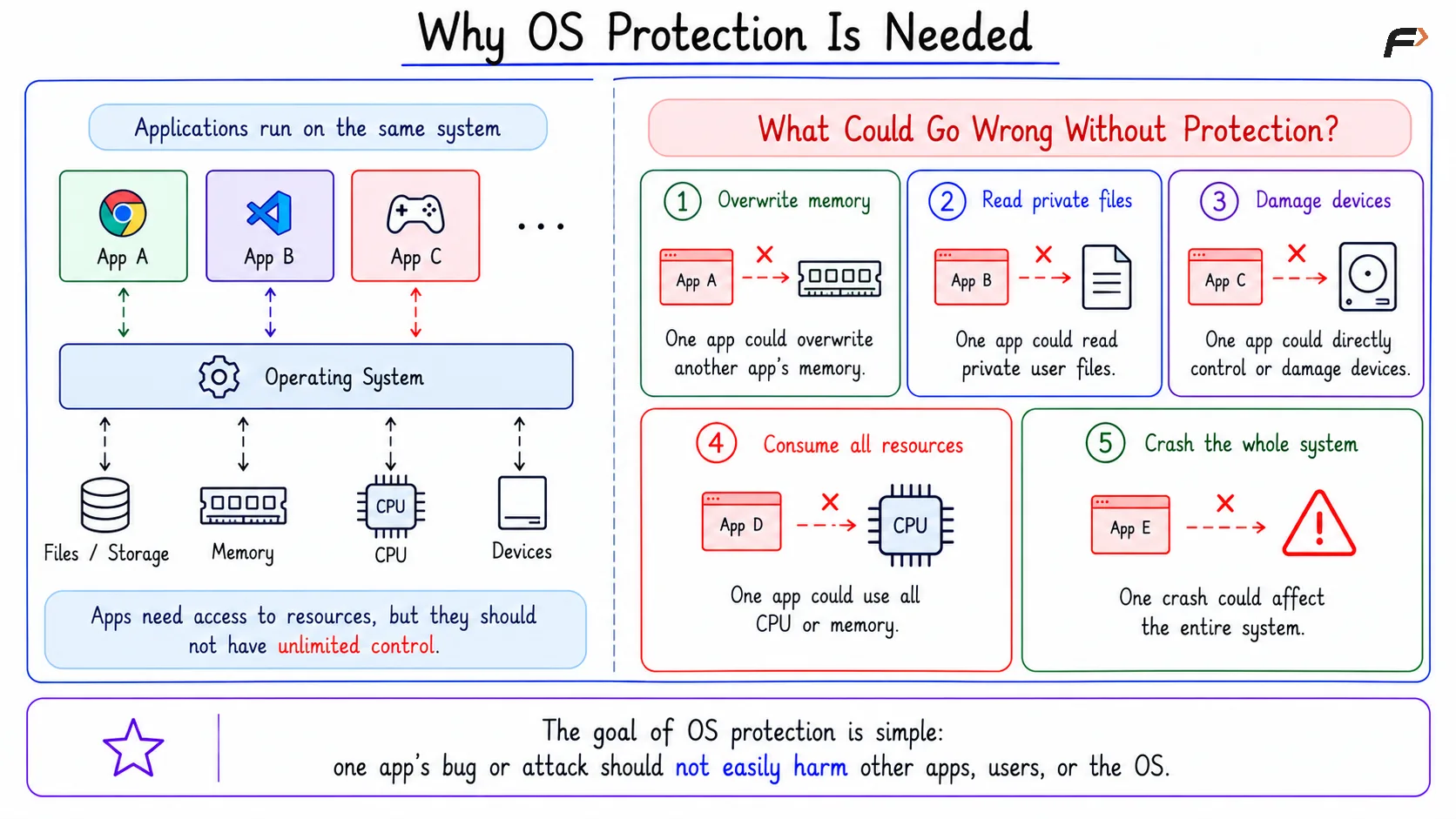
Applications should not have unlimited control over the system. A normal app should not be able to freely read private files, overwrite another process’s memory, control devices directly, or consume all CPU and RAM.
Without protection:
One app could overwrite another app’s memory.
One app could read private user files.
One app could damage device state.
One app could consume all CPU or memory.
One crash could affect the whole system.
The goal of operating system protection is simple: one app’s bug or attack should not easily harm other apps, users, or the OS.
Why OS Protection Is Needed
User Mode And Kernel Mode
The first major protection layer is the separation between user mode and kernel mode. Normal applications run in user mode, while the operating system kernel runs in kernel mode.
User mode has limited privileges. A user application can perform normal work, but it cannot directly modify page tables, access arbitrary physical memory, or control hardware freely.
Kernel mode is privileged. The kernel can manage CPU scheduling, memory, files, devices, and system calls because it needs higher access to control the system safely.
System Calls As Controlled Gates
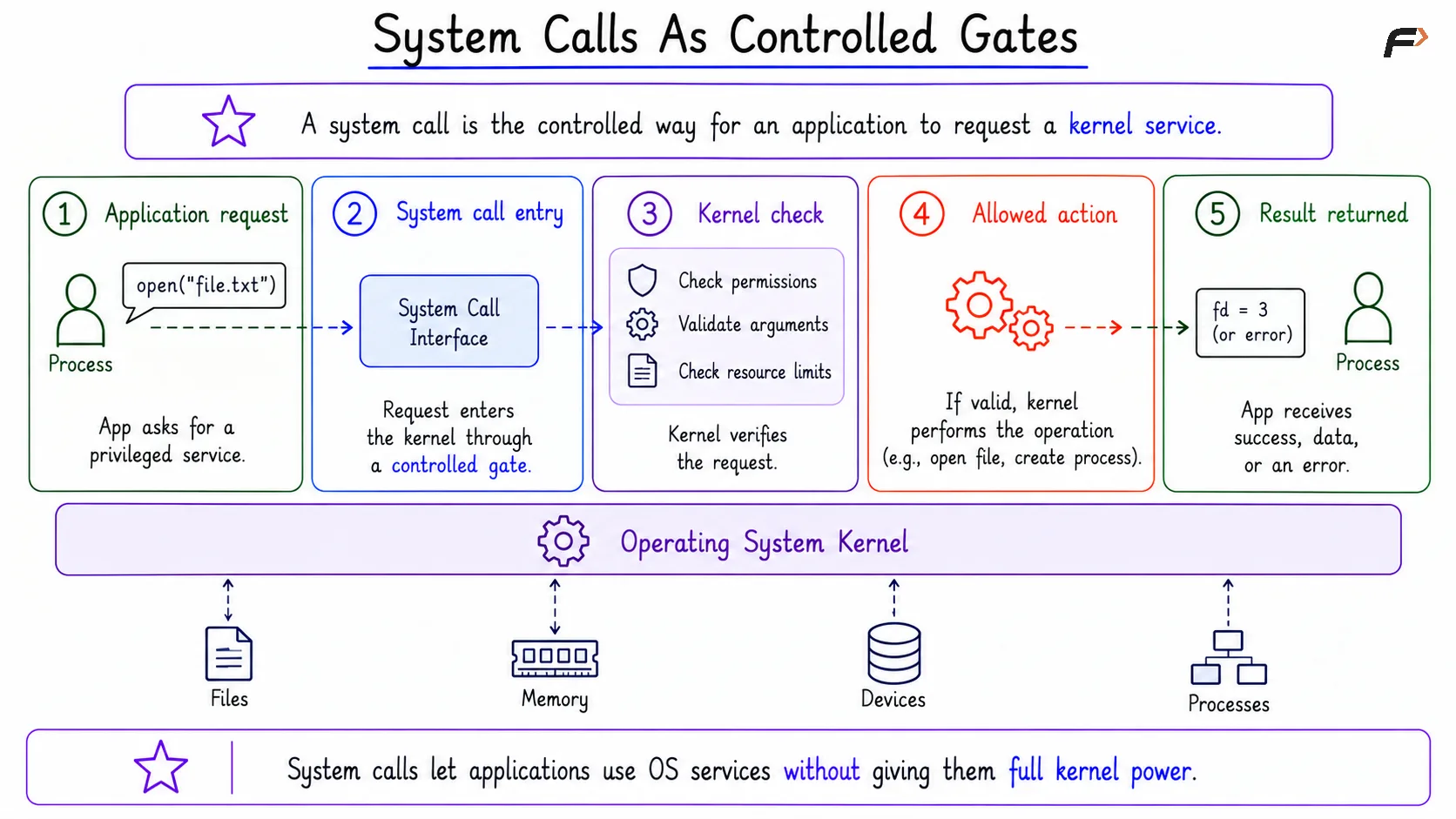
A system call is the controlled way for an application to request a kernel service. Applications use system calls when they need actions such as opening a file, creating a process, allocating memory, or using a device.
The kernel does not blindly trust every request. It checks permissions, validates parameters, performs the allowed action, and returns the result.
This is why system calls are often called the gate into the kernel. They let applications use OS services without giving them full kernel power.
System Calls As Controlled Gates
Process Isolation Using Virtual Memory
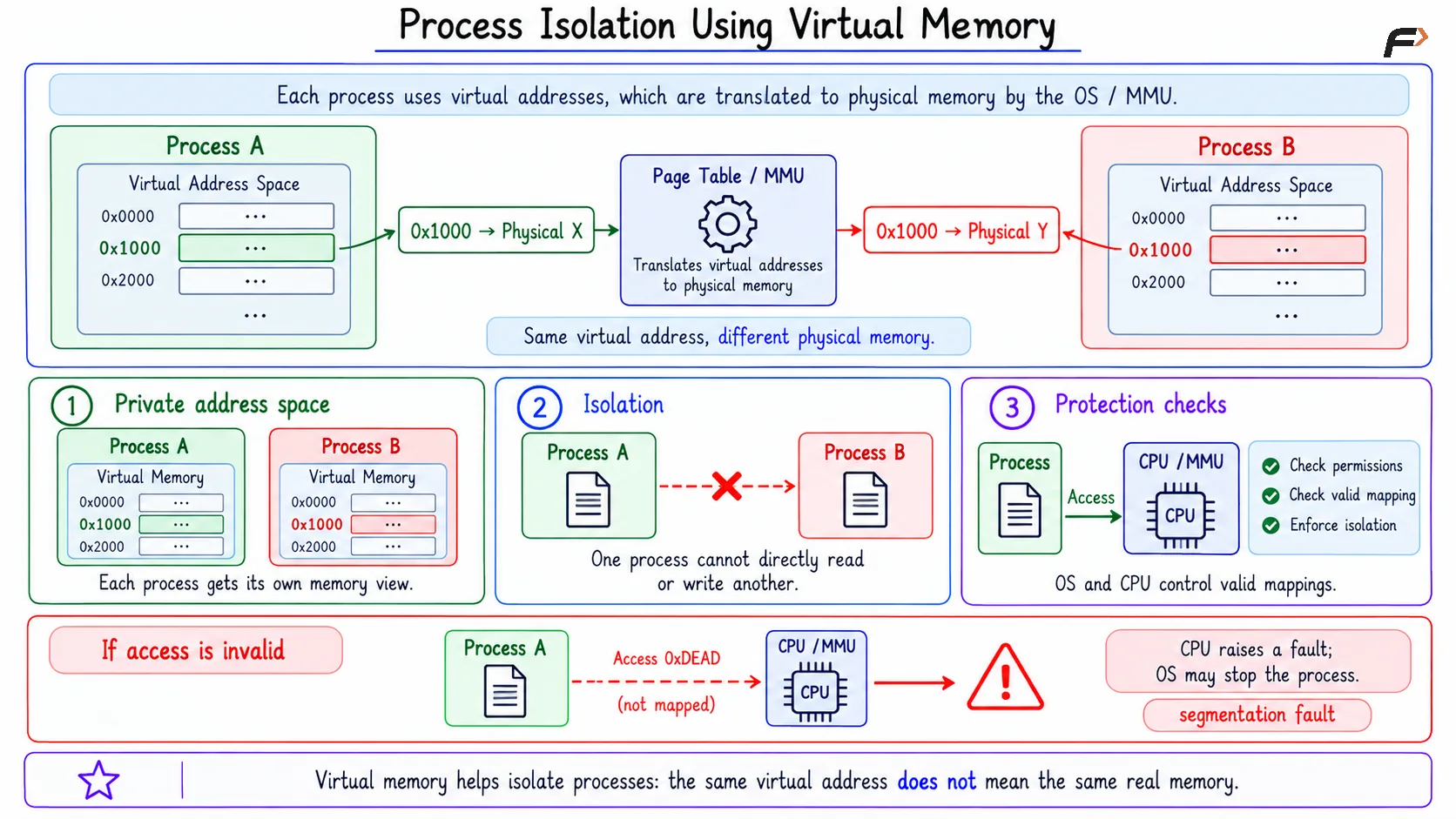
Process isolation is one of the most important parts of OS protection. Each process gets its own virtual address space, which gives it a private view of memory.
Two processes may use the same virtual address value, but those addresses can map to different physical memory locations. This prevents one process from directly reading or writing another process’s memory.
For example:
Process A: Virtual address
0x1000maps to physical memory X.Process B: Virtual address
0x1000maps to physical memory Y.
Both processes see 0x1000, but they are not touching the same actual memory. The OS and CPU memory-protection checks keep these mappings controlled.
If a process tries to access forbidden memory, the CPU raises a fault. The OS handles that fault, and the process may be stopped with an error such as a segmentation fault.
Process Isolation Using Virtual Memory
File Permissions And User Identity
The operating system also protects files using user identity, group identity, ownership, and permissions. A file may exist, but that does not mean every process can read or modify it.
When a process tries to open a file, the OS checks:
which user is running the process
which group the user belongs to
who owns the file
read, write, and execute permissions
what operation the process requested
For example, a process may try to read a private file and receive a permission error. That error is not a failure of the OS; it is protection working correctly.
$ cat secret.txt
cat: secret.txt: Permission denied
File permissions protect user data and system files from unauthorized access.
Controlled Device Access
Applications should not directly control devices such as camera, microphone, disk, network card, printer, GPU, or keyboard. Device access is powerful, so the operating system mediates it.
Instead of direct hardware control, applications request device access through system calls and OS APIs. The OS then uses drivers and controlled I/O paths to perform the actual operation.
The basic flow is:
App requests device access => OS checks permission => Driver talks to device => Result returns to app
This protects the system from unsafe device use. For example, an app should not freely access the microphone or write arbitrary data to a disk device without OS checks.
Resource Limits And Isolation
Protection also means preventing one process from consuming too many resources. A buggy or malicious process should not be allowed to use all CPU time, memory, open files, disk space, or process slots.
Operating systems can enforce limits on:
CPU usage
memory usage
number of processes
number of open files
disk usage
container resources
device access
On Linux, mechanisms such as cgroups and namespaces are important here. Cgroups can limit and monitor resource usage, while namespaces can isolate views of processes, mounts, users, networks, and hostnames.
Real Examples Of OS Protection
OS protection becomes easier to understand through common system behavior. Many things that feel like errors are actually protection boundaries doing their job.
Examples include:
Browser tab crash: One tab process may crash, but other tabs and the OS can continue running.
Permission denied: A process may try to read a protected file and get blocked.
Segmentation fault: A process may touch invalid memory and get stopped.
Container isolation: A container may see only a limited process list instead of the whole host.
Resource limits: A process may be restricted from opening too many files or using too much memory.
These examples show that protection is not only about security attacks. It also helps the system survive bugs, crashes, and accidental misuse.
Summary
OS protection exists because applications should not freely access memory, files, devices, CPU, or kernel resources. The operating system creates safety boundaries around apps, users, and itself.
It uses user mode, kernel mode, system calls, virtual memory, file permissions, device control, resource limits, and isolation mechanisms. The central idea is that one app’s bug or attack should not easily harm other apps, users, or the operating system.
Be the first to add a comment.