Introduction
Memory-mapped files and mmap connect files, memory, and IPC. Normally, file access uses calls like read and write, where bytes are explicitly copied between a file and a program buffer.
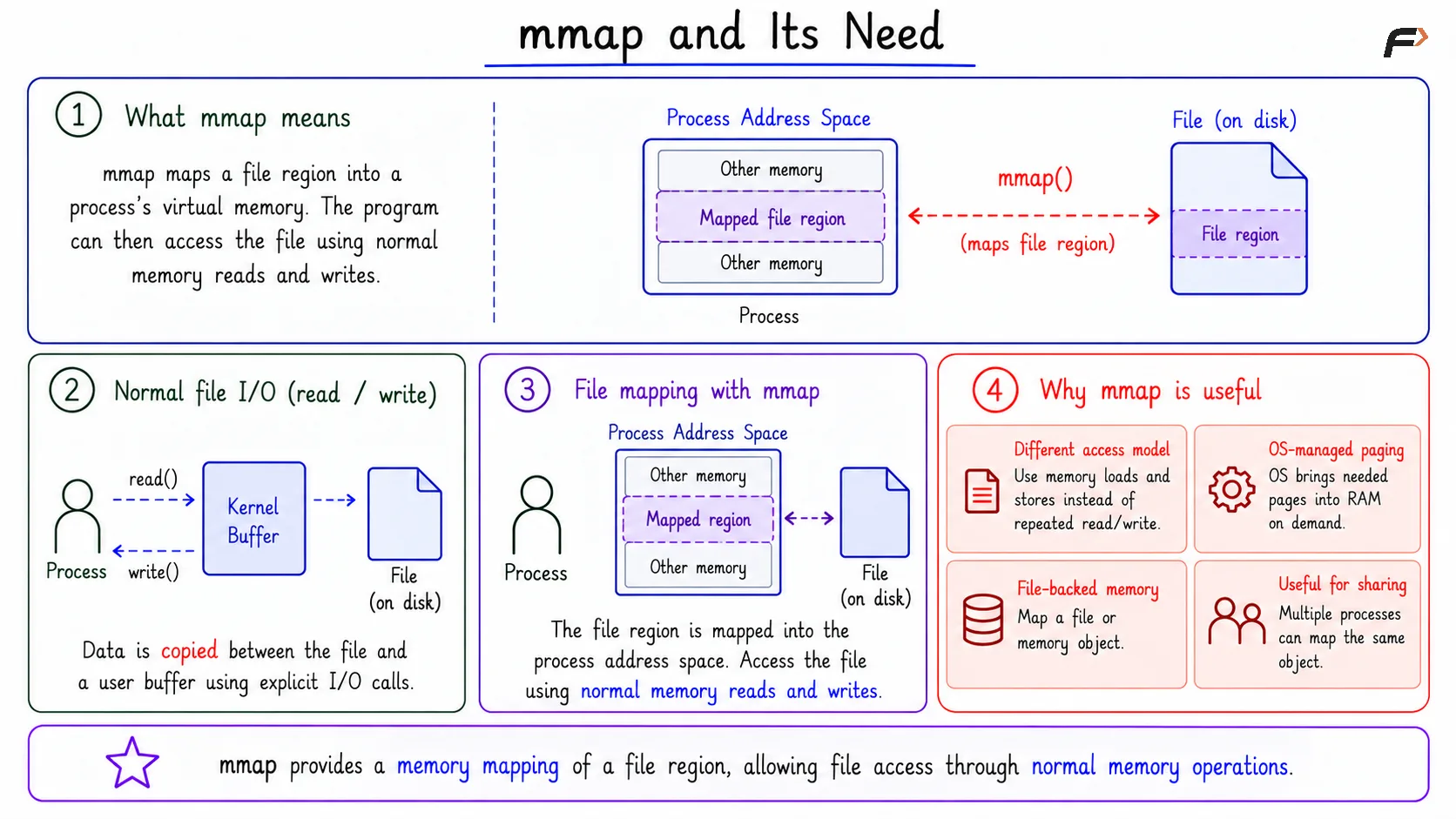
mmap gives a different model. It maps a file or memory object into a process address space, so the program can access that region through memory addresses.
What mmap Means
mmap is a system call that creates a memory mapping inside a process address space. In the file-backed case, a region of a file is mapped into virtual memory.
After mapping, the program can read or write the mapped region using normal memory operations. The operating system handles the connection between those memory accesses and the underlying file, object, page cache, and physical memory.
Why mmap Exists
Normal file I/O treats the file as something accessed through explicit I/O calls. The program asks the OS to copy bytes from the file into a buffer or from a buffer back into the file.
With mmap, the program maps a file region and then works with it as memory. This can be useful when a program repeatedly accesses a file, works with large data, or wants file-backed memory sharing.
Important points include:
Different access model: The program uses memory loads and stores instead of repeated
readandwritecalls.OS-managed paging: The OS brings needed pages into RAM when they are accessed.
File-backed memory: A mapped region can be connected to a file or memory object.
Useful for sharing: Multiple processes can map the same object when shared access is needed.
mmap and its Need
File-Backed Mapping Flow
A file-backed mapping starts with a file or object and turns part of it into a mapped virtual memory region.
The basic flow is:
Open the file: The process obtains access to the file or object.
Map a region:
mmapcreates a mapped area in the process address space.Access through memory: The process reads and writes using memory operations.
Let the OS manage pages: The OS handles page faults, caching, and backing storage details.
Unmap when done:
munmapremoves the mapping when it is no longer needed.
The program is not manually copying the mapped data through a loop of read and write calls for that region.
Types of mmap Mappings
mmap can create different kinds of mappings depending on what is mapped and how updates should behave.
Mapping Type | Meaning |
|---|---|
File-backed mapping | Maps part of a file or object into virtual memory |
Anonymous mapping | Creates memory not backed by a normal file |
Shared mapping | Updates may be visible through other mappings of the same object |
Private mapping | Changes stay private to the process, often using copy-on-write |
Shared Mapping vs Private Mapping
A shared mapping allows updates to be visible through other mappings of the same object, depending on permissions and OS behavior. This is why shared mappings are useful for IPC and file-backed updates.
A private mapping keeps modifications local to the process. It often uses copy-on-write behavior: the process can initially read from the original mapped content, but when it writes, the change is kept in a private copy.
Point | Shared Mapping | Private Mapping |
|---|---|---|
Visibility | Updates may be visible to other mappings | Changes stay private |
IPC use | Useful for sharing between processes | Not used for direct shared updates |
Write behavior | Can update shared object when allowed | Usually copy-on-write |
The key distinction is whether writes are shared or private.
mmap as IPC
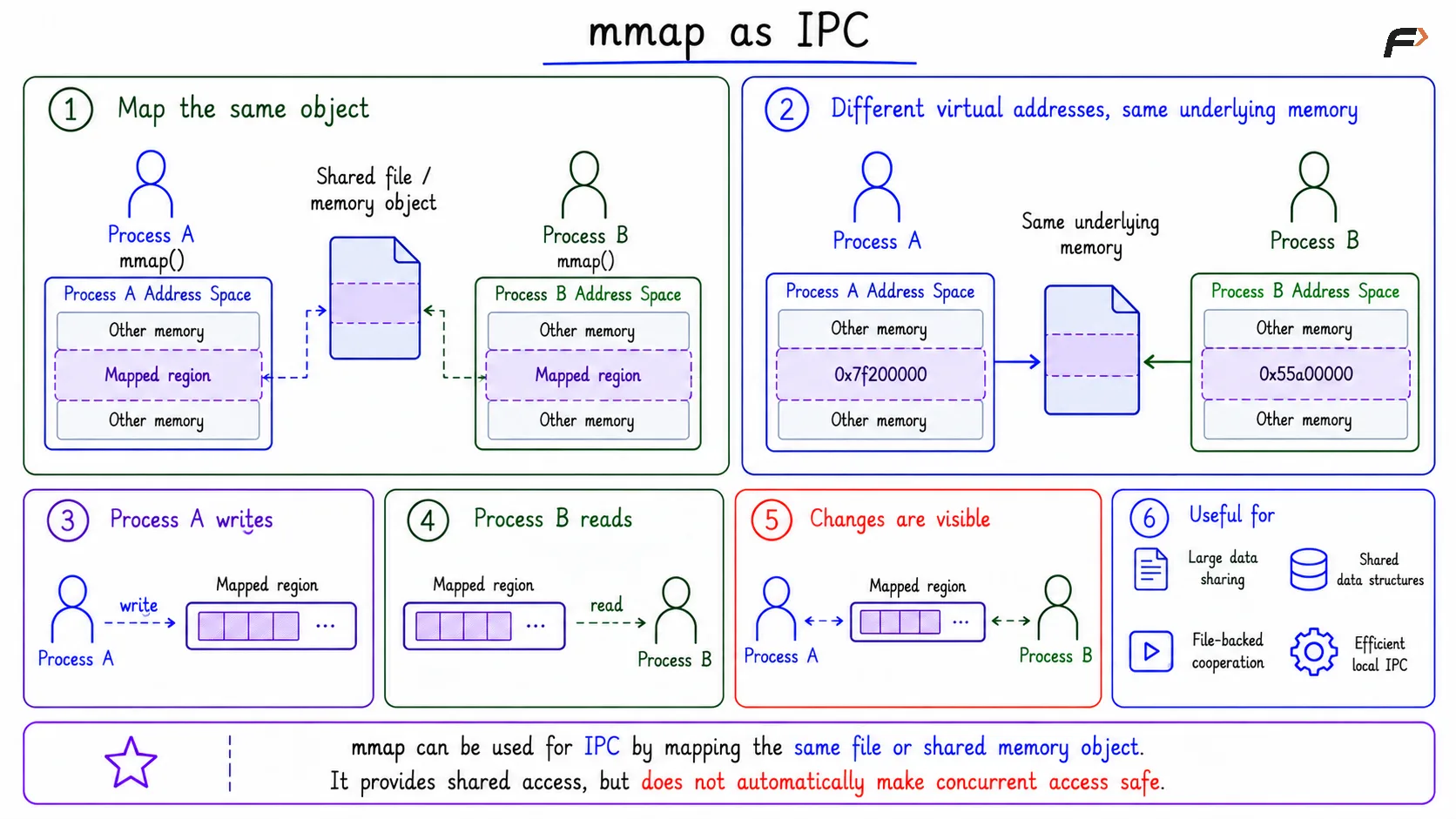
mmap can support IPC when two processes map the same file or shared memory object. If the mapping is shared, both processes can access the same underlying region.
For example, Process A may write data into the mapped region, and Process B may read that data through its own mapping. The virtual addresses may be different in each process, but the underlying mapped object can be the same.
This is useful for:
Large local data sharing: Avoid copying large buffers through pipes or queues.
Shared data structures: Keep common structures in a mapped region.
File-backed cooperation: Let multiple processes work with the same mapped file region.
Efficient local IPC: Use memory access after the mapping is set up.
The mapping provides shared access, but it does not automatically make concurrent access safe.
mmap as IPC
Synchronization Still Matters
When mmap is used for sharing, synchronization is still required if multiple processes may update the same data. The OS maps the memory, but it does not automatically decide which process may write at what time.
Without coordination, shared writable mappings can cause race conditions or inconsistent data. Processes may need mutexes, semaphores, file locks, atomic metadata, or a designed protocol to control access.
The practical rule is simple: mmap can create sharing, but safe sharing still needs coordination.
Summary
mmap maps a file or memory object into a process address space so the program can access it through memory. In a file-backed mapping, the OS connects memory access to the underlying file or object and manages paging details.
Shared mappings can support IPC or file-backed updates because changes may be visible through other mappings. Private mappings keep changes local, often through copy-on-write. When mappings are shared and writable, synchronization is still needed for correctness.
Be the first to add a comment.