Introduction
In a conventional paging system, each process usually has its own page table. That table contains entries for virtual pages, so its size grows with the process’s virtual address space.
An inverted page table changes the organization. Instead of tracking every virtual page, it keeps one system-wide table with one entry for each physical frame in RAM.
Why Inverted Page Tables Exist
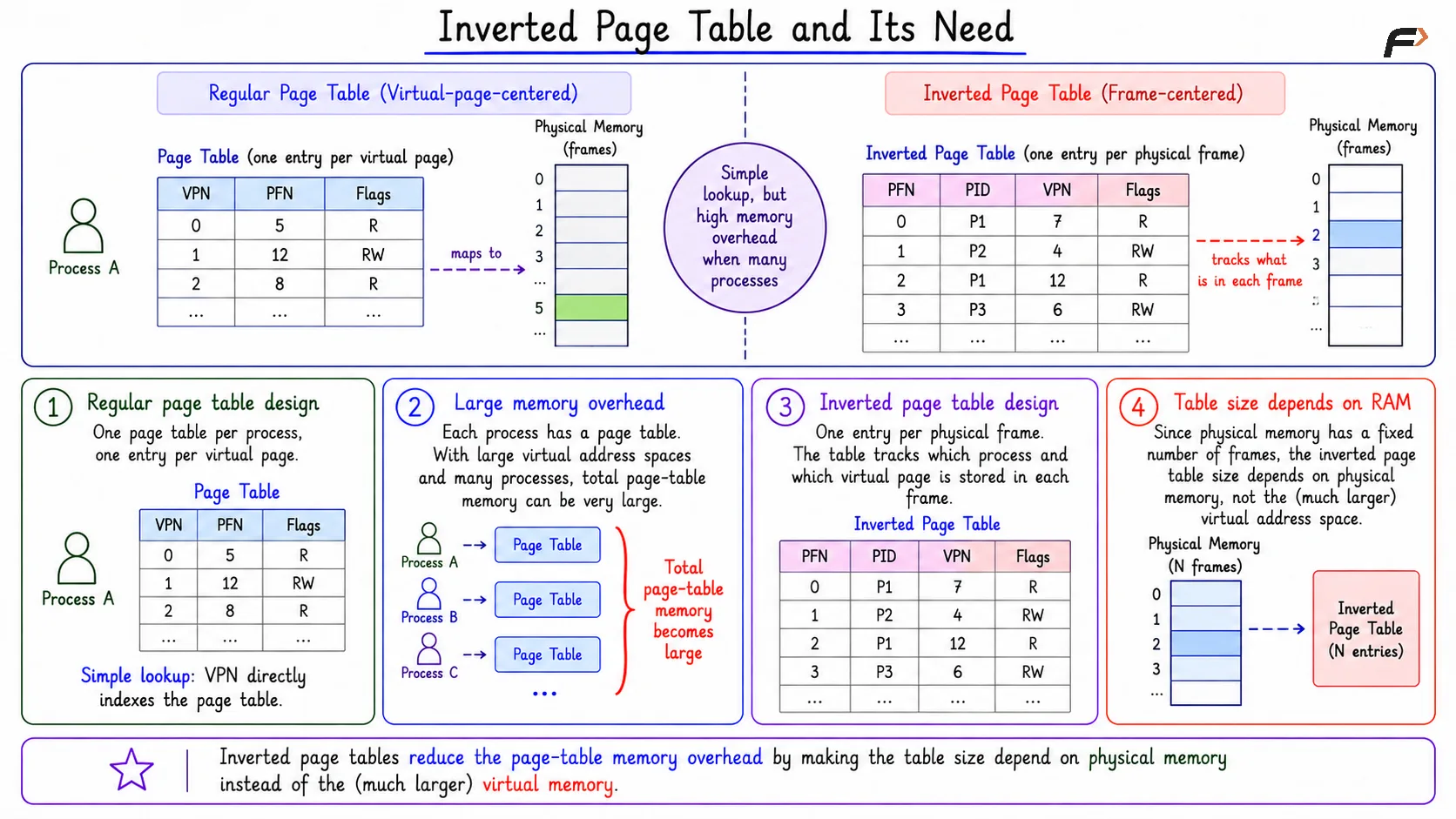
A regular page table is virtual-page-centered. Each process has a table, and each virtual page has a page table entry.
This is simple for lookup because the virtual page number can directly index the page table. But when virtual address spaces are large and many processes exist, the total page-table memory can become large.
An inverted page table reduces this overhead by making the table size depend on physical memory instead of virtual memory.
Core Idea
An inverted page table has one entry for each physical frame. The basic difference between the two is:
Regular page table: One entry per virtual page
Inverted page table: One entry per physical frame
This means the inverted table tracks what is currently stored in RAM. Since physical memory has a fixed number of frames, the table size is tied to actual RAM rather than the much larger possible virtual address space.
Inverted Page Table and its Need
What an Inverted Page Table Entry Stores
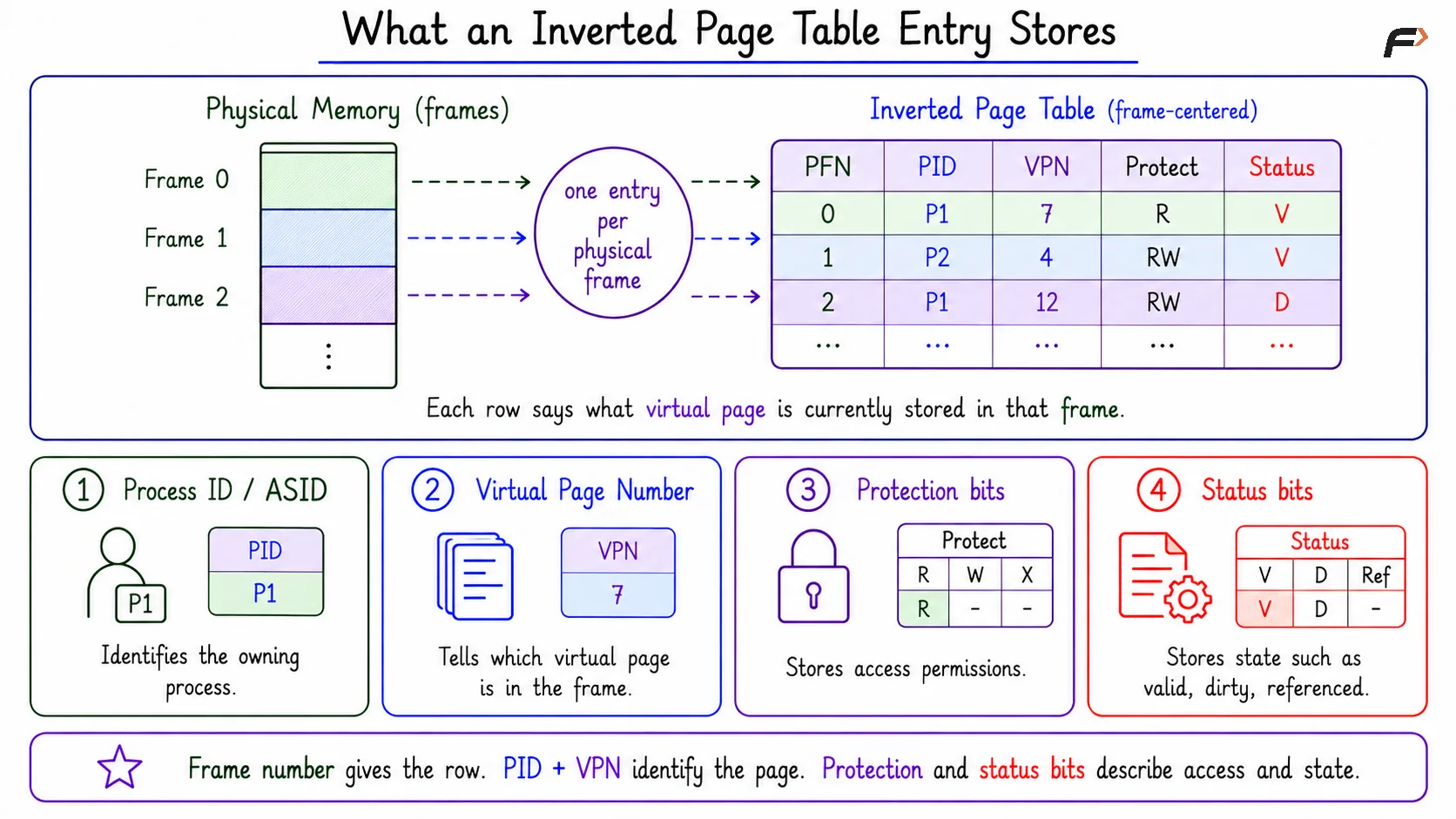
Because an inverted page table is frame-centered, each entry must say which virtual page is currently stored in that physical frame. A typical entry may contain:
Process ID or address-space ID: Identifies the process that owns the page.
Virtual Page Number: Identifies the virtual page stored in the frame.
Protection bits: Store access permissions such as read, write, or execute.
Status bits: Store state information such as valid, dirty, or referenced status.
For example:
Frame 0 => Process P1, VPN 7, read-only
Frame 1 => Process P2, VPN 4, read-write
Frame 2 => Process P1, VPN 12, dirty
The frame number identifies the row, while the stored process ID and VPN identify what virtual page is inside that frame.
What an Inverted Page Table Entry Stores
Regular Page Table vs Inverted Page Table
Aspect | Regular Page Table | Inverted Page Table |
|---|---|---|
Organization | Per process | System-wide |
Entries | One per virtual page | One per physical frame |
Lookup idea | VPN directly indexes the table | PID + VPN must be matched |
Main benefit | Simple lookup | Lower memory overhead |
Main cost | Can use lots of memory | Lookup is less direct |
The most important shift is the question being asked. A regular page table asks, “Where is this virtual page stored?” An inverted page table records, “Which process’s virtual page is stored in this physical frame?”
How Address Lookup Works
The CPU-generated virtual address provides a virtual page number and an offset. The system also knows which process is running, so it can identify the process ID.
The lookup uses: Process ID + Virtual Page Number.
PID + VPN: Use the process ID and virtual page number to search the inverted page table.
Matching entry: Find the entry containing the same PID and VPN, then get its frame number.
Physical address: Combine the frame number with the page offset to form the physical address.
Once the matching entry is found, the system gets the physical frame number. The offset is then used to locate the exact byte inside that frame.
Lookup Trade-Off
The inverted page table saves memory, but lookup becomes harder. In a regular page table, the VPN can directly index the page table. In an inverted page table, the system must find which physical-frame entry matches the given (PID, VPN) pair.
A direct scan would be slow if the table has many frame entries. So practical designs often use helper structures such as:
Hashing: Computes a likely location from the PID and VPN.
Hash chains: Handle cases where multiple mappings hash to the same location.
Auxiliary structures: Help locate the right inverted-table entry faster.
The key trade-off is memory versus lookup work. The table is smaller, but finding an entry is less direct.
Role of the TLB
The Translation Lookaside Buffer, or TLB, is especially important with inverted page tables. A TLB caches recent translations such as (PID, VPN) => Physical Frame.
If the translation is already in the TLB, the system does not need to search or hash through the inverted page table. If there is a TLB miss, the system must perform the slower lookup. So the TLB helps hide the lookup cost and keeps address translation fast for recently used pages.
Summary
An inverted page table is a system-wide table with one entry per physical frame. It stores which process and virtual page currently occupy each frame, so its size depends on physical RAM rather than the total virtual address space.
Its main advantage is reduced page-table memory overhead. Its main cost is lookup complexity, because translation must locate a matching (PID, VPN) entry, often using hashing and relying heavily on the TLB for speed.
Be the first to add a comment.