Introduction
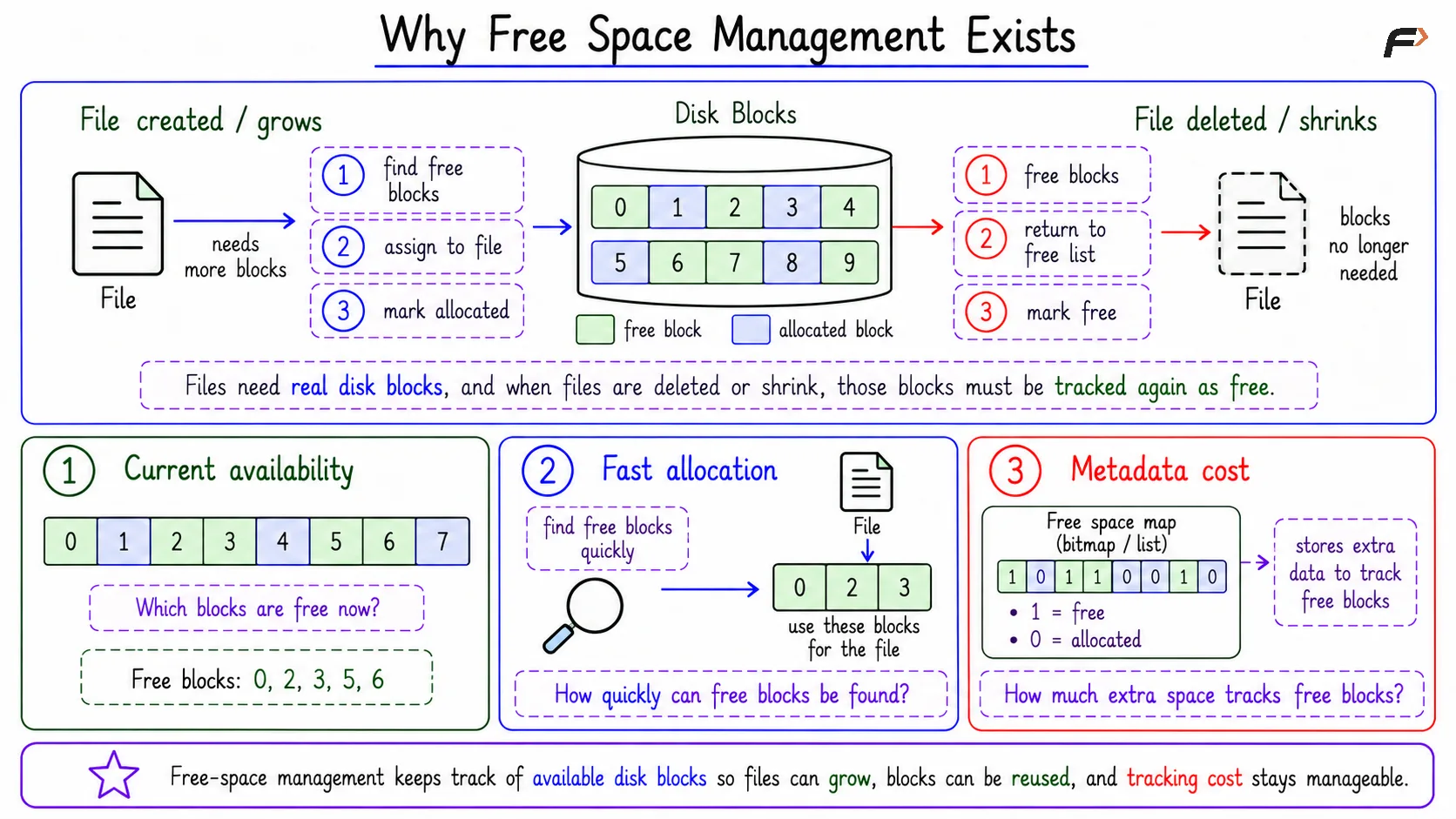
Free space management is needed because files are constantly created, expanded, shrunk, and deleted. The file system must know which disk blocks are available before it can allocate storage to a file.
When a file releases storage, those blocks must also be marked free again. Without free-space tracking, the file system could lose usable storage or accidentally allocate the same block incorrectly.
Why Free Space Management Exists
Files use real disk blocks. When a file is created or grows, the file system needs free blocks. When a file is deleted or shrinks, previously used blocks become available again.
The basic idea is that when a file needs storage, the operating system first finds available disk blocks, assigns the required blocks to the file, and then marks those blocks as allocated so they are not used by another file.
Free-space management mainly answers three questions:
Current availability: Which blocks are free right now?
Fast allocation: How quickly can free blocks be found?
Metadata cost: How much extra space is needed to track free blocks?
Different methods answer these questions differently.
Why Free Space Management Exists
Bitmap or Bit Vector
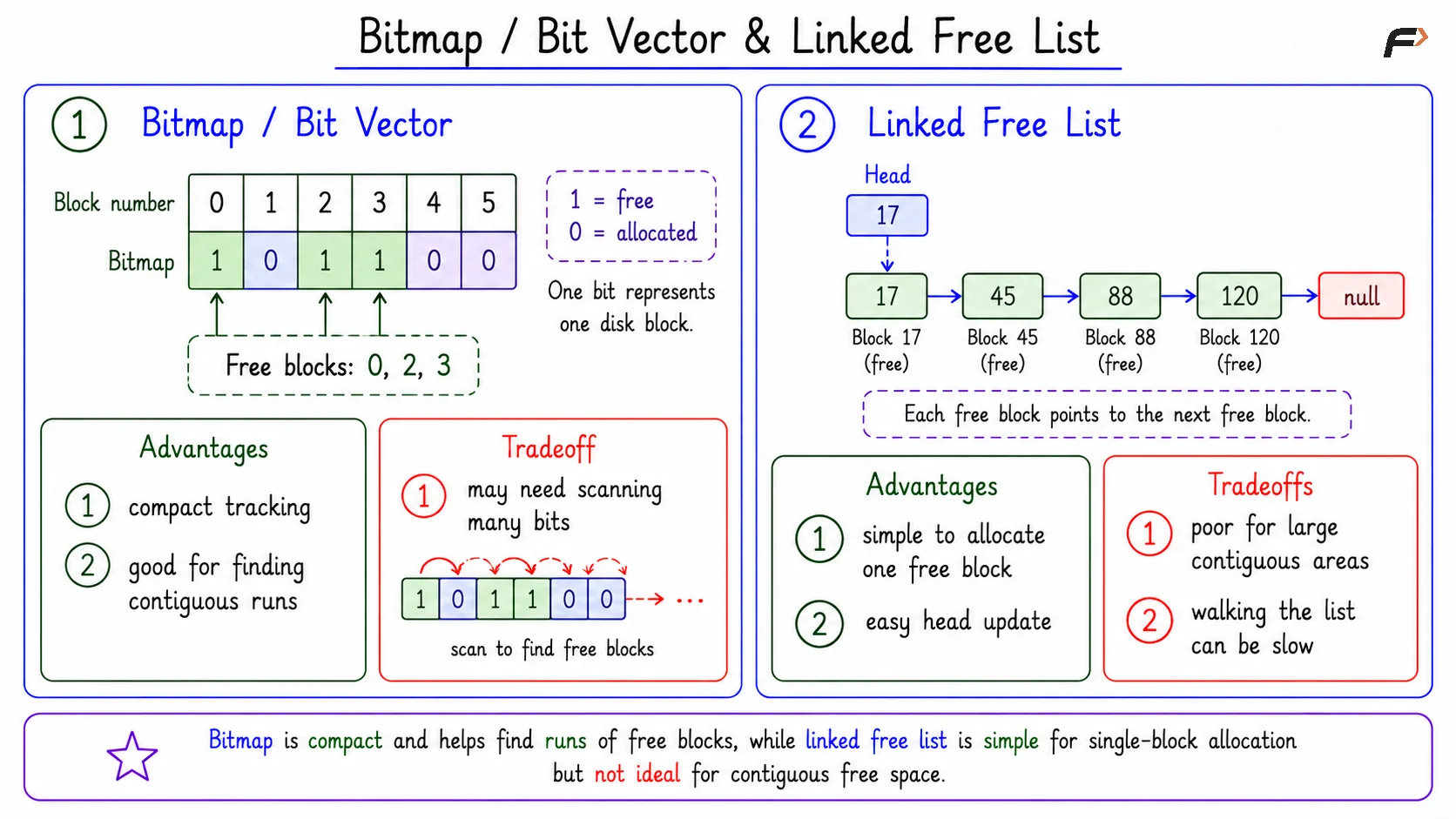
In a bitmap, one bit represents one disk block. The bit shows whether that block is free or allocated. For example, if 1 means free and 0 means allocated, a bitmap like this can represent block status:
Block | 0 | 1 | 2 | 3 | 4 | 5 |
|---|---|---|---|---|---|---|
Bitmap | 1 | 0 | 1 | 1 | 0 | 0 |
Here, blocks 0, 2, and 3 are free.
Bitmap is compact because each block needs only one bit of tracking information. It is also useful for finding contiguous free runs because the file system can scan the bit pattern and look for consecutive free bits.
Its tradeoff is scanning cost. If the disk is large or free space is scattered, the system may need to scan many bits to find suitable blocks.
Linked Free List
In a linked free list, free blocks are connected as a chain. Each free block points to the next free block. A simple chain may look like: 17 => 45 => 88 => 120 => null
This method is simple when the system needs one free block. It can take the first block from the list and update the head pointer.
The weakness is that it is not good for finding large contiguous free areas. The free blocks in the list may be scattered, and walking through a long list can be slow.
Bitmap/Bit Vector & Linked Free List
Grouping
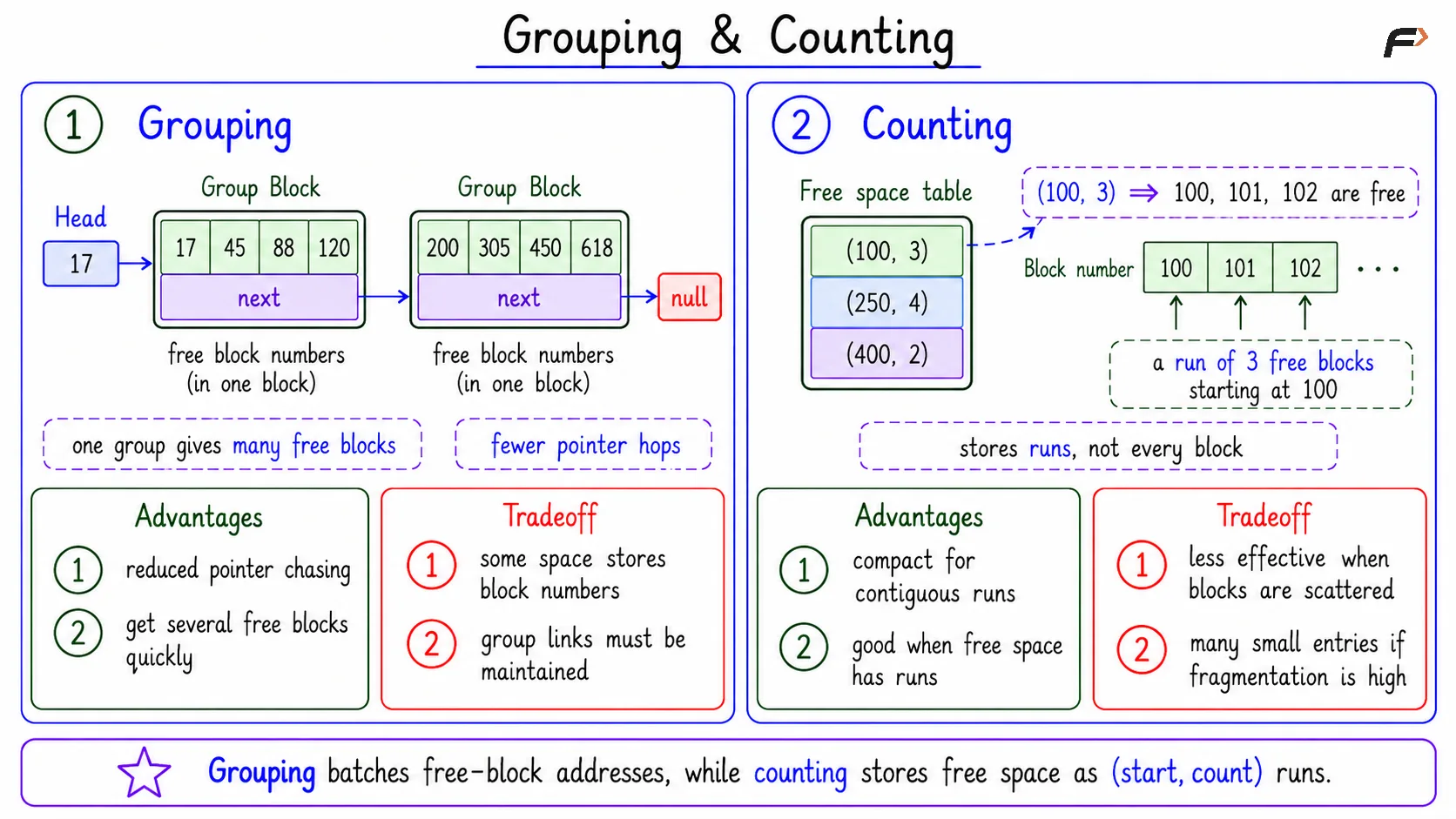
Grouping improves the linked-list idea by storing many free block numbers inside one block. That block also points to another group of free block numbers.
Instead of following one pointer for every free block, the file system can get several free block addresses from one group.
Main benefit: Reduces repeated pointer chasing.
Useful when: The system wants several free blocks quickly.
Tradeoff: Some block space is used to store block numbers and group links.
Grouping is still based on free-block lists, but it batches the information more efficiently.
Counting
Counting stores free space as pairs of the form: (start_block, count). For example: (100, 3) means blocks 100, 101, and 102 are free.
Counting is efficient when free space appears in consecutive runs. Instead of storing every free block separately, it stores the start of the run and how many blocks are free from there.
Its limitation is that it works best when free space has meaningful runs. If free blocks are highly scattered, the system may need many small (start, count) entries.
Grouping & Counting
Free-Space Methods Comparison
Method | Main Idea | Strength | Limitation |
|---|---|---|---|
Bitmap | One bit per block | Compact and good for finding free runs | May require scanning |
Linked free list | Free blocks linked as a chain | Simple one-block allocation | Poor for contiguous runs |
Grouping | One block stores many free block numbers | Finds several blocks with less traversal | Needs space for group metadata |
Counting | Store | Compact for consecutive free runs | Less effective when space is scattered |
The best method depends on storage size, allocation pattern, and whether contiguous free blocks are important.
Bitmap Size Example
Suppose:
Disk size:
64 GBBlock size:
4 KBBitmap rule: One bit per disk block
First calculate the number of blocks: 64 GB / 4 KB = (64 * 2^30) / 2^12 = 2^24 blocks
Since one block needs one bitmap bit: bitmap size = 2^24 bits
Convert bits to bytes: 2^24 / 8 = 2^21 bytes = 2 MB. So the bitmap needs 2 MB.
Summary
Free space management tracks available disk blocks so files can be created, expanded, shrunk, and deleted safely. The file system needs this information before allocating blocks and must update it when blocks are released.
Bitmap, linked free list, grouping, and counting are common methods. Bitmap is compact, linked list is simple, grouping reduces pointer chasing, and counting is efficient when free space appears in consecutive runs.
Be the first to add a comment.