Introduction
File access method means the pattern used to read or write data inside a file. The same file may be accessed from start to end, from a specific offset, or through an index.
This matters because access pattern affects operating system behavior. Caching, read-ahead, storage scheduling, and I/O cost can all change depending on how the file is used.
Why File Access Methods Matter
Different applications use files differently. A log reader may scan a file line by line, while a database may jump directly to the page that contains a required record. The key consideration is how the application accesses the data: whether it processes data sequentially, moves directly to specific locations, or uses an index to quickly find the required information.
How the application accesses its data determines which file-system and storage strategies will provide the best performance. If the pattern is predictable, the OS can optimize more easily. If the pattern jumps often, caching becomes harder because the next required block may not be near the current one.
Sequential Access
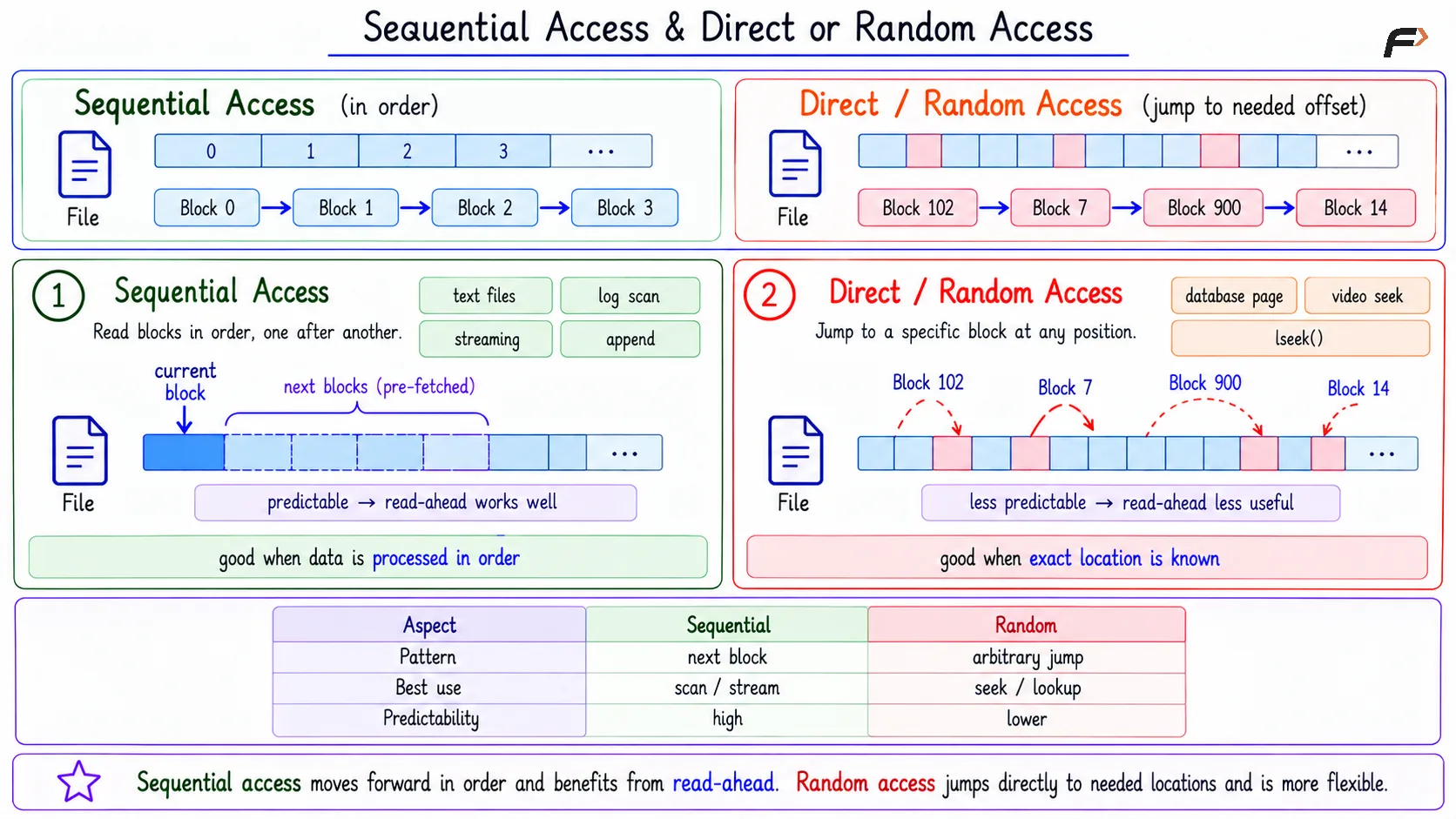
Sequential access means file data is read or written in order. The application moves forward step by step through the file.
A simple flow is: Block 0 => Block 1 => Block 2 => Block 3
Sequential access is common in:
Reading text files: A program reads line by line.
Scanning logs: Log entries are processed in order.
Streaming media: Playback usually moves forward.
Appending logs: New records are added at the end.
Sequential access is efficient because the pattern is predictable. The OS can use read-ahead, where it fetches upcoming blocks early because they are likely to be needed soon.
Sequential Access & Direct or Random Access
Direct or Random Access
Direct access, also called random access, means the program jumps to a specific byte offset or block instead of reading everything before it.
For example: Block 102 => Block 7 => Block 900 => Block 14
This method is useful when the program already knows where the required data is located. It avoids unnecessary scanning. Common examples include:
Database reads: Jumping to a specific page in a table file.
Video seeking: Moving to a selected timestamp.
lseek(): Changing the file offset before reading or writing.
Random access is flexible, but less predictable. Since the next access may be far away, caching and read-ahead are usually less effective than in sequential access.
Stream Plus Seek
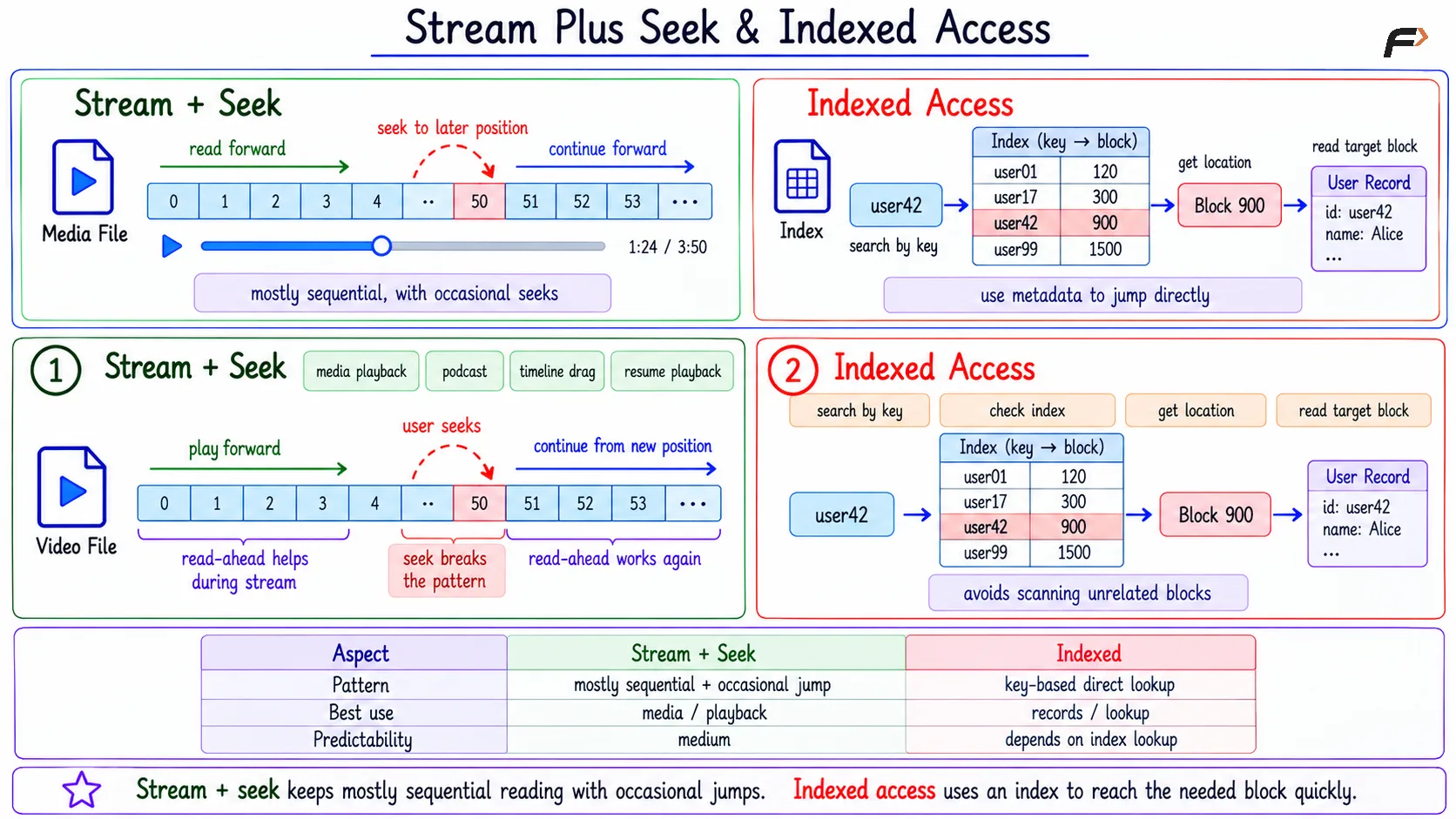
Some applications are mostly sequential but occasionally jump. A media player is a good example. During normal playback, the file is read forward like a stream. When the user drags the progress bar, the program seeks to another position and then continues reading from there.
This pattern sits between sequential and random access. The OS may still benefit from read-ahead during streaming, but seeking can interrupt that predictable pattern.
Stream Plus Seek & Indexed Access
Indexed Access
Indexed access uses extra metadata to locate data quickly. Instead of scanning the whole file, the application or system first checks an index.
The basic flow is:
Search by key: Start with a key such as
user42.Check index: Find where that key points.
Get location: The index may point to block
900.Read target data: Access that block directly.
Example:
Key | Block |
|---|---|
user01 | 120 |
user17 | 300 |
user42 | 900 |
user99 | 1500 |
If the key is user42, the index directs the system to block 900. This avoids scanning unrelated blocks.
Sequential vs Random vs Indexed Access
Access Method | Main Idea | Best For | Tradeoff |
|---|---|---|---|
Sequential access | Read or write in order | Logs, scans, streams | Not ideal for direct lookup |
Random access | Jump to known offset or block | Databases, seeking, fixed records | Harder to optimize |
Indexed access | Use metadata to find data | Fast search and record lookup | Needs extra index storage and updates |
Indexed access is powerful because it turns a search problem into a metadata lookup. Its cost is that the index must be stored, maintained, and kept consistent with the actual data.
Performance View
Sequential access is easiest for the OS to optimize because future access is predictable. Read-ahead and caching work well when the program keeps moving forward.
Random access is useful when exact locations are known, but it can create more cache misses. Indexed access improves lookup speed, especially in databases and file-system structures, but it adds metadata overhead.
Summary
File access methods describe how an application moves through file data. Sequential access reads or writes in order, direct or random access jumps to a known location, and indexed access uses metadata to find data efficiently.
The access pattern matters because it changes caching, read-ahead, I/O behavior, and performance. A file system or application can work better when its access method matches the way the data is actually used.
Be the first to add a comment.