Introduction
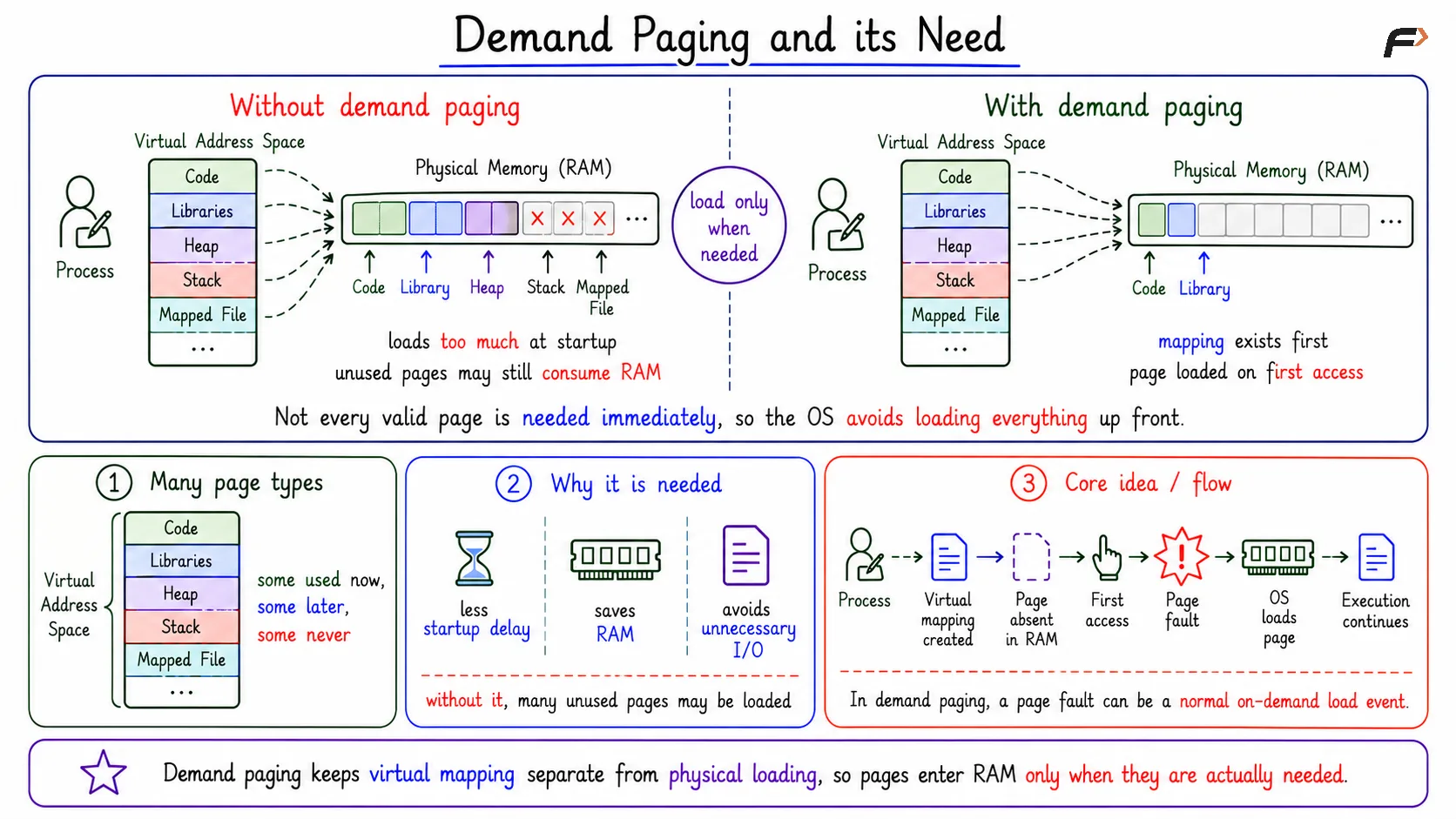
Demand paging is a memory-management technique where pages are brought into physical memory only when they are actually needed. Instead of loading the entire program into RAM at startup, the OS loads pages on first use.
This follows a simple idea: map first, load later. A process can have many valid pages in its virtual address space, but only the pages it touches must occupy RAM.
Why Demand Paging Is Needed
A process can have many kinds of pages in its virtual address space:
Code pages: Store executable instructions.
Library pages: Store code and data from libraries.
Heap pages: Support dynamic memory allocation.
Stack pages: Store function calls and local data.
Mapped file pages: Represent file regions mapped into memory.
Not all of these pages are needed immediately. Some may be used at startup, some may be used later, and some may never be touched during that run.
Without demand paging, the OS may load too much data before execution begins. This increases startup time, consumes RAM unnecessarily, and may perform I/O for pages that are never used.
Core Idea of Demand Paging
Demand paging separates virtual mapping from physical loading. A page can be part of a valid address space even if it is not currently present in physical memory. When the process first touches that page, a page fault occurs, and the OS brings or creates the required page.
This is not an error by itself. In demand paging, a page fault can be a normal mechanism for loading a valid page on demand.
Demand Paging and its Need
Present, Valid, and Invalid Pages
Demand paging depends on the information stored in the page table entry, or PTE.
Page State | Meaning | Result |
|---|---|---|
Present | Page is already in RAM | Access continues normally |
Valid but not present | Page belongs to the process, but is not in RAM | Page fault, OS loads or creates page |
Invalid | Address is not legal for the process | Illegal access, process may be terminated |
The most important distinction is between valid but not present and invalid. A valid missing page can be loaded. An invalid address is not a demand-paging case.
First-Touch Page Fault Flow
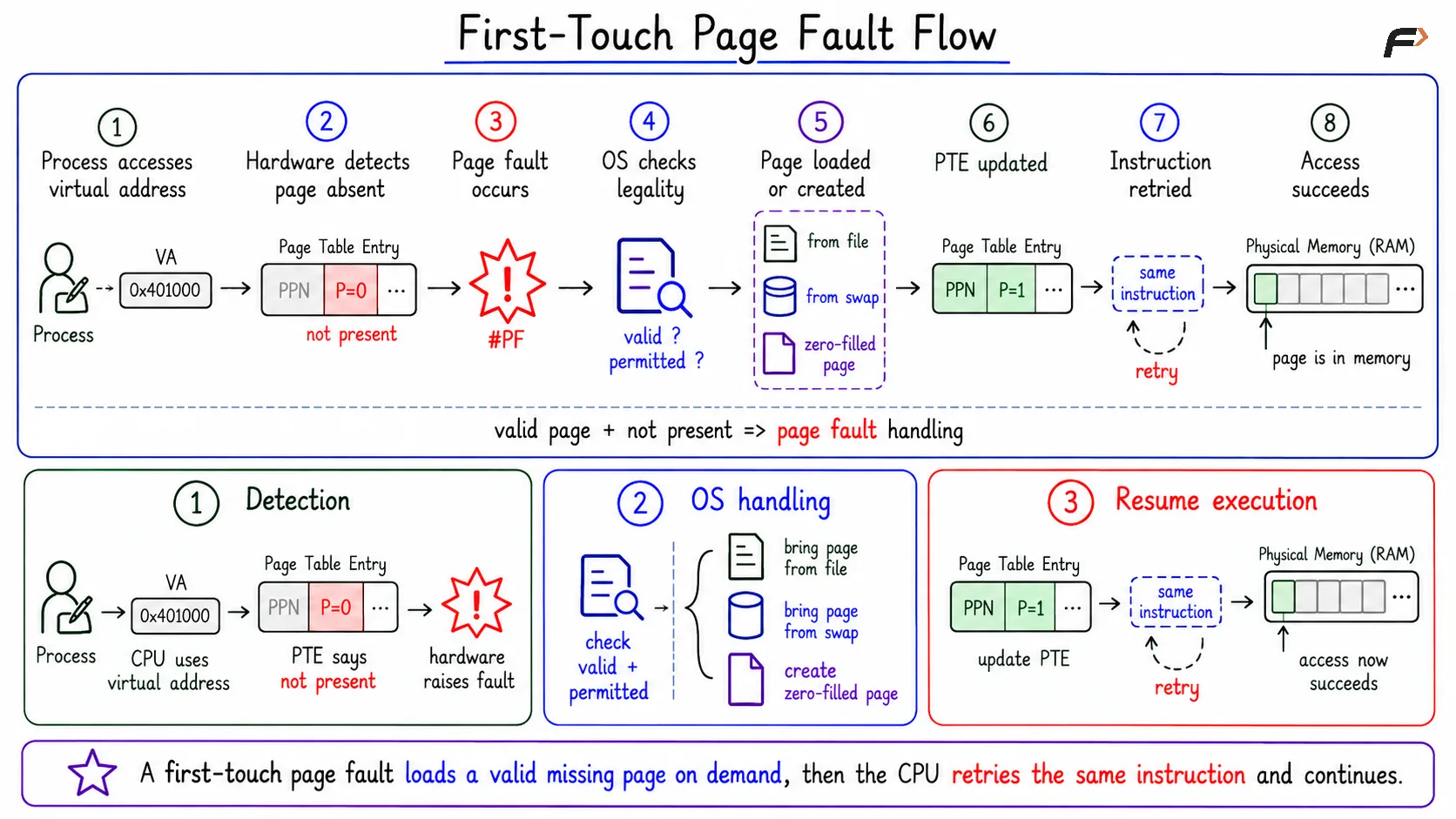
When a process first accesses a valid page that is not present in RAM, the system follows a page-fault flow.
Process accesses a virtual address: The CPU tries to use an address.
Hardware detects absence: The page-table entry says the page is not present.
Page fault occurs: Control transfers to the OS page-fault handler.
OS checks legality: The OS verifies that the access is valid and permitted.
Page is loaded or created: The page comes from a file, swap, or is created as a new zero-filled page.
PTE is updated: The page table now points to the physical frame.
Instruction is retried: The original memory access runs again and succeeds.
The same instruction is retried because the fault happened before the memory access could complete.
First-Touch Page Fault Flow
Demand Paging Pseudocode
A compact view of the decision logic is:
void memoryAccess(VirtualAddress address) { PTE pte = pageTable.lookup(address.page); if (pte.present) { accessPhysicalMemory(); } else if (pte.valid) { handlePageFault(); retrySameInstruction(); } else { terminateProcess(); }}This shows the three main paths: already present, valid but absent, and invalid.
Why Startup Becomes Faster
Without demand paging, the OS may load all required program pages before execution starts. That means more disk or SSD activity and more RAM usage before the program can run.
With demand paging, the OS can map the program’s regions first and load only the pages that execution actually touches. This helps programs start faster because unused or rarely used pages do not need to be loaded immediately.
Example: Browser Startup
A browser may have pages for core UI, rendering, settings, extensions, libraries, caches, and rarely used features.
At startup, the browser may need only core pages for opening the window, rendering basic UI, and handling navigation. Settings pages, uncommon feature libraries, or rarely used mapped files can remain unloaded until the browser actually touches them.
Demand paging avoids loading every possible browser page at startup. RAM is used more for active pages and less for pages that may never be used.
Benefits and Cost
Demand paging gives practical memory-management benefits.
Faster startup: The OS does not load every page before running the program.
Lower RAM usage: Untouched pages do not occupy frames.
Less unnecessary I/O: Pages are brought from storage only when needed.
Larger virtual address spaces: A process can have many valid virtual pages without all of them being resident.
The cost is page-fault overhead. The first access to a missing valid page is slower because the OS must handle the fault, find or create a frame, update the page table, and retry the instruction. After the page is present, later accesses can use the normal fast path.
Summary
Demand paging loads pages into physical memory only when they are accessed. The OS can create a process’s virtual address space first and delay actual loading until a valid missing page is touched.
The key rule is: present pages are accessed normally, valid but not present pages cause demand-paging page faults, and invalid pages represent illegal memory access. This saves startup time and RAM, while page faults provide the mechanism for loading pages on demand.
Be the first to add a comment.