Introduction
Deadlock detection only tells the system that a deadlock exists. After that, the operating system still needs a way to break the waiting cycle and allow progress again.
That second step is called deadlock recovery. It is used when a system allows normal resource allocation, detects deadlock later, and then takes corrective action.
What Deadlock Recovery Means
Deadlock recovery is the action taken after a deadlock has been detected to make the system move again. Detection asks whether a deadlock exists, while recovery decides how to get out of it.
Recovery is not free. Since the deadlocked processes are already stuck, the system usually has to sacrifice some work, rollback some state, or terminate one or more processes.
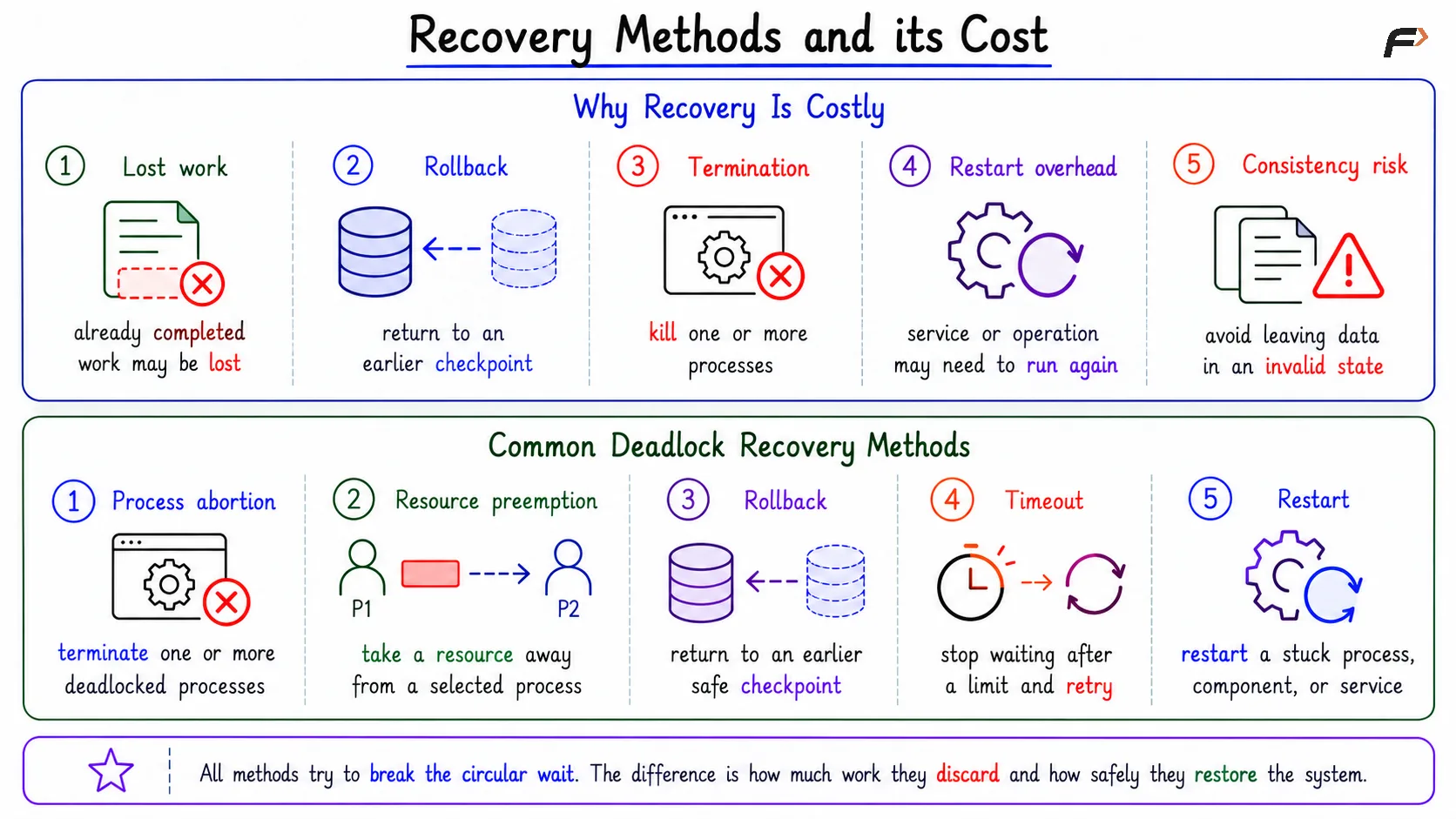
Why Recovery Is Costly
Recovery is disruptive because deadlock cannot usually be fixed by simply continuing from the same point. Every process in the deadlocked cycle is waiting for a resource that cannot become free naturally.
Common costs include:
Lost work: A process or transaction may lose work already completed.
Rollback: The system may return a process to an earlier checkpoint.
Termination: One or more processes may be killed to release resources.
Restart overhead: A service, process, or operation may need to run again.
Consistency risk: Recovery must avoid leaving files, memory, or data in an invalid state.
So recovery restores progress, but it may do so by undoing or discarding part of the work.
Recovery Methods and its Cost
Common Deadlock Recovery Methods
Once deadlock is detected, the system can use different recovery techniques. The right choice depends on the type of resource, the cost of restarting, and how important correctness is.
Process abortion: Terminate one or more deadlocked processes
Resource preemption: Take a resource away from a selected process
Rollback: Return a process to an earlier safe checkpoint
Timeout: Stop waiting after a limit and retry or reset
Restart: Restart a stuck process, component, or service
All these methods try to break the circular wait. The difference is how much work they discard and how safely they restore the system.
Abort-Based Recovery
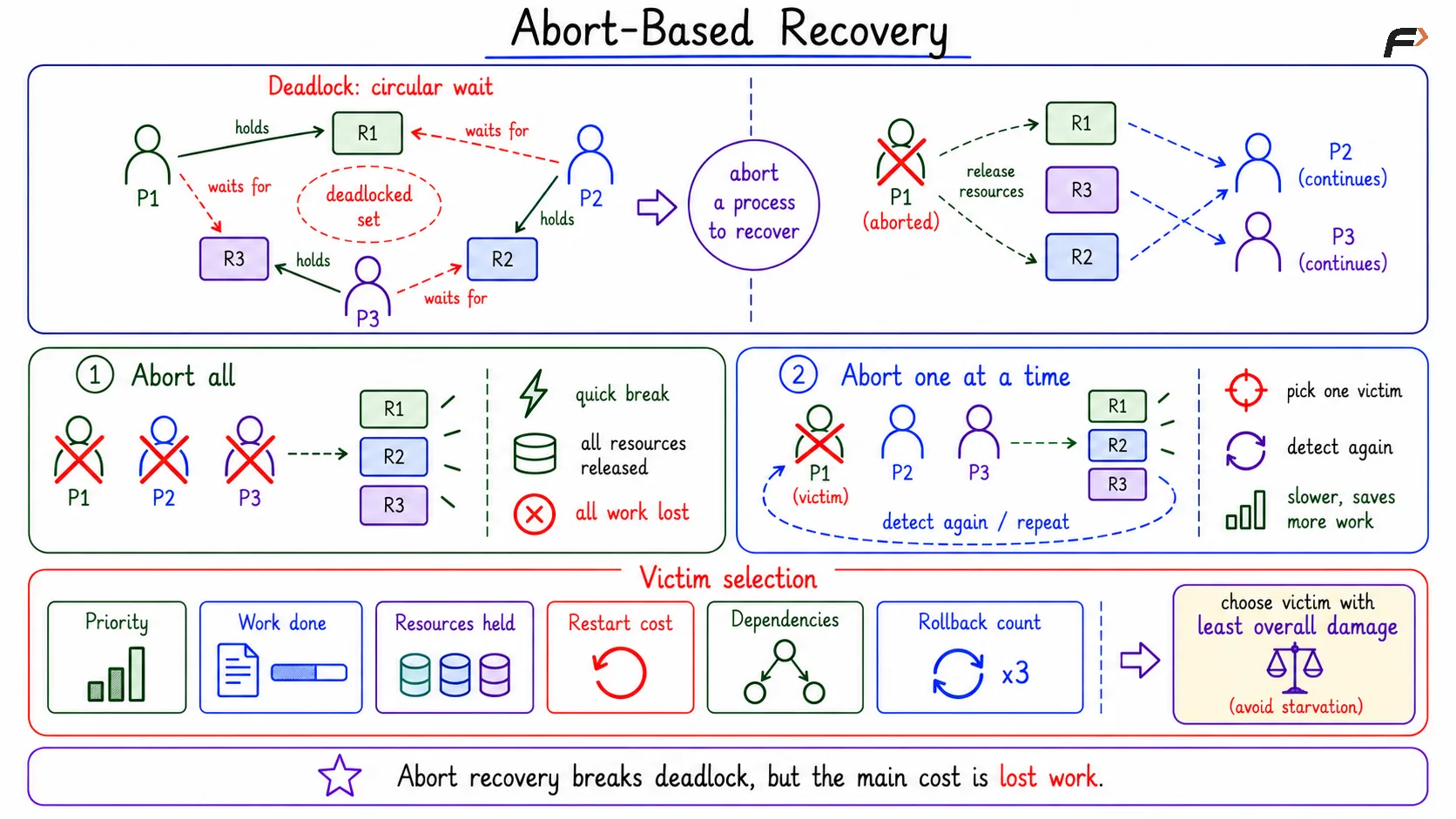
One simple recovery method is to abort processes from the deadlocked set. When a process is aborted, its resources are released, and other processes may be able to continue.
There are two common approaches:
Abort all deadlocked processes: This breaks the deadlock quickly because all resources held by the deadlocked group are released. The drawback is that it wastes the work of every process in the group.
Abort one process at a time: The system aborts one selected process, runs deadlock detection again, and repeats only if the deadlock still exists. This is slower, but it may preserve more work.
Aborting all processes is simple but destructive. Aborting one at a time is more careful, but it adds extra detection and decision overhead.
Abort-Based Recovery
Victim Selection
When the system chooses a process to abort or preempt, that process is called the victim. Good victim selection tries to break the deadlock with the least overall damage.
A recovery policy may consider:
Priority: Lower-priority processes may be better victims.
Work completed: Killing a nearly finished process may waste more work.
Resources held: A process holding many resources may release more if aborted.
Restart cost: Some processes are easier to restart than others.
Dependencies: Terminating one process may affect other processes or services.
Rollback count: A process repeatedly selected as victim may suffer starvation.
There is no single best victim-selection rule for every system. The choice depends on the cost model and the kind of work being protected.
Resource Preemption and Rollback
Resource preemption means taking a resource away from a process and giving it to another process. In deadlock recovery, this may break the circular wait without killing all deadlocked processes.
However, preemption is safe only when the resource state can be restored correctly. If a process is writing to a file and the system forcibly takes the resource in the middle, the file may become inconsistent.
That is why preemption is often paired with rollback. Rollback returns the selected process to an earlier checkpoint, releases its resources safely, and allows it to retry later.
Rollback is easier in systems designed for undo, such as database transactions. It is harder for general OS resources when there is no clean checkpoint or recovery state.
Practical Recovery Examples
Deadlock recovery appears differently across systems, but the idea remains the same: break the cycle and restore progress safely.
In a database, the system may abort one transaction and roll it back so other transactions can continue. In a backend service, a timeout may cancel a stuck operation and allow a retry. In an operating system, a stuck process may be terminated or restarted.
In distributed systems, a watchdog or leader process may restart a blocked component. In each case, recovery should restore progress without corrupting shared state.
Summary
Deadlock recovery is used after deadlock detection to break the waiting cycle and make the system progress again. It may use process abortion, resource preemption, rollback, timeout, or restart.
Recovery is powerful but costly because it may lose work, undo state, or terminate processes. A good recovery policy chooses victims carefully, protects consistency, and avoids starvation when the same process might otherwise be selected again and again.
Be the first to add a comment.