Introduction
Backup, recovery, and network file systems are different concepts, but they all deal with reliability. They answer what happens when data is lost, storage fails, a system crashes, or files live on another machine.
A file system is not only responsible for storing bytes. It must also support restoration, consistency after failure, and sometimes remote access where files appear local but are actually stored across a network.
Backup and Recovery
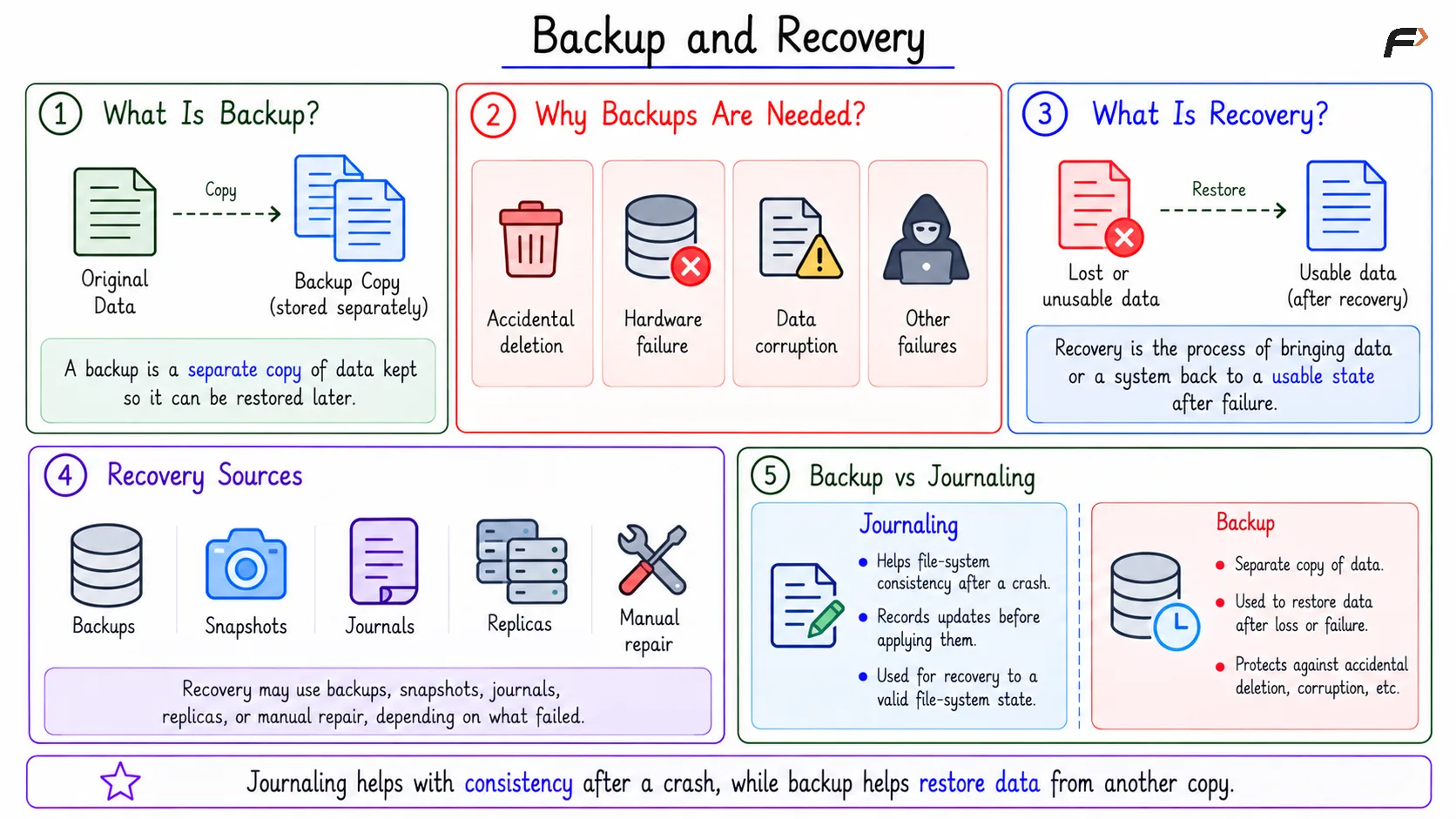
A backup is a separate copy of data kept so that the data can be restored later. It protects against data loss, corruption, accidental deletion, hardware failure, and other situations where the original copy is no longer reliable.
Recovery is the process of bringing data or a system back to a usable state after failure. Recovery may use backups, snapshots, journals, replicas, or manual repair, depending on what failed and what kind of data must be restored.
Journaling and backup should not be confused. Journaling mainly helps file-system consistency after a crash, while backup helps restore data from another copy.
Backup and Recovery
Types of Backup
Different backup methods balance storage cost, backup time, and restore complexity.
Backup Type | Meaning | Main Point |
|---|---|---|
Full backup | Copies all selected data | Simple restore, high storage cost |
Incremental backup | Copies changes since the last backup | Saves space, restore may need many pieces |
Differential backup | Copies changes since the last full backup | Easier restore than incremental, grows over time |
Snapshot-based backup | Uses a point-in-time storage view | Fast and useful for rollback or backup workflows |
Full backup is easiest to understand, but it can be expensive. Incremental and differential backups reduce repeated copying, while snapshots make point-in-time recovery easier.
Snapshots and Copy-on-Write
A snapshot is a point-in-time view of a file system or volume. It preserves how storage looked at a particular moment.
Copy-on-write helps snapshots avoid copying everything immediately. Old blocks remain available for the snapshot, and when new writes happen, modified data is written to new blocks.
This makes snapshots useful for rollback, backup workflows, testing, and recovery from recent mistakes. The snapshot is not the same as a full independent backup unless it is also stored safely outside the original failure domain.
Network File System
A network file system lets a client machine access files stored on another machine. NFS is a common example in Unix/Linux environments.
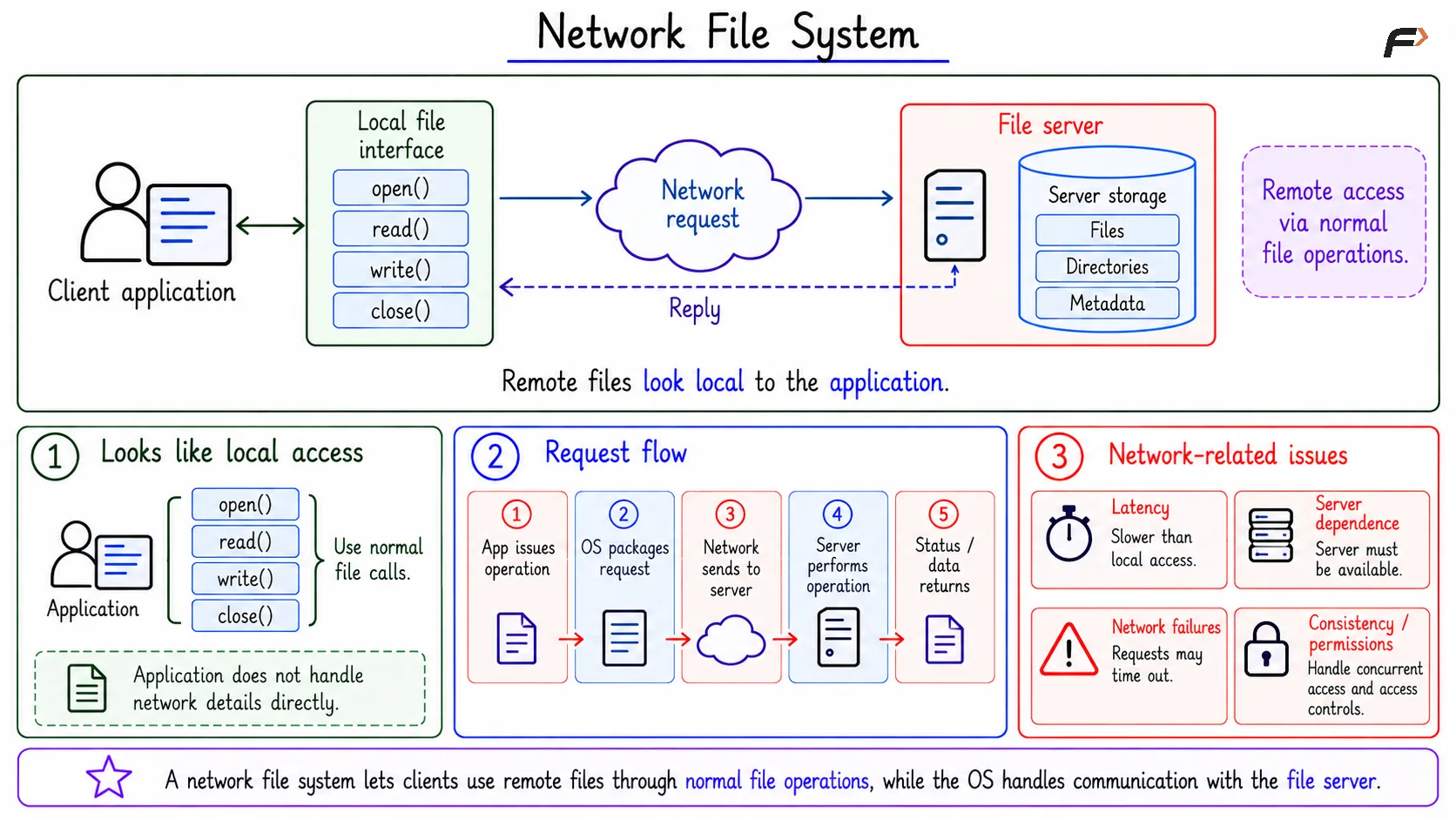
The goal is to make remote files look as much like local files as possible. An application may still use familiar operations such as open(), read(), write(), and close(), while the operating system sends requests to a file server in the background.
The basic flow is:
Client application: Requests a normal file operation.
Local file interface: Receives the operation.
Network request: Sends the request to the server.
File server: Performs the operation on its storage.
Reply: Sends data or status back to the client.
This hides remote storage details from the application, but it introduces network-related issues.
Network File System
Problems in Network File Systems
Remote file access is more complex than local file access because more components are involved.
Network latency: File operations may be slower than local access.
Server failure: Files may become unavailable if the server fails.
Client failure: A client may crash during remote file use.
Partial failure: The network may disconnect or slow down.
Permission mapping: The server must decide which remote users can access which files.
Network file systems are useful, but they must manage both file-system behavior and distributed-system problems.
Cache Consistency
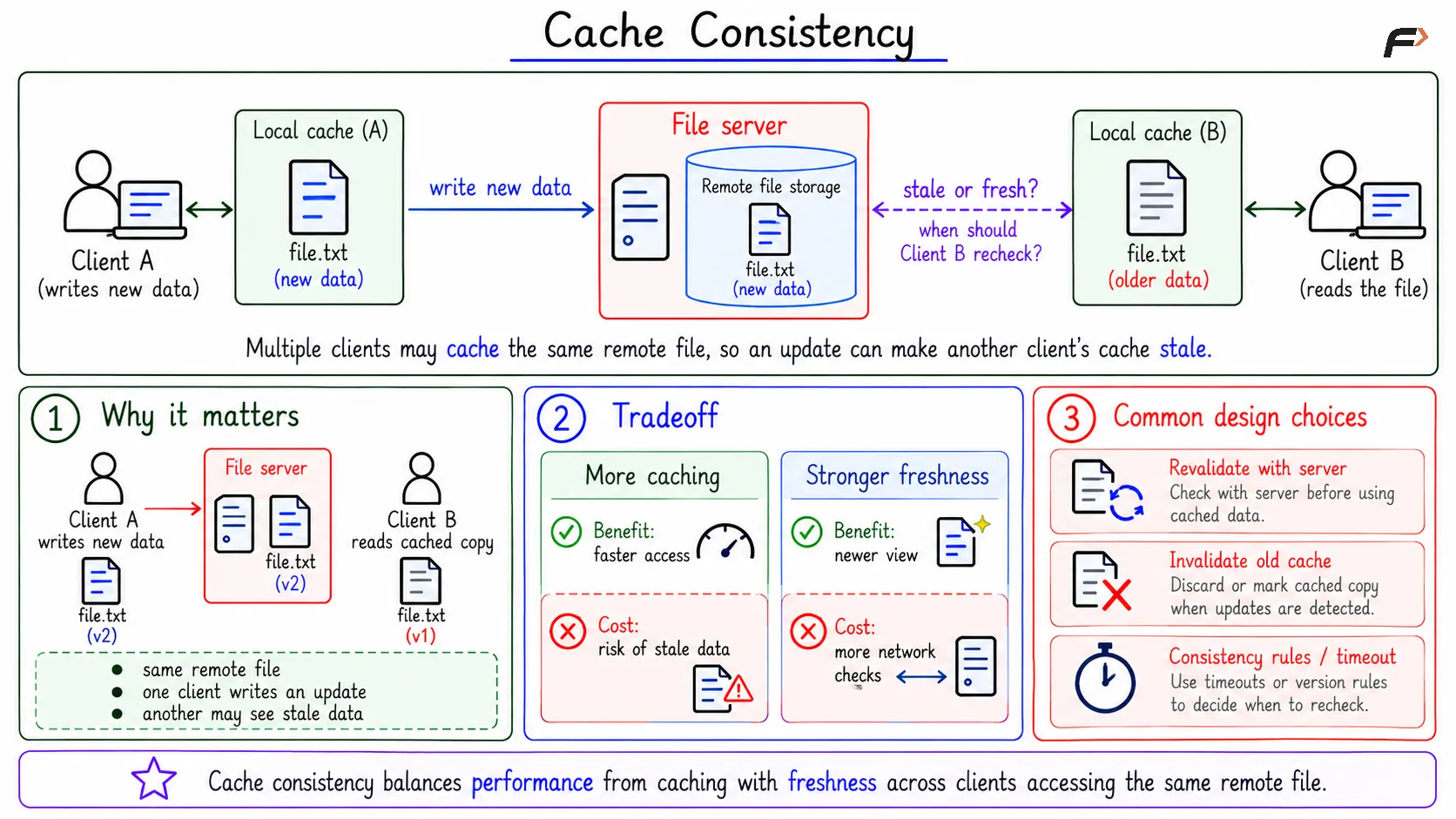
Cache consistency becomes important when multiple clients access the same remote file. If Client A writes new data, Client B may still have an older cached version.
This creates a freshness question: when should Client B stop trusting its cache and fetch the updated version from the server?
More caching improves performance because fewer network requests are needed. Stronger freshness improves correctness because clients see newer data sooner. The trade-off is:
Choice | Benefit | Cost |
|---|---|---|
More caching | Faster access | Risk of stale data |
Stronger freshness | More up-to-date views | More network checks and overhead |
This is why remote file systems often make careful design choices around caching, invalidation, and consistency rules.
Cache Consistency
Key Terms
Concept | Main Purpose |
|---|---|
Backup | Keep another copy of data for later restore |
Recovery | Bring data or system state back after failure |
Snapshot | Preserve a point-in-time view |
Journaling | Restore file-system consistency after crash |
Network file system | Access files stored on another machine |
These ideas are connected by reliability, but they solve different problems. Backup protects against data loss, recovery restores usable state, and network file systems provide remote access with local-like operations.
Summary
Backup keeps another copy of data so lost or corrupted information can be restored. Recovery uses backups, snapshots, journals, replicas, or repair methods to bring data or a system back to a usable state.
Network file systems let clients access remote files through familiar file operations, but they introduce latency, server failure, permission mapping, and cache consistency problems. The main trade-off is speed versus freshness: more caching is faster, while stronger freshness gives more up-to-date views.
Be the first to add a comment.