Given a non-negative binary number N represented as a string of digits or as an integer whose written digits are 0 and 1. Return the decimal value represented by those binary digits.
Example 1
Input: N = 1011010
Output: 90
Explanation: Reading the digits from left to right produces the running totals 1 → 2 → 5 → 11 → 22 → 45 → 90.
Example 2
Input: N = "00101"
Output: 5
Explanation: The leading zeros keep the total at 0. Reading the remaining digits produces 1 → 2 → 5.
Approach
In binary, each place is worth twice as much as the place to its right. Appending a digit moves all the earlier digits one place to the left, doubling their value. The new digit lands in the ones place and contributes either 0 or 1.
The running total starts at 0, the value of the empty prefix. Each time a digit is read from left to right, doubling the total and adding that digit gives the decimal value of all the digits read so far. After the last digit, the total is the decimal value of N.
Algorithm
Use the digit sequence directly for a string input. Convert an integer input to its written digits.
Start the running total at zero, the value of the empty prefix.
Read the digits from left to right, treating each as the integer zero or one.
Double the running total and add the current digit. A single digit therefore produces its own value.
After the rightmost digit, return the running total.
Dry Run
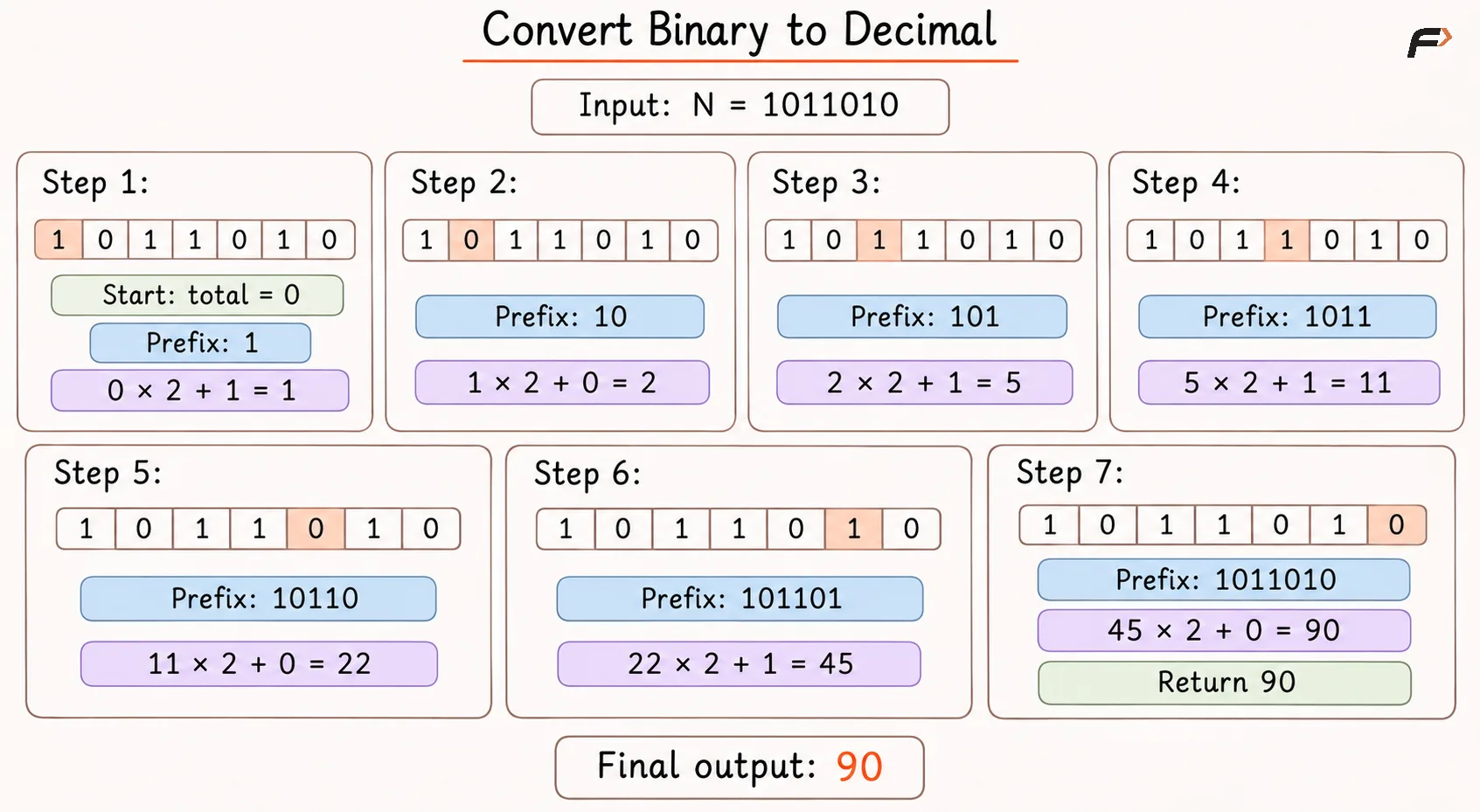
Convert Binary to Decimal
Solution
#include <bits/stdc++.h>using namespace std;class Solution {public: // Returns the decimal value of a string of binary digits. long long binaryToDecimal(const string& N) { long long decimal = 0; // Shift the prefix one binary place and include the next digit. for (char digit : N) { decimal = decimal * 2 + (digit - '0'); } return decimal; } // Returns the decimal value of the integer's written binary digits. long long binaryToDecimal(long long N) { return binaryToDecimal(to_string(N)); }};// Driver codeint main() { long long N = 1011010; // instance for class Solution Solution sol; cout << sol.binaryToDecimal(N) << '\n'; return 0;}Complexity Analysis
Time Complexity: O(D), where D is the number of binary digits, because each digit causes one doubling and one addition within the stated arithmetic bound.
Space Complexity: O(1) auxiliary space for a string input because only the running total and traversal state are kept.
Interview follow-up Questions
Every place contributes zero, and doubling a zero prefix keeps it at zero. Both "0" and "000" therefore return 0.
Be the first to add a comment.