Bit Basics and Operators
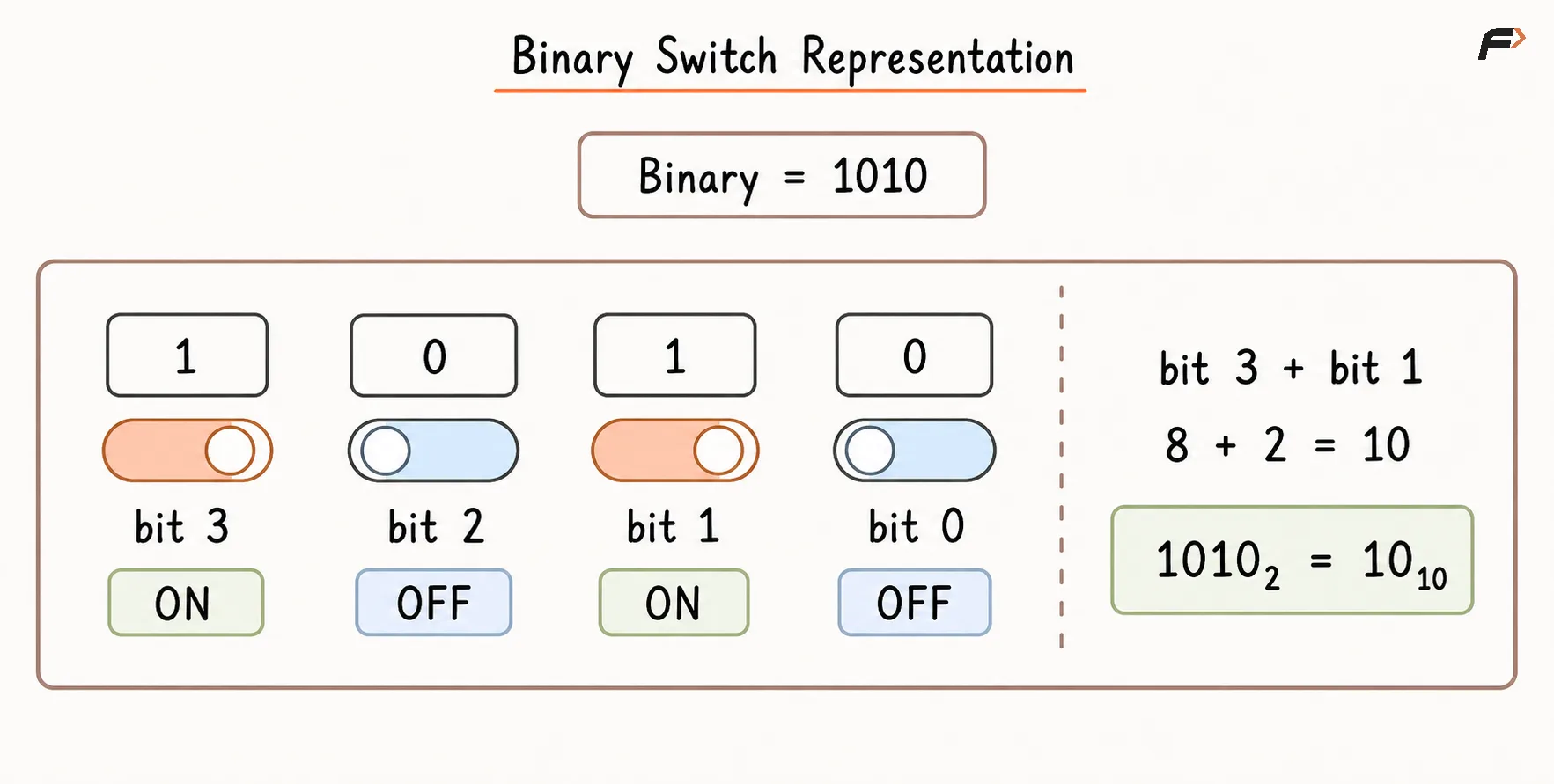
Computers represent data using bits. A bit is the smallest unit of digital information and can hold only one of two values:
0represents an off state.1represents an on state.
Numbers, characters, images, instructions, and other forms of data are ultimately stored as patterns of bits. Bit manipulation means examining or modifying these individual bits using bitwise operators.
For example, the decimal number 5 is represented in binary as:
101
Bit manipulation allows us to check, set, clear, toggle, or combine such bits without processing each value separately.
It is widely used in:
Bitmasking and flag management
Subset generation
Permission systems
Low-level programming
Compression and compact state storage
Problems involving powers of two
Finding unique or missing elements
Dynamic programming with states
Graph and set representations
Bianry Swtich Representation.png
Why Should You Learn Bit Manipulation?
Bit manipulation is valuable because it provides a compact and direct way to represent and process binary states.
A fixed-width integer can store multiple true-or-false conditions. For example, a 32-bit integer can represent up to 32 independent flags, with each bit describing whether one condition is enabled or disabled.
Bitwise operations are also useful when the problem itself is based on binary properties, such as:
Checking whether a bit is set
Generating all subsets
Finding a non-repeating number
Tracking visited states
Testing whether a number is a power of two
Combining permissions
Storing compact DP states
Bitwise operations should primarily be used because they correctly and clearly represent the problem. They should not automatically be treated as faster replacements for normal arithmetic. Modern compilers can already optimize many operations, including multiplication or division by powers of two.
Understanding Binary Numbers
The decimal number system uses base 10 and contains digits from 0 to 9.
The binary number system uses base 2 and contains only:
0 and 1
Each binary position represents a power of 2.
Consider:
1101
Bit Position | 3 | 2 | 1 | 0 |
|---|---|---|---|---|
Bit Value | 1 | 1 | 0 | 1 |
Place Value |
|
|
|
|
Contribution | 8 | 4 | 0 | 1 |
Therefore:
1101₂ = 8 + 4 + 0 + 1 = 13₁₀
The small subscript indicates the number system:
1101₂is a binary value.13₁₀is a decimal value.
Decimal to Binary Conversion
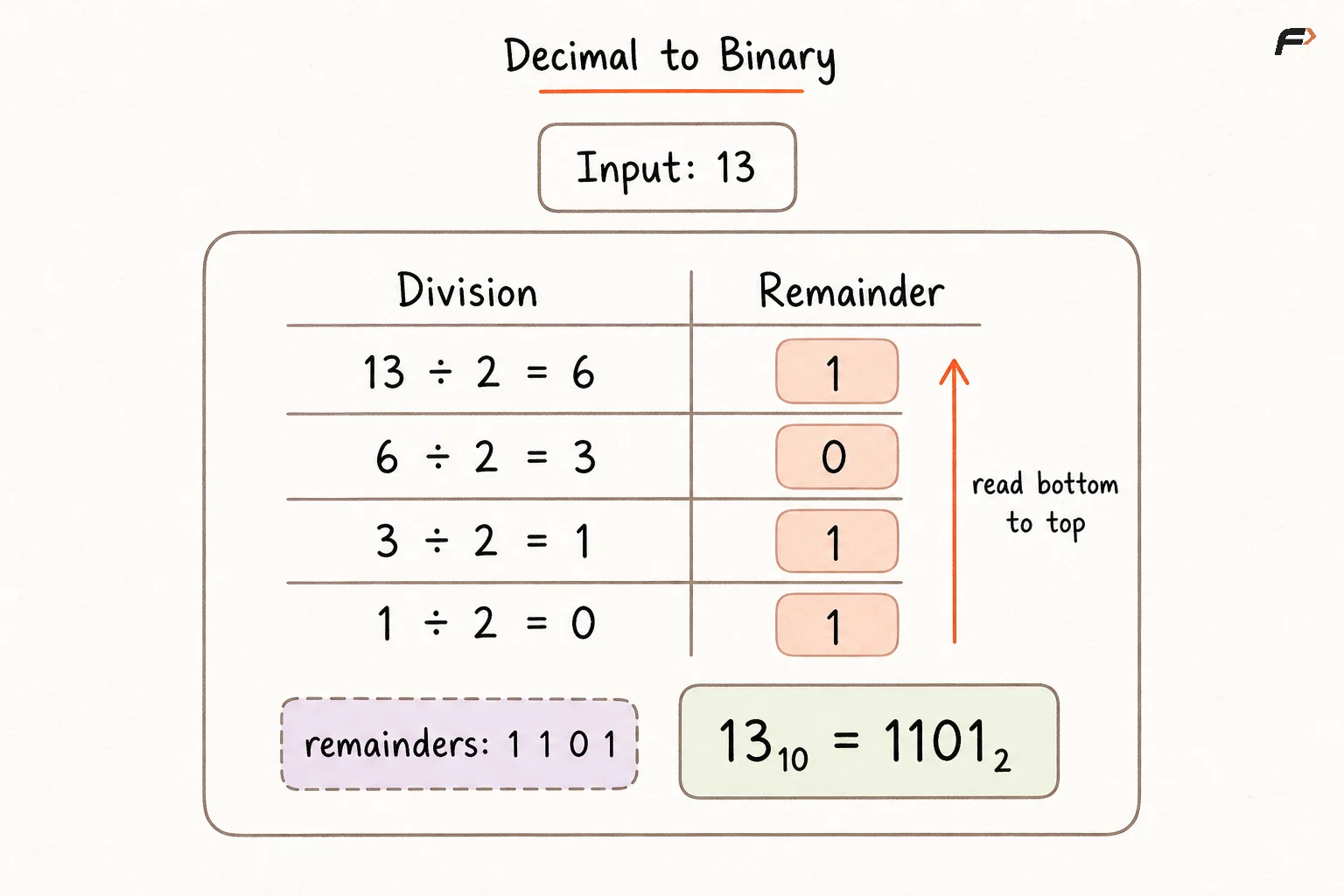
A positive decimal number can be converted to binary through repeated division by 2.
Algorithm
Divide the decimal number by
2.Record the remainder, which will be either
0or1.Continue dividing the quotient by
2.Stop when the quotient becomes
0.Read the recorded remainders from bottom to top.
Example: Convert 13 to Binary
Division | Quotient | Remainder |
|---|---|---|
| 6 | 1 |
| 3 | 0 |
| 1 | 1 |
| 0 | 1 |
Reading the remainders from bottom to top gives:
1101
Therefore:
13₁₀ = 1101₂
Decimal to BInary .png
Binary to Decimal Conversion
To convert a binary number to decimal:
Multiply every bit by the power of
2represented by its position.Add all the resulting values.
Example: Convert 10110 to Decimal
10110₂
The place values are:
1 × 2⁴ + 0 × 2³ + 1 × 2² + 1 × 2¹ + 0 × 2⁰
= 16 + 0 + 4 + 2 + 0
= 22
Therefore:
10110₂ = 22₁₀
Binary Indexing
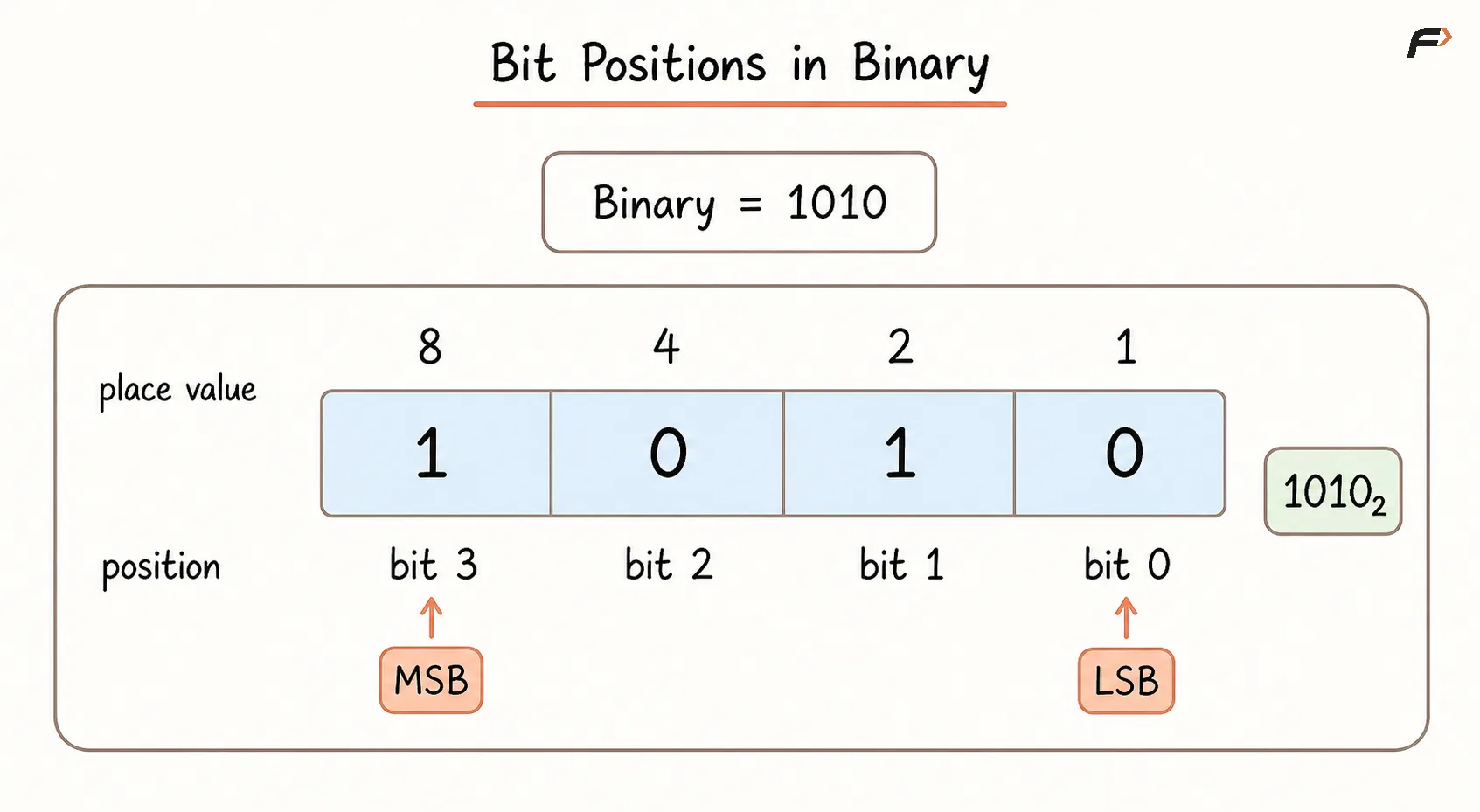
Bits are indexed from right to left, beginning at position 0.
Consider:
1010
Bit Position | 3 | 2 | 1 | 0 |
|---|---|---|---|---|
Bit | 1 | 0 | 1 | 0 |
The rightmost bit is called the Least Significant Bit, or LSB. It represents 2⁰.
The leftmost meaningful bit is called the Most Significant Bit, or MSB. It represents the highest power of two present in the number.
For 1010:
The LSB is
0.The MSB is
1at position3.Bit
1is set.Bit
2is unset.
Whenever a problem refers to the ith bit, count from the right starting at 0, unless another indexing convention is explicitly stated.
Bit Postions in Binary.png
Bit, Byte, and Word
A bit stores one binary value.
A byte usually contains 8 bits.
Common fixed-width integer sizes include:
8 bits
16 bits
32 bits
64 bits
For an unsigned 8-bit value:
00000000 represents 0.
11111111 represents 255.
An unsigned integer uses every bit to store the magnitude. A signed integer also needs to represent negative values, commonly through two’s complement.
The exact width matters because operators such as NOT and shifts act on the complete stored bit pattern, including bits that are not shown when a binary number is written without leading zeros.
Truth Table for Bitwise Operators
The AND, OR, and XOR operators compare corresponding bits.
A | B |
|
|
|
|---|---|---|---|---|
0 | 0 | 0 | 0 | 0 |
0 | 1 | 0 | 1 | 1 |
1 | 0 | 0 | 1 | 1 |
1 | 1 | 1 | 1 | 0 |
The NOT operator uses only one input:
A |
|
|---|---|
0 | 1 |
1 | 0 |
Core Bitwise Operators
1. Bitwise AND (&)
The AND operator returns 1 only when both corresponding bits are 1.
Consider:
5 = 0101
3 = 0011
Applying AND:
  0101
& 0011
------
  0001
Therefore:
5 & 3 = 1
AND is commonly used to:
Check whether a bit is set.
Clear selected bits.
Extract part of a bit pattern.
Test whether a number is even or odd.
Apply a bitmask.
A mask containing 1 preserves the corresponding bit, while a mask containing 0 clears it.
2. Bitwise OR (|)
The OR operator returns 1 when at least one corresponding bit is 1.
Using the same values:
  0101
| 0011
------
  0111
Therefore:
5 | 3 = 7
OR is commonly used to:
Set a particular bit.
Enable one or more flags.
Combine two bitmasks.
Preserve existing set bits while adding new ones.
A bit combined with 1 using OR always becomes 1.
3. Bitwise XOR (^)
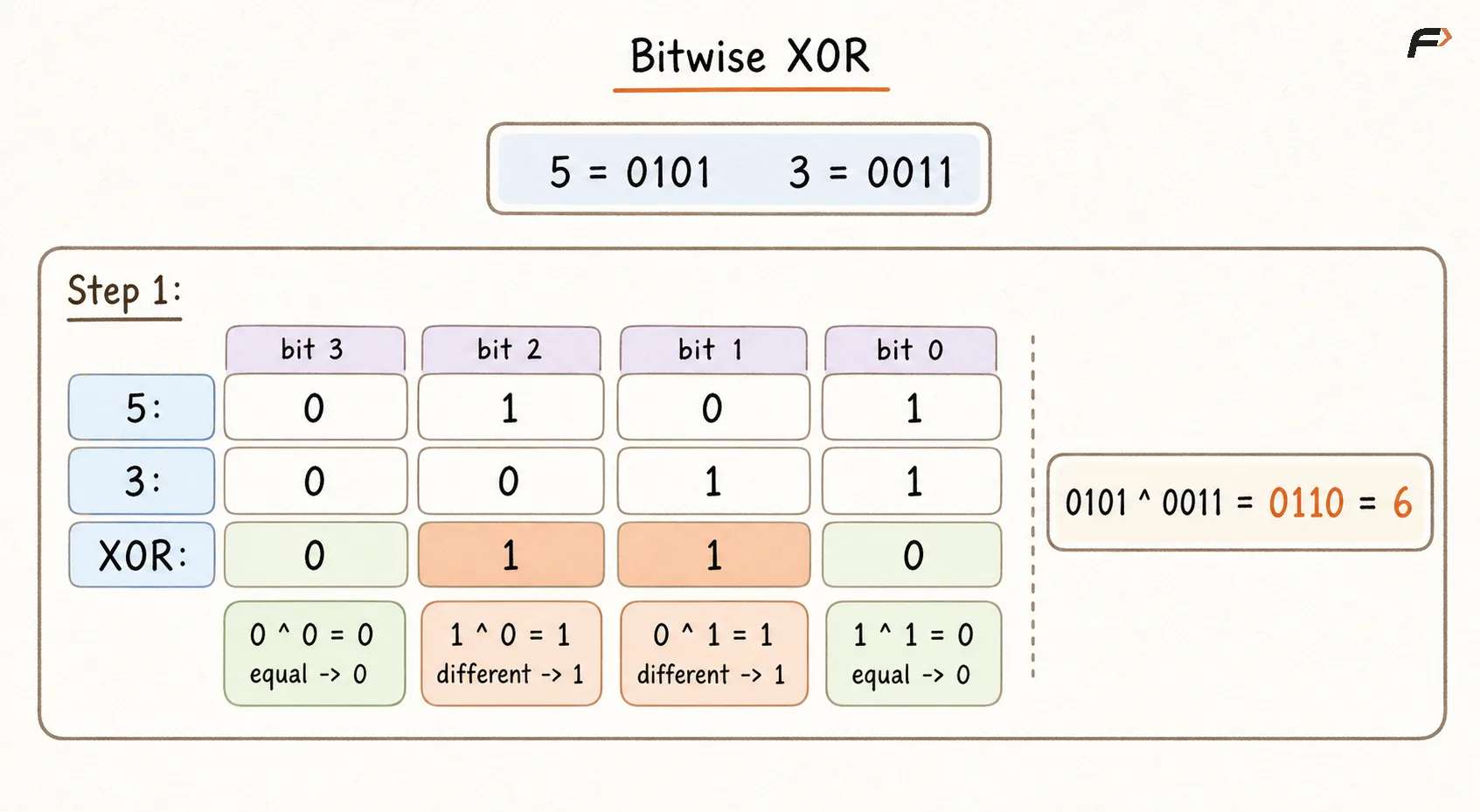
XOR stands for Exclusive OR. It returns 1 when the corresponding bits are different.
  0101
^ 0011
------
  0110
Therefore:
5 ^ 3 = 6
Important XOR properties include:
N ^ N = 0N ^ 0 = NA ^ B = B ^ A(A ^ B) ^ C = A ^ (B ^ C)
XOR is commonly used to:
Toggle bits.
Find an element appearing an odd number of times.
Cancel equal values.
Compare bit differences.
Solve missing-number and unique-number problems.
Bitwise XOR.png
4. Bitwise NOT (~)
NOT flips every bit:
0becomes1.1becomes0.
Within a four-bit representation:
0101 → 1010
The numeric result depends on:
The number of bits used
Whether the value is signed or unsigned
How the programming language represents integers
For signed integers using two’s complement:
~N = -(N + 1)
Therefore:
~5 = -6
NOT does not flip only the visible bits. It acts on the complete stored representation of the number.
Two’s Complement and Negative Numbers
Most systems represent signed integers using two’s complement.
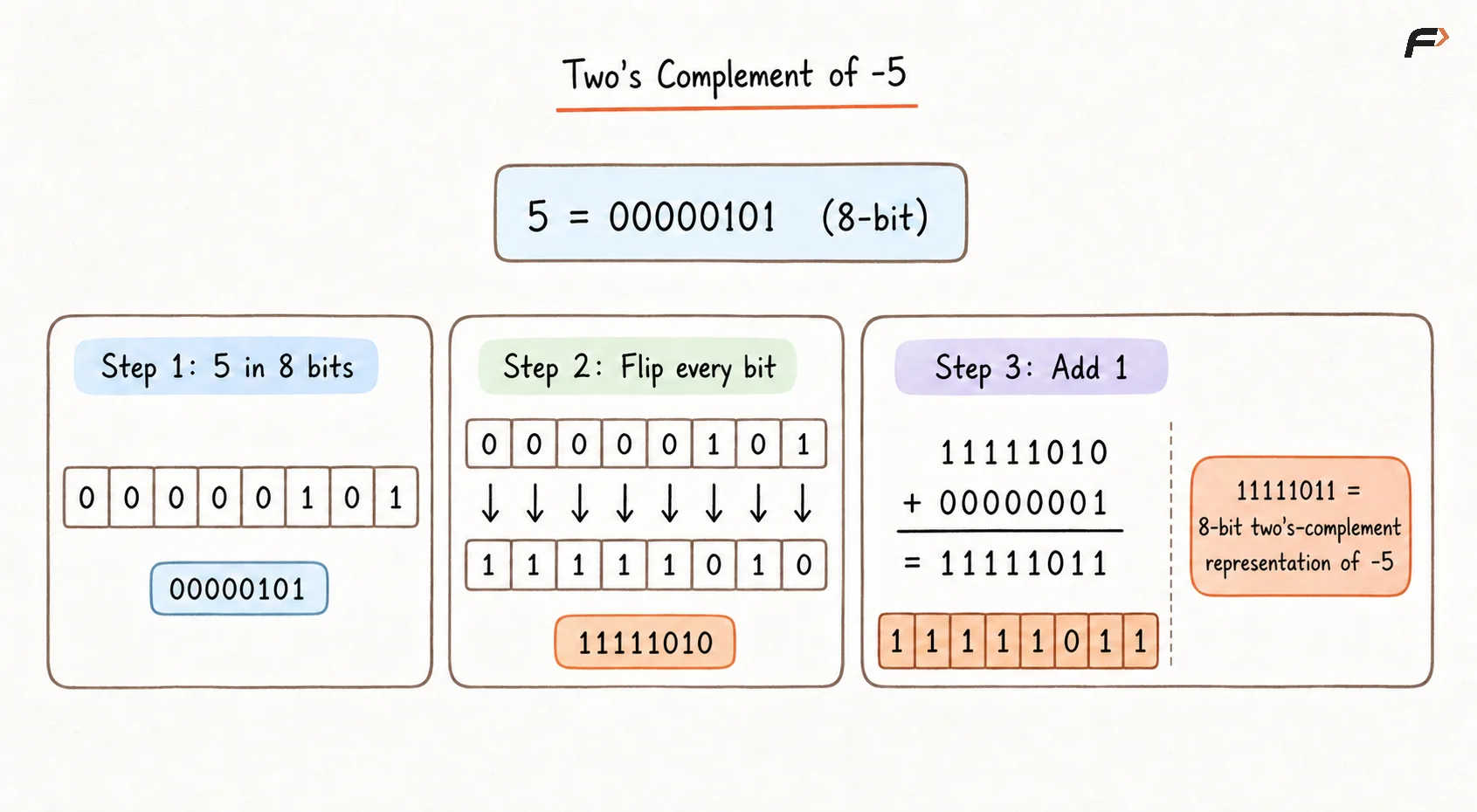
To obtain the fixed-width representation of -N:
Write the binary representation of
N.Flip every bit.
Add
1.
Using an 8-bit representation:
5 = 00000101
Flip all bits:
11111010
Add 1:
11111011
Therefore:
-5 = 11111011
Two’s complement provides the identities:
-N = ~N + 1
and:
~N = -N - 1
The bit width must always be considered when interpreting negative values.
Twos Compliment of -5.png
5. Left Shift (<<)
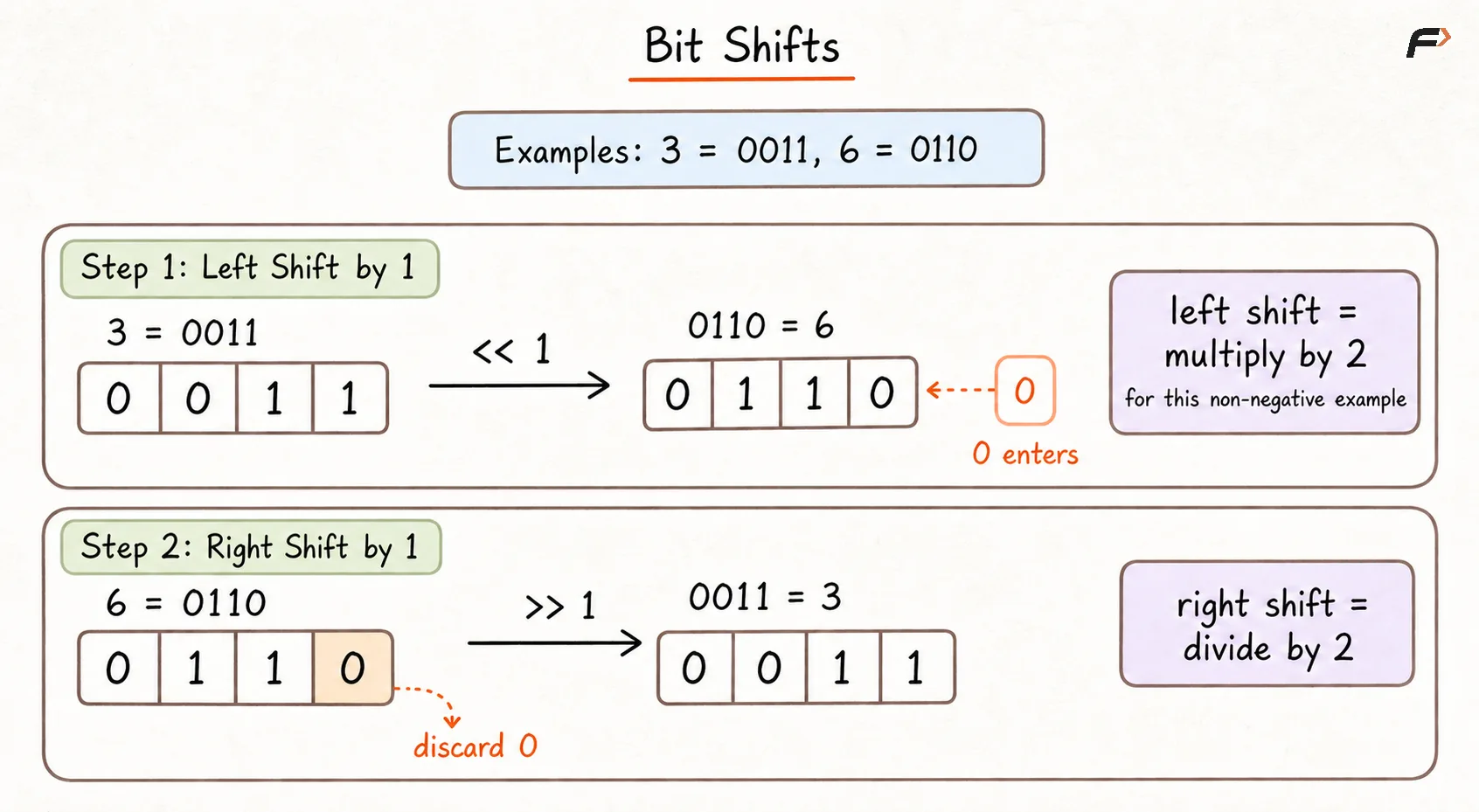
The left-shift operator moves the bit pattern to the left by a given number of positions. Zeros are inserted into the empty positions on the right.
Consider:
3 = 0011
Shift left by one position:
3 << 1 = 0110
0110 represents 6.
For a non-negative value where the result remains representable:
N << K corresponds to N × 2ᴷ
For example:
3 << 2 = 12
because:
3 × 2² = 12
This relationship must not be used blindly. Information can be lost when important bits move beyond the available width, and signed shifting rules differ across languages.
6. Right Shift (>>)
The right-shift operator moves the bit pattern to the right. Bits leaving from the right are discarded.
Consider:
6 = 0110
Shift right by one position:
6 >> 1 = 0011
0011 represents 3.
For non-negative integers:
N >> K corresponds to taking the floor of N ÷ 2ᴷ.
For example:
13 >> 1 = 6
because:
13 ÷ 2 = 6 with the fractional part discarded.
For negative signed values, the inserted bits and rounding behaviour depend on the programming language and the right-shift operator being used. Unsigned values provide the clearest fixed-width behaviour.
Bit Shifts.png
Creating a Bitmask
A bitmask is a binary pattern used to select or modify particular bits.
To create a mask for bit position i, shift 1 left by i positions:
mask = 1 << i
For i = 3:
0001 << 3 = 1000
This mask contains a 1 only at bit position 3.
The mask can then be combined with a number using AND, OR, XOR, or NOT.
Checking the ith Bit
To check whether bit i is set:
N & (1 << i)
A non-zero result means the bit is set.
A zero result means the bit is unset.
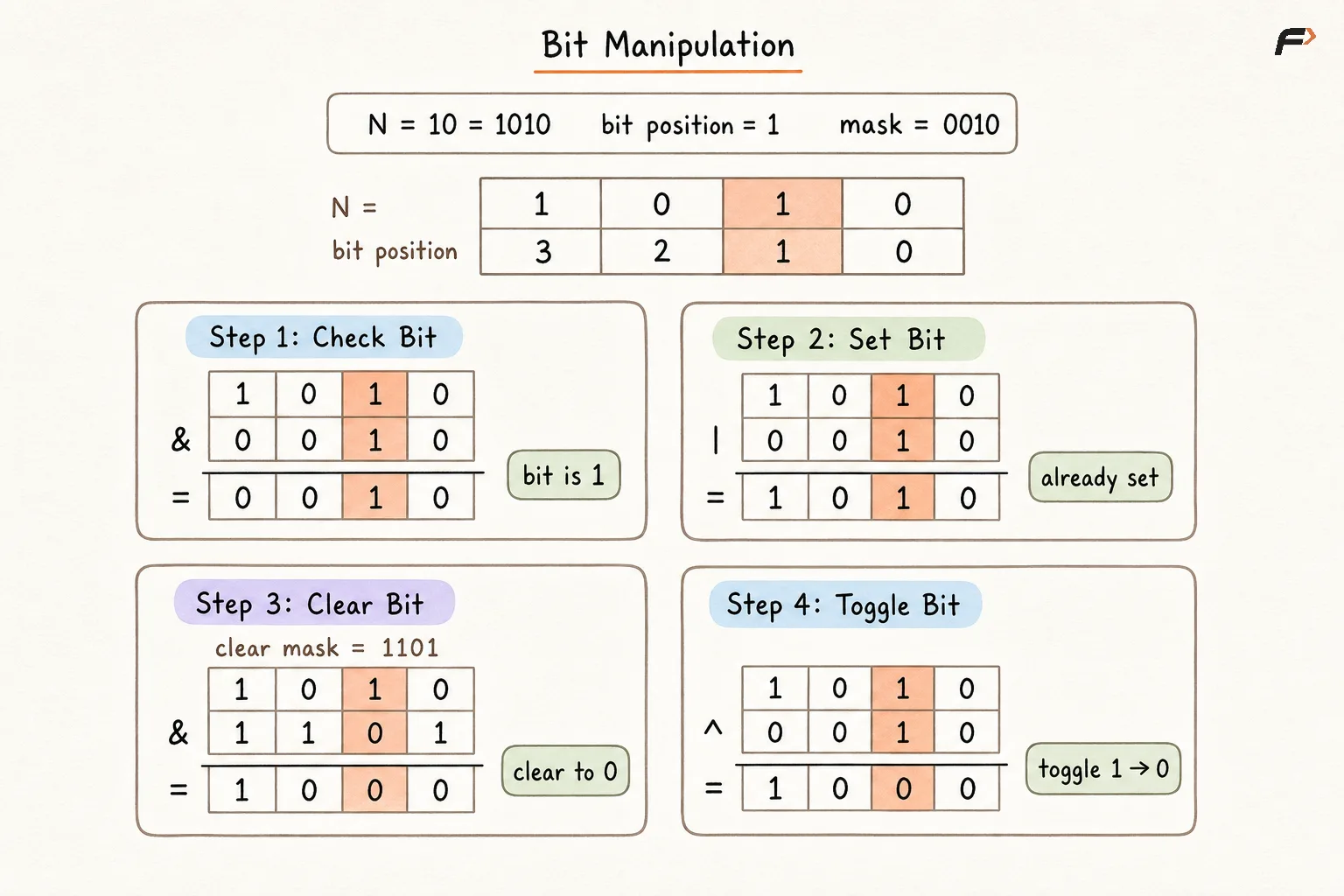
Consider:
N = 10 = 1010
Check bit 1:
1 << 1 = 0010
1010 & 0010 = 0010
The result is non-zero, so bit 1 is set.
Setting the ith Bit
To set bit i:
N | (1 << i)
Consider:
N = 8 = 1000
Set bit 1:
1000 | 0010 = 1010
Therefore, the updated value is:
10
OR sets the selected bit without changing the other bits.
Clearing the ith Bit
To clear bit i:
N & ~(1 << i)
Consider:
N = 10 = 1010
Clear bit 1:
Create the mask:
0010Invert the mask:
1101Apply AND:
1010 & 1101 = 1000
Therefore, the updated value is:
8
The inverted mask contains 0 only at the bit that must be cleared.
Toggling the ith Bit
To toggle bit i:
N ^ (1 << i)
A set bit becomes unset.
An unset bit becomes set.
Consider:
N = 10 = 1010
Toggle bit 2:
1010 ^ 0100 = 1110
Therefore, the updated value is:
14
Applying the same toggle again restores the original value.
Bit Manipulation.png
Bit Manipulation Cheat Sheet
Operation | Expression | Purpose |
|---|---|---|
Check bit |
| Tests whether bit |
Set bit |
| Changes bit |
Clear bit |
| Changes bit |
Toggle bit |
| Reverses bit |
Check odd number |
| Tests the least significant bit |
Check even number |
| Tests whether the LSB is unset |
Remove lowest set bit |
| Clears the rightmost set bit |
Check power of two |
| Verifies that only one bit is set |
Multiply by |
| Valid when the shifted result is representable |
Divide non-negative |
| Discards the fractional part |
Cancel equal values |
| Used in unique-element problems |
Important Bitwise Identities
AND Identities
N & 0 = 0N & N = NN & all-ones = N
OR Identities
N | 0 = NN | N = N
XOR Identities
N ^ 0 = NN ^ N = 0N ^ A ^ A = N
NOT Identity
~N = -N - 1for signed two’s-complement interpretation
Lowest Set Bit Identity
N & (N - 1) removes the lowest set bit of N.
For:
N = 12 = 1100
N - 1 = 11 = 1011
Applying AND:
1100 & 1011 = 1000
The lowest set bit of 1100 has been removed.
Bitwise and Logical Operators
Bitwise and logical operators serve different purposes.
Bitwise Operator | Logical Operator |
|---|---|
|
|
|
|
|
|
Bitwise operators process corresponding bits of integer values.
Logical operators treat complete expressions as true or false.
Consider:
4 = 0100
2 = 0010
Bitwise AND:
4 & 2 = 0
Logical AND in a language where non-zero values are true:
4 && 2 = true
Logical AND and OR commonly use short-circuit evaluation:
A && Bmay skipBwhenAis false.A || Bmay skipBwhenAis true.
Bitwise operators generally evaluate both operands because every bit is needed to produce the result.
Operator Precedence
Operator precedence determines which part of an expression is evaluated first.
The following is the relevant high-to-low order commonly used by C and C++:
Priority | Operator Type | Operators |
|---|---|---|
1 | Unary |
|
2 | Multiplicative |
|
3 | Additive |
|
4 | Shift |
|
5 | Relational |
|
6 | Equality |
|
7 | Bitwise AND |
|
8 | Bitwise XOR |
|
9 | Bitwise OR |
|
10 | Logical AND |
|
11 | Logical OR |
|
Languages may define different precedence and integer behaviour. Parentheses should be used whenever bitwise operators are combined with comparisons, arithmetic, or logical expressions.
For example, avoid relying on the precedence of:
N & 1 == 0
Write the intended grouping clearly:
(N & 1) == 0
This checks whether N is even.
Common Mistakes
Confusing bit position with the value represented by that position.
Counting bit positions from the left instead of the right.
Confusing bitwise
&and|with logical&&and||.Omitting parentheses when combining bitwise and comparison operators.
Assuming NOT flips only the visible binary digits.
Ignoring the fixed width and signedness of an integer.
Assuming left shift can never overflow or discard significant bits.
Assuming right shift behaves like normal division for every negative value.
Shifting by a negative amount or by an amount greater than or equal to the type width.
Using a narrow literal such as
1when a higher bit requires a wider mask.Checking whether
0is a power of two without requiringN > 0.Assuming bitwise operations are always faster than readable arithmetic.
Printing a binary value without leading zeros and then misinterpreting its width.
FAQs
Q1. Why does ~5 evaluate to -6 instead of a positive number?
NOT flips every bit of the fixed-width representation, including the leading bits that are normally hidden. Under two’s-complement signed interpretation, ~N = -N - 1, so ~5 = -6.
Q2. Are left and right shifts always equivalent to multiplication and division by powers of two?
Only under suitable conditions. For non-negative values, N << K corresponds to N × 2ᴷ when the result remains representable, while N >> K corresponds to floor division by 2ᴷ. Overflow, signed values, and language-specific rules can change the behaviour.
Q3. What is the difference between arithmetic and logical right shift?
An arithmetic right shift preserves the sign by filling new left positions with the sign bit. A logical right shift fills them with zeros. Languages such as Java provide >> for arithmetic shift and >>> for logical shift, while other languages handle unsigned shifting differently.
Q4. Why does N & (N - 1) remove the lowest set bit?
Subtracting 1 changes the lowest set bit to 0 and turns all lower bits into 1. Applying AND with the original number clears that lowest set bit while leaving every higher bit unchanged.
Q5. When should an unsigned integer be preferred for bit manipulation?
Unsigned integers are preferable when the task depends on a predictable fixed-width bit pattern rather than a signed numeric meaning. They avoid sign-extension concerns and make shifts, masks, and high-order bits easier to reason about.
Be the first to add a comment.