Introduction and Basics of Arrays
An array is a linear data structure that stores multiple elements of the same data type in a fixed sequence. Every element occupies a specific position, called an index, which allows it to be accessed directly.
Consider the following array:
[10, 20, 30, 40, 50]
Its elements and indices are:
Index | 0 | 1 | 2 | 3 | 4 |
|---|---|---|---|---|---|
Element | 10 | 20 | 30 | 40 | 50 |
Most programming languages use zero-based indexing, so the first element is stored at index 0, the second at index 1, and the last element of an array of size N is stored at index N - 1.
Arrays are among the most commonly used data structures because they provide fast element access, simple traversal, and efficient storage.
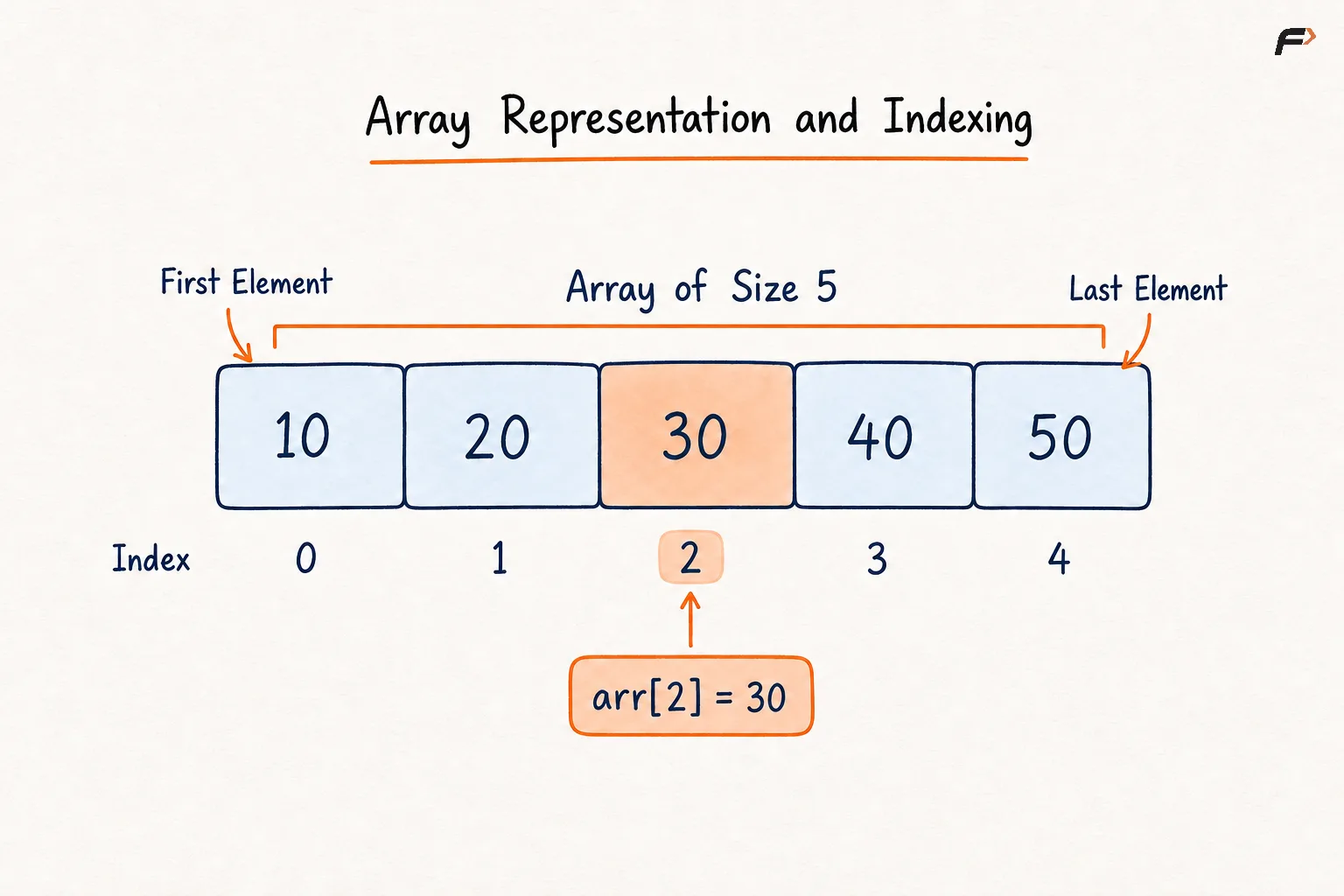
Array Representation and Indexing.png
How Is an Array Stored in Memory?
Array elements are stored in contiguous memory locations, meaning each element is placed immediately after the previous element in memory.
Suppose every element requires 4 bytes and the first element begins at memory address 1000. The addresses would be:
Element | 10 | 20 | 30 | 40 |
|---|---|---|---|---|
Index | 0 | 1 | 2 | 3 |
Address | 1000 | 1004 | 1008 | 1012 |
Because the elements have equal sizes and consecutive addresses, the location of any element can be calculated directly:
Address of arr[i] = Base Address + (i × Size of Each Element)
This direct address calculation is why accessing an array element using its index takes constant time.
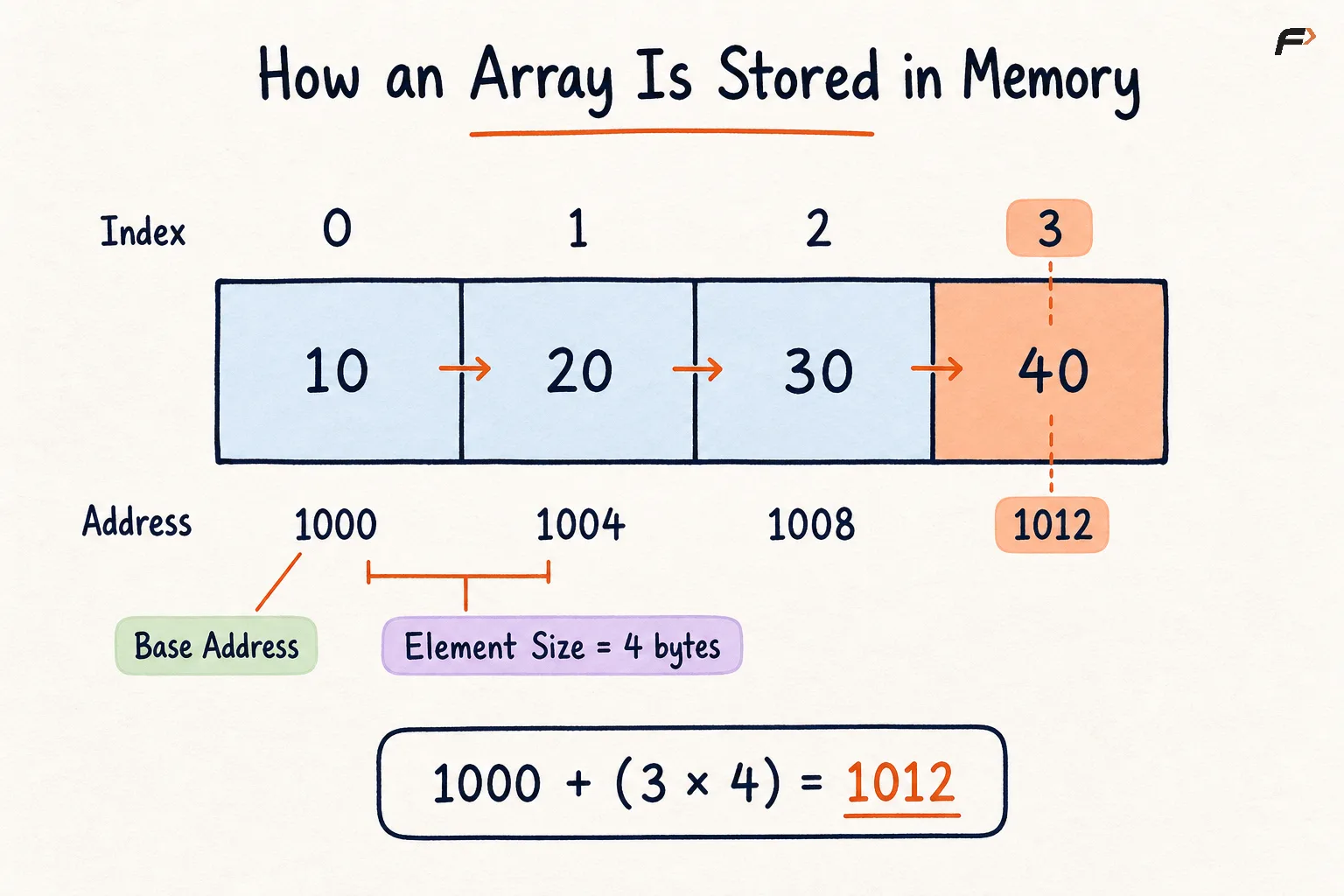
How an Array is Stored in Memory.png
Important Array Terminology
Term | Meaning |
|---|---|
Element | A value stored inside the array. |
Index | The position used to identify an element. |
Length or Size | The number of elements currently stored in the array. |
Capacity | The maximum number of elements the allocated array can store. |
Base Address | The memory address of the first array element. |
Subarray | A continuous portion of an array. |
Size and Capacity
The size and capacity of an array are not always the same.
Consider:
[10, 20, 30, _, _]
Here:
Size is
3because three valid elements are stored.Capacity is
5because the allocated array has five positions.The final two positions are currently unused.
This difference becomes important while performing insertion and deletion operations.
Types of Arrays
One-Dimensional Array
A one-dimensional array stores elements in a single sequence.
Example:
[5, 10, 15, 20]
Each element is identified using one index.
Two-Dimensional Array
A two-dimensional array stores elements in rows and columns, similar to a matrix.
Example:
1  2  3
4  5  6
An element requires a row index and a column index. For example, the element in row 1 and column 2 is 6 when zero-based indexing is used.
Multidimensional Array
An array containing more than two dimensions is called a multidimensional array. Such arrays are useful when information needs to be represented across several dimensions.
Static and Dynamic Arrays
Static Array
A static array has a fixed capacity determined when the array is created. Its allocated storage cannot be expanded directly.
If a static array becomes full, inserting another element requires creating a larger array and copying the existing elements into it.
Dynamic Array
A dynamic array can increase its capacity when more space is required. Structures such as C++ vector and Java ArrayList behave like dynamic arrays.
Internally, a dynamic array usually creates a larger memory block and copies the existing elements when its current capacity becomes insufficient.
Basic Operations on Arrays
1. Access an Array Element
Given an array and an index K, retrieve the element stored at that index.
Consider:
arr = [10, 20, 30, 40]
For K = 2, the required element is:
arr[2] = 30
Algorithm
Check whether
Klies between0andN - 1.Use index
Kto directly locate the required element.Return the value stored at that index.
Time Complexity: O(1) because the element’s address is calculated directly.
Space Complexity: O(1) because no additional data structure is required.
2. Traverse an Array
Given an array of N elements, visit every element exactly once from the first index to the last index.
Consider:
arr = [10, 20, 30, 40]
Traversal order:
10 → 20 → 30 → 40
Algorithm
Begin from index
0, which represents the first element.Visit and process the element stored at the current index.
Move to the next index.
Continue until index
N - 1has been processed.Stop after every valid element has been visited.
Time Complexity: O(N) because all N elements are visited once.
Space Complexity: O(1) because only an index variable is required.
3. Update an Array Element
Given an array, an index K, and a value X, replace the element at index K with X.
Consider:
arr = [10, 20, 30, 40]
Update index 1 with 25:
[10, 25, 30, 40]
Only the value at index 1 changes. The positions of the other elements remain unchanged.
Algorithm
Check whether
Kis a valid array index.Locate the element directly using index
K.Replace its existing value with
X.Keep every other element unchanged.
Time Complexity: O(1) because the required position is accessed directly.
Space Complexity: O(1) because no additional storage is required.
4. Insert an Element at a Given Position
Given an array, an index K, and a value X, insert X at index K.
Consider an array with available capacity:
[10, 20, 30, 40, _]
Insert 25 at index 2.
Before insertion:
[10, 20, 30, 40, _]
Shift the elements from index 2 onward one position to the right:
[10, 20, _, 30, 40]
Place 25 at index 2:
[10, 20, 25, 30, 40]
Elements must be shifted from right to left during the operation. Shifting in the opposite order could overwrite values that still need to be moved.
Algorithm
Check whether the insertion index lies between
0andN.Ensure that the array has enough capacity for one more element.
Starting from the last valid element, shift each affected element one position to the right.
Continue shifting until index
Kbecomes available.Store
Xat indexKand increase the logical size by one.
Time Complexity: O(N) in the worst case because multiple elements may need to be shifted.
Insertion at the end takes O(1) when unused capacity is available.
Space Complexity: O(1) auxiliary space because the insertion is performed within the existing array.
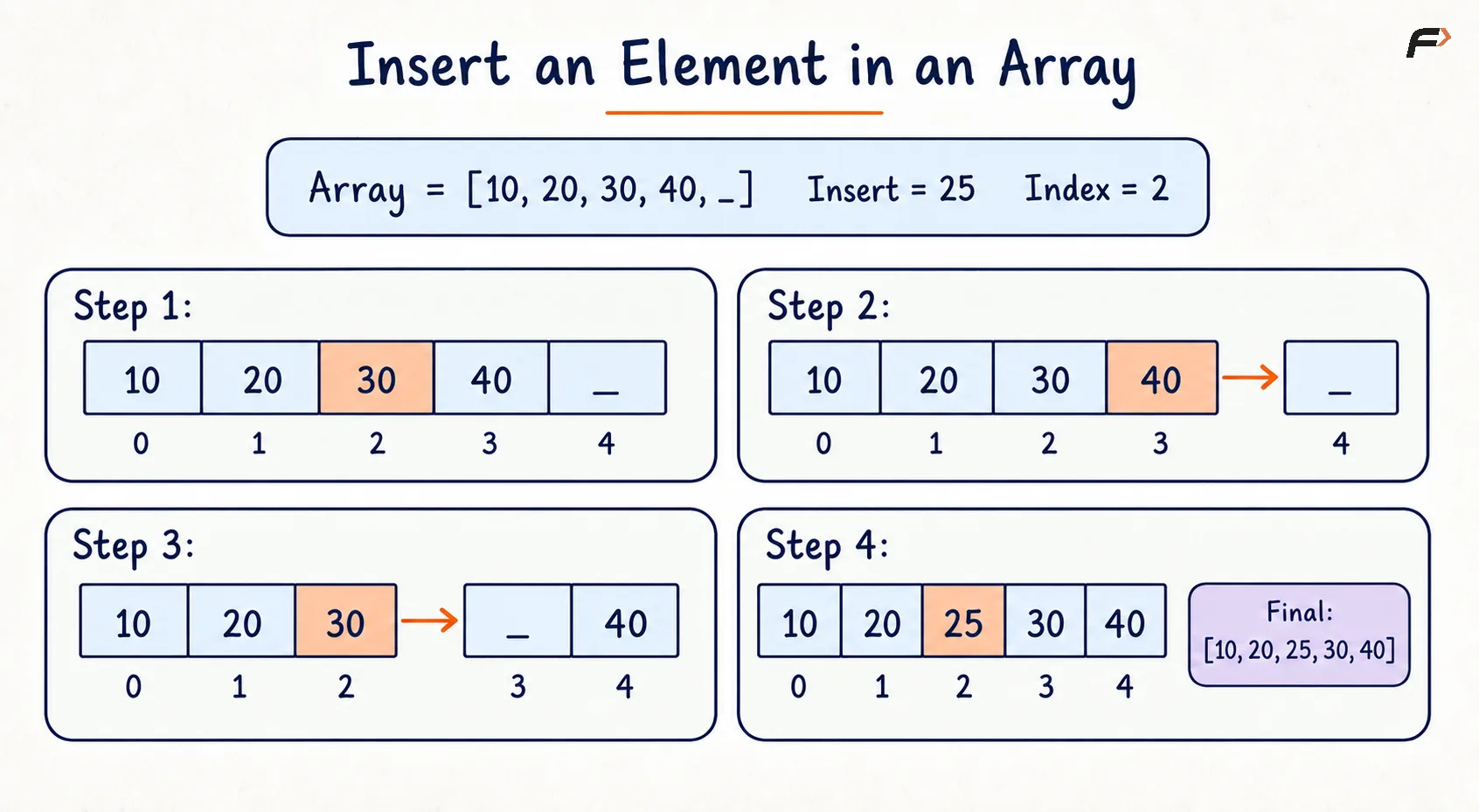
Insert an Element in an Array.png
5. Delete an Element from a Given Position
Given an array and an index K, remove the element stored at that index.
Consider:
arr = [10, 20, 30, 40, 50]
Delete the element at index 2.
The value 30 is removed:
[10, 20, _, 40, 50]
The elements after it are shifted one position to the left:
[10, 20, 40, 50, _]
For a fixed-size array, deletion does not reduce the allocated capacity. It only decreases the number of valid elements.
Algorithm
Check whether
Klies between0andN - 1.Identify the element stored at index
K.Starting from index
K, shift every following element one position to the left.Continue until the last valid element has been shifted.
Decrease the logical size of the array by one.
Time Complexity: O(N) in the worst case because the following elements may need to be shifted.
Deleting the last element takes O(1) because no shifting is required.
Space Complexity: O(1) because the operation uses no additional data structure.
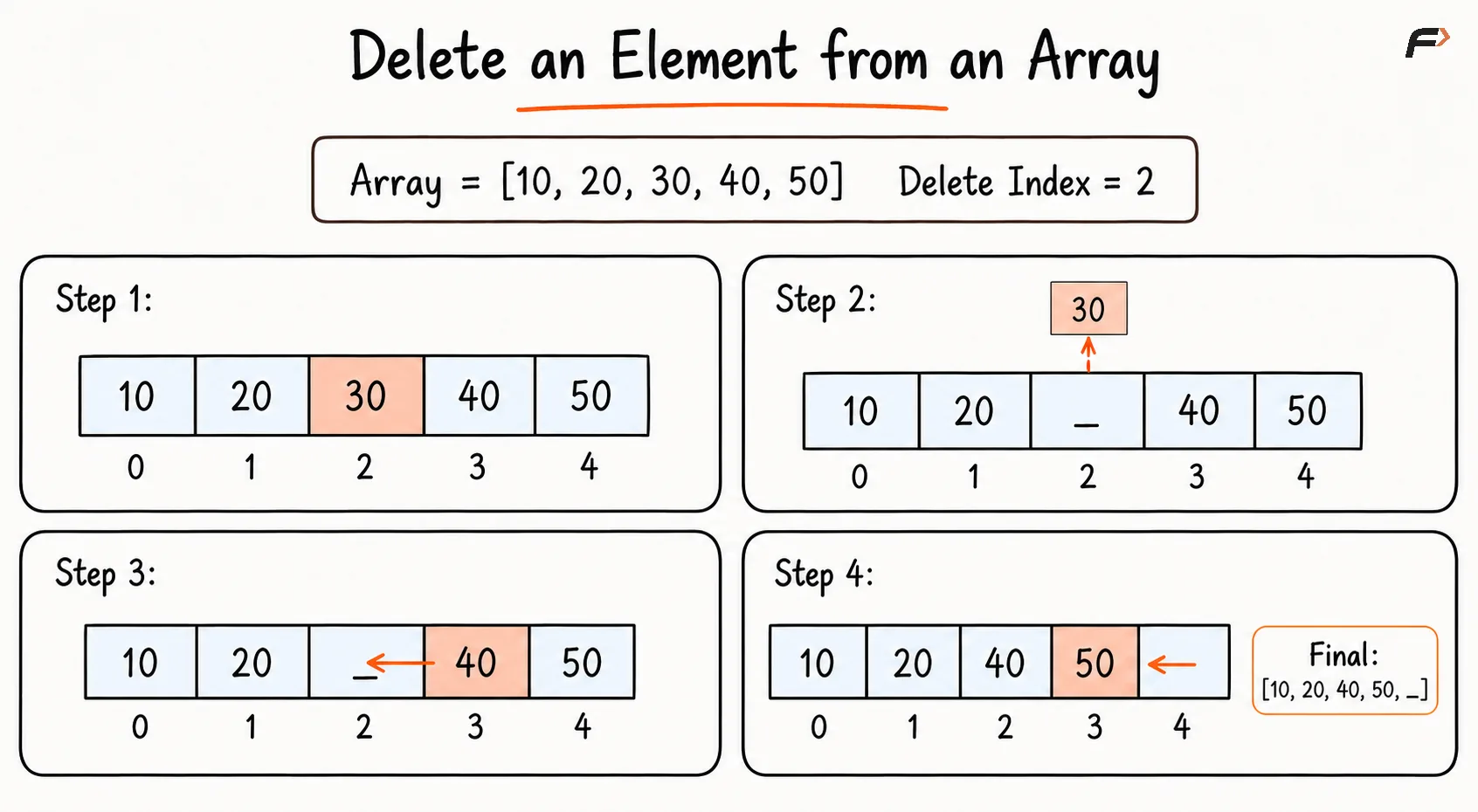
Delete an Element from an Array.png
6. Search for an Element
Searching determines whether a target value exists in an array and, if it exists, returns its index.
Linear Search
Linear search checks the elements one by one.
Consider:
arr = [12, 7, 25, 18]
Target:
25
The search checks:
12 → 7 → 25
The target is found at index 2.
Algorithm
Begin from the first element of the array.
Compare the current element with the target value.
If they are equal, return the current index.
Otherwise, move to the next element.
If every element is checked without finding the target, report that it is absent.
Time Complexity: O(N) in the worst case because every element may need to be checked.
Space Complexity: O(1) because only an index is required.
Binary Search
If the array is sorted, binary search can locate an element in O(log N) time by repeatedly eliminating half of the remaining search space.
Binary search cannot be applied directly to an unsorted array.
Complexity Summary
Operation | Time Complexity | Reason |
|---|---|---|
Access by index |
| The address is calculated directly. |
Update by index |
| The required position is accessed directly. |
Traversal |
| Every element is visited. |
Linear search |
| The target may be at the end or absent. |
Binary search on a sorted array |
| Half of the search space is removed each time. |
Insert at the end with free capacity |
| No shifting is required. |
Insert at the beginning or middle |
| Existing elements must be shifted right. |
Delete the last element |
| No shifting is required. |
Delete from the beginning or middle |
| Following elements must be shifted left. |
These are auxiliary-space complexities of O(1) when the operations are performed within an already allocated array. Creating a larger array during resizing requires additional memory.
Advantages of Arrays
Elements can be accessed directly in
O(1)time using their indices.Contiguous memory storage provides efficient traversal and good cache performance.
Arrays are simple to understand and implement.
They are useful for storing and processing a fixed sequence of values.
Other data structures, such as matrices, heaps, and hash-table buckets, can be built using arrays.
Limitations of Arrays
A traditional array has a fixed capacity.
Inserting or deleting elements from the beginning or middle requires shifting.
A large allocated array may waste memory when only a few positions are used.
A small array may need to be recreated when additional capacity is required.
Elements generally need to belong to the same data type.
Accessing an invalid index may cause an error or undefined behaviour, depending on the programming language.
Common Mistakes
Accessing index
Nin an array of sizeN, even though the last valid index isN - 1.Using a negative index where the language does not support it.
Confusing the number of stored elements with the total capacity.
Shifting elements in the wrong direction during insertion.
Forgetting to decrease the logical size after deletion.
Applying binary search to an unsorted array.
Trying to insert an element into a full fixed-size array without allocating additional space.
Interview follow-up Questions
A fixed-size array cannot accommodate another element directly. A larger array must be created, the existing elements must be copied into it, and then the new element can be inserted. Dynamic arrays perform this resizing automatically.
Be the first to add a comment.